
- Posts: 57
- Thank you received: 2
Change format of variant code
- expertbeginner
-
 Topic Author
- Offline
Less
More
14 years 10 months ago #34414
by expertbeginner
Change format of variant code was created by expertbeginner
Hi,
I see that when variants are added to a product the code produced is the item code (i.e. 2345) with an underscore and the characteristic_id appended (2345_1, 2345_2, etc).
Is there any way that the formatting can be customised?
I would like the variant code to consist of the item code followed by a two digit number, padded with a leading zero if appropriate. For example 2345_1 to 2345_9 would become 234501 to 234509. Any Id above 9 would be the product code plus the id - 234510, 234511.
In my case there will never be a characteristic Id higher than 18,
I'm happy to change the code given the location of where the code is generated.
Thanks in anticipation.
I see that when variants are added to a product the code produced is the item code (i.e. 2345) with an underscore and the characteristic_id appended (2345_1, 2345_2, etc).
Is there any way that the formatting can be customised?
I would like the variant code to consist of the item code followed by a two digit number, padded with a leading zero if appropriate. For example 2345_1 to 2345_9 would become 234501 to 234509. Any Id above 9 would be the product code plus the id - 234510, 234511.
In my case there will never be a characteristic Id higher than 18,
I'm happy to change the code given the location of where the code is generated.
Thanks in anticipation.
Please Log in or Create an account to join the conversation.

14 years 9 months ago #34474
by nicolas
Replied by nicolas on topic Re: Change format of variant code
Hi,
That is handled by the code:
$product_code = $element->product_code.'_'.implode('_',$key);
in the file administrator/components/com_hikashop/classes/product.php
You could do like that instead:
static $i =0;
$i++;
if($i>9){ $add = $i; }
else{ $add = '0'.$i; }
$product_code = $element->product_code.$add;
That is handled by the code:
$product_code = $element->product_code.'_'.implode('_',$key);
in the file administrator/components/com_hikashop/classes/product.php
You could do like that instead:
static $i =0;
$i++;
if($i>9){ $add = $i; }
else{ $add = '0'.$i; }
$product_code = $element->product_code.$add;
Please Log in or Create an account to join the conversation.
- expertbeginner
-
Topic Author
- Offline
Less
More
- Posts: 57
- Thank you received: 2
14 years 9 months ago #34526
by expertbeginner
Replied by expertbeginner on topic Re: Change format of variant code
Hi,
Thanks for the response and the suggested code.
For anyone who's interested the code I used is
$product_code =$element->product_code.str_pad($key[0],2,"0",STR_PAD_LEFT);
Both pieces of code produce the same result.
Again, many thanks for the answer.
Thanks for the response and the suggested code.
For anyone who's interested the code I used is
$product_code =$element->product_code.str_pad($key[0],2,"0",STR_PAD_LEFT);
Both pieces of code produce the same result.
Again, many thanks for the answer.
Please Log in or Create an account to join the conversation.
11 years 10 months ago #184927
by nicolas
Replied by nicolas on topic Re: Change format of variant code
Hi,
Note that your previous code only worked because you had only one characteristic. With several characteristics, my solution was better.
We completely rewrote the function generating the variants in a recent release in order to to make it more efficient. The product_code is now generated dynamically during the insertion of the data by MySQL.
To do the same thing as you had done, you can change the line:
to something like this:
and I think that it should work (please backup before, and do some tests).
Having it working for several characteristics would be a lot more complex but for your case that's not necessary apparently.
Note that your previous code only worked because you had only one characteristic. With several characteristics, my solution was better.
We completely rewrote the function generating the variants in a recent release in order to to make it more efficient. The product_code is now generated dynamically during the insertion of the data by MySQL.
To do the same thing as you had done, you can change the line:
Code:
' SELECT CONCAT('.$p_code.', '.implode(',\'_\',', $concat).') AS c_product_code, p.product_id, '.$t.', '.$t.', 0, 0, '.implode(', ', $fields).
Code:
' SELECT CONCAT('.$p_code.', LPAD(CONCAT('.implode(',', $concat).'),2,'0')) AS c_product_code, p.product_id, '.$t.', '.$t.', 0, 0, '.implode(', ', $fields).
Having it working for several characteristics would be a lot more complex but for your case that's not necessary apparently.
Please Log in or Create an account to join the conversation.
- expertbeginner
-
Topic Author
- Offline
Less
More
- Posts: 57
- Thank you received: 2
11 years 10 months ago #184966
by expertbeginner
Replied by expertbeginner on topic Re: Change format of variant code
Hi Nicolas,
Thanks for the quick response.
I've tried the suggested line of code. As it stands it causes white screens. I edited it to
Note : I generally use double quotes (") in strings when single quotes (') are also used on the line as I find it easier to read, especially when the single quotes would otherwise need escaping.
The result is as in the attached image
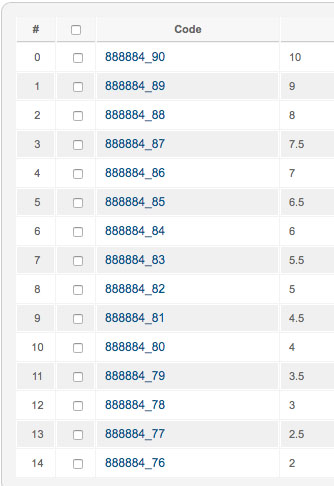
The '_'s persist and the sub-codes _xx are not as required.
I see that there are quite a few instances of the underscore in the products.php file, I'm guessing that maybe one or more of these are having some effect on the result:
The full product code should consist of the code (888884) with a two digit number (01, 02, through 18 [there will never be more than 18 sub codes]. In the attached image the 888884_76 should be 88888401 (size 2 being the 1st size in the scale), 888884_77 should be 88888402 (2.5 is the 2nd size in the scale) etc. 888884_85 should be 88888410.
In the previous mod it is the $i variable that is setting the last two digits of the product code. In the new code it looks as though the last two digits are the variant code id - correct me if I'm wrong.
A product, in my case, will only ever have one characteristic.
Is what I require easily, and quickly achievable?
Regards,
Martyn
Thanks for the quick response.
I've tried the suggested line of code. As it stands it causes white screens. I edited it to
Code:
" SELECT CONCAT(" .$p_code. ", LPAD(CONCAT(" .implode(',', $concat). "),2,'0')) AS c_product_code, p.product_id, " .$t. ", " .$t. ", 0, 0, " .implode(', ', $fields).
The result is as in the attached image
The '_'s persist and the sub-codes _xx are not as required.
I see that there are quite a few instances of the underscore in the products.php file, I'm guessing that maybe one or more of these are having some effect on the result:
Code:
902: $data = 'CONCAT(`product_code`,\'_\')';
904: $data = 'REPLACE('.$data.',\'_'.$default.'_\',\'_\')';
907: ' SET `product_code` = TRIM(TRAILING \'_\' FROM '.$data.')'.
1049: $p_code = 'p.product_code, \'_\'';
1051: $p_code = 'CONCAT(`product_code`,\'_\')';
1053: $p_code = 'REPLACE('.$p_code.',\'_'.$r.'_\',\'_\')';
1058: ' SELECT CONCAT('.$p_code.', '.implode(',\'_\',', $concat).') AS c_product_code, p.product_id, '.$t.', '.$t.', 0, 0, '.implode(', ', $fields).
1104: ' SELECT CONCAT('.$p_code.', '.implode(',\'_\',', $concat).') as c_product_code, '. $this->database->Quote('variant') .','. (int)$product_id . ',1,' . $t . ',' . $t . ',' . $this->database->Quote(@$element->product_group_after_purchase) .
The full product code should consist of the code (888884) with a two digit number (01, 02, through 18 [there will never be more than 18 sub codes]. In the attached image the 888884_76 should be 88888401 (size 2 being the 1st size in the scale), 888884_77 should be 88888402 (2.5 is the 2nd size in the scale) etc. 888884_85 should be 88888410.
In the previous mod it is the $i variable that is setting the last two digits of the product code. In the new code it looks as though the last two digits are the variant code id - correct me if I'm wrong.
A product, in my case, will only ever have one characteristic.
Is what I require easily, and quickly achievable?
Regards,
Martyn
Please Log in or Create an account to join the conversation.
11 years 10 months ago #185001
by nicolas
Replied by nicolas on topic Re: Change format of variant code
Hi,
Try like that then and that should remove the _ :
" SELECT CONCAT(`product_code`, LPAD(CONCAT(" .implode(',', $concat). "),2,'0')) AS c_product_code, p.product_id, " .$t. ", " .$t. ", 0, 0, " .implode(', ', $fields).
Note that this assumes that the characteristic values' id are 1, 2, 3 etc through 18.
If that's not the case, you can go in your phpmyadmin and enter the number you want for each value in the characteristic_alias column of each value and then change the line:
to:
and you shoudl get the result you want.
Try like that then and that should remove the _ :
" SELECT CONCAT(`product_code`, LPAD(CONCAT(" .implode(',', $concat). "),2,'0')) AS c_product_code, p.product_id, " .$t. ", " .$t. ", 0, 0, " .implode(', ', $fields).
Note that this assumes that the characteristic values' id are 1, 2, 3 etc through 18.
If that's not the case, you can go in your phpmyadmin and enter the number you want for each value in the characteristic_alias column of each value and then change the line:
Code:
$concat[] = 'c'.$k.'.characteristic_id';
Code:
$concat[] = 'c'.$k.'.characteristic_alias';
Please Log in or Create an account to join the conversation.
- expertbeginner
-
Topic Author
- Offline
Less
More
- Posts: 57
- Thank you received: 2
11 years 10 months ago #185064
by expertbeginner
Replied by expertbeginner on topic Re: Change format of variant code
Hi Nicolas,
Thanks for the suggested changes.
After implementing the line
the '_' was still appearing in the product code.
After turning debugging on and looking at the queries being executed it appears that the '_' was being added by the query built in the 'else' section of the if(!empty($variants)), when choosing 'Manage Variants' on the product page.
The places where I've made changes are:
Around line 1013
1020:
After making this change I manually set the 'characteristic_alias' in the database.
Is there any way that this can be set from the front end, when a new characteristic is created? Or will it be a case of remembering to edit the table after creation of a new characteristic.
and 1105:
With the above changes implemented the product codes are being generated and looking as required. However, I'm not fully confident that all the necessary/relevant changes have been made. Are you able to advise on this, or suggest any areas/operations that should be tested where the changes may have a knock on effect?
Thanks for your assistance.
Regards,
Martyn.
Thanks for the suggested changes.
After implementing the line
Code:
" SELECT CONCAT(`product_code`, LPAD(CONCAT(" .implode(',', $concat). "),2,'0')) AS c_product_code, p.product_id, " .$t. ", " .$t. ", 0, 0, " .implode(', ', $fields).
After turning debugging on and looking at the queries being executed it appears that the '_' was being added by the query built in the 'else' section of the if(!empty($variants)), when choosing 'Manage Variants' on the product page.
The places where I've made changes are:
Around line 1013
Code:
/* $p_code = $this->database->Quote($element->product_code . '_');*/
$p_code = $this->database->Quote($element->product_code);
1020:
Code:
/* $concat[] = 'c'.$k.'.characteristic_id'; */
$concat[] = 'c'.$k.'.characteristic_alias';
Is there any way that this can be set from the front end, when a new characteristic is created? Or will it be a case of remembering to edit the table after creation of a new characteristic.
and 1105:
Code:
/*
$query = 'INSERT IGNORE INTO '.hikashop_table('product').' (product_code, product_type, product_parent_id, product_published, product_modified, product_created, product_group_after_purchase) '.' SELECT CONCAT('.$p_code.', '.implode(',\'_\',', $concat).') as c_product_code, '. $this->database->Quote('variant') .','. (int)$product_id . ',1,' . $t . ',' . $t . ',' .$this->database->Quote(@$element->product_group_after_purchase) .
*/
$query = 'INSERT IGNORE INTO '.hikashop_table('product').' (product_code, product_type, product_parent_id, product_published, product_modified, product_created, product_group_after_purchase) '." SELECT CONCAT(" .$p_code. ", " .implode(',', $concat). ") AS c_product_code, " . $this->database->Quote('variant'). "," .(int)$product_id. ",1," .$t. "," .$t. "," .$this->database->Quote(@$element->product_group_after_purchase) .' FROM ' . implode(', ', $tables) .' WHERE (' . implode(') AND (', $filters) . ')';
With the above changes implemented the product codes are being generated and looking as required. However, I'm not fully confident that all the necessary/relevant changes have been made. Are you able to advise on this, or suggest any areas/operations that should be tested where the changes may have a knock on effect?
Thanks for your assistance.
Regards,
Martyn.
Please Log in or Create an account to join the conversation.
11 years 10 months ago #185089
by nicolas
Replied by nicolas on topic Re: Change format of variant code
Hi,
The alias is supposed to be useful only for the characteristic name, not for the values. And that's why there is no interface to edit it for the values and that I told you to do it via the database. I'm afraid you'll have to add the alias via phpmyadmin next time you need to add new values to your characteristics.
You can try to add an input like that in the file "editpopup" of the view "characteristic" for your backend template via the menu Display>Views:
These modifications only affect the variants generation process. If it works now with these modifications, I don't see why it would affect anything else.
The alias is supposed to be useful only for the characteristic name, not for the values. And that's why there is no interface to edit it for the values and that I told you to do it via the database. I'm afraid you'll have to add the alias via phpmyadmin next time you need to add new values to your characteristics.
You can try to add an input like that in the file "editpopup" of the view "characteristic" for your backend template via the menu Display>Views:
Code:
Alias: <input type="text" name="data[characteristic][characteristic_alias]" value="<?php echo @$this->element->characteristic_alias; ?>" />
These modifications only affect the variants generation process. If it works now with these modifications, I don't see why it would affect anything else.
Please Log in or Create an account to join the conversation.
Time to create page: 0.080 seconds