

- Posts: 80
- Thank you received: 0
Styling problem with product and category listings
14 years 8 months ago - 14 years 8 months ago #34824
by CassHW
Styling problem with product and category listings was created by CassHW
Hello,
there is something weird happening and I have no idea.
I imported my shop from VM and everything displayed nicely.
I then upgraded from starter to business.
I have now started creating new categories and products and things aren't displaying like the stuff I imported from VM.
I've created a menu item to display a category.
For some reason, the image is on the left (that's ok) but the category description and its title are centred instead of left aligned like the stuff imported. I can get around it by left aligning manually in the description, but it's annoying as I have to do this for all new categories. Is there a setting somewhere to have it left align automatically?
There is one thing I changed in the CSS is to float the image category on the left but I don't thing this should affect the text alignment. I checked the source code and the text is centred with inline CSS.
Now, from the category I'm displaying with the menu, it displays the sub categories as intended. When I click on the subcat link, it takes me to a page to display its products.
And this is all badly displayed with title too big and going over the product box. See screen shot.
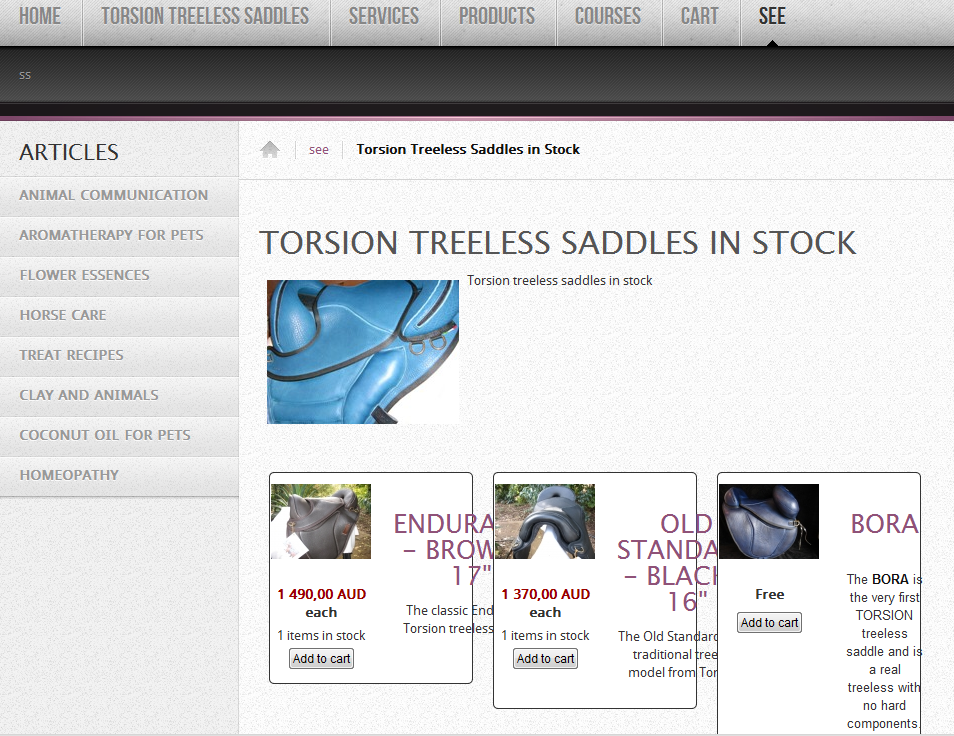
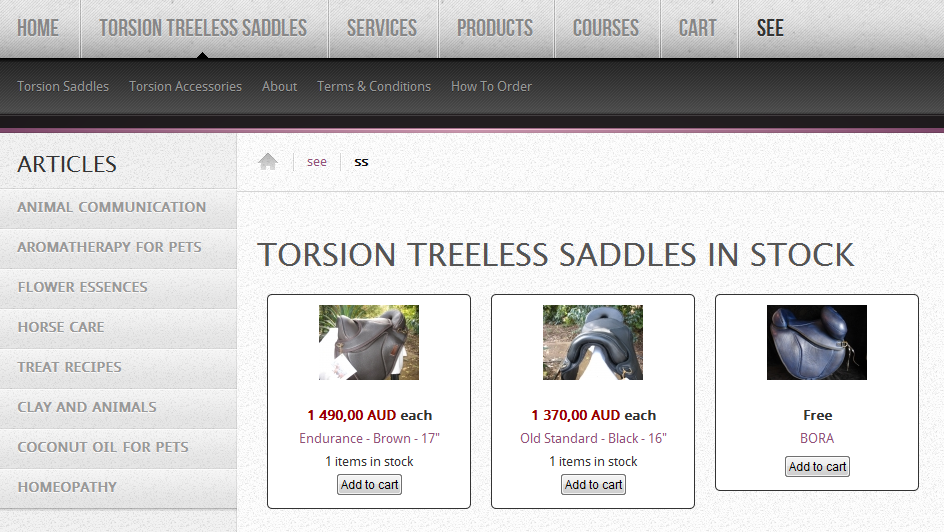
I've created a submenu to display the subcat above and I managed to have it looking the way I want. See screen shot.
How do I get the same category to display like this without having to use a menu?
thanks
there is something weird happening and I have no idea.
I imported my shop from VM and everything displayed nicely.
I then upgraded from starter to business.
I have now started creating new categories and products and things aren't displaying like the stuff I imported from VM.
I've created a menu item to display a category.
For some reason, the image is on the left (that's ok) but the category description and its title are centred instead of left aligned like the stuff imported. I can get around it by left aligning manually in the description, but it's annoying as I have to do this for all new categories. Is there a setting somewhere to have it left align automatically?
There is one thing I changed in the CSS is to float the image category on the left but I don't thing this should affect the text alignment. I checked the source code and the text is centred with inline CSS.
Now, from the category I'm displaying with the menu, it displays the sub categories as intended. When I click on the subcat link, it takes me to a page to display its products.
And this is all badly displayed with title too big and going over the product box. See screen shot.
I've created a submenu to display the subcat above and I managed to have it looking the way I want. See screen shot.
How do I get the same category to display like this without having to use a menu?
thanks
Last edit: 14 years 8 months ago by CassHW.
Please Log in or Create an account to join the conversation.

14 years 8 months ago #34865
by nicolas
Replied by nicolas on topic Re: Styling problem with product and category listings
Hi,
The problem is that in the hikashop options of the products listing module associated with your category menu, you set the item box layout to "image and description" instead of "image and title" like you have in the other one.
When you edit the hikashop options of your menu, you have a link to access the hikashop options of the associated module where you will be able to change that option.
For the alignment of the description of the categories, there is no option for that. It will use the styling of your template. If you want it always aligned to the left, you could just add some CSS in the front end CSS file of HikaShop that you can edit in the Display tab of the configuration:
.hikashop_category_description_content{
text-align: left !important;
}
The problem is that in the hikashop options of the products listing module associated with your category menu, you set the item box layout to "image and description" instead of "image and title" like you have in the other one.
When you edit the hikashop options of your menu, you have a link to access the hikashop options of the associated module where you will be able to change that option.
For the alignment of the description of the categories, there is no option for that. It will use the styling of your template. If you want it always aligned to the left, you could just add some CSS in the front end CSS file of HikaShop that you can edit in the Display tab of the configuration:
.hikashop_category_description_content{
text-align: left !important;
}
Please Log in or Create an account to join the conversation.
14 years 8 months ago - 14 years 8 months ago #34909
by CassHW
Replied by CassHW on topic Re: Styling problem with product and category listings
Hi Nicolas,
the text align CSS you suggested didn't work.
Here is the code behind the page:
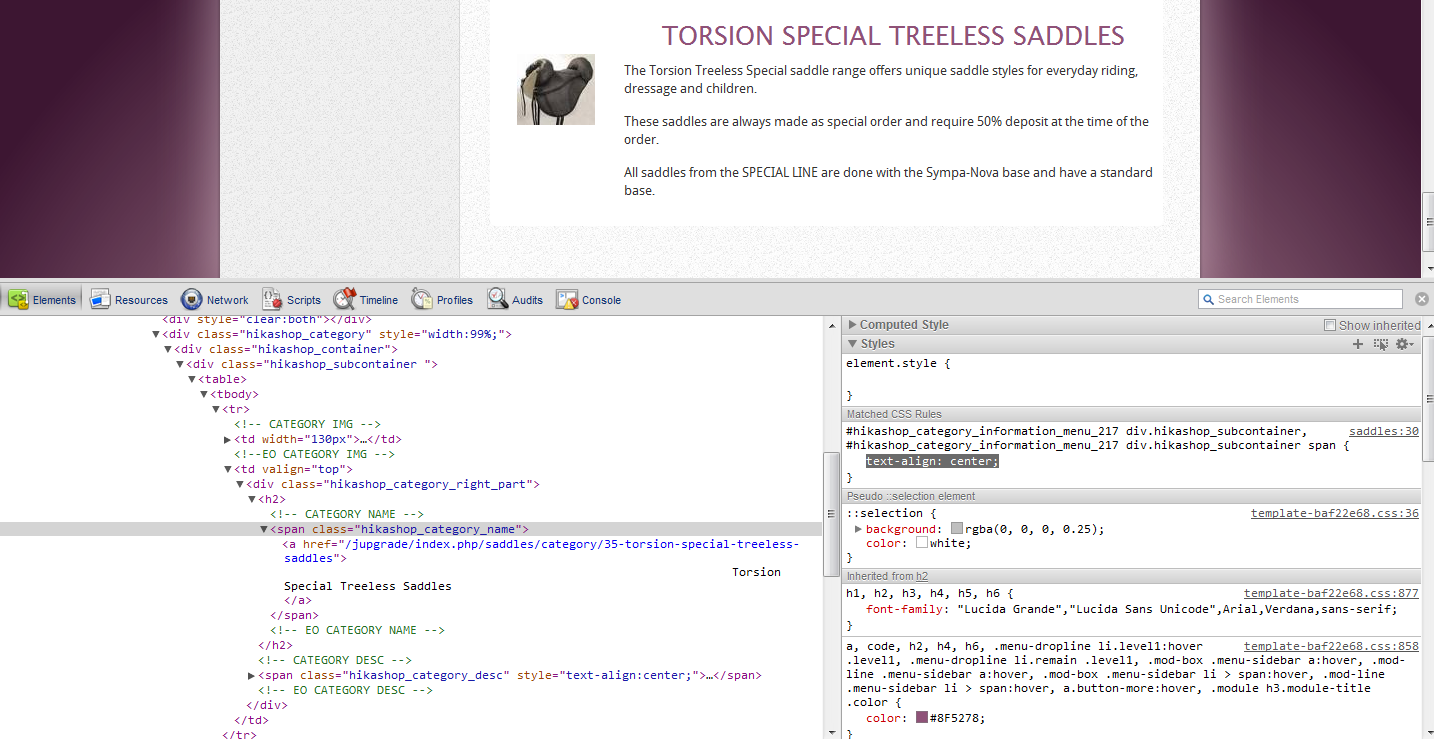
I fixed the other one though following your instructions. thanks
the text align CSS you suggested didn't work.
Here is the code behind the page:
I fixed the other one though following your instructions. thanks
Last edit: 14 years 8 months ago by CassHW.
Please Log in or Create an account to join the conversation.
14 years 8 months ago #34912
by CassHW
Replied by CassHW on topic Re: Styling problem with product and category listings
I fixed it!
I've added text-align here:
.hikashop_category_right_part{
padding-left:1px;
text-align:left !important;
}
I've added text-align here:
.hikashop_category_right_part{
padding-left:1px;
text-align:left !important;
}
Please Log in or Create an account to join the conversation.
Time to create page: 0.190 seconds