

- Posts: 46
- Thank you received: 1
Google Products
14 years 8 months ago #34853
by AZTacGear
Google Products was created by AZTacGear
I'm following the documentation on setting up Google Products automatically using the Cron, and the Google merchant center is asking for a feed url. The documentation talks about naming an xml file. Which feed do I need to give to Google?
Please Log in or Create an account to join the conversation.

14 years 8 months ago #34872
by nicolas
Replied by nicolas on topic Re: Google Products
In your Google products account, you need to enter a feed name. That name will have to be the same in the plugin.
Here is the documentation page of Google, in order to setup your account on their end:
support.google.com/merchants/bin/answer.py?hl=en&answer=188475
Here is the documentation page of Google, in order to setup your account on their end:
support.google.com/merchants/bin/answer.py?hl=en&answer=188475
Please Log in or Create an account to join the conversation.
14 years 8 months ago #34900
by AZTacGear
Replied by AZTacGear on topic Re: Google Products
I made an xml file in my store root folder, and pasted the entire url into the Google Products plug in and on Google Merchant center. My cron is also configured and active. When I try and trigger the auto upload, Google tells me I have no items uploaded.
Please Log in or Create an account to join the conversation.
14 years 8 months ago #34918
by nicolas
Replied by nicolas on topic Re: Google Products
That's not what you should do.
There is no xml file to create.
Just put a file name in google, like that: my_store.xml
In the plugin, just do the same: my_store.xml
and try again.
There is no xml file to create.
Just put a file name in google, like that: my_store.xml
In the plugin, just do the same: my_store.xml
and try again.
Please Log in or Create an account to join the conversation.
14 years 8 months ago #34932
by AZTacGear
Replied by AZTacGear on topic Re: Google Products
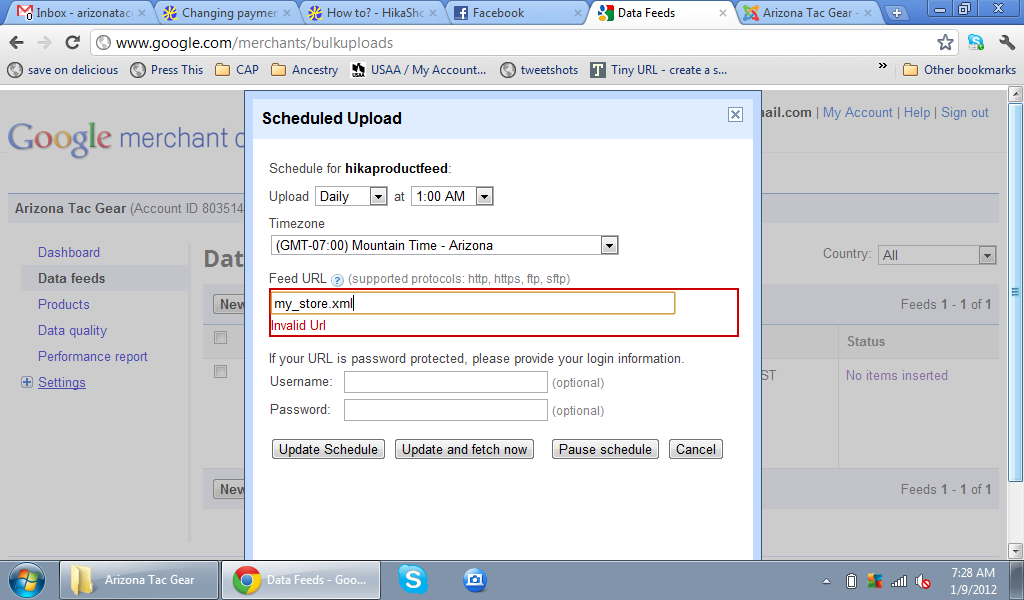
Google is asking for a feed url, with an http://.
Please Log in or Create an account to join the conversation.
14 years 8 months ago #34933
by nicolas
Replied by nicolas on topic Re: Google Products
You should not create a scheduled upload.
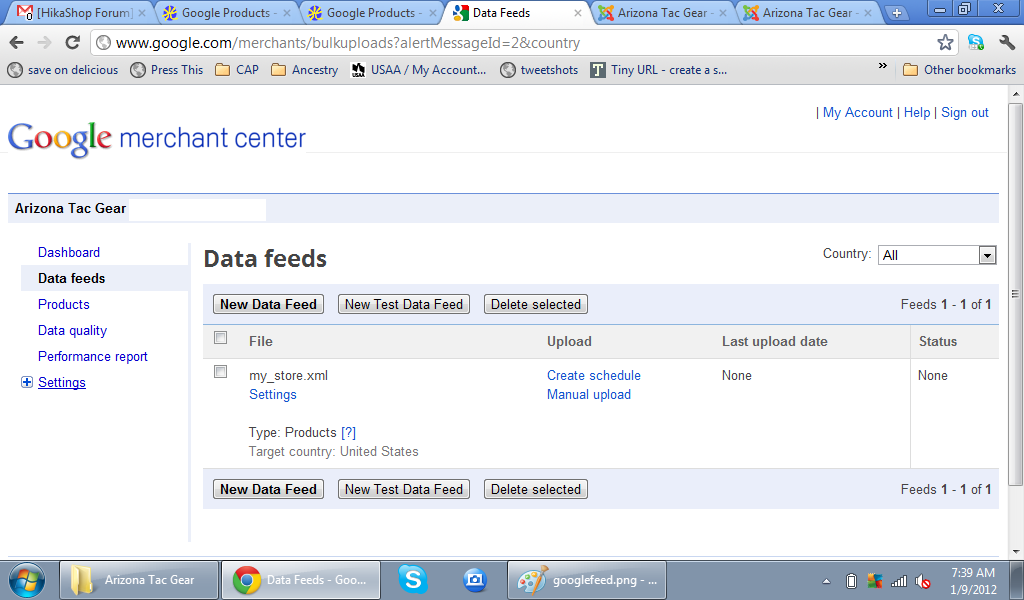
Just close that popup. There, on that listing, under the "File" column you should have the name of your data feed.
Just close that popup. There, on that listing, under the "File" column you should have the name of your data feed.
Please Log in or Create an account to join the conversation.
14 years 8 months ago #34935
by AZTacGear
Replied by AZTacGear on topic Re: Google Products
So I just started from scratch, and put in your example (my_store.xml, which matches the name I put in Google).
How long do I have to wait for the plugin to feed products over to Google?
How long do I have to wait for the plugin to feed products over to Google?
Please Log in or Create an account to join the conversation.
14 years 8 months ago #34936
by nicolas
Replied by nicolas on topic Re: Google Products
It depends on the settings of the plugin where you can define that period in seconds.
Make sure that your cron is running correctly and that you configured the FTP settings in your google merchant settings and in the plugin and it should work.
Make sure that your cron is running correctly and that you configured the FTP settings in your google merchant settings and in the plugin and it should work.
Please Log in or Create an account to join the conversation.
14 years 8 months ago #34937
by AZTacGear
Replied by AZTacGear on topic Re: Google Products
Do I need any special FTP settings regarding hikashop or the plugin to type in? I didn't see anything about FTP settings in your documentation.
Please Log in or Create an account to join the conversation.
14 years 8 months ago #34939
by nicolas
Replied by nicolas on topic Re: Google Products
For the plugin it's your google user account username and password which need to be entered in the plugin so that it is recognized by Google.
Please Log in or Create an account to join the conversation.
14 years 8 months ago #34963
by AZTacGear
Replied by AZTacGear on topic Re: Google Products
Ok,
So I'm doing something wrong here.
I configured my cron, minimum delay between tasks is 10 min.
Cron triggered evefry 15 min.
I activated the google products plug in.
Put in my Google Merchant Account user name (email address) and password.
Set up the frequency to 900 seconds (15 min).
Type in a file name of "my_store.xml" in the plug in.
Then I created a google data feed using the same "my_store.xml"
I still have no products getting plugged into Google from the plug in.
Anything I missed here?
So I'm doing something wrong here.
I configured my cron, minimum delay between tasks is 10 min.
Cron triggered evefry 15 min.
I activated the google products plug in.
Put in my Google Merchant Account user name (email address) and password.
Set up the frequency to 900 seconds (15 min).
Type in a file name of "my_store.xml" in the plug in.
Then I created a google data feed using the same "my_store.xml"
I still have no products getting plugged into Google from the plug in.
Anything I missed here?
Please Log in or Create an account to join the conversation.
14 years 8 months ago #34976
by nicolas
Replied by nicolas on topic Re: Google Products
If you download the xml file manually and upload it yourself to google, does it work ? If no, then you should first check on that problem.
If yes, then the problem is either the login to google which is not correct OR the plugin which is not triggered by the cron. So make sure that your credentials are correct, that the plugin is published and also check the ordering of the plugin in the joomla plugins manager as we had someone having a problem with it when the ordering was at 0.
Also, if the plugin uploads the file but that there is a problem during the upload, you should have some information on the problem in the "last upload date" column in the data feeds listing of google merchant.
Let us know what you find.
If yes, then the problem is either the login to google which is not correct OR the plugin which is not triggered by the cron. So make sure that your credentials are correct, that the plugin is published and also check the ordering of the plugin in the joomla plugins manager as we had someone having a problem with it when the ordering was at 0.
Also, if the plugin uploads the file but that there is a problem during the upload, you should have some information on the problem in the "last upload date" column in the data feeds listing of google merchant.
Let us know what you find.
Please Log in or Create an account to join the conversation.
14 years 8 months ago #34989
by AZTacGear
Replied by AZTacGear on topic Re: Google Products
The manual upload works.
I changed the ordering to 1 (it was 0).
I've also made sure my log in info is correct. I'll give it a while, and then let you know if that works.
I changed the ordering to 1 (it was 0).
I've also made sure my log in info is correct. I'll give it a while, and then let you know if that works.
Please Log in or Create an account to join the conversation.
14 years 8 months ago #35017
by AZTacGear
Replied by AZTacGear on topic Re: Google Products
Still no luck getting products on google....
Please Log in or Create an account to join the conversation.
14 years 8 months ago #35062
by nicolas
Replied by nicolas on topic Re: Google Products
Thank you for the access you provided. We'll look at that tomorrow as we won't have time to debug the problem today.
We'll also look at your other problem at the same time. If you could also provide a FTP access to your website it would help us find the problem.
We'll also look at your other problem at the same time. If you could also provide a FTP access to your website it would help us find the problem.
Please Log in or Create an account to join the conversation.
14 years 8 months ago #35201
by nicolas
Replied by nicolas on topic Re: Google Products
I changed the frequency of the plugin to 1 so that it triggers each time the cron is run.
Then, I went to your cron URL that you can find in the configuration of HikaShop and I got the Errors:
JFTP::login: Unable to login
JFTP: :write: Unable to use passive mode
That means that your username/password in your plugin is not correct.
Then, I went to your cron URL that you can find in the configuration of HikaShop and I got the Errors:
JFTP::login: Unable to login
JFTP: :write: Unable to use passive mode
That means that your username/password in your plugin is not correct.
Please Log in or Create an account to join the conversation.
14 years 8 months ago #35202
by AZTacGear
Replied by AZTacGear on topic Re: Google Products
I had the @gmail.com listed in my user name. Maybe that's what's making it not work?
Please Log in or Create an account to join the conversation.
14 years 8 months ago #35204
by nicolas
Replied by nicolas on topic Re: Google Products
I try again your cron and I still have the same error.
Please follow google guidelines on that problem:
support.google.com/merchants/bin/answer.py?hl=en&answer=160568
Please follow google guidelines on that problem:
support.google.com/merchants/bin/answer.py?hl=en&answer=160568
Please Log in or Create an account to join the conversation.
14 years 8 months ago #35321
by AZTacGear
Replied by AZTacGear on topic Re: Google Products
From what I'm reading on the google page, there's the Google Merchant Center log in, and then a separate FTP log in. Do I put the GMC username/password or the FTP username/password?
Please Log in or Create an account to join the conversation.
14 years 8 months ago #35323
by nicolas
Replied by nicolas on topic Re: Google Products
The FTP credentials. But it's not the ones of your website FTP. It's the FTP credentials of your google merchant account.
Please Log in or Create an account to join the conversation.
Time to create page: 0.258 seconds