
- Posts: 37
- Thank you received: 0
TOS Link?
- yellowhousejake
-
 Topic Author
- Offline
Less
More
14 years 8 months ago #35401
by yellowhousejake
TOS Link? was created by yellowhousejake
Has anyone setup a TOS link or something like it? We are using Hikashop to sell/register people for public programs at our city Parks and Recreation department. We need to be able to force folks to read the Terms of Service before they can complete the checkout process.
Plugin maybe?
Thanks,
DAve
Plugin maybe?
Thanks,
DAve
Please Log in or Create an account to join the conversation.

14 years 8 months ago #35443
by nicolas
Replied by nicolas on topic Re: TOS Link?
You can do that by:
1. Adding the view "terms and conditions" in the "checkout workflow" option of the configuration of HikaShop.
2. In that same screen, you will find the "terms and condition" option where you can select a joomla article which will be your terms and conditions.
1. Adding the view "terms and conditions" in the "checkout workflow" option of the configuration of HikaShop.
2. In that same screen, you will find the "terms and condition" option where you can select a joomla article which will be your terms and conditions.
Please Log in or Create an account to join the conversation.
- yellowhousejake
-
Topic Author
- Offline
Less
More
- Posts: 37
- Thank you received: 0
14 years 8 months ago #35762
by yellowhousejake
Replied by yellowhousejake on topic Re: TOS Link?
Ahhhhhhhhhh [slaps face]. I LOOKED for that and did not see it. My apologies.
DAve
DAve
Please Log in or Create an account to join the conversation.
- yellowhousejake
-
Topic Author
- Offline
Less
More
- Posts: 37
- Thank you received: 0
14 years 8 months ago - 14 years 8 months ago #36135
by yellowhousejake
Replied by yellowhousejake on topic Re: TOS Link?
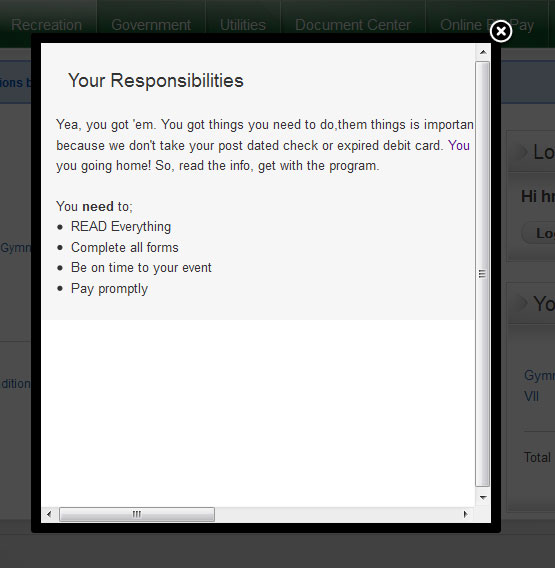
Yep, that works fine. I still have one problem I think is not Hikashop but Joomla. The article I select for my Terms of Service agreement will not display into the lightbox properly. The article requires scrolling sideways to view. I cannot seem to get it to format for the window.
I would think this is a template issue, has anyone else faced this?
Thanks,
DAve
I would think this is a template issue, has anyone else faced this?
Thanks,
DAve
Last edit: 14 years 8 months ago by yellowhousejake.
Please Log in or Create an account to join the conversation.
14 years 8 months ago #36178
by nicolas
Replied by nicolas on topic Re: TOS Link?
Hi,
That's indeed a template issue.
That's because in the CSS of the template, the width is set in hard and the component.php file of the template loads that CSS file too.
The solution is to either not load the CSS in that component.php file of your template or to use a copy of the main template css file which doesn't have the width of the page set in hard.
If unsure about how to go with that, you should ask your template provider.
That's indeed a template issue.
That's because in the CSS of the template, the width is set in hard and the component.php file of the template loads that CSS file too.
The solution is to either not load the CSS in that component.php file of your template or to use a copy of the main template css file which doesn't have the width of the page set in hard.
If unsure about how to go with that, you should ask your template provider.
Please Log in or Create an account to join the conversation.
- yellowhousejake
-
Topic Author
- Offline
Less
More
- Posts: 37
- Thank you received: 0
14 years 8 months ago #36366
by yellowhousejake
Replied by yellowhousejake on topic Re: TOS Link?
For now, I simply set the text into a table with the width set by pixel and it works.
Thanks,
DAve
Thanks,
DAve
Please Log in or Create an account to join the conversation.
Time to create page: 0.220 seconds