
New Address page from Checkout
- Crashedash
-
 Topic Author
- Offline
Less
More
14 years 8 months ago #35662
by Crashedash
New Address page from Checkout was created by Crashedash
Hi I am evaluating Hikashop for use on several stores, most likely upgading to the business version.
I am quite new to Joomla and I am not sure if this is a Hikashop template question or a Joomla template question so I hope someone could point me in the right direction..
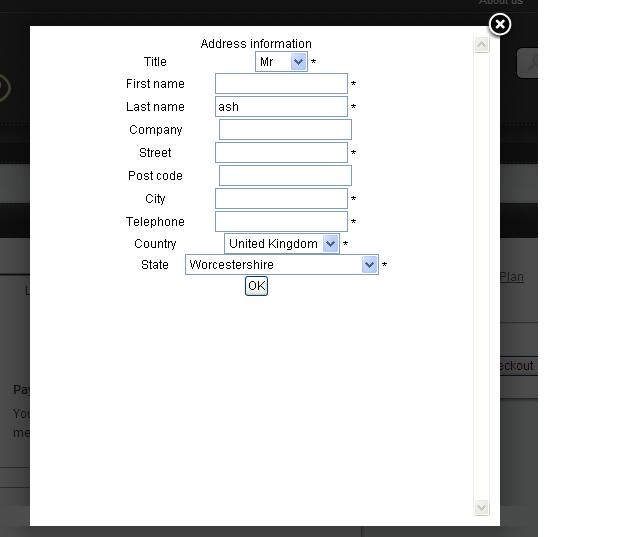
if you register with the site, then add a product to the cart and click the "new" button under the address a pop up window opens that allows you to enter the details.
this is great however the formatting seems to be aligned to the center rather than to the left??
please see the attached picture.
the website this is running on currently is www.theukhostingcompany.co.uk
any assistance in how to change this would be deeply appreciated.. :silly:
I am quite new to Joomla and I am not sure if this is a Hikashop template question or a Joomla template question so I hope someone could point me in the right direction..
if you register with the site, then add a product to the cart and click the "new" button under the address a pop up window opens that allows you to enter the details.
this is great however the formatting seems to be aligned to the center rather than to the left??
please see the attached picture.
the website this is running on currently is www.theukhostingcompany.co.uk
any assistance in how to change this would be deeply appreciated.. :silly:
Please Log in or Create an account to join the conversation.

14 years 8 months ago #35708
by nicolas
Replied by nicolas on topic Re: New Address page from Checkout
Hi,
That indeed comes from your template CSS : www.theukhostingcompany.co.uk/templates/.../css/print.css?v=1.0
where you have:
body {
color: black;
font: normal normal normal 75%/125% arial,sans-serif;
text-align: center;
}
if you change the line text-align: center; to text-align: left; the fields will be aligned onto the left.
That indeed comes from your template CSS : www.theukhostingcompany.co.uk/templates/.../css/print.css?v=1.0
where you have:
body {
color: black;
font: normal normal normal 75%/125% arial,sans-serif;
text-align: center;
}
if you change the line text-align: center; to text-align: left; the fields will be aligned onto the left.
Please Log in or Create an account to join the conversation.
- Crashedash
-
Topic Author
- Offline
14 years 8 months ago #35784
by Crashedash
Replied by Crashedash on topic Re: New Address page from Checkout
Fantastic! thats worked!
thanks for your help.
thanks for your help.
Please Log in or Create an account to join the conversation.
Time to create page: 0.160 seconds