

- Posts: 45
- Thank you received: 0
A few things I cannot find with Firebug
15 years 9 months ago #3583
by afonic
A few things I cannot find with Firebug was created by afonic
Hi,
if you could tell me the location of a few things I want to customize and which I cannot find with firebug you would really speed me up:
- the add address popup frame. It is too small in height and width is too great so a scrollbar appears
- the add to cart popup (the one that appears for a few seconds after adding an item). Buttons are in strange positions and the background is white
- The text of the CCV popup in the credit card payment option. It is very dark and gets disappeared in my template
Thanks.
if you could tell me the location of a few things I want to customize and which I cannot find with firebug you would really speed me up:
- the add address popup frame. It is too small in height and width is too great so a scrollbar appears
- the add to cart popup (the one that appears for a few seconds after adding an item). Buttons are in strange positions and the background is white
- The text of the CCV popup in the credit card payment option. It is very dark and gets disappeared in my template
Thanks.
Please Log in or Create an account to join the conversation.
15 years 9 months ago #3585
by afonic
Replied by afonic on topic Re: A few things I cannot find with Firebug
OK I found the cart popup at administrator/components/com_hikashop/helpers/cart.php
Please Log in or Create an account to join the conversation.

15 years 9 months ago #3587
by nicolas
Replied by nicolas on topic Re: A few things I cannot find with Firebug
Hi,
For now, the only solution is indeed to edit that file if you can't do the modifications you want in CSS. The problem is that you will loose your changes when you update. With next version of HikaShop, we will include a way to override the popup code we a template file like joomla does with the pagination.
For the CCV tooltip, we use the standard joomla tooltips. For example: personal-stuff.davidtraves.com/blog/43-j...ot-showing-also.html
or: docs.joomla.org/Tutorial:How_to_add_tool...yling_to_the_Tooltip
For now, the only solution is indeed to edit that file if you can't do the modifications you want in CSS. The problem is that you will loose your changes when you update. With next version of HikaShop, we will include a way to override the popup code we a template file like joomla does with the pagination.
For the CCV tooltip, we use the standard joomla tooltips. For example: personal-stuff.davidtraves.com/blog/43-j...ot-showing-also.html
or: docs.joomla.org/Tutorial:How_to_add_tool...yling_to_the_Tooltip
Please Log in or Create an account to join the conversation.
15 years 9 months ago #3593
by afonic
Replied by afonic on topic Re: A few things I cannot find with Firebug
Hi,
I want to change the CCV tooltip text, meaning not the tooltip itself, but the text that you hover over for the tooptip to appear and is not the same color as credit card number or expiration date above.
For the address popup, if you have a template with a fixed width like me you can add:
in the bottom of your css file so that scroll bars do not appear.
PS. Shouldn't the credit card plugin ask the owner's name as well since it may be different from the account's name? Let's say for example my wife has an account in a store and wants to use my credit card.
I want to change the CCV tooltip text, meaning not the tooltip itself, but the text that you hover over for the tooptip to appear and is not the same color as credit card number or expiration date above.
For the address popup, if you have a template with a fixed width like me you can add:
Code:
.sbox-content-iframe iframe {
overflow-x: hidden;
}
in the bottom of your css file so that scroll bars do not appear.
PS. Shouldn't the credit card plugin ask the owner's name as well since it may be different from the account's name? Let's say for example my wife has an account in a store and wants to use my credit card.
Please Log in or Create an account to join the conversation.
15 years 9 months ago #3594
by nicolas
Replied by nicolas on topic Re: A few things I cannot find with Firebug
The text of the tooltip can be changed in the translation file (in the configuration under the tab languages) like any text in HikaShop.
The credit card owner is not always necessary but you're right, that's an option we already added on our end and will be in next version.
The credit card owner is not always necessary but you're right, that's an option we already added on our end and will be in next version.
Please Log in or Create an account to join the conversation.
15 years 9 months ago #3596
by afonic
Replied by afonic on topic Re: A few things I cannot find with Firebug
Very nice!
I don't want to change the text, just the color of the text. I have not been clear, sorry. If you go to the checkout you'll see what I mean.
I don't want to change the text, just the color of the text. I have not been clear, sorry. If you go to the checkout you'll see what I mean.
Please Log in or Create an account to join the conversation.
15 years 9 months ago #3598
by nicolas
Replied by nicolas on topic Re: A few things I cannot find with Firebug
Well, it's explained in the docs I gave the links to :
.tool-text { color : #FFF }
.tool-text { color : #FFF }
Please Log in or Create an account to join the conversation.
15 years 9 months ago #3604
by afonic
Replied by afonic on topic Re: A few things I cannot find with Firebug
Hi,
this is the text I cannot find how to change.
On a different question, how can I categorize a user as Individual, Company with VAT or Company without VAT. Just by adding VAT or not?
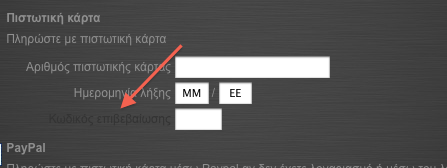
this is the text I cannot find how to change.
On a different question, how can I categorize a user as Individual, Company with VAT or Company without VAT. Just by adding VAT or not?
Please Log in or Create an account to join the conversation.
15 years 9 months ago #3605
by nicolas
Replied by nicolas on topic Re: A few things I cannot find with Firebug
Ahhhh ok.
The color of that text seems to be hard coded in Joomla ! You can see the color being applied directly in joomla's code:
forum.joomla.org/viewtopic.php?f=428&t=557739
The only solution is to change that code directly in the file libraries/joomla/html/html.php
The individual will be considered as a company with VAT if he fills the company field. If he fills the VAT number field, he will be considered as a company without VAT.
European companies are exempted from VAT only if they have a valid VAT number. Otherwise, you have to charge them the VAT that you will give back to your adminsitration, like individuals.
In the configuration, you can activate or not the check of the VAT number so that you are sure that the company VAT number is real.
The color of that text seems to be hard coded in Joomla ! You can see the color being applied directly in joomla's code:
forum.joomla.org/viewtopic.php?f=428&t=557739
The only solution is to change that code directly in the file libraries/joomla/html/html.php
The individual will be considered as a company with VAT if he fills the company field. If he fills the VAT number field, he will be considered as a company without VAT.
European companies are exempted from VAT only if they have a valid VAT number. Otherwise, you have to charge them the VAT that you will give back to your adminsitration, like individuals.
In the configuration, you can activate or not the check of the VAT number so that you are sure that the company VAT number is real.
Please Log in or Create an account to join the conversation.
Less
More
- Posts: 18
- Thank you received: 0
14 years 3 weeks ago #65334
by piscitellij
Replied by piscitellij on topic Re: A few things I cannot find with Firebug
To continue this thread - where do you change the color of the text and box of the actual tip displayed when hovering over the tool tip.
Please Log in or Create an account to join the conversation.
14 years 3 weeks ago #65525
by nicolas
Replied by nicolas on topic Re: A few things I cannot find with Firebug
You should be able to do that in the CSS of your template.
Here is more information on the CSS which is used by the tooltip system of joomla:
docs.joomla.org/How_to_add_tooltips_to_your_Joomla!_website
Here is more information on the CSS which is used by the tooltip system of joomla:
docs.joomla.org/How_to_add_tooltips_to_your_Joomla!_website
Please Log in or Create an account to join the conversation.
Time to create page: 0.190 seconds