
- Posts: 218
- Thank you received: 6
Styling the product page
- woonydanny
-
 Topic Author
- Offline
Less
More
14 years 8 months ago #37166
by woonydanny
Styling the product page was created by woonydanny
I have been thinking that it would be good to give some styling to the product page.
I had a quick look and saw this example where the image has a nice looking border effect. How would you go about this in hikashop?
shop.theartisanclothing.com/products/the-yachtsman
where do you apply css to the product page?
thanks
I had a quick look and saw this example where the image has a nice looking border effect. How would you go about this in hikashop?
shop.theartisanclothing.com/products/the-yachtsman
where do you apply css to the product page?
thanks
Please Log in or Create an account to join the conversation.

14 years 8 months ago #37323
by nicolas
Replied by nicolas on topic Re: Styling the product page
You can edit the CSS of hikashop in the CSS area of the Display tab of the configuration.
Please Log in or Create an account to join the conversation.
- woonydanny
-
Topic Author
- Offline
Less
More
- Posts: 218
- Thank you received: 6
14 years 8 months ago #37435
by woonydanny
Replied by woonydanny on topic Re: Styling the product page
I really like the default OpenCart product detail page styling and think it would be great if Hikashop had a similar great style by default.
i like the layout of the items, the grouping of the different options, the buttons etc.
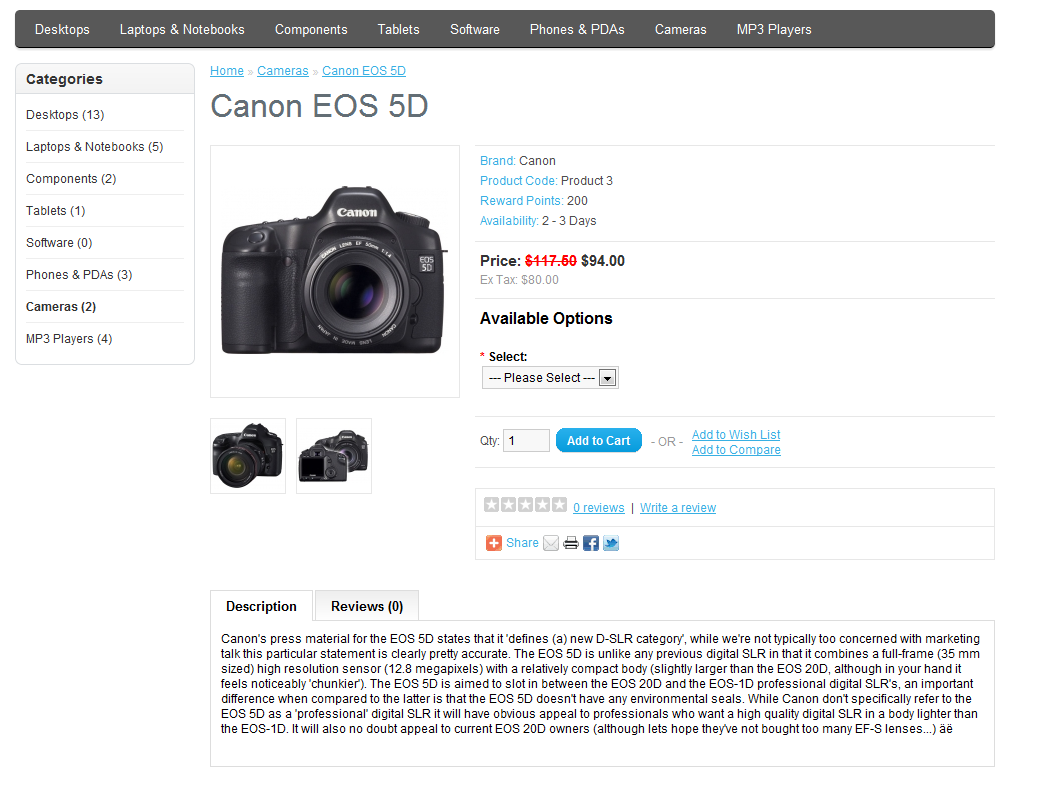
i like the layout of the items, the grouping of the different options, the buttons etc.
Please Log in or Create an account to join the conversation.
14 years 8 months ago #37546
by nicolas
Replied by nicolas on topic Re: Styling the product page
I don't see much differences.
The layout (and I'm not talking about the styling) is the same as the default one in HikaShop:
product name at the top, images on the left, price then options then add to cart button on the right, description at the bottom.
For the styling (like the borders around the different areas, the size of the text, etc), it mainly depends on the CSS of your template.
The layout (and I'm not talking about the styling) is the same as the default one in HikaShop:
product name at the top, images on the left, price then options then add to cart button on the right, description at the bottom.
For the styling (like the borders around the different areas, the size of the text, etc), it mainly depends on the CSS of your template.
Please Log in or Create an account to join the conversation.
- woonydanny
-
Topic Author
- Offline
Less
More
- Posts: 218
- Thank you received: 6
14 years 8 months ago #37560
by woonydanny
Replied by woonydanny on topic Re: Styling the product page
Ok, but is the layout have the Brand, Product Code, Availability down in that area?
I thought the Product Code was still up in the Product Name line?
Anyway, just a thought to consider this if doing any work on improving look of hikashop
I thought the Product Code was still up in the Product Name line?
Anyway, just a thought to consider this if doing any work on improving look of hikashop
Please Log in or Create an account to join the conversation.
14 years 8 months ago #37689
by nicolas
Replied by nicolas on topic Re: Styling the product page
The product code is indeed displayed a bit differently. That's a minor change that you can do by editing the view file.
For the other info, if you use custom product fields to display them, you will have them like on your screenshot.
For the other info, if you use custom product fields to display them, you will have them like on your screenshot.
Please Log in or Create an account to join the conversation.
Time to create page: 0.194 seconds