
- Posts: 190
- Thank you received: 0
Re: Round Pb with a discount
- codewarrior
-
 Topic Author
- Offline
Less
More
14 years 8 months ago - 14 years 8 months ago #37204
by codewarrior
Re: Round Pb with a discount was created by codewarrior
Bonjour,
j'ai mis à jour en version 1.5.6
Le résultat est le suivant dans le front-end

et pour la configuration :

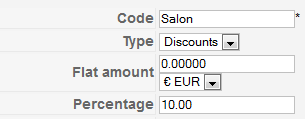
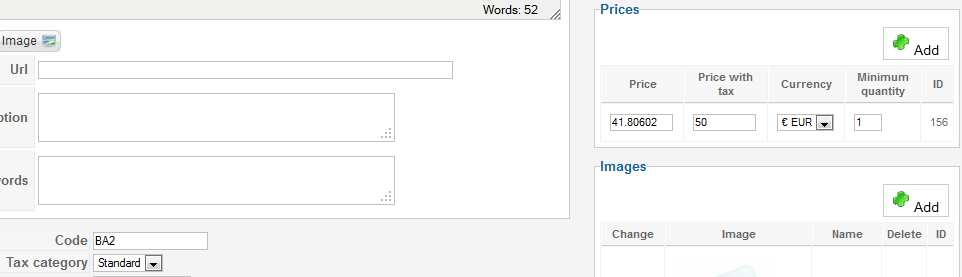

NB : si je change la config en Apply Discount=After Taxes, l'affichage est correct.
Dites-moi si je vous ai communiqué suffisamment d'informations de paramétrage.
Cordialement
j'ai mis à jour en version 1.5.6
Le résultat est le suivant dans le front-end
et pour la configuration :
NB : si je change la config en Apply Discount=After Taxes, l'affichage est correct.
Dites-moi si je vous ai communiqué suffisamment d'informations de paramétrage.
Cordialement
Last edit: 14 years 8 months ago by codewarrior.
Please Log in or Create an account to join the conversation.

14 years 7 months ago #37342
by nicolas
Replied by nicolas on topic Re: Round Pb with a discount
En effet, quand les taxes sont calculées avant les réductions il n'y a pas de problème.
Pourriez vous changer les lignes:
$round = $this->getRounding(@$price->price_currency_id);
en:
$round = 5;
dans la fonction addDiscount du fichier administrator/components/com_hikashop/classes/currency.php et réessayer ?
Pourriez vous changer les lignes:
$round = $this->getRounding(@$price->price_currency_id);
en:
$round = 5;
dans la fonction addDiscount du fichier administrator/components/com_hikashop/classes/currency.php et réessayer ?
Please Log in or Create an account to join the conversation.
- codewarrior
-
Topic Author
- Offline
Less
More
- Posts: 190
- Thank you received: 0
14 years 7 months ago #37484
by codewarrior
Replied by codewarrior on topic Re: Round Pb with a discount
Cela résout en effet le pb.
Cela donnera t'il lieu à une correction dans la prochaine version, ou faudra t'il refaire la manip ?
Cordialement
Cela donnera t'il lieu à une correction dans la prochaine version, ou faudra t'il refaire la manip ?
Cordialement
Please Log in or Create an account to join the conversation.
14 years 7 months ago #37583
by nicolas
Replied by nicolas on topic Re: Round Pb with a discount
Je ne vois pas de problème à faire cette modification donc ce sera inclu.
The following user(s) said Thank You: codewarrior
Please Log in or Create an account to join the conversation.
- codewarrior
-
Topic Author
- Offline
Less
More
- Posts: 190
- Thank you received: 0
14 years 7 months ago #37621
by codewarrior
Replied by codewarrior on topic Re: Round Pb with a discount
Merci beaucoup.
Je sais bien que cette autre question n'est pas technique, mais pour la France, faut-il appliquer la réduction avant ou après les taxes ?
Merci
Je sais bien que cette autre question n'est pas technique, mais pour la France, faut-il appliquer la réduction avant ou après les taxes ?
Merci
Please Log in or Create an account to join the conversation.
14 years 7 months ago #37622
by nicolas
Replied by nicolas on topic Re: Round Pb with a discount
Nous l'appliquons avant de notre coté mais le mieux est de demander à votre comptable.
Please Log in or Create an account to join the conversation.
- codewarrior
-
Topic Author
- Offline
Less
More
- Posts: 190
- Thank you received: 0
14 years 1 month ago - 14 years 1 month ago #61937
by codewarrior
Replied by codewarrior on topic Re: Round Pb with a discount
Bonjour Nicolas,
j'ai à nouveau ce problème d'arrondi depuis le passage à la version 1.5.9
Prix HT : 32.00669
Prix TTC : 38.28
Discount : 29.46%
Prix TTC final : 27.00 dans l'affichage du produit ==> OK
Une fois dans le Caddy, j'obtiens les prix corrects, sauf pour le TOTAL TTC = 27.01

Vous m'aviez fait modifier la vue Checkout / Cart ainsi pour afficher le prix TOTAL TTC :
<td class="hikashop_cart_product_price_value">
<?php
$this->params->set('price_with_tax',1);
$this->row=&$row;
$this->unit=true;
echo $this->loadTemplate();
?>
<span class="hikashop_product_price_before_discount">
<?php
$LBprice = $this->currencyHelper->format($row->prices[0]->price_value_without_discount_with_tax/$row->cart_product_quantity,$row->prices[0]->price_currency_id);
if (!$LBprice) {echo $LBprice; }
?>
</ span>
</td>
PS : pour 2 articles, le prix Total TTC passe à 54.02€
Par avance merci de votre aide, pour corriger :
1) le problème d'arrondi
2) l'affichage de la TVA (négative et valeur incorrecte)
Cordialement
j'ai à nouveau ce problème d'arrondi depuis le passage à la version 1.5.9
Prix HT : 32.00669
Prix TTC : 38.28
Discount : 29.46%
Prix TTC final : 27.00 dans l'affichage du produit ==> OK
Une fois dans le Caddy, j'obtiens les prix corrects, sauf pour le TOTAL TTC = 27.01
Vous m'aviez fait modifier la vue Checkout / Cart ainsi pour afficher le prix TOTAL TTC :
<td class="hikashop_cart_product_price_value">
<?php
$this->params->set('price_with_tax',1);
$this->row=&$row;
$this->unit=true;
echo $this->loadTemplate();
?>
<span class="hikashop_product_price_before_discount">
<?php
$LBprice = $this->currencyHelper->format($row->prices[0]->price_value_without_discount_with_tax/$row->cart_product_quantity,$row->prices[0]->price_currency_id);
if (!$LBprice) {echo $LBprice; }
?>
</ span>
</td>
PS : pour 2 articles, le prix Total TTC passe à 54.02€
Par avance merci de votre aide, pour corriger :
1) le problème d'arrondi
2) l'affichage de la TVA (négative et valeur incorrecte)
Cordialement
Last edit: 14 years 1 month ago by codewarrior.
Please Log in or Create an account to join the conversation.
14 years 1 month ago #62048
by nicolas
Replied by nicolas on topic Re: Round Pb with a discount
Bonjour,
Nous avons pu reproduire le problème de notre coté. Nous allons voir pour corriger cela en début de semaine.
Nous avons pu reproduire le problème de notre coté. Nous allons voir pour corriger cela en début de semaine.
Please Log in or Create an account to join the conversation.

14 years 1 month ago #62226
by Eliot
Replied by Eliot on topic Re: Round Pb with a discount
Bonjour,
Après reproduction du bug nous avons résolut le problème.
Pour le corriger, remplacer le fichier currency.php dans administrator\components\com_hikashop\classes par celui ci-dessous.
Nous sommes encore en train de tester cette modification mais cela devrait résoudre votre soucis.
Après reproduction du bug nous avons résolut le problème.
Pour le corriger, remplacer le fichier currency.php dans administrator\components\com_hikashop\classes par celui ci-dessous.
Nous sommes encore en train de tester cette modification mais cela devrait résoudre votre soucis.
Attachment not found
The following user(s) said Thank You: codewarrior
Please Log in or Create an account to join the conversation.
- codewarrior
-
Topic Author
- Offline
Less
More
- Posts: 190
- Thank you received: 0
14 years 3 weeks ago - 14 years 3 weeks ago #63835
by codewarrior
Replied by codewarrior on topic Re: Round Pb with a discount
Problème d'arrondi résolu avec maj 1.6.0
Merci
Mais pouvez-vous m'aider avec l'affichage de la TVA qui est comme vous pouvez le voir sur l'image, à -1.96€ quel que soit le Total TTC
Merci
Mais pouvez-vous m'aider avec l'affichage de la TVA qui est comme vous pouvez le voir sur l'image, à -1.96€ quel que soit le Total TTC
Last edit: 14 years 3 weeks ago by codewarrior.
Please Log in or Create an account to join the conversation.
14 years 3 weeks ago #63982
by nicolas
Replied by nicolas on topic Re: Round Pb with a discount
Il n'y a pas d'image dans votre message ?
Please Log in or Create an account to join the conversation.
- codewarrior
-
Topic Author
- Offline
Less
More
- Posts: 190
- Thank you received: 0
14 years 3 weeks ago - 14 years 3 weeks ago #63988
by codewarrior
Replied by codewarrior on topic Re: Round Pb with a discount
je faisais référence à l'image 5 posts plus hauts.
La TVA apparait à la saisie du coupon.
La TVA apparait à la saisie du coupon.
Last edit: 14 years 3 weeks ago by codewarrior.
Please Log in or Create an account to join the conversation.
14 years 3 weeks ago #64172
by nicolas
Replied by nicolas on topic Re: Round Pb with a discount
La TVA devrait apparaitre sans coupon et être positive. Je n'ai pas souvenir de quelqu'un ayant une TVA négative.
Pourriez vous fournir un accès au back end pour que nous regardions cela ?
Pourriez vous fournir un accès au back end pour que nous regardions cela ?
Please Log in or Create an account to join the conversation.
- codewarrior
-
Topic Author
- Offline
Less
More
- Posts: 190
- Thank you received: 0
14 years 2 weeks ago #64988
by codewarrior
Replied by codewarrior on topic Re: Round Pb with a discount
Je vous ai envoyé un PM il y a quelques jours. Par avance merci
Please Log in or Create an account to join the conversation.
14 years 2 weeks ago #65170
by nicolas
Replied by nicolas on topic Re: Round Pb with a discount
Nous avons trouvé le problème.
Remplacez voir le code:
$coupon2->total->prices[0]->price_value_with_tax = $totalnondiscount_with_tax;
$coupon2->total->prices[0]->price_value = $totalnondiscount;
$currency->addCoupon($coupon2->total,$coupon2);
par:
if($coupon2->discount_flat_amount>$totalnondiscount_with_tax){
$coupon2->discount_flat_amount=0;
}
$total = null;
$obj=null;
$total->prices = array($obj);
$total->prices[0]->price_value_with_tax = $totalnondiscount_with_tax;
$total->prices[0]->price_value = $totalnondiscount;
$currency->addCoupon($total,$coupon2);
dans le fichier administrator/components/com_hikashop/classes/discount.php
Cela résoud le problème de notre coté.
Remplacez voir le code:
$coupon2->total->prices[0]->price_value_with_tax = $totalnondiscount_with_tax;
$coupon2->total->prices[0]->price_value = $totalnondiscount;
$currency->addCoupon($coupon2->total,$coupon2);
par:
if($coupon2->discount_flat_amount>$totalnondiscount_with_tax){
$coupon2->discount_flat_amount=0;
}
$total = null;
$obj=null;
$total->prices = array($obj);
$total->prices[0]->price_value_with_tax = $totalnondiscount_with_tax;
$total->prices[0]->price_value = $totalnondiscount;
$currency->addCoupon($total,$coupon2);
dans le fichier administrator/components/com_hikashop/classes/discount.php
Cela résoud le problème de notre coté.
Please Log in or Create an account to join the conversation.
- codewarrior
-
Topic Author
- Offline
Less
More
- Posts: 190
- Thank you received: 0
14 years 6 days ago #66728
by codewarrior
Replied by codewarrior on topic Re: Round Pb with a discount
Nicolas,
I'm sorry, but I have product at 79€ ttc and a coupon of 10€ ttc
with your modification I have the following displays :
1) with no coupon
2) with the 10€ coupon
Obviously, coupon, VAT and Total (should be 69€) are all false !
I'm sorry, but I have product at 79€ ttc and a coupon of 10€ ttc
with your modification I have the following displays :
1) with no coupon
Attachment Capture1.PNG not found
2) with the 10€ coupon
Attachment Capture2.PNG not found
Obviously, coupon, VAT and Total (should be 69€) are all false !
Please Log in or Create an account to join the conversation.
14 years 3 days ago #67005
by nicolas
Replied by nicolas on topic Re: Round Pb with a discount
You should just not apply any tax category on your coupon and everything would be correct
The following user(s) said Thank You: codewarrior
Please Log in or Create an account to join the conversation.
- codewarrior
-
Topic Author
- Offline
Less
More
- Posts: 190
- Thank you received: 0
13 years 11 months ago #68097
by codewarrior
Replied by codewarrior on topic Re: Round Pb with a discount
Thanks Nicolas, it works fine !
Please Log in or Create an account to join the conversation.
Time to create page: 0.257 seconds