

- Posts: 60
- Thank you received: 0
Display products on front page?
14 years 7 months ago #38451
by Dzumla
Display products on front page? was created by Dzumla
Hello,
I want to display some products on front page, like featured products (see image for details please)
How do I do that?
I want to display some products on front page, like featured products (see image for details please)
How do I do that?
Please Log in or Create an account to join the conversation.

14 years 7 months ago #38569
by Jerome
Jerome - Obsidev.com
HikaMarket & HikaSerial developer / HikaShop core dev team.
Replied by Jerome on topic Re: Display products on front page?
Hi,
HikaShop as a "content module" system.
You can read more about it here : www.hikashop.com/en/support/documentatio...splay-front-end.html
You can create a special category (which will be hidden) and put into your "Featured Products" and create a content module in order to display products from that category.
And the hidden category won't be displayed in the category listing so it wouldn't impact your website.
Regards,
HikaShop as a "content module" system.
You can read more about it here : www.hikashop.com/en/support/documentatio...splay-front-end.html
You can create a special category (which will be hidden) and put into your "Featured Products" and create a content module in order to display products from that category.
And the hidden category won't be displayed in the category listing so it wouldn't impact your website.
Regards,
Jerome - Obsidev.com
HikaMarket & HikaSerial developer / HikaShop core dev team.
Please Log in or Create an account to join the conversation.
14 years 7 months ago - 14 years 7 months ago #38590
by Dzumla
Replied by Dzumla on topic Re: Display products on front page?
Hello Jerome,
How do I actually make a category hidden?
I have 5 product categories, I just tried editing one now but did not see that option?
Also, the products are showing one below the other, can I make them show in a row?
How do I actually make a category hidden?
I have 5 product categories, I just tried editing one now but did not see that option?
Also, the products are showing one below the other, can I make them show in a row?
Last edit: 14 years 7 months ago by Dzumla.
Please Log in or Create an account to join the conversation.
14 years 7 months ago #38594
by Jerome
Jerome - Obsidev.com
HikaMarket & HikaSerial developer / HikaShop core dev team.
Replied by Jerome on topic Re: Display products on front page?
Hi,
Sorry ! An hidden category is a category which is not published.
www.hikashop.com/en/support/documentatio...form.html#additional
Regards,
Sorry ! An hidden category is a category which is not published.
www.hikashop.com/en/support/documentatio...form.html#additional
Published : If a category is published it means that it can be seen by your customers in your shop.
Regards,
Jerome - Obsidev.com
HikaMarket & HikaSerial developer / HikaShop core dev team.
Please Log in or Create an account to join the conversation.
14 years 7 months ago #38596
by Dzumla
Replied by Dzumla on topic Re: Display products on front page?
Thank you.
Also,
My products are now showing on front page, but one below the other.
Can you please tell me how to make them appear in a row, side by side?
Also,
My products are now showing on front page, but one below the other.
Can you please tell me how to make them appear in a row, side by side?
Please Log in or Create an account to join the conversation.
14 years 7 months ago #38600
by Jerome
Jerome - Obsidev.com
HikaMarket & HikaSerial developer / HikaShop core dev team.
Replied by Jerome on topic Re: Display products on front page?
Hi,
You can configure the type of listing and for some cases, the number of columns.
You can see some pages from our demo website:
www.demo.hikashop.com/index.php?option=c...ng&Itemid=79&lang=en
www.demo.hikashop.com/index.php?option=c...5&Itemid=103&lang=en
Regards,
You can configure the type of listing and for some cases, the number of columns.
You can see some pages from our demo website:
www.demo.hikashop.com/index.php?option=c...ng&Itemid=79&lang=en
www.demo.hikashop.com/index.php?option=c...5&Itemid=103&lang=en
Regards,
Jerome - Obsidev.com
HikaMarket & HikaSerial developer / HikaShop core dev team.
The following user(s) said Thank You: Dzumla
Please Log in or Create an account to join the conversation.
14 years 7 months ago #38601
by Dzumla
Replied by Dzumla on topic Re: Display products on front page?
There are div, list and table options for layout, and all of them display products one below the other and for example if they are divs they are built in to 100% width so I cant css them next to each other.
Is there a solution to this?
you can see the products in the image, I want them side by side not like this in the picture
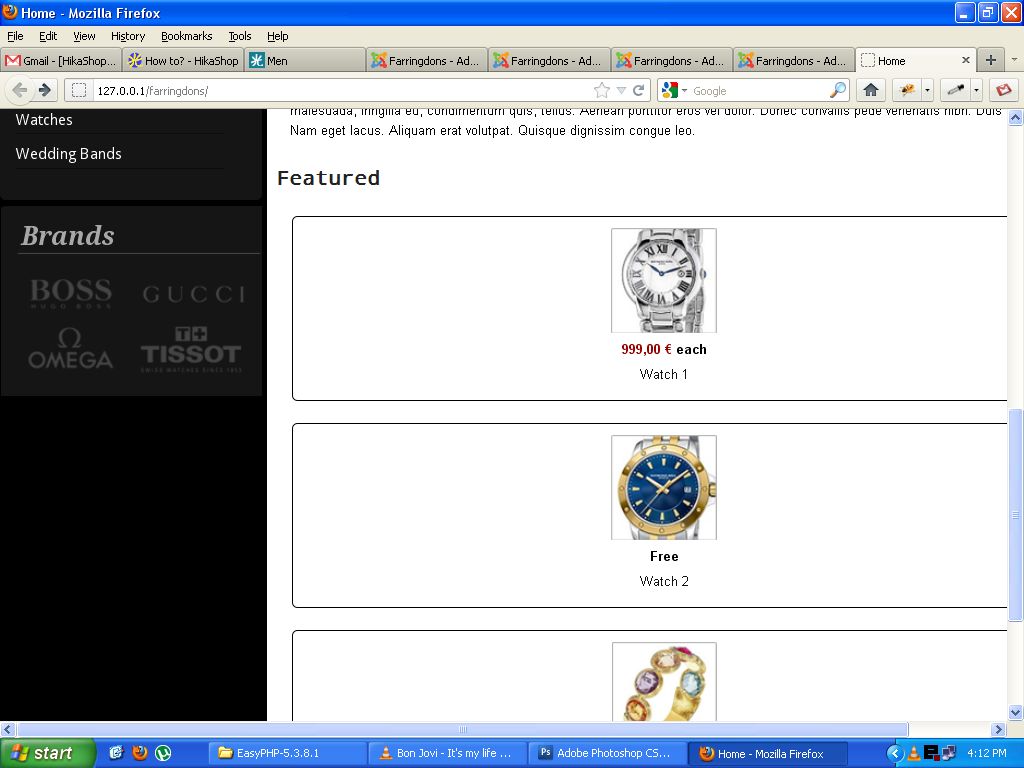
Is there a solution to this?
you can see the products in the image, I want them side by side not like this in the picture
Please Log in or Create an account to join the conversation.

14 years 7 months ago #38631
by nicolas
Replied by nicolas on topic Re: Display products on front page?
You don't need to change the CSS for that.
As Jerome said, you can just change the "number of columns" option of your listing.
You should go in the menu Display->Content menus/modules and edit your menus/modules and you will see that option.
As Jerome said, you can just change the "number of columns" option of your listing.
You should go in the menu Display->Content menus/modules and edit your menus/modules and you will see that option.
Please Log in or Create an account to join the conversation.
Time to create page: 0.195 seconds