
- Posts: 75
- Thank you received: 1
modified option
- Scheinbacher
-
 Topic Author
- Offline
Less
More
14 years 7 months ago #40021
by Scheinbacher
modified option was created by Scheinbacher
Hello Hika-Team
first at all, thank you for your great support. Hikashop is a powerful tool for webshop.
I am sure, again you can give me a solution for this question:
As you know, my product have different options. The options have different characteristics.
Once the option have more than one characteristics, the line "no" disappear and only the selectable options stay.
This do not happens if there is only one option.
My question, is there a possiblity to have eg. a option with three characteristics which shown 4 selectabel options with "no", "xx", "xx", ....
I have already try to add a fourth characteristic as "without" with 0€, but it appear in the cart with "free of charge".
How can I add the "No" to my option so that this item do not show in my cart?
Best Regards.
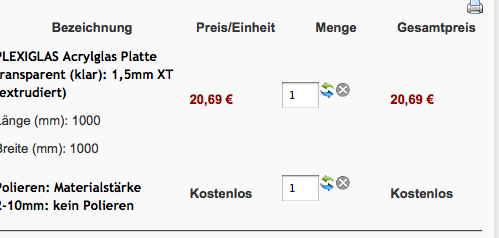
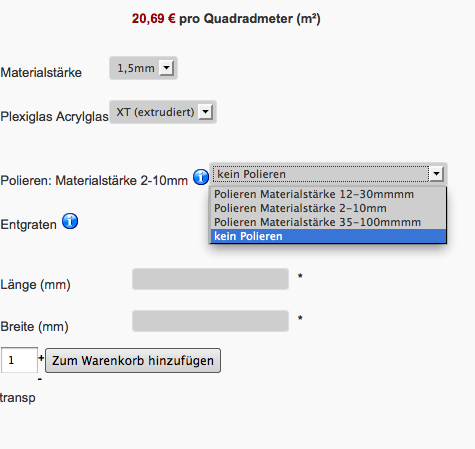
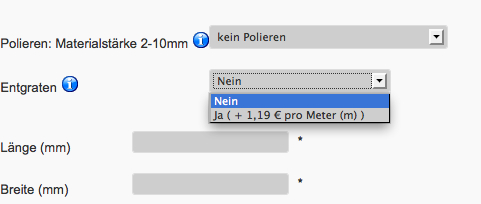
first at all, thank you for your great support. Hikashop is a powerful tool for webshop.
I am sure, again you can give me a solution for this question:
As you know, my product have different options. The options have different characteristics.
Once the option have more than one characteristics, the line "no" disappear and only the selectable options stay.
This do not happens if there is only one option.
My question, is there a possiblity to have eg. a option with three characteristics which shown 4 selectabel options with "no", "xx", "xx", ....
I have already try to add a fourth characteristic as "without" with 0€, but it appear in the cart with "free of charge".
How can I add the "No" to my option so that this item do not show in my cart?
Best Regards.
Please Log in or Create an account to join the conversation.

14 years 7 months ago #40221
by nicolas
Replied by nicolas on topic Re: modified option
Hi,
That's indeed the case.
Usually, people will use options with the option "group options with products" activated in the configuration so that the options don't have their own line on the checkout. Then, you don't really have that problem.
Would that be a solution for you ?
Otherwise, you add a "no" option to the option, you would have to edit the file "option" of the view "product" via the menu Display->Views and add the line:
before the line
That's indeed the case.
Usually, people will use options with the option "group options with products" activated in the configuration so that the options don't have their own line on the checkout. Then, you don't really have that problem.
Would that be a solution for you ?
Otherwise, you add a "no" option to the option, you would have to edit the file "option" of the view "product" via the menu Display->Views and add the line:
Code:
$this->values[] = JHTML::_('select.option', 0,JText::_('HIKASHOP_NO'));
Code:
foreach($optionElement->variants as $variant){
Please Log in or Create an account to join the conversation.
- Scheinbacher
-
Topic Author
- Offline
Less
More
- Posts: 75
- Thank you received: 1
14 years 7 months ago #40315
by Scheinbacher
Replied by Scheinbacher on topic Re: modified option
Thank you Nicolas
is it also possible to set "No" as default?
is it also possible to set "No" as default?
Please Log in or Create an account to join the conversation.
14 years 7 months ago #40495
by nicolas
Replied by nicolas on topic Re: modified option
Yes. Just remove the line:
Code:
$value = $variant->product_id;
Please Log in or Create an account to join the conversation.
Time to create page: 0.189 seconds