

- Posts: 16
- Thank you received: 0
Unable to find CSS in configuration
14 years 7 months ago #40628
by leez300
Unable to find CSS in configuration was created by leez300
Unable to locate the CSS area in the Display tab in Configuration. It is not there! Why are the CSS files impossible to find. For instance If I look for #hikashop_category_information_module_106 div.hikashop_container, it is nowhere to be found???
HikaShop 1.5.6 Joomla 2.5.1
HikaShop 1.5.6 Joomla 2.5.1
Please Log in or Create an account to join the conversation.

14 years 7 months ago - 14 years 7 months ago #40638
by protorob
Replied by protorob on topic Re: Unable to find CSS in configuration
You have to go to:
Hikashop>Global Configuration>
There is a tab called "Display" in that page, click on it.
If you scroll down in that "Display" tab you can see this:
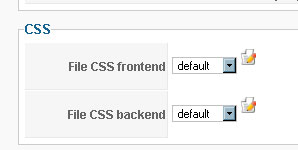
If you click on that pencil/notepad icon it will bring a popup like this:
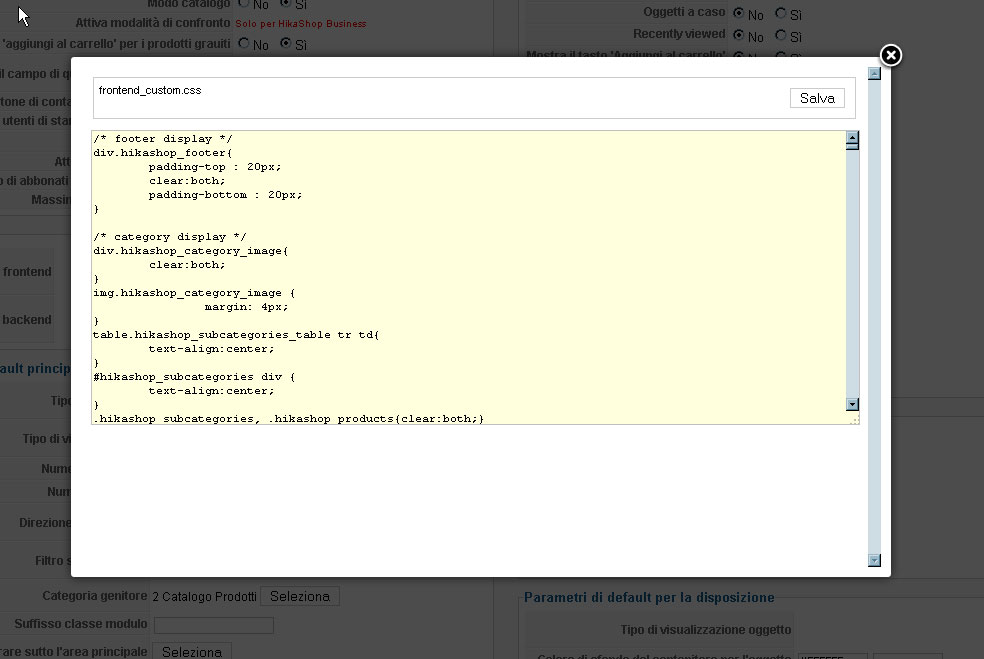
And that's your css!
Hikashop>Global Configuration>
There is a tab called "Display" in that page, click on it.
If you scroll down in that "Display" tab you can see this:
If you click on that pencil/notepad icon it will bring a popup like this:
And that's your css!
Last edit: 14 years 7 months ago by protorob.
Please Log in or Create an account to join the conversation.

14 years 7 months ago #40649
by nicolas
Replied by nicolas on topic Re: Unable to find CSS in configuration
It's the tab "Display" not "Views".
The CSS #hikashop_category_information_module_106 div.hikashop_container is generated dynamically from the options of your menu/module, you don't need to change the CSS for that, just change the corresponding options in the menu/module's hikashop options.
If you want to do it with CSS, you need to ADD your CSS for the hikashop front end CSS file and make sure that you use !important in order to override the CSS generated from the options of your menu/module.
The CSS #hikashop_category_information_module_106 div.hikashop_container is generated dynamically from the options of your menu/module, you don't need to change the CSS for that, just change the corresponding options in the menu/module's hikashop options.
If you want to do it with CSS, you need to ADD your CSS for the hikashop front end CSS file and make sure that you use !important in order to override the CSS generated from the options of your menu/module.
Please Log in or Create an account to join the conversation.
14 years 7 months ago #40651
by leez300
Replied by leez300 on topic Re: Unable to find CSS in configuration
Thanks Protorob
I have NO css area as you describe. My guess is that it has changed in version 1.6.5.
The only thing I can find is: Configuration -> Display -> Views -> filter css -> and then 5 differenst back end css configs for five different templates. I use Youtheme from YouJoomla, and this one is the fifth. When clicking the css link for this theme I only get a "config / css.php file with some form configuration... not a css file.
Thanks Nicolas
Yes I understand that it's dynamically generated. But the option to set the item box margin in Div parameters does not include a possibility to set it to 2px 0px 2px -20px (need to force it to the left). Also I cannot change the box border to one single bottom line (don't want a box just a seperator line between each item).
Now, in Firebug in the line <div class="hikashop_container"> it shoes the generated style (margin 10px) this of course can be changed in the options in menu/module, but not into different values for each margin.
Maybe the solution is put my modifications in a custom.css file (because of future upgrades)
I found the frontend_default.css in /media/com_hikashop/css, can I simply add the styles needed into this file?
As mentioned above, I do not have the option to modify the frontend css from a css area within views or display, and I do not quite understand the mecanism herein. Also I have no idea whatsoever why this css area is not shown. ??
Clarification much appreciated...
Thanks...
I have NO css area as you describe. My guess is that it has changed in version 1.6.5.
The only thing I can find is: Configuration -> Display -> Views -> filter css -> and then 5 differenst back end css configs for five different templates. I use Youtheme from YouJoomla, and this one is the fifth. When clicking the css link for this theme I only get a "config / css.php file with some form configuration... not a css file.
Thanks Nicolas
Yes I understand that it's dynamically generated. But the option to set the item box margin in Div parameters does not include a possibility to set it to 2px 0px 2px -20px (need to force it to the left). Also I cannot change the box border to one single bottom line (don't want a box just a seperator line between each item).
Now, in Firebug in the line <div class="hikashop_container"> it shoes the generated style (margin 10px) this of course can be changed in the options in menu/module, but not into different values for each margin.
Maybe the solution is put my modifications in a custom.css file (because of future upgrades)
I found the frontend_default.css in /media/com_hikashop/css, can I simply add the styles needed into this file?
As mentioned above, I do not have the option to modify the frontend css from a css area within views or display, and I do not quite understand the mecanism herein. Also I have no idea whatsoever why this css area is not shown. ??
Clarification much appreciated...
Thanks...
Please Log in or Create an account to join the conversation.
14 years 7 months ago #40654
by protorob
Replied by protorob on topic Re: Unable to find CSS in configuration
Oops!, i've just corrected that.
Please Log in or Create an account to join the conversation.
14 years 7 months ago - 14 years 7 months ago #40657
by leez300
Replied by leez300 on topic Re: Unable to find CSS in configuration
Hi protorob
What do you mean? Will there be a new version or patch available?
What do you mean? Will there be a new version or patch available?
Last edit: 14 years 7 months ago by leez300. Reason: typo
Please Log in or Create an account to join the conversation.
14 years 7 months ago #40669
by protorob
Replied by protorob on topic Re: Unable to find CSS in configuration
Nope, i mean i have corrected my post as pointed by nicolas, i'm not a hikashop developer, i'm just an user.
Please Log in or Create an account to join the conversation.
14 years 7 months ago #40670
by nicolas
Replied by nicolas on topic Re: Unable to find CSS in configuration
If you add your modifications to the file directly, you will loose your changes when you update.
There is no ways you don't have the CSS edition interface. You must not be looking in the good place.
It's the TAB Display of the configuration:
www.hikashop.com/media/doc/config_form_main.png
where you will find the CSS edition interface.
The configuration can be accessed via the menu Components->HikaShop->Configuration of your back end.
There is no ways you don't have the CSS edition interface. You must not be looking in the good place.
It's the TAB Display of the configuration:
www.hikashop.com/media/doc/config_form_main.png
where you will find the CSS edition interface.
The configuration can be accessed via the menu Components->HikaShop->Configuration of your back end.
The following user(s) said Thank You: leez300
Please Log in or Create an account to join the conversation.
Time to create page: 0.223 seconds