
- Posts: 29
- Thank you received: 0
carousel product width inline style issue
- jessicapschultz
-
 Topic Author
- Offline
Less
More
14 years 7 months ago #41304
by jessicapschultz
carousel product width inline style issue was created by jessicapschultz
Hello,
I have a module on my home page for some random products. I have it set for one column and one product. As a normal module the width spans across the full width which is what I want. As soon as I enable the carousel, the width suddenly gets set to 260px in inline style. I have checked all my module and menu settings for a place to modify this but cannot find any where to remove this width. I see that if you select carousel, the items get put in a ul list.... I have searched high and low for settings and in display/views for any inline styling, Please help! I have it set to image and description.
theuncommonlife.com/store/
also, when I click the arrows to move to the next product, they do not work.
Any help would be much appreciated.
I have a module on my home page for some random products. I have it set for one column and one product. As a normal module the width spans across the full width which is what I want. As soon as I enable the carousel, the width suddenly gets set to 260px in inline style. I have checked all my module and menu settings for a place to modify this but cannot find any where to remove this width.
I see that if you select carousel, the items get put in a ul list.... I have searched high and low for settings and in display/views for any inline styling, Please help! I have it set to image and description.theuncommonlife.com/store/
also, when I click the arrows to move to the next product, they do not work.
Any help would be much appreciated.
Please Log in or Create an account to join the conversation.
- jessicapschultz
-
Topic Author
- Offline
Less
More
- Posts: 29
- Thank you received: 0
14 years 7 months ago #41305
by jessicapschultz
Replied by jessicapschultz on topic Re: carousel product width inline style issue
update, I have the arrows working, I forgot to change number of products from one to more, just need assistance with the width thing.
Please Log in or Create an account to join the conversation.

14 years 7 months ago #41450
by nicolas
Replied by nicolas on topic Re: carousel product width inline style issue
Could you do a screenshot of the carousel options you set for your module ?
Please Log in or Create an account to join the conversation.
- jessicapschultz
-
Topic Author
- Offline
Less
More
- Posts: 29
- Thank you received: 0
14 years 7 months ago #41452
by jessicapschultz
Replied by jessicapschultz on topic Re: carousel product width inline style issue
yes thanks for looking
Please Log in or Create an account to join the conversation.
14 years 7 months ago #41456
by nicolas
Replied by nicolas on topic Re: carousel product width inline style issue
Please set either increase the image size or the number of products per slides. That way, it will be able to take more space.
By the way, the arrows work properly for me...
By the way, the arrows work properly for me...
Please Log in or Create an account to join the conversation.
- jessicapschultz
-
Topic Author
- Offline
Less
More
- Posts: 29
- Thank you received: 0
14 years 7 months ago #41458
by jessicapschultz
Replied by jessicapschultz on topic Re: carousel product width inline style issue
that is not what I want.... I want one product to span the full width. Even if I do try 2 products, the area will be too tall due to the description text and I do not want that to take up that much space. There must be a way to remove that inline width style of 260px, it is grabbing that number from somewhere, right? It can't just pick a random number. See attachment for the layout i want.
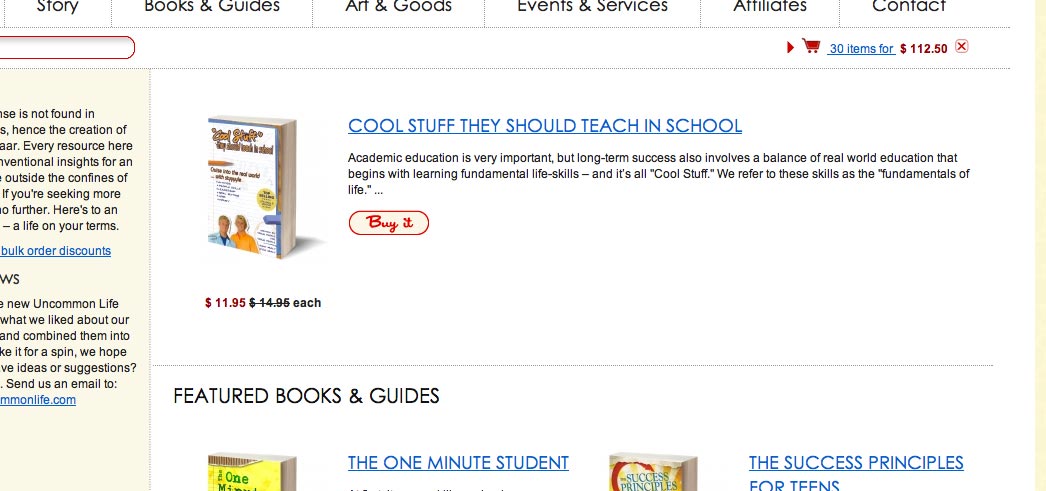
yes the arrow work fine as I mentioned in my right after the first one. I forgot to set a number of products to scroll. oops.
yes the arrow work fine as I mentioned in my right after the first one. I forgot to set a number of products to scroll. oops.
Please Log in or Create an account to join the conversation.
14 years 7 months ago #41461
by nicolas
Replied by nicolas on topic Re: carousel product width inline style issue
That 260px number is the size of your image multiplicated by 2.
That's why I also proposed you to increase the size of the image.
If you really don't want that either, you can edit the file "carousel" of the view "product" via the menu Display->Views and change the width calculation code at the beginning to change the behaviour of the system.
That's why I also proposed you to increase the size of the image.
If you really don't want that either, you can edit the file "carousel" of the view "product" via the menu Display->Views and change the width calculation code at the beginning to change the behaviour of the system.
Please Log in or Create an account to join the conversation.
- jessicapschultz
-
Topic Author
- Offline
Less
More
- Posts: 29
- Thank you received: 0
14 years 7 months ago #41467
by jessicapschultz
Replied by jessicapschultz on topic Re: carousel product width inline style issue
OK, I see. Thank you for that info! I see there are two places to change *2, do I change both, or can I change just one that will only affect my products with descriptions?
so lets say i change it from 2 to lets say *4 but then I want to use a carousel, lets say under all my product pages (associated modules), but there I want to display a row of maybe 4 products without the description next to them. Would those squares also be image size times 4?
so lets say i change it from 2 to lets say *4 but then I want to use a carousel, lets say under all my product pages (associated modules), but there I want to display a row of maybe 4 products without the description next to them. Would those squares also be image size times 4?
Please Log in or Create an account to join the conversation.
14 years 7 months ago #41472
by nicolas
Replied by nicolas on topic Re: carousel product width inline style issue
It's that one you should change I think:
No you won't have the problem. That modification will only be for when you use the "image and description" item box layout
Code:
if($this->params->get('div_item_layout_type')=='img_desc' || $this->params->get('div_item_layout_type')=='img_desc_2'){
$width=$width*2;
}
No you won't have the problem. That modification will only be for when you use the "image and description" item box layout
The following user(s) said Thank You: jessicapschultz
Please Log in or Create an account to join the conversation.
- jessicapschultz
-
Topic Author
- Offline
Less
More
- Posts: 29
- Thank you received: 0
14 years 7 months ago #41475
by jessicapschultz
Replied by jessicapschultz on topic Re: carousel product width inline style issue
yippy! It is not just how I want it. thank you. I hope I can still use it under the other pages and not have a size issue, I shall see shortly. thanks again.
Please Log in or Create an account to join the conversation.
Time to create page: 0.246 seconds