

- Posts: 35
- Thank you received: 0
How to: format descriptions of product imports
15 years 9 months ago #4135
by gemmill
How to: format descriptions of product imports was created by gemmill
Hi,
Currently sussing out the file import file, and am struggling with getting the text descriptions to drop onto multiple lines.
Can this be done? or do I have to upload it, then format it?
Thanks
Currently sussing out the file import file, and am struggling with getting the text descriptions to drop onto multiple lines.
Can this be done? or do I have to upload it, then format it?
Thanks
Please Log in or Create an account to join the conversation.

15 years 9 months ago #4136
by nicolas
Replied by nicolas on topic Re: How to: format descriptions of product imports
You can use quotes to have multiple lines in a field:
product_code,product_description
my_code,"my
product
description
on
several
lines"
product_code,product_description
my_code,"my
product
description
on
several
lines"
Please Log in or Create an account to join the conversation.
15 years 9 months ago #4137
by gemmill
Replied by gemmill on topic Re: How to: format descriptions of product imports
any chance of doing it from within an excel csv?
tried via text field too... got the following error...
.
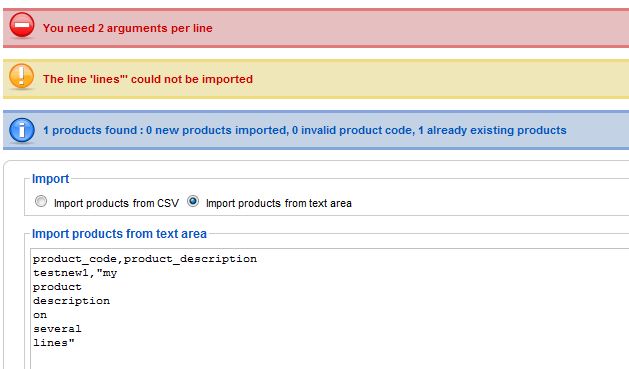
tried via text field too... got the following error...
.
Please Log in or Create an account to join the conversation.
15 years 9 months ago #4138
by nicolas
Replied by nicolas on topic Re: How to: format descriptions of product imports
Interesting. You found a bug in the import.
It doesn't work if the last column is on several lines.
You can replace the file administrator/components/com_hikashop/helpers/import.php by the one in the archive to fix the problem.
The text field example I wrote is just to show you how the system handles several lines.
Excel CSV are supported as well.
This attachment is hidden for guests.
It doesn't work if the last column is on several lines.
You can replace the file administrator/components/com_hikashop/helpers/import.php by the one in the archive to fix the problem.
The text field example I wrote is just to show you how the system handles several lines.
Excel CSV are supported as well.
This attachment is hidden for guests.
Please log in or register to see it.
Please Log in or Create an account to join the conversation.
15 years 9 months ago #4139
by gemmill
Replied by gemmill on topic Re: How to: format descriptions of product imports
thanks 
i'll check it out in a few days...
Have a happy Christmas
i'll check it out in a few days...
Have a happy Christmas
Please Log in or Create an account to join the conversation.
15 years 9 months ago - 15 years 9 months ago #4141
by gemmill
Replied by gemmill on topic Re: How to: format descriptions of product imports
with the csv import... how do I get text on the next lines... i did the usual "alt+enter" ... but this doesn't work
**** EDIT***
this does move the lines down on execl... but not when imported.
also, even when using the text editor / imort it still puts them all on the same line.
****** The text i was trying to import *******
product_code,product_description,categories
testnew1,"my
product
description
on
several
lines",11
**********************************************
**** EDIT***
this does move the lines down on execl... but not when imported.
also, even when using the text editor / imort it still puts them all on the same line.
****** The text i was trying to import *******
product_code,product_description,categories
testnew1,"my
product
description
on
several
lines",11
**********************************************
Last edit: 15 years 9 months ago by gemmill.
Please Log in or Create an account to join the conversation.
15 years 9 months ago #4142
by nicolas
Replied by nicolas on topic Re: How to: format descriptions of product imports
Entering several lines in Excel isn't really related to HikaShop
From what I know it's ctrl+enter or ctrl+alt+centre on macs.
Some users say alt+enter works for them...
Just try the different combinations. There's got to be one working but apparently it depends on your version of Excel.
From what I know it's ctrl+enter or ctrl+alt+centre on macs.
Some users say alt+enter works for them...
Just try the different combinations. There's got to be one working but apparently it depends on your version of Excel.
Please Log in or Create an account to join the conversation.
15 years 9 months ago #4143
by gemmill
Replied by gemmill on topic Re: How to: format descriptions of product imports
sorry yes I meant I put the text on more lines in excel, but didn't work on the import.
Please Log in or Create an account to join the conversation.
15 years 9 months ago #4144
by nicolas
Replied by nicolas on topic Re: How to: format descriptions of product imports
Could you edit the CSV with a text editor and copy/paste here a few lines so that we can test on our end ?
Did you get any error ?
Did you get any error ?
Please Log in or Create an account to join the conversation.
15 years 9 months ago #4145
by gemmill
Replied by gemmill on topic Re: How to: format descriptions of product imports
no error, it just didn't split the lines.
i'll do it now.
my csv file has all the fields... but not populated yet as i'm just trying to get it worked out before I start putting in data.
i'll do it now.
my csv file has all the fields... but not populated yet as i'm just trying to get it worked out before I start putting in data.
Please Log in or Create an account to join the conversation.
15 years 9 months ago #4146
by gemmill
Replied by gemmill on topic Re: How to: format descriptions of product imports
product_parent_id,product_name,product_description,product_quantity,product_code,product_published,product_hit,product_created,product_sale_start,product_sale_end,product_delay_id,product_tax_id,product_type,product_vendor_id,product_manufacturer_id,product_url,product_weight,product_keywords,product_weight_unit,product_modified,product_meta_description,product_dimension_unit,product_width,product_length,product_height,product_max_per_order,price_value,price_currency_id,price_quantity,files,images,categories,related,size
,testnew,"""my description
on multiple
lines""",,testnew2,yes,,,,,,,,,,,0.1,,,,,,,,,,12,,,,thumbnail/umm.jpg,10,,
hmmm... it appears there is extra quote marks around the text...
i'll try removing this
,testnew,"""my description
on multiple
lines""",,testnew2,yes,,,,,,,,,,,0.1,,,,,,,,,,12,,,,thumbnail/umm.jpg,10,,
hmmm... it appears there is extra quote marks around the text...
i'll try removing this
Please Log in or Create an account to join the conversation.
15 years 9 months ago #4147
by gemmill
Replied by gemmill on topic Re: How to: format descriptions of product imports
I got rid of the "s from the csv... so the code is now this...
product_parent_id,product_name,product_description,product_quantity,product_code,product_published,product_hit,product_created,product_sale_start,product_sale_end,product_delay_id,product_tax_id,product_type,product_vendor_id,product_manufacturer_id,product_url,product_weight,product_keywords,product_weight_unit,product_modified,product_meta_description,product_dimension_unit,product_width,product_length,product_height,product_max_per_order,price_value,price_currency_id,price_quantity,files,images,categories,related,size
,test3,"my description
on multiple
lines",,testnew3,yes,,,,,,,,,,,0.1,,,,,,,,,,12,,,,thumbnail/umm.jpg,10,,
but.... this doesn't work either....
product_parent_id,product_name,product_description,product_quantity,product_code,product_published,product_hit,product_created,product_sale_start,product_sale_end,product_delay_id,product_tax_id,product_type,product_vendor_id,product_manufacturer_id,product_url,product_weight,product_keywords,product_weight_unit,product_modified,product_meta_description,product_dimension_unit,product_width,product_length,product_height,product_max_per_order,price_value,price_currency_id,price_quantity,files,images,categories,related,size
,test3,"my description
on multiple
lines",,testnew3,yes,,,,,,,,,,,0.1,,,,,,,,,,12,,,,thumbnail/umm.jpg,10,,
but.... this doesn't work either....
Please Log in or Create an account to join the conversation.
15 years 9 months ago #4148
by nicolas
Replied by nicolas on topic Re: How to: format descriptions of product imports
This yelds an error because of the space in the image column name as you have "imag es".
After correcting that, it imported correctly on my end in several lines.
Mmmm. I'm feeling that you're missing something:
The description of products is displayed in HTML. So return characters are not interpreted by the browser. If you want text on several lines in the description, you should use HTML tags. For example by adding <br/> tags.
Also, you might be tricked by your HTML editor. Some Joomla HTML editors will remove the return characters when displaying the description. If you set the editor option of hikashop to no editor, or if you look directly in the database, you will see the return characters.
After correcting that, it imported correctly on my end in several lines.
Mmmm. I'm feeling that you're missing something:
The description of products is displayed in HTML. So return characters are not interpreted by the browser. If you want text on several lines in the description, you should use HTML tags. For example by adding <br/> tags.
Also, you might be tricked by your HTML editor. Some Joomla HTML editors will remove the return characters when displaying the description. If you set the editor option of hikashop to no editor, or if you look directly in the database, you will see the return characters.
Please Log in or Create an account to join the conversation.
15 years 9 months ago - 15 years 9 months ago #4149
by gemmill
Replied by gemmill on topic Re: How to: format descriptions of product imports
wow thats weird... i just checked the csv file, and there is no space in images.
when i paste the file text here... there is no space,
but once submitted, the space appears.
when pasted in the "import from text area" with no space in images, it doesn't split them.. i'll try using html
when i paste the file text here... there is no space,
but once submitted, the space appears.
when pasted in the "import from text area" with no space in images, it doesn't split them.. i'll try using html
Last edit: 15 years 9 months ago by gemmill.
Please Log in or Create an account to join the conversation.
15 years 9 months ago - 15 years 9 months ago #4150
by gemmill
Replied by gemmill on topic Re: How to: format descriptions of product imports
ok so back to it after the break, I hope you have had time to relax.
this is what i'm getting at the moment... before even trying to get it right in the .csv file.
This is the text import I tried.
.
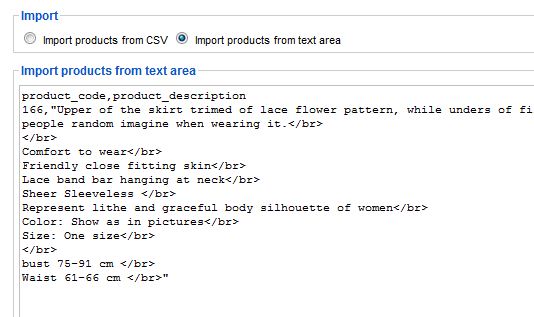
this is what i'm getting at the moment... before even trying to get it right in the .csv file.
This is the text import I tried.
.
Last edit: 15 years 9 months ago by gemmill.
Please Log in or Create an account to join the conversation.
15 years 9 months ago - 15 years 9 months ago #4297
by gemmill
Replied by gemmill on topic Re: How to: format descriptions of product imports
gives me this.. which is correct,
.
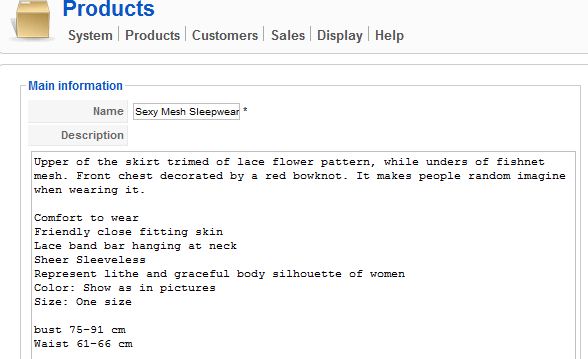
.
Last edit: 15 years 9 months ago by gemmill.
Please Log in or Create an account to join the conversation.
15 years 9 months ago #4298
by gemmill
Replied by gemmill on topic Re: How to: format descriptions of product imports
But is displaying this.....
.

.
Please Log in or Create an account to join the conversation.
15 years 8 months ago - 15 years 8 months ago #4302
by nicolas
Replied by nicolas on topic Re: How to: format descriptions of product imports
What if you try with <br/> instead of </br> which is wrong ? It might have been removed by the text editor at one point because it's not valid HTML.
Last edit: 15 years 8 months ago by nicolas.
Please Log in or Create an account to join the conversation.
15 years 8 months ago #4304
by gemmill
Replied by gemmill on topic Re: How to: format descriptions of product imports
same result.
Sorry to be such a pain.
Sorry to be such a pain.
Please Log in or Create an account to join the conversation.
15 years 8 months ago #4305
by nicolas
Replied by nicolas on topic Re: How to: format descriptions of product imports
Ah, I have an idea, it's probably the input filtering which strips the HMTL.
Could you change the line
by the line
in the file administrator/components/com_hikashop/controllers/import.php ?
Could you change the line
Code:
$content = JRequest::getString('textareaentries');
Code:
$content = JRequest::getVar('textareaentries','','','string',JREQUEST_ALLOWRAW);
Please Log in or Create an account to join the conversation.
Time to create page: 0.367 seconds