

- Posts: 86247
- Thank you received: 14235
How to: Show Manufacturer on Product Page
15 years 9 months ago #4388
by nicolas
Replied by nicolas on topic Re: How to: Show Manufacturer on Product Page
Ah I know !
I forgot that you customized the show file to display the custom fields with your own code. You need to call the translation function on the value of the custom fields (we do it when we display custom fields).
In the beginning of the thread, I told you to use the code
but if you want the field value to be translatable, you should use instead the code
I forgot that you customized the show file to display the custom fields with your own code. You need to call the translation function on the value of the custom fields (we do it when we display custom fields).
In the beginning of the thread, I told you to use the code
Code:
echo $this->element->FIELD_COLUMN_NAME;
Code:
echo $this->fieldsClass->trans($this->element->FIELD_COLUMN_NAME);
Please Log in or Create an account to join the conversation.

15 years 9 months ago #4394
by YakNarak
Replied by YakNarak on topic Re: How to: Show Manufacturer on Product Page
Indeed Nicholas, that did it.
Thanks a lot!
Gert.
Thanks a lot!
Gert.
Please Log in or Create an account to join the conversation.
15 years 7 months ago #8752
by YakNarak
Replied by YakNarak on topic Re: How to: Show Manufacturer on Product Page
Nicholas,
I need to implement the translate function in these lines of code too:
<td><span class="hikashop_product_custom_name" style="border:none; valign=top;"><?php echo $this->fieldsClass->getFieldName($oneExtraField); ?></span></td>
<td><span class="hikashop_product_custom_value" style="border:none;"><?php echo $this->fieldsClass->show($oneExtraField,$this->element->$fieldName); ?></span></td>
Where do I put it?
Gert.
I need to implement the translate function in these lines of code too:
<td><span class="hikashop_product_custom_name" style="border:none; valign=top;"><?php echo $this->fieldsClass->getFieldName($oneExtraField); ?></span></td>
<td><span class="hikashop_product_custom_value" style="border:none;"><?php echo $this->fieldsClass->show($oneExtraField,$this->element->$fieldName); ?></span></td>
Where do I put it?
Gert.
Please Log in or Create an account to join the conversation.
15 years 7 months ago #8763
by nicolas
Replied by nicolas on topic Re: How to: Show Manufacturer on Product Page
The fields label/values are already translatable. The label should be translatable via joomfish's interface. The values can be translated via your language file.
If you use the value test, you can add to your hikashop translation file (in the config in the languages tab) the line:
TEST="Test"
If you use the value test, you can add to your hikashop translation file (in the config in the languages tab) the line:
TEST="Test"
Please Log in or Create an account to join the conversation.
15 years 7 months ago #8770
by YakNarak
Replied by YakNarak on topic Re: How to: Show Manufacturer on Product Page
I have this in my language file:
#products_more
MA-0175="Framed"
On the product page it shows MA-0175
#products_more
MA-0175="Framed"
On the product page it shows MA-0175
Please Log in or Create an account to join the conversation.
15 years 7 months ago #8772
by nicolas
Replied by nicolas on topic Re: How to: Show Manufacturer on Product Page
I don't think that dashes are valid in translation keys. Please try without dash.
Also, could you do a screenshot of your custom field options ?
Also, could you do a screenshot of your custom field options ?
Please Log in or Create an account to join the conversation.
15 years 7 months ago #8774
by YakNarak
Replied by YakNarak on topic Re: How to: Show Manufacturer on Product Page
Indeed Nicolas,
It works without the dash. Thanks!
Gert.
It works without the dash. Thanks!
Gert.
Please Log in or Create an account to join the conversation.
14 years 6 months ago - 14 years 6 months ago #43192
by maison05
Replied by maison05 on topic Re: How to: Show Manufacturer on Product Page
Hi Nicolas,
I read through the instructions in this thread but they are over 1 year old and I'm not sure if the codes have changed.
I'm using the Essential package with J2.5.2.
I'm trying to add a manufacturer's logo onto the product page. I've added the manufactured name successfully by creating a custom field but I don't understand how to add the logo of individual manufacturers.
Question: In the "Add A new product" page, we can choose the "manufacturer". Why can't we choose to list the manufacturer and its logo in the front end too? If we can choose it, it would mean that it is being associated in the database. There should be a way to call out the name and the logo out to show on the front end. I was previously using Zen Cart and it had such a feature. Maybe you could add it in future release?
Can you give more instructions on how to add a logo in the front end? I tried using Display->custom field then choosing: table->'product' and type->'custom text'. When I add in the html for the logo, it shows up correctly in the Preview. Next, I used "add categories" and added the associated manufacturer. Now, the logo shows up on my product edit page with the logo but it wouldn't show up on the front end. How can I make it show up on the front end?
I read through the instructions in this thread but they are over 1 year old and I'm not sure if the codes have changed.
I'm using the Essential package with J2.5.2.
I'm trying to add a manufacturer's logo onto the product page. I've added the manufactured name successfully by creating a custom field but I don't understand how to add the logo of individual manufacturers.
Question: In the "Add A new product" page, we can choose the "manufacturer". Why can't we choose to list the manufacturer and its logo in the front end too? If we can choose it, it would mean that it is being associated in the database. There should be a way to call out the name and the logo out to show on the front end. I was previously using Zen Cart and it had such a feature. Maybe you could add it in future release?
Can you give more instructions on how to add a logo in the front end? I tried using Display->custom field then choosing: table->'product' and type->'custom text'. When I add in the html for the logo, it shows up correctly in the Preview. Next, I used "add categories" and added the associated manufacturer. Now, the logo shows up on my product edit page with the logo but it wouldn't show up on the front end. How can I make it show up on the front end?
Last edit: 14 years 6 months ago by maison05.
Please Log in or Create an account to join the conversation.
14 years 6 months ago #43302
by nicolas
Replied by nicolas on topic Re: How to: Show Manufacturer on Product Page
It's not possible because we didn't had the time to do it. It's already in the todo list.
What the current selection of the manufacturer allows you to do is this:
-create a listing of products based on the manufacturer
-create a listing of manufacturers
-create a filter on the manufacturer so that you can filter products per manufacturers in products listings
-display a listing of products from the same manufacturer on the product page.
This thread is indeed outdated. At that time, there was no manufacturer selection at all in HikaShop.
If you want to display the logo of a manufacturer on the product page, it's not that simple.
I would recommend instead to add your manufacturer image in the description of the manufacturer and then display the description in the "show_default" view file of the product view via the menu Display->Views.
You can easily display the description of the manufacturer with that code:
What the current selection of the manufacturer allows you to do is this:
-create a listing of products based on the manufacturer
-create a listing of manufacturers
-create a filter on the manufacturer so that you can filter products per manufacturers in products listings
-display a listing of products from the same manufacturer on the product page.
This thread is indeed outdated. At that time, there was no manufacturer selection at all in HikaShop.
If you want to display the logo of a manufacturer on the product page, it's not that simple.
I would recommend instead to add your manufacturer image in the description of the manufacturer and then display the description in the "show_default" view file of the product view via the menu Display->Views.
You can easily display the description of the manufacturer with that code:
Code:
<?php
$manufacturerClass = hikashop_get('class.category');
$manufacturer = $manufacturerClass->get($this->element->product_manufacturer_id);
echo $manufacturer->category_description;
?>
Please Log in or Create an account to join the conversation.
14 years 6 months ago #43322
by maison05
Replied by maison05 on topic Re: How to: Show Manufacturer on Product Page
Thanks nicolas, it works! Appreciate your assistance.
Please Log in or Create an account to join the conversation.
Less
More
- Posts: 15
- Thank you received: 0
12 years 4 months ago - 12 years 4 months ago #157790
by alanjosino
Replied by alanjosino on topic Re: How to: Show Manufacturer on Product Page
hello thanks for the help, in part show_default product page nothing happens, but when I modify the listing_img_title putting this code:
it appears
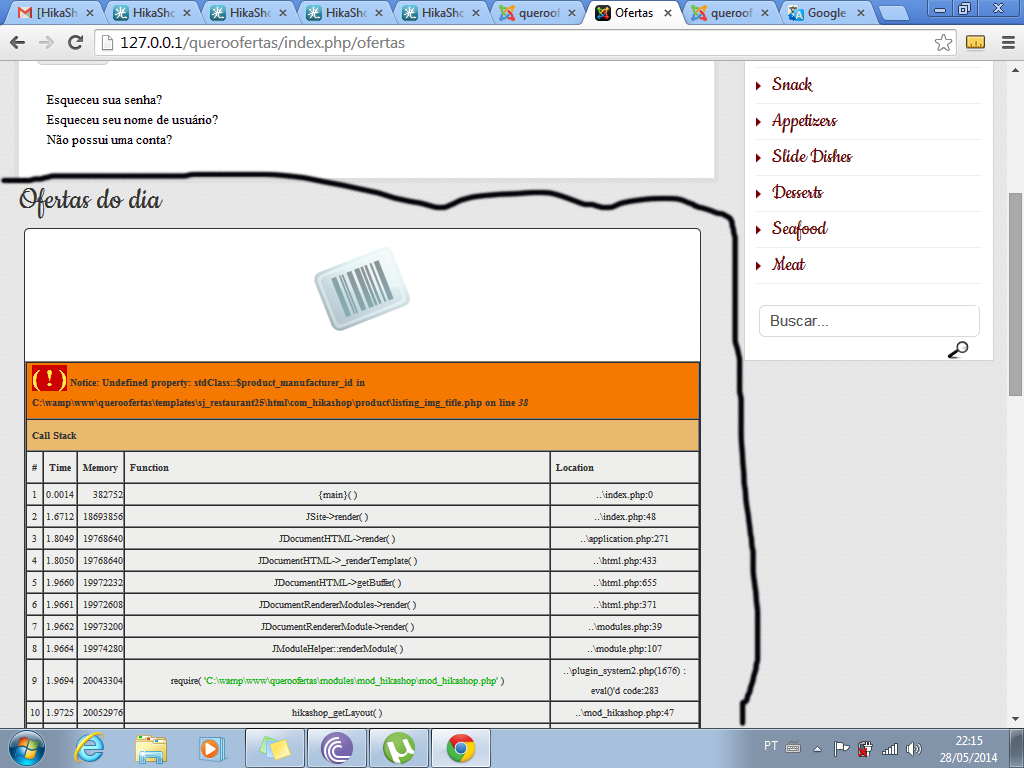
thank's for the help.
Code:
<? php
manufacturerClass hikashop_get $ = ("class.category ');
$ manufacturer = $ manufacturerClass-> get ($ this-> element-> product_manufacturer_id);
echo $ manufacturer-> category_description;
>
it appears
thank's for the help.
Last edit: 12 years 4 months ago by Jerome. Reason: [code] is nice !!
Please Log in or Create an account to join the conversation.

12 years 4 months ago #157985
by Jerome
Jerome - Obsidev.com
HikaMarket & HikaSerial developer / HikaShop core dev team.
Replied by Jerome on topic Re: How to: Show Manufacturer on Product Page
Hi,
You were talking about the product page but you put the code in a product listing.
That's typical that the code won't work correctly if it is not put in the right place.
So if you really want to put it in a product listing and not in the product page, you have to use a slightly different code.
It's not "element", it's row.
A little different but quite logical in the code (you're reading a row of a listing, not the element of the page).
Regards,
You were talking about the product page but you put the code in a product listing.
That's typical that the code won't work correctly if it is not put in the right place.
So if you really want to put it in a product listing and not in the product page, you have to use a slightly different code.
Code:
<?php
$manufacturerClass = hikashop_get('class.category');
$manufacturer = $manufacturerClass->get($this->row->product_manufacturer_id);
echo $manufacturer->category_description;
?>
A little different but quite logical in the code (you're reading a row of a listing, not the element of the page).
Regards,
Jerome - Obsidev.com
HikaMarket & HikaSerial developer / HikaShop core dev team.
Please Log in or Create an account to join the conversation.
Less
More
- Posts: 15
- Thank you received: 0
12 years 4 months ago #158178
by alanjosino
Replied by alanjosino on topic Re: How to: Show Manufacturer on Product Page
hi Jerome, thanks for a help
I put this code
<?php
$manufacturerClass = hikashop_get('class.category');
$manufacturer = $manufacturerClass->get($this->row->product_manufacturer_id);
echo $manufacturer->category_description;
?>
on product / listing_img_title.php and nothing happened but the error in the product listing disappeared.
I put this code
<?php
$manufacturerClass = hikashop_get('class.category');
$manufacturer = $manufacturerClass->get($this->row->product_manufacturer_id);
echo $manufacturer->category_description;
?>
on product / listing_img_title.php and nothing happened but the error in the product listing disappeared.
Please Log in or Create an account to join the conversation.

12 years 4 months ago #158375
by Xavier
Replied by Xavier on topic Re: How to: Show Manufacturer on Product Page
Hi,
Do you have put that code in the foreach ? That should work without errors.
Thanks to give us the part of code where you added it.
Do you have put that code in the foreach ? That should work without errors.
Thanks to give us the part of code where you added it.
Please Log in or Create an account to join the conversation.
Less
More
- Posts: 15
- Thank you received: 0
12 years 4 months ago - 12 years 4 months ago #158512
by alanjosino
Replied by alanjosino on topic Re: How to: Show Manufacturer on Product Page
Thanks Xavier but I do not know put this code in the foreach, i have put a code for inside foreach or create foreach and put a code in product / listing_img_title.php ?
Last edit: 12 years 4 months ago by alanjosino.
Please Log in or Create an account to join the conversation.

Less
More
- Posts: 12953
- Thank you received: 1778
12 years 4 months ago #158644
by Mohamed Thelji
Replied by Mohamed Thelji on topic Re: How to: Show Manufacturer on Product Page
Hello,
I think that the best solution will be to edit the "listing_div" file of the "product" view of your front-end template and add that code :
Just after this line :
I think that the best solution will be to edit the "listing_div" file of the "product" view of your front-end template and add that code :
Code:
if ($row->product_manufacturer_id != 0){
$manufacturerClass = hikashop_get('class.category');
$manufacturer = $manufacturerClass->get($row->product_manufacturer_id);
echo $manufacturer->category_description;}
Code:
foreach($this->rows as $row){
Please Log in or Create an account to join the conversation.
Less
More
- Posts: 15
- Thank you received: 0
12 years 4 months ago #158687
by alanjosino
Replied by alanjosino on topic Re: How to: Show Manufacturer on Product Page
thanks for the tip but nothing happened
Please Log in or Create an account to join the conversation.
12 years 3 months ago #159028
by Xavier
Replied by Xavier on topic Re: How to: Show Manufacturer on Product Page
Thanks to replace all the code of the view by :
If you still don't see the description, so you maybe edit the view in the wrong template.
Code:
<?php
$mainDivName=$this->params->get('main_div_name');
$carouselEffect=$this->params->get('carousel_effect');
$enableCarousel=$this->params->get('enable_carousel');
$textCenterd=$this->params->get('text_center');
$this->align="left";
if($textCenterd){
$this->align="center";
}
$height=$this->params->get('image_height');
$width=$this->params->get('image_width');
$this->borderClass="";
if($this->params->get('border_visible',1) == 1){
$this->borderClass="hikashop_subcontainer_border";
}
if($this->params->get('border_visible',1) == 2){
$this->borderClass="thumbnail";
}
if(empty($width) && empty($height)){
$width=$this->image->main_thumbnail_x;
$height=$this->image->main_thumbnail_y;
}
if(!empty($this->rows)){
//If one of the parametre is missing
$row = reset($this->rows);
$this->image->checkSize($width,$height,$row);
$this->newSizes= new stdClass();
$this->newSizes->height=$height;
$this->newSizes->width=$width;
$this->image->main_thumbnail_y=$height;
$this->image->main_thumbnail_x=$width;
}
if((!empty($this->rows) || !$this->module || JRequest::getVar('hikashop_front_end_main',0)) && $this->pageInfo->elements->total){
$app = JFactory::getApplication();
$pagination = $this->config->get('pagination','bottom');
if(in_array($pagination,array('top','both')) && $this->params->get('show_limit') && $this->pageInfo->elements->total){
$this->pagination->form = '_top';
?>
<form action="<?php echo hikashop_currentURL(); ?>" method="post" name="adminForm_<?php echo $this->params->get('main_div_name').$this->category_selected;?>_top">
<div class="hikashop_products_pagination hikashop_products_pagination_top">
<?php echo $this->pagination->getListFooter($this->params->get('limit')); ?>
<span class="hikashop_results_counter"><?php echo $this->pagination->getResultsCounter(); ?></span>
</div>
<input type="hidden" name="filter_order_<?php echo $this->params->get('main_div_name').$this->category_selected;?>" value="<?php echo $this->pageInfo->filter->order->value; ?>" />
<input type="hidden" name="filter_order_Dir_<?php echo $this->params->get('main_div_name').$this->category_selected;?>" value="<?php echo $this->pageInfo->filter->order->dir; ?>" />
<?php echo JHTML::_( 'form.token' ); ?>
</form>
<?php
}
?>
<div class="hikashop_products">
<?php
if(!empty($this->rows)){
if ($this->config->get('show_quantity_field')>=2) {
?>
<form action="<?php echo hikashop_completeLink('product&task=updatecart'); ?>" method="post" name="hikashop_product_form_<?php echo $this->params->get('main_div_name'); ?>" enctype="multipart/form-data">
<?php
}
if($enableCarousel){
$this->setLayout('carousel');
echo $this->loadTemplate();
}
else
{
$columns = (int)$this->params->get('columns');
if(empty($columns) || $columns<1) $columns = 1;
$width = (int)(100/$columns)-1;
$current_column = 1;
$current_row = 1;
if(HIKASHOP_RESPONSIVE) {
switch($columns) {
case 12:
case 6:
case 4:
case 3:
case 2:
case 1:
$row_fluid = 12;
$span = $row_fluid / $columns;
break;
case 10:
case 8:
case 7:
$row_fluid = $columns;
$span = 1;
break;
case 5:
$row_fluid = 10;
$span = 2;
break;
case 9: // special case
$row_fluid = 10;
$span = 1;
break;
}
if($row_fluid == 12)
echo '<div class="row-fluid"><ul class="thumbnails">';
else
echo '<div class="row-fluid-'.$row_fluid.'"><ul class="thumbnails">';
}
foreach($this->rows as $row){
if ($row->product_manufacturer_id != 0){
$manufacturerClass = hikashop_get('class.category');
$manufacturer = $manufacturerClass->get($row->product_manufacturer_id);
echo $manufacturer->category_description;}
if(!HIKASHOP_RESPONSIVE) {
?>
<div class="hikashop_product hikashop_product_column_<?php echo $current_column; ?> hikashop_product_row_<?php echo $current_row; ?>" style="width:<?php echo $width;?>%;">
<div class="hikashop_container">
<div class="hikashop_subcontainer <?php echo $this->borderClass; ?>">
<?php
} else {
?>
<li class="span<?php echo $span; ?> hikashop_product hikashop_product_column_<?php echo $current_column; ?> hikashop_product_row_<?php echo $current_row; ?>">
<div class="hikashop_container">
<div class="hikashop_subcontainer <?php echo $this->borderClass; ?>">
<?php
}
// Set the quantity layout depending on the configurations
if(!empty($row->product_quantity_layout) && $row->product_quantity_layout != 'inherit'){
$qLayout = $row->product_quantity_layout;
}else{
$categoryQuantityLayout = '';
if(!empty($row->categories) ) {
foreach($row->categories as $category) {
if(!empty($category->category_quantity_layout) && $this->quantityDisplayType->check($category->category_quantity_layout, $app->getTemplate())) {
$categoryQuantityLayout = $category->category_quantity_layout;
break;
}
}
}
if(!empty($categoryQuantityLayout) && $categoryQuantityLayout != 'inherit'){
$qLayout = $categoryQuantityLayout;
}else{
$qLayout = $this->config->get('product_quantity_display','show_default');
}
}
JRequest::setVar('quantitylayout',$qLayout);
$this->row =& $row;
$this->setLayout('listing_'.$this->params->get('div_item_layout_type'));
echo $this->loadTemplate();
if(!HIKASHOP_RESPONSIVE) {
?>
</div>
</div>
</div>
<?php
} else {
?>
</div>
</div>
</li>
<?php
}
if($current_column>=$columns){
$current_row++;
if(!HIKASHOP_RESPONSIVE) {
?>
<div style="clear:both"></div>
<?php
}
$current_column=0;
}
$current_column++;
}
if(HIKASHOP_RESPONSIVE) {
echo '</ul></div>';
}
}
?>
<div style="clear:both"></div>
<?php
if ($this->config->get('show_quantity_field')>=2) {
$this->ajax = 'if(hikashopCheckChangeForm(\'item\',\'hikashop_product_form_'.$this->params->get('main_div_name').'\')){ return hikashopModifyQuantity(\'\',field,1,\'hikashop_product_form_'.$this->params->get('main_div_name').'\'); } return false;';
$this->row = new stdClass();
$this->row->prices = array($this->row);
$this->row->product_quantity = -1;
$this->row->product_min_per_order = 0;
$this->row->product_max_per_order = -1;
$this->row->product_sale_start = 0;
$this->row->product_sale_end = 0;
$this->row->prices = array('filler');
$this->setLayout('quantity');
echo $this->loadTemplate();
if(!empty($this->ajax) && $this->config->get('redirect_url_after_add_cart','stay_if_cart')=='ask_user'){
?>
<input type="hidden" name="popup" value="1"/>
<?php
}
?>
<input type="hidden" name="hikashop_cart_type_0" id="hikashop_cart_type_0" value="cart"/>
<input type="hidden" name="add" value="1"/>
<input type="hidden" name="ctrl" value="product"/>
<input type="hidden" name="task" value="updatecart"/>
<input type="hidden" name="return_url" value="<?php echo urlencode(base64_encode(urldecode($this->redirect_url)));?>"/>
</form>
<?php
}
}
?>
</div>
<?php if(in_array($pagination,array('bottom','both')) && $this->params->get('show_limit') && $this->pageInfo->elements->total){ $this->pagination->form = '_bottom'; ?>
<form action="<?php echo hikashop_currentURL(); ?>" method="post" name="adminForm_<?php echo $this->params->get('main_div_name').$this->category_selected;?>_bottom">
<div class="hikashop_products_pagination hikashop_products_pagination_bottom">
<?php echo $this->pagination->getListFooter($this->params->get('limit')); ?>
<span class="hikashop_results_counter"><?php echo $this->pagination->getResultsCounter(); ?></span>
</div>
<input type="hidden" name="filter_order_<?php echo $this->params->get('main_div_name').$this->category_selected;?>" value="<?php echo $this->pageInfo->filter->order->value; ?>" />
<input type="hidden" name="filter_order_Dir_<?php echo $this->params->get('main_div_name').$this->category_selected;?>" value="<?php echo $this->pageInfo->filter->order->dir; ?>" />
<?php echo JHTML::_( 'form.token' ); ?>
</form>
<?php }
}
?>
If you still don't see the description, so you maybe edit the view in the wrong template.
Please Log in or Create an account to join the conversation.

12 years 3 months ago #161804
by LIP Trade
Replied by LIP Trade on topic Re: How to: Show Manufacturer on Product Page
Hello,in Our product page in the tab description link url manufacturer displays the product name instead of url manufacturers. Clicking the link goes 404 error. See here
donmarin.com/katalog/podovi-plochki/gran...-plochki-za-pod.html
!
Please Log in or Create an account to join the conversation.
12 years 3 months ago #161807
by Xavier
Replied by Xavier on topic Re: How to: Show Manufacturer on Product Page
Hi,
The link used in that view is the same than in the default product view.
Do you have made any customizations of hte show_tabular view ?
The link used in that view is the same than in the default product view.
Do you have made any customizations of hte show_tabular view ?
Please Log in or Create an account to join the conversation.
Time to create page: 0.321 seconds