

- Posts: 30
- Thank you received: 0
Add the text "+VAT" after all prices
14 years 7 months ago #41644
by code7
Add the text "+VAT" after all prices was created by code7
Hi there,
I'm working with some clients who want to display the price without VAT on the site but would also like the text "+VAT" to appear after prices, e.g
£2000 + VAT
I know I can just show prices including my tax rule but they do not want to do this.
Any help would be appreciated.
I'm working with some clients who want to display the price without VAT on the site but would also like the text "+VAT" to appear after prices, e.g
£2000 + VAT
I know I can just show prices including my tax rule but they do not want to do this.
Any help would be appreciated.
Please Log in or Create an account to join the conversation.

14 years 7 months ago #41817
by nicolas
Replied by nicolas on topic Re: Add the text "+VAT" after all prices
Hi,
You could override the translation key PRICE_END in order to add that text after prices:
www.hikashop.com/en/download/languages.html#modify
You could override the translation key PRICE_END in order to add that text after prices:
www.hikashop.com/en/download/languages.html#modify
Please Log in or Create an account to join the conversation.
14 years 7 months ago #41945
by code7
Replied by code7 on topic Re: Add the text "+VAT" after all prices
Thanks thats worked perfectly!
Is there a way to add it to the 'price with options' as on screenshot?
I could change that to 'price with options (+ VAT), but would be better after the price as on the rest?
Also, will the language file not get overwritten by updates to the component?
Thanks
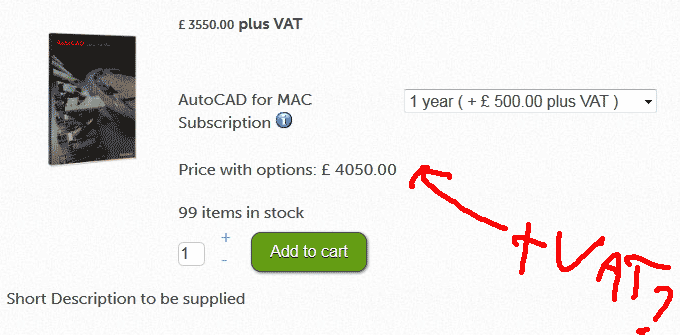
Is there a way to add it to the 'price with options' as on screenshot?
I could change that to 'price with options (+ VAT), but would be better after the price as on the rest?
Also, will the language file not get overwritten by updates to the component?
Thanks
Please Log in or Create an account to join the conversation.
14 years 6 months ago #42075
by nicolas
Replied by nicolas on topic Re: Add the text "+VAT" after all prices
For that price, it's the translation key PRICE_WITH_OPTIONS that you need to override.
If you enter your modifications in the override area when you edit the translation file and not directly in the translation file, as it is explained in the documentation, you won't loose your changes when you update.
If you enter your modifications in the override area when you edit the translation file and not directly in the translation file, as it is explained in the documentation, you won't loose your changes when you update.
Please Log in or Create an account to join the conversation.
14 years 6 months ago #42113
by nicolas
Replied by nicolas on topic Re: Add the text "+VAT" after all prices
If you want to put the text after the price, the explanation in my last post won't do sorry.
You need to edit the file "option_price" via the menu Display->Views and add your text like that:
echo ' (+VAT)';
before the code:
exit;
You need to edit the file "option_price" via the menu Display->Views and add your text like that:
echo ' (+VAT)';
before the code:
exit;
Please Log in or Create an account to join the conversation.
14 years 6 months ago #42130
by code7
Replied by code7 on topic Re: Add the text "+VAT" after all prices
sounds good, did it as in screenshot, but not working?
code7dev4.co.uk/index.php?option=com_hik...related_product=1059
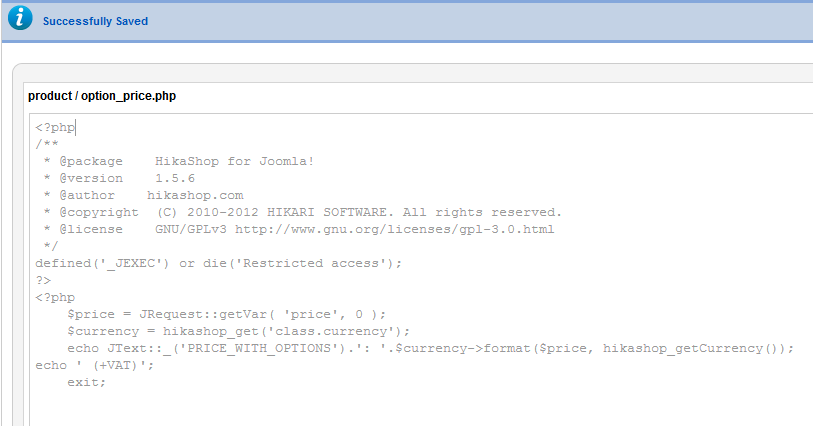
code7dev4.co.uk/index.php?option=com_hik...related_product=1059
Please Log in or Create an account to join the conversation.
14 years 6 months ago #42211
by nicolas
Replied by nicolas on topic Re: Add the text "+VAT" after all prices
The modification you did is correct. Make sure that you're editing the view for the correct template.
Please Log in or Create an account to join the conversation.
14 years 6 months ago #42229
by code7
Replied by code7 on topic Re: Add the text "+VAT" after all prices
Thanks very much, I see now there is a view for each template, works perfectly!
Please Log in or Create an account to join the conversation.
Time to create page: 0.206 seconds