
- Posts: 121
- Thank you received: 0
Applying discounts based on qty purchased?
- bluetonguedesigns
-
 Topic Author
- Offline
Less
More
14 years 6 months ago #42866
by bluetonguedesigns
Applying discounts based on qty purchased? was created by bluetonguedesigns
Is it possible to apply a discount without a coupon based on the qty they purchase of something? And not just 1 product, a whole category, so if it was greeting cards, and there was 20 designs, and they ordered a mixed lot of 25 card, can I drop the price based on how many was purchased?
Cheers
Cheers
Please Log in or Create an account to join the conversation.

14 years 6 months ago #42925
by nicolas
Replied by nicolas on topic Re: Applying discounts based on qty purchased?
Via auto loaded coupons yes, but otherwise no, you can't do that.
Please Log in or Create an account to join the conversation.
- bluetonguedesigns
-
Topic Author
- Offline
Less
More
- Posts: 121
- Thank you received: 0
14 years 6 months ago #42939
by bluetonguedesigns
Replied by bluetonguedesigns on topic Re: Applying discounts based on qty purchased?
Hi Nicolas. I assume that is in the commercial versions only? Is it just based on the total qty of "ANY" products, or can you be a bit selective?
Cheers
Cheers
Please Log in or Create an account to join the conversation.
14 years 6 months ago #42940
by nicolas
Replied by nicolas on topic Re: Applying discounts based on qty purchased?
It is only in commercial versions yes.
If the option "Coupon percentage applies to product only" is turned on and that a category is selected int he coupon, the coupon will be based on the qty of the products from that category only.
If the option "Coupon percentage applies to product only" is turned on and that a category is selected int he coupon, the coupon will be based on the qty of the products from that category only.
Please Log in or Create an account to join the conversation.
- bluetonguedesigns
-
Topic Author
- Offline
Less
More
- Posts: 121
- Thank you received: 0
14 years 6 months ago #43102
by bluetonguedesigns
Replied by bluetonguedesigns on topic Re: Applying discounts based on qty purchased?
Hi Nicolas
I just logged into a clients backend who has the commercial version of 1.5.6 and I don't see a lot of those options like autoload to cart etc?
I just logged into a clients backend who has the commercial version of 1.5.6 and I don't see a lot of those options like autoload to cart etc?
Please Log in or Create an account to join the conversation.
- bluetonguedesigns
-
Topic Author
- Offline
Less
More
- Posts: 121
- Thank you received: 0
14 years 6 months ago #43103
by bluetonguedesigns
Replied by bluetonguedesigns on topic Re: Applying discounts based on qty purchased?
Also, what would happen in the case of...
I setup coupons, set them to autoload, set them to one category and then set them like so...
Coupon 1, min 3 items, give 10% off
Coupon 2, min 5 items, give 15% off
Coupon 3, min 10 items, give 20% off
If the person order 8 items from that category, would it apply coupon 2?
And of course it would not touch products from another category.
Now, just to make life interesting, this particular client has already setup for each of the products in this category, variants for each item with scaled pricing so like pack of 3 is x price, pack of 5 is Y price, pack of 10 is Z price. If those were left in place, they would be getting the current "reduced" pricing based on the packs, plus, the coupon would then add itself ontop yes? So, ideally, we remove the discounted pricing from the variants and just let the coupon apply the discount?
Cheers
I setup coupons, set them to autoload, set them to one category and then set them like so...
Coupon 1, min 3 items, give 10% off
Coupon 2, min 5 items, give 15% off
Coupon 3, min 10 items, give 20% off
If the person order 8 items from that category, would it apply coupon 2?
And of course it would not touch products from another category.
Now, just to make life interesting, this particular client has already setup for each of the products in this category, variants for each item with scaled pricing so like pack of 3 is x price, pack of 5 is Y price, pack of 10 is Z price. If those were left in place, they would be getting the current "reduced" pricing based on the packs, plus, the coupon would then add itself ontop yes? So, ideally, we remove the discounted pricing from the variants and just let the coupon apply the discount?
Cheers
Please Log in or Create an account to join the conversation.
14 years 6 months ago #43216
by nicolas
Replied by nicolas on topic Re: Applying discounts based on qty purchased?
Discounts are already automatically applied to product prices, so the auto load option is only available when you change the "type" option to "coupon".
Yes, it would apply the correct coupon automatically.
Also, make sure that you're using the 1.5.7 version of HikaShop, as there was a bug on the restriction of coupons per products/categories.
Yes, if you don't want that the users cumulate the scaled pricing for each product and the global discounts for the whole number of products of the category in the cart, then yes, you will have to remove the scaled prices you have.
Yes, it would apply the correct coupon automatically.
Also, make sure that you're using the 1.5.7 version of HikaShop, as there was a bug on the restriction of coupons per products/categories.
Yes, if you don't want that the users cumulate the scaled pricing for each product and the global discounts for the whole number of products of the category in the cart, then yes, you will have to remove the scaled prices you have.
The following user(s) said Thank You: bluetonguedesigns
Please Log in or Create an account to join the conversation.
- bluetonguedesigns
-
Topic Author
- Offline
Less
More
- Posts: 121
- Thank you received: 0
14 years 6 months ago #43220
by bluetonguedesigns
Replied by bluetonguedesigns on topic Re: Applying discounts based on qty purchased?
Hi Nicolas, brilliant, 1.5.7? I cannot see that for download as yet or from the update console in any store? Will that be up soon?
Please Log in or Create an account to join the conversation.
14 years 6 months ago #43222
by nicolas
Replied by nicolas on topic Re: Applying discounts based on qty purchased?
The update via the menu Update>About us of the back end of HikaShop is locked for a few days while we get some feedback from users testing the update. If you want to update immediately, you can download the new version via the menu Download (for the Starter edition) or the menu Your account>Your subscriptions (for commercial editions) on our website
Please Log in or Create an account to join the conversation.
- bluetonguedesigns
-
Topic Author
- Offline
Less
More
- Posts: 121
- Thank you received: 0
14 years 6 months ago #43230
by bluetonguedesigns
Replied by bluetonguedesigns on topic Re: Applying discounts based on qty purchased?
Thanks.
Please Log in or Create an account to join the conversation.

14 years 6 months ago #43267
by kasnoff
Replied by kasnoff on topic Re: Applying discounts based on qty purchased?
Tried to download as per instructions below, still shows 1.5.6
Please Log in or Create an account to join the conversation.
14 years 6 months ago #43437
by nicolas
Replied by nicolas on topic Re: Applying discounts based on qty purchased?
Please try again.
Please Log in or Create an account to join the conversation.
- bluetonguedesigns
-
Topic Author
- Offline
Less
More
- Posts: 121
- Thank you received: 0
14 years 6 months ago #43763
by bluetonguedesigns
Replied by bluetonguedesigns on topic Re: Applying discounts based on qty purchased?
Hi Nicolas
Does BOTH essential and Business do this loaded discount coupon functionality?
Does BOTH essential and Business do this loaded discount coupon functionality?
Please Log in or Create an account to join the conversation.
14 years 6 months ago #43882
by nicolas
Replied by nicolas on topic Re: Applying discounts based on qty purchased?
Yes.
The following user(s) said Thank You: bluetonguedesigns
Please Log in or Create an account to join the conversation.
- bluetonguedesigns
-
Topic Author
- Offline
Less
More
- Posts: 121
- Thank you received: 0
14 years 6 months ago #43896
by bluetonguedesigns
Replied by bluetonguedesigns on topic Re: Applying discounts based on qty purchased?
Hi Nicolas
OK, installed the essential version. Setup a coupon like...
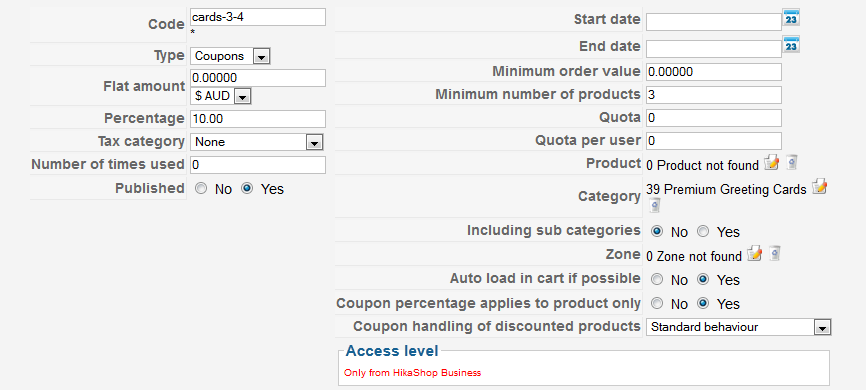
When I add any qty of greeting cards to the cart and go to checkout, no discount is applied? Does this not take effect until the user logs in?
This shop is actually doing some weird things on the checkout page, the usual login/create account page is displayed. I login with the admin details, the system message displays saying please create or select an address, there are no options displayed to do that, just the login/create an account form again. I tried creating an account on a new email address, no email is sent, and it is the same system message for add or select an address.
Any ideas why that is so? I'm a few days from launching this site and this is a pretty big issue to overcome.
Cheers
Neil
OK, installed the essential version. Setup a coupon like...
When I add any qty of greeting cards to the cart and go to checkout, no discount is applied? Does this not take effect until the user logs in?
This shop is actually doing some weird things on the checkout page, the usual login/create account page is displayed. I login with the admin details, the system message displays saying please create or select an address, there are no options displayed to do that, just the login/create an account form again. I tried creating an account on a new email address, no email is sent, and it is the same system message for add or select an address.
Any ideas why that is so? I'm a few days from launching this site and this is a pretty big issue to overcome.
Cheers
Neil
Please Log in or Create an account to join the conversation.
- bluetonguedesigns
-
Topic Author
- Offline
Less
More
- Posts: 121
- Thank you received: 0
14 years 6 months ago #44017
by bluetonguedesigns
Replied by bluetonguedesigns on topic Re: Applying discounts based on qty purchased?
Hi Nicolas.
Any ideas as to the two issues I have? The coupons not autoloading and the other issues with checkout?
Cheers
Neil
Any ideas as to the two issues I have? The coupons not autoloading and the other issues with checkout?
Cheers
Neil
Please Log in or Create an account to join the conversation.
14 years 6 months ago #44215
by nicolas
Replied by nicolas on topic Re: Applying discounts based on qty purchased?
Hi,
Could you give a back end access to your website via our contact form so that we can look at the problem ?
Could you give a back end access to your website via our contact form so that we can look at the problem ?
The following user(s) said Thank You: bluetonguedesigns
Please Log in or Create an account to join the conversation.
- bluetonguedesigns
-
Topic Author
- Offline
Less
More
- Posts: 121
- Thank you received: 0
14 years 6 months ago #44220
by bluetonguedesigns
Replied by bluetonguedesigns on topic Re: Applying discounts based on qty purchased?
Email sent.
Cheers
Cheers
Please Log in or Create an account to join the conversation.
14 years 6 months ago #44400
by nicolas
Replied by nicolas on topic Re: Applying discounts based on qty purchased?
Hi,
The account you provided was not allowed to access the back end of your website. Please double check it and send it again via our contact form.
The account you provided was not allowed to access the back end of your website. Please double check it and send it again via our contact form.
Please Log in or Create an account to join the conversation.
- bluetonguedesigns
-
Topic Author
- Offline
Less
More
- Posts: 121
- Thank you received: 0
14 years 6 months ago #44427
by bluetonguedesigns
Replied by bluetonguedesigns on topic Re: Applying discounts based on qty purchased?
Sorry, had forgot to bump access to admin level. fixed now.
With the Qty based coupons, it uses the word "products", is it based on "Items" so 3 of the same item is fine, not 3 different products?
Cheers
With the Qty based coupons, it uses the word "products", is it based on "Items" so 3 of the same item is fine, not 3 different products?
Cheers
Please Log in or Create an account to join the conversation.
Time to create page: 0.349 seconds