

- Posts: 86250
- Thank you received: 14236
Applying discounts based on qty purchased?
14 years 6 months ago #45928
by nicolas
Replied by nicolas on topic Re: Applying discounts based on qty purchased?
It's fixed now.
We'll add that to next version of HikaShop so you won't have problems updating.
We'll add that to next version of HikaShop so you won't have problems updating.
Please Log in or Create an account to join the conversation.
- bluetonguedesigns
-
 Topic Author
- Offline
Less
More
- Posts: 121
- Thank you received: 0
14 years 6 months ago #45935
by bluetonguedesigns
Replied by bluetonguedesigns on topic Re: Applying discounts based on qty purchased?
Hi Nicolas, thanks for looking at it, but, I am not seeing discounts coming into effect at all?
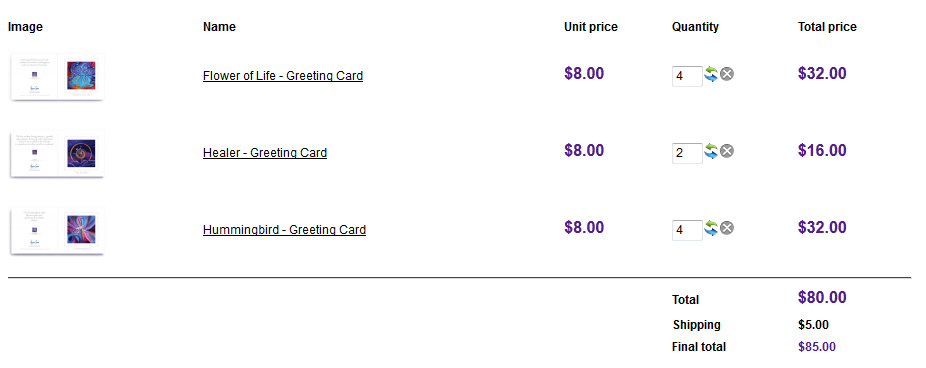
I have the discount coupon loaded as you would have seen for 3 and up, I have tried 3+ of a single product, plus 3 different products and still no discount shows?
I have the discount coupon loaded as you would have seen for 3 and up, I have tried 3+ of a single product, plus 3 different products and still no discount shows?
Please Log in or Create an account to join the conversation.
14 years 6 months ago #45937
by nicolas
Replied by nicolas on topic Re: Applying discounts based on qty purchased?
I had disabled the auto load option of the coupon in order to add it manually and see the error message.
Just turn that option back on and the coupon will be loaded automatically.
Just turn that option back on and the coupon will be loaded automatically.
Please Log in or Create an account to join the conversation.
- bluetonguedesigns
-
Topic Author
- Offline
Less
More
- Posts: 121
- Thank you received: 0
14 years 6 months ago #45940
by bluetonguedesigns
Replied by bluetonguedesigns on topic Re: Applying discounts based on qty purchased?
Ahh, missed that, thankyou.
Please Log in or Create an account to join the conversation.
- bluetonguedesigns
-
Topic Author
- Offline
Less
More
- Posts: 121
- Thank you received: 0
14 years 6 months ago #45948
by bluetonguedesigns
Replied by bluetonguedesigns on topic Re: Applying discounts based on qty purchased?
Just to be a pain, I am assuming only 1 coupon can be active? In this situation, it seems you can only have one product category applied to a coupon, and as there are 3 categories out of 5 that we need coupons for. So I did try setting up another coupon for a second category, added products but the first coupon was the only active one.
Typing this out, the solution came to me LOL
I'll add a 6th category that the discounts will apply for, and add that "special discountable" category to all the products that are eligible for discounting.
I think that should work fine.
Typing this out, the solution came to me LOL
I'll add a 6th category that the discounts will apply for, and add that "special discountable" category to all the products that are eligible for discounting.
I think that should work fine.
Please Log in or Create an account to join the conversation.
14 years 6 months ago #45949
by nicolas
Replied by nicolas on topic Re: Applying discounts based on qty purchased?
Indeed, you won't be able to have several coupons applied at the same time. Your solution sounds good.
Please Log in or Create an account to join the conversation.
- bluetonguedesigns
-
Topic Author
- Offline
Less
More
- Posts: 121
- Thank you received: 0
14 years 6 months ago #45956
by bluetonguedesigns
Replied by bluetonguedesigns on topic Re: Applying discounts based on qty purchased?
OK, how can I firstly make discounts show inc tax?
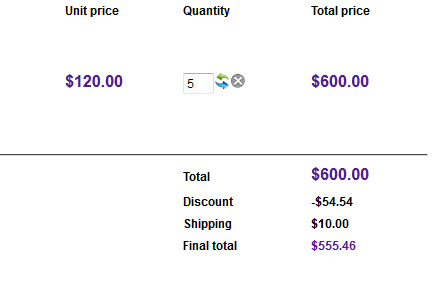
If I am taking 10% off that would be less $60? Plus the $10 freight, making the grand total $550? Or am I missing a setting or something?
If I am taking 10% off that would be less $60? Plus the $10 freight, making the grand total $550? Or am I missing a setting or something?
Please Log in or Create an account to join the conversation.
14 years 6 months ago #45958
by nicolas
Replied by nicolas on topic Re: Applying discounts based on qty purchased?
You have several options to control taxes on discounts. First, you have the option "apply discounts" of the configuration. Second, in your discounts, you can change the "tax category" option.
Please Log in or Create an account to join the conversation.
- bluetonguedesigns
-
Topic Author
- Offline
Less
More
- Posts: 121
- Thank you received: 0
14 years 6 months ago #45961
by bluetonguedesigns
Replied by bluetonguedesigns on topic Re: Applying discounts based on qty purchased?
Hi Nicolas.
Before Taxes setting fixed the issue.
Have a great easter.
Before Taxes setting fixed the issue.
Have a great easter.
Please Log in or Create an account to join the conversation.
Time to create page: 0.259 seconds