
Can't align productname left

14 years 6 months ago - 14 years 6 months ago #42924
by gasoline
I'll keep on trying!
Can't align productname left was created by gasoline
I want to align the text to left under productdisplay. However Hikashop putt some code in the HTML so I can't override it with my stylesheet.
It puts ther enow f.e.:
Why does it putt code there. I don't want that. See also my settings attached:
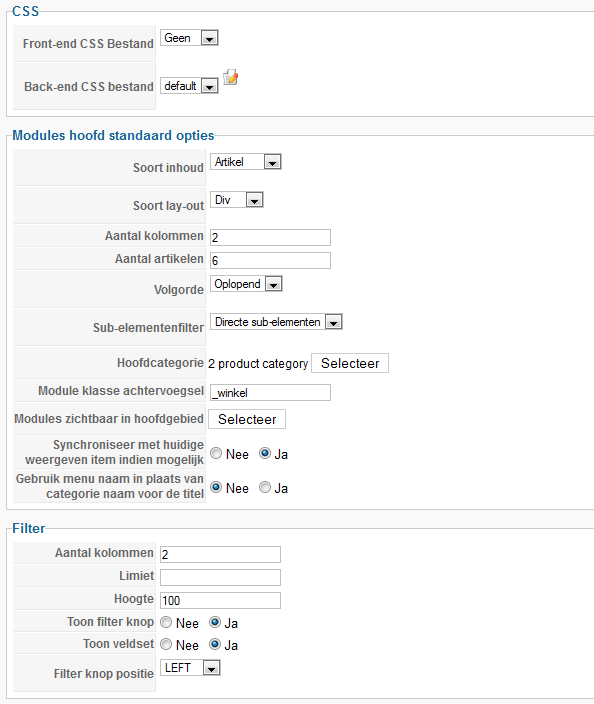
It puts ther enow f.e.:
Code:
<style type="text/css">
#hikashop_category_information_module_88 div.hikashop_subcontainer {
background:#FFFFFF;
}
#hikashop_category_information_module_88 .hikashop_rtop *,#hikashop_category_information_module_88 .hikashop_rbottom *{
background:#FFFFFF;
}
#hikashop_category_information_module_88 div.hikashop_subcontainer,#hikashop_category_information_module_88 div.hikashop_subcontainer span {
text-align:center; /* I WANT THIS F.E. LEFT ALIGNED */
}
#hikashop_category_information_module_88 div.hikashop_container {
text-align:center;
}
#hikashop_category_information_module_88 div.hikashop_container {
margin:10px 10px;
}
#hikashop_category_information_module_88 div.hikashop_category,#hikashop_category_information_module_88 div.hikashop_product{
float:left;
width:100%;
}
#hikashop_category_information_module_88 .hikashop_subcontainer {
-moz-border-radius: 5px;
-webkit-border-radius: 5px;
-khtml-border-radius: 5px;
border-radius: 5px;
}
</style>
Why does it putt code there. I don't want that. See also my settings attached:
I'll keep on trying!
Last edit: 14 years 6 months ago by gasoline. Reason: explain some more
Please Log in or Create an account to join the conversation.

14 years 6 months ago #43028
by nicolas
Replied by nicolas on topic Re: Can't align productname left
This CSS is added based on the options you set in Hikashop.
Go in the menu Display->Content module, edit the module with the id 88 and turn off the "text centered" option and you won't have the CSS code for the text-align property.
Also, you should learn to use the !important CSS trick. It helps a lot when you want to override CSS:
www.webcredible.co.uk/user-friendly-reso.../css-important.shtml
Go in the menu Display->Content module, edit the module with the id 88 and turn off the "text centered" option and you won't have the CSS code for the text-align property.
Also, you should learn to use the !important CSS trick. It helps a lot when you want to override CSS:
www.webcredible.co.uk/user-friendly-reso.../css-important.shtml
Please Log in or Create an account to join the conversation.
14 years 6 months ago #43056
by gasoline
I see. I know this rule but do not want to use that if not necessery.
Try your solution. Your system is great but templating is difficult. But maybe I need more expericnce with the system.
I'll keep on trying!
Replied by gasoline on topic Re: Can't align productname left
nicolas wrote: Also, you should learn to use the !important CSS trick. It helps a lot when you want to override CSS:
www.webcredible.co.uk/user-friendly-reso.../css-important.shtml
I see. I know this rule but do not want to use that if not necessery.
Try your solution. Your system is great but templating is difficult. But maybe I need more expericnce with the system.
I'll keep on trying!
Please Log in or Create an account to join the conversation.
Time to create page: 0.169 seconds