

- Posts: 56
- Thank you received: 0
About "Force a menu on the checkout"
14 years 5 months ago #46153
by savio
About "Force a menu on the checkout" was created by savio
I use the captioned field to prevent the cart module from displaying together with the checkout page. This part is fine.
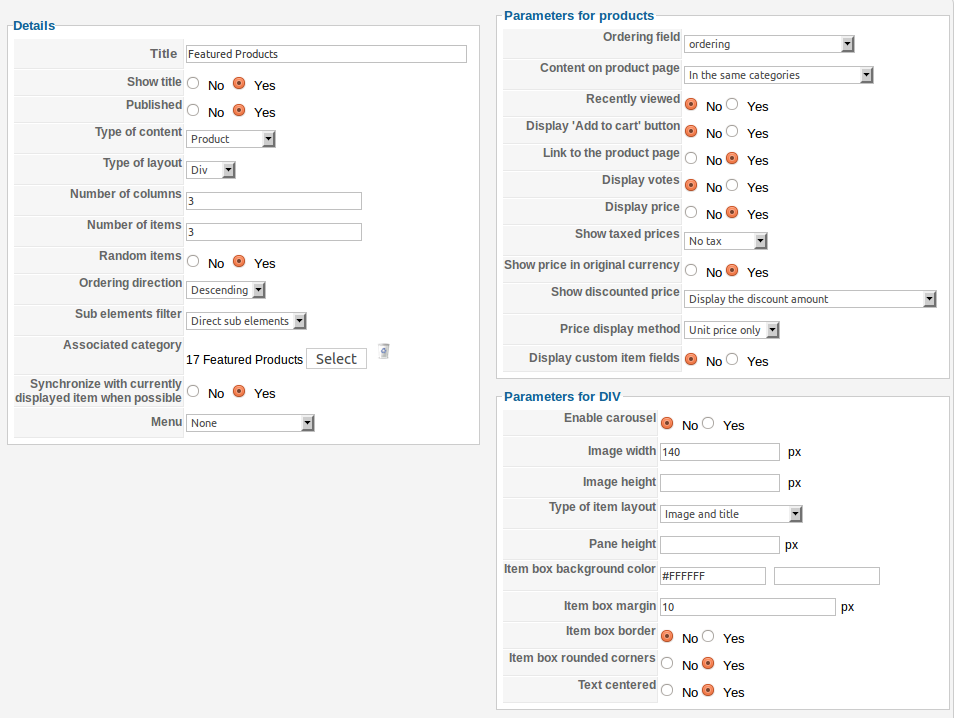
The problem is the cart module also disappear when I click into a product page thru a "Featured Product" module I created. Only Home (i.e. frontpage) is selected in the menu assignment for this featured product module.
As it doesn't happen on other product pages when navigate thru "product listing" menu, I have no idea what is wrong.
Screen cap for the featured product module is attached below. Please help.
The problem is the cart module also disappear when I click into a product page thru a "Featured Product" module I created. Only Home (i.e. frontpage) is selected in the menu assignment for this featured product module.
As it doesn't happen on other product pages when navigate thru "product listing" menu, I have no idea what is wrong.
Screen cap for the featured product module is attached below. Please help.
Please Log in or Create an account to join the conversation.

14 years 5 months ago #46208
by nicolas
Replied by nicolas on topic Re: About "Force a menu on the checkout"
On your screenshot, you need to set the option "menu" to a menu where your cart module is displayed.
Please Log in or Create an account to join the conversation.
14 years 5 months ago #46223
by savio
I tried that anyway and it put the "Featured Product" and "product page" together which is not ideal.
I finally assigned it to a hidden menu (i.e. a dummy menu: published with no_page on menu assignment) and get what I want. But I still don't understand what is happening.
I also don't understand the explanation on "Help".
Replied by savio on topic Re: About "Force a menu on the checkout"
I don't understand cause it is done once on Joomla module's menu assignment already.nicolas wrote: On your screenshot, you need to set the option "menu" to a menu where your cart module is displayed.
I tried that anyway and it put the "Featured Product" and "product page" together which is not ideal.
I finally assigned it to a hidden menu (i.e. a dummy menu: published with no_page on menu assignment) and get what I want. But I still don't understand what is happening.
I also don't understand the explanation on "Help".
Menu : By default, the links of a HikaShop content module will go to a page displaying the listing to sub elements (products or categories). This page won't have any content configuration attributed unless you choose here a HikaShop joomla menu here where you will be able to configure its options and thus add there a listing of products, etc.
Please Log in or Create an account to join the conversation.
14 years 5 months ago #46238
by nicolas
Replied by nicolas on topic Re: About "Force a menu on the checkout"
The menu assignement of joomla defines where that module will be displayed.
The menu option of hikashop defines on which menu the links displayed by the module will direct the user.
The menu option of hikashop defines on which menu the links displayed by the module will direct the user.
Please Log in or Create an account to join the conversation.
Time to create page: 0.239 seconds