

- Posts: 28
- Thank you received: 2
struggling with layouts
14 years 5 months ago - 14 years 5 months ago #46525
by bendraper
struggling with layouts was created by bendraper
Just a quick question
Can I give categories and sub-categories in menus differnet styles?
I want to make the front page - main categories - be images only, but then when the images are clicked I want the sub-categories to show images and text.
Any thoughts would be appreciated
Also I'm puzzled why the gap from the title of category and the sub-categories items is smaller than that between the title and list of products. I'm sure that it's a setting but I'm really struggling to find it!
site is www.lilybshop.co.uk/
Kind regards
Ben
Can I give categories and sub-categories in menus differnet styles?
I want to make the front page - main categories - be images only, but then when the images are clicked I want the sub-categories to show images and text.
Any thoughts would be appreciated
Also I'm puzzled why the gap from the title of category and the sub-categories items is smaller than that between the title and list of products. I'm sure that it's a setting but I'm really struggling to find it!
site is www.lilybshop.co.uk/
Kind regards
Ben
Last edit: 14 years 5 months ago by bendraper.
Please Log in or Create an account to join the conversation.

14 years 5 months ago #46534
by nicolas
Replied by nicolas on topic Re: struggling with layouts
That's not possible for now are the display options are related to menus and you don't change the menu when you display the subcategories listing so you still have the same options.
Ther eis no title for your listing of products. Are you talking about the recent products module's title ? If so, that's because the title of the modules are displayed by the template with different styling than the main title of the page.
Ther eis no title for your listing of products. Are you talking about the recent products module's title ? If so, that's because the title of the modules are displayed by the template with different styling than the main title of the page.
Please Log in or Create an account to join the conversation.
14 years 5 months ago #46551
by bendraper
Replied by bendraper on topic Re: struggling with layouts
that's what I thought re: the image vs image and title
regarding the diffent spacing the attached image should explain what I mean better
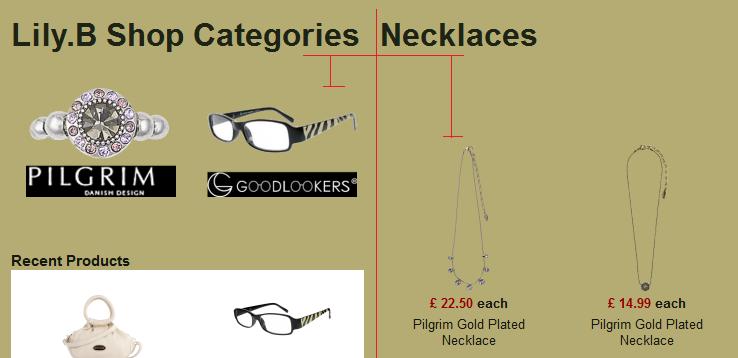
Can you see how the gap at the top is quite a bit more on the product listing than it is on the category or sub-sategory listing
Kind regards
Ben
regarding the diffent spacing the attached image should explain what I mean better
Can you see how the gap at the top is quite a bit more on the product listing than it is on the category or sub-sategory listing
Kind regards
Ben
Please Log in or Create an account to join the conversation.
14 years 5 months ago #46668
by nicolas
Replied by nicolas on topic Re: struggling with layouts
You can add such CSS in the front end CSS file of HikaShop via the Display tab of the configuration in order to have the same gap:
.hikashop_submodules {
padding-top: 0px !important;
}
.hikashop_submodules {
padding-top: 0px !important;
}
Please Log in or Create an account to join the conversation.
14 years 5 months ago #46689
by bendraper
Replied by bendraper on topic Re: struggling with layouts
perfect fix, thank you very much for your help
Please Log in or Create an account to join the conversation.
14 years 5 months ago #46695
by bendraper
Replied by bendraper on topic Re: struggling with layouts
On a slightly different note is there any way of automatically going through every title of every product, category etc and altering the capitalisation of the words.
Like in word where you can use change case:Title Case to capitalise the first letter of ever word - this would be really very helpful!!
Like in word where you can use change case:Title Case to capitalise the first letter of ever word - this would be really very helpful!!
Please Log in or Create an account to join the conversation.
14 years 5 months ago #46851
by nicolas
Replied by nicolas on topic Re: struggling with layouts
There is no such automatic function.
Please Log in or Create an account to join the conversation.
Time to create page: 0.301 seconds