

- Posts: 48
- Thank you received: 0
Last screen of the checkout
14 years 5 months ago - 14 years 5 months ago #47244
by guido
Last screen of the checkout was created by guido
In the last screen of the checkout, the customer sees what is has to do.
Is it possible to have a button, when its pressed you go to another page on the website.
Now there is nothing and the customer is possibly waiting for something.
With regards,
Guido
Is it possible to have a button, when its pressed you go to another page on the website.
Now there is nothing and the customer is possibly waiting for something.
With regards,
Guido
Last edit: 14 years 5 months ago by guido. Reason: adding infi
Please Log in or Create an account to join the conversation.

14 years 5 months ago - 14 years 5 months ago #47261
by Xavier
Replied by Xavier on topic Re: Last screen of the checkout
Hi guido,
You can add a button by this way:
Go in HikaShop > Display > views, and edit the view "checkout / end.php" in the good template.
Then add this line:
Under the two existing "echo".
You can change the text, and set the location as you want.
You can add a button by this way:
Go in HikaShop > Display > views, and edit the view "checkout / end.php" in the good template.
Then add this line:
Code:
?><input class="button" type="button" value="<?php echo JText::_('JERROR_LAYOUT_HOME_PAGE'); ?>" onClick="document.location='index.php';"/><?php
Under the two existing "echo".
You can change the text, and set the location as you want.
Last edit: 14 years 5 months ago by Xavier.
Please Log in or Create an account to join the conversation.
14 years 5 months ago #47283
by guido
Replied by guido on topic Re: Last screen of the checkout
Thanks Xavier.
But i'm a nono with php, could you give an example where to place that line.
Guido
But i'm a nono with php, could you give an example where to place that line.
Guido
Please Log in or Create an account to join the conversation.
14 years 5 months ago #47288
by Xavier
Replied by Xavier on topic Re: Last screen of the checkout
Your PHP should be like that:
Code:
<?php
if(empty($this->html)){
echo JText::_('THANK_YOU_FOR_PURCHASE');
?><input class="button" type="button" value="<?php echo JText::_('JERROR_LAYOUT_HOME_PAGE'); ?>" onClick="document.location='index.php';"/><?php
}else{
echo $this->html;
?><input class="button" type="button" value="<?php echo JText::_('JERROR_LAYOUT_HOME_PAGE'); ?>" onClick="document.location='index.php';"/><?php
}
$this->nextButton = false;
Please Log in or Create an account to join the conversation.
14 years 5 months ago #47291
by guido
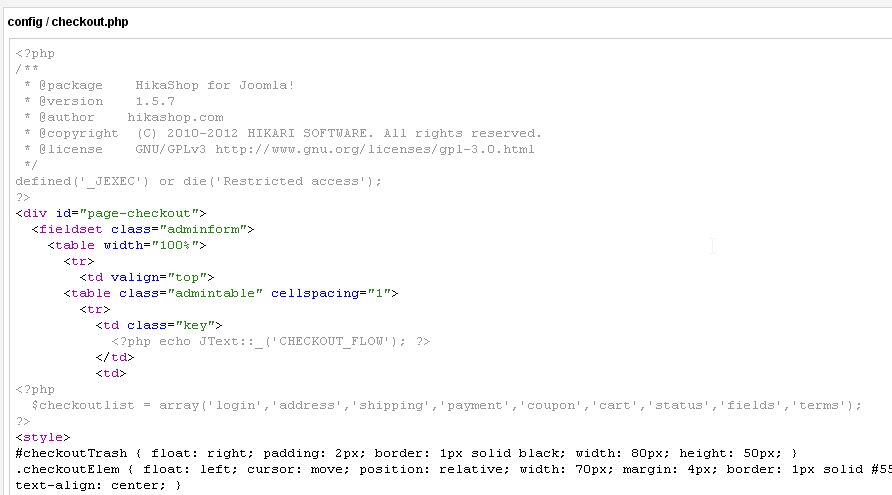
i suppose i have to insert above code.
But where in that file, i suppose it is this file, see attachment.
Guido
Replied by guido on topic Re: Last screen of the checkout
i suppose i have to insert above code.
But where in that file, i suppose it is this file, see attachment.
Guido
Please Log in or Create an account to join the conversation.
14 years 5 months ago #47292
by Xavier
Replied by Xavier on topic Re: Last screen of the checkout
It's not this file.
You have to edit the file "end.php" in the view "checkout".
You have to edit the file "end.php" in the view "checkout".
Please Log in or Create an account to join the conversation.
14 years 5 months ago - 14 years 5 months ago #47295
by guido
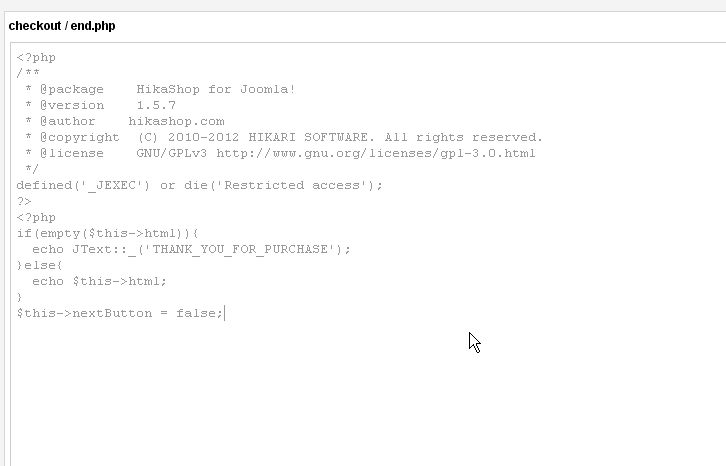
do you mean this file.
and if so, do i have to add the code at the bottom.
i think its this file, i changed it, but nothing to see at the checkout screen.
Replied by guido on topic Re: Last screen of the checkout
do you mean this file.
and if so, do i have to add the code at the bottom.
i think its this file, i changed it, but nothing to see at the checkout screen.
Last edit: 14 years 5 months ago by guido.
Please Log in or Create an account to join the conversation.
14 years 5 months ago #47298
by guido
Replied by guido on topic Re: Last screen of the checkout
i found it, wrong i searched in the wrong template, found it and it works.
Thanks
Thanks
Please Log in or Create an account to join the conversation.
Time to create page: 0.221 seconds