

- Posts: 108
- Thank you received: 2
Not Logging In After Register
14 years 5 months ago #48817
by bars92
Not Logging In After Register was created by bars92
hey again.
I am using the register menu to register before shopping, and after the register the user needs to be logged in.
The problem is, he is not.
It happened to me before, and i was because the user register contained fields that was required but not in the front-end.
Now i tried everything i could think of and i cant seem to understand why.
If you have any suggestions, please share.
Thanks in advance.
I am using the register menu to register before shopping, and after the register the user needs to be logged in.
The problem is, he is not.
It happened to me before, and i was because the user register contained fields that was required but not in the front-end.
Now i tried everything i could think of and i cant seem to understand why.
If you have any suggestions, please share.
Thanks in advance.
Please Log in or Create an account to join the conversation.

14 years 5 months ago #48840
by nicolas
Replied by nicolas on topic Re: Not Logging In After Register
The user registration form does not auto log users in joomla.
If you want to do that, you'll have to use an auto login plugin:
extensions.joomla.org/extensions/access-...te-access/auto-login
If you want to do that, you'll have to use an auto login plugin:
extensions.joomla.org/extensions/access-...te-access/auto-login
Please Log in or Create an account to join the conversation.
14 years 5 months ago #48853
by bars92
Replied by bars92 on topic Re: Not Logging In After Register
I know in the checkout the registration in the login step does login to joomla.
Anyway, when i install and try it, it gives me Invalid Token and it does not save the Hikashop custom fields.
What do i do now?
Anyway, when i install and try it, it gives me Invalid Token and it does not save the Hikashop custom fields.
What do i do now?
Please Log in or Create an account to join the conversation.
14 years 5 months ago #48873
by nicolas
Replied by nicolas on topic Re: Not Logging In After Register
Can you give a link to that page so that we can see that ?
Please Log in or Create an account to join the conversation.
14 years 5 months ago #48880
by bars92
Replied by bars92 on topic Re: Not Logging In After Register
Here is the link:
zristar.com/en/register
fill in and click register you will see a Invalid Token by the plugin and the little line in the top says whos logged in and his Refferal custom field you entered.
fill in and click register you will see a Invalid Token by the plugin and the little line in the top says whos logged in and his Refferal custom field you entered.
Please Log in or Create an account to join the conversation.
14 years 5 months ago #48899
by nicolas
Replied by nicolas on topic Re: Not Logging In After Register
That's not normal. Once logged in, HikaShop doesn't even display the registration form but redirects to the user control panel when trying to display that page.
Also, there is no token check in HikaShop, and even if it were, it should match as we send the current one.
It sounds like you have a cache problem on your website.
Please check that the cache of the joomla configuration, the cache plugin via the plugins manager and the cache option of your template (if there in the options of the template) are all deactivated and try again.
Also, there is no token check in HikaShop, and even if it were, it should match as we send the current one.
It sounds like you have a cache problem on your website.
Please check that the cache of the joomla configuration, the cache plugin via the plugins manager and the cache option of your template (if there in the options of the template) are all deactivated and try again.
Please Log in or Create an account to join the conversation.
14 years 5 months ago #48932
by bars92
Replied by bars92 on topic Re: Not Logging In After Register
i couldnt understand how to deactivate cache, but if you ment purge cache then it didnt help..
I noticed the plugin uses onAfterUserCreated but Hikashop custom fields are not saved so plug in must have been interuppting Hikashop..
I noticed the plugin uses onAfterUserCreated but Hikashop custom fields are not saved so plug in must have been interuppting Hikashop..
Please Log in or Create an account to join the conversation.
14 years 5 months ago #48987
by nicolas
Replied by nicolas on topic Re: Not Logging In After Register
What plugin ?
To turn off cache, you need to do three things:
Global Configuration--> System-->Cache Settings-->Cache
Please select 'No';
Extensions-->Plugin Manager-->System - Cache
Please disable the plugin-"System-Cache" .
Extensions-->Templates Manager-->YOUR TEMPLATE
Please look for a cache option in your template's options.
To turn off cache, you need to do three things:
Global Configuration--> System-->Cache Settings-->Cache
Please select 'No';
Extensions-->Plugin Manager-->System - Cache
Please disable the plugin-"System-Cache" .
Extensions-->Templates Manager-->YOUR TEMPLATE
Please look for a cache option in your template's options.
Please Log in or Create an account to join the conversation.
14 years 5 months ago - 14 years 5 months ago #49117
by bars92
Replied by bars92 on topic Re: Not Logging In After Register
All cache options already set to off..
I meant the auto login plugin that might interuppt Hikashop.
Have you ever heard about someone that this plugin worked using Hikashop?
EDIT: i checked the auto plugin and notice i get error 1 when trying to login. Trying to figure out what does it mean.
I meant the auto login plugin that might interuppt Hikashop.
Have you ever heard about someone that this plugin worked using Hikashop?
EDIT: i checked the auto plugin and notice i get error 1 when trying to login. Trying to figure out what does it mean.
Last edit: 14 years 5 months ago by bars92.
Please Log in or Create an account to join the conversation.
14 years 5 months ago #49199
by nicolas
Replied by nicolas on topic Re: Not Logging In After Register
No that's the first time someon asks to auto login users after registration from the registration page of HikaShop.
Most of the time, they only use the registration inside the checkout. In that case, HikaShop handles automatically the auto login.
What error do you get with the auto plugin ?
Most of the time, they only use the registration inside the checkout. In that case, HikaShop handles automatically the auto login.
What error do you get with the auto plugin ?
Please Log in or Create an account to join the conversation.
14 years 5 months ago #49337
by bars92
Replied by bars92 on topic Re: Not Logging In After Register
I dont know what the error is, but when i run the JApplication::login it retruns 1 which means error.
but i couldnt see what 1 means.. Perhaps you would know.
but i couldnt see what 1 means.. Perhaps you would know.
Please Log in or Create an account to join the conversation.
14 years 5 months ago #49400
by nicolas
Replied by nicolas on topic Re: Not Logging In After Register
I don't know about that. Could you do a screenshot ?
Please Log in or Create an account to join the conversation.
14 years 5 months ago - 14 years 5 months ago #49408
by bars92
Replied by bars92 on topic Re: Not Logging In After Register
attached a picture of the plug-in.
The line: $error = $app->login($credentials, $options); returns 1
and all Hikashop custom fields are NULL, which cause the plugin to log in, but all of the user custom fields are empty.
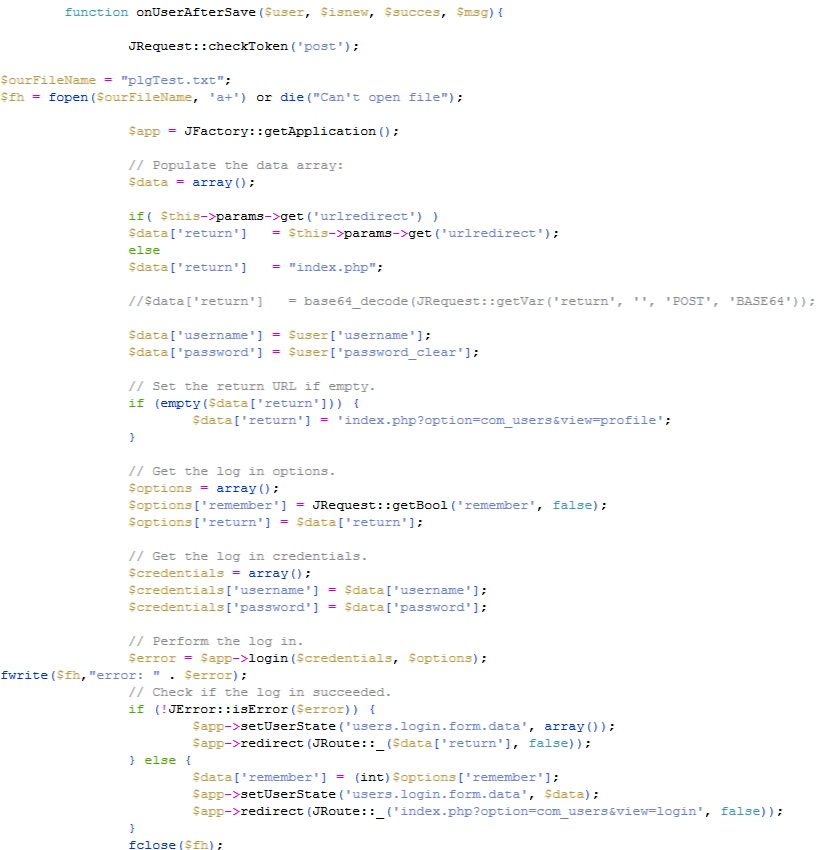
The line: $error = $app->login($credentials, $options); returns 1
and all Hikashop custom fields are NULL, which cause the plugin to log in, but all of the user custom fields are empty.
Last edit: 14 years 5 months ago by bars92.
Please Log in or Create an account to join the conversation.
14 years 5 months ago #49437
by nicolas
Replied by nicolas on topic Re: Not Logging In After Register
No I mean a screenshot of the error message.
Please Log in or Create an account to join the conversation.
14 years 5 months ago #49459
by bars92
Replied by bars92 on topic Re: Not Logging In After Register
there is no error message i just print the $error as you see in the picture.
Please Log in or Create an account to join the conversation.
14 years 5 months ago #49503
by nicolas
Replied by nicolas on topic Re: Not Logging In After Register
So do you mean that the auto login plugin does not work ?
Please Log in or Create an account to join the conversation.
14 years 5 months ago #49541
by bars92
Replied by bars92 on topic Re: Not Logging In After Register
It does work, strangly the user is connected but hika fields are empty as if Hikashop register did not work and i get an error from the plugin.
Please Log in or Create an account to join the conversation.
14 years 5 months ago #49609
by nicolas
Replied by nicolas on topic Re: Not Logging In After Register
As yes. That's because the saving of address fields is done after the user has been saved in Joomla. And that plugin is triggered in between and it redirects the page at that point. You should try to remove the redirect lines of code in the plugin and that should help.
Please Log in or Create an account to join the conversation.
12 years 5 months ago #152925
by coolbugs
Replied by coolbugs on topic Re: Not Logging In After Register
have you got this working? I seem to have problem saving the user information with the autologin
Please Log in or Create an account to join the conversation.
12 years 5 months ago #152940
by nicolas
Replied by nicolas on topic Re: Not Logging In After Register
As I said in my last post, you should remove the "redirect" lines in the auto login plugin file so that it doesn't redirect the user to another page before HikaShop process the user information.
The following user(s) said Thank You: coolbugs
Please Log in or Create an account to join the conversation.
Time to create page: 0.287 seconds