

- Posts: 43
- Thank you received: 0
Credit card fields
14 years 5 months ago #49346
by Sue
Credit card fields was created by Sue
Hello,
I don't know if this question is being asked right.
But I notice on the demo site that on the checkout page when you select the credit card option the info appears nicely.
On my side it doesn't work like that. It is there only not visible.
How can I get it to work like that?
Thanks in advance
I don't know if this question is being asked right.
But I notice on the demo site that on the checkout page when you select the credit card option the info appears nicely.
On my side it doesn't work like that. It is there only not visible.
How can I get it to work like that?
Thanks in advance
Please Log in or Create an account to join the conversation.

14 years 5 months ago #49405
by nicolas
Replied by nicolas on topic Re: Credit card fields
Hard to say. It might be because of a javascript error on your website. We would need a link to the shop in order to give a more accurate answer.
Please Log in or Create an account to join the conversation.
14 years 5 months ago #49409
by Sue
Replied by Sue on topic Re: Credit card fields
ok.
Here's the link: www.smartgiftsshop.com/test/checkout
Here's the link: www.smartgiftsshop.com/test/checkout
Please Log in or Create an account to join the conversation.
14 years 4 months ago #49438
by nicolas
Replied by nicolas on topic Re: Credit card fields
It's working fine for me on your website.
It might come from your browser. What browser are you using ?
It might come from your browser. What browser are you using ?
Please Log in or Create an account to join the conversation.
14 years 4 months ago #49592
by Sue
Replied by Sue on topic Re: Credit card fields
I am using Firefox version 12.0 en Internet Explorer 9
Can you show me a mockup of how you see it then?
Can you show me a mockup of how you see it then?
Please Log in or Create an account to join the conversation.
14 years 4 months ago #49681
by nicolas
Replied by nicolas on topic Re: Credit card fields
I see it exactly like on our demo website. The fields appear rolling down from below the payment method text.
I tried on FF12 and IE9 and it's working too on your website.
When I click on the credit cart payment method name, I see the fields.
I tried on FF12 and IE9 and it's working too on your website.
When I click on the credit cart payment method name, I see the fields.
Please Log in or Create an account to join the conversation.
14 years 4 months ago #49719
by Sue
Replied by Sue on topic Re: Credit card fields
Can you then send me a screenshot of how you see it on my website.
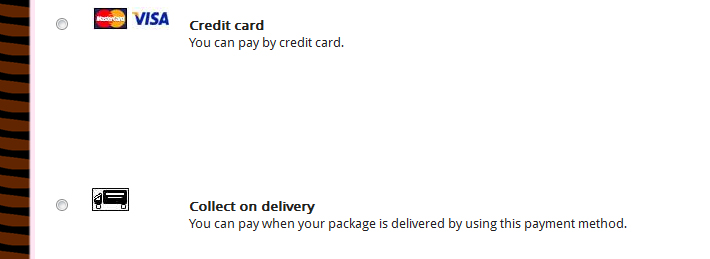
Because I still see the white space between the credit card and collect on deliver payment.
Only when I select credit card payment the info appeard in the white space.
It is not like on your demo site.
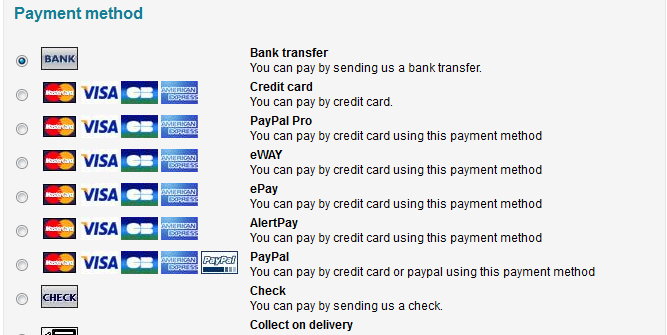
See how the payment options are neatly placed under each other and only when you selected one of them the info for the card slides open.
There is no white space where the info is in like on my website
Because I still see the white space between the credit card and collect on deliver payment.
Only when I select credit card payment the info appeard in the white space.
It is not like on your demo site.
See how the payment options are neatly placed under each other and only when you selected one of them the info for the card slides open.
There is no white space where the info is in like on my website
Please Log in or Create an account to join the conversation.
14 years 4 months ago #49834
by nicolas
Replied by nicolas on topic Re: Credit card fields
I don't have that on your website.
Here is what I see:
Here is what I see:
Please Log in or Create an account to join the conversation.
14 years 4 months ago #50031
by Sue
Replied by Sue on topic Re: Credit card fields
Ok.
That's a mistery.
Thanks.
That's a mistery.
Thanks.
Please Log in or Create an account to join the conversation.
14 years 4 months ago #50070
by Sue
Replied by Sue on topic Re: Credit card fields
I have found out what the problem is.
The settings for the hikashop_credit_card_creditcard is
element.style {
margin: -128px 0 0;
}
the margin must be 0.
If you can tell me where I can find that element.style I can change that.
The settings for the hikashop_credit_card_creditcard is
element.style {
margin: -128px 0 0;
}
the margin must be 0.
If you can tell me where I can find that element.style I can change that.
Please Log in or Create an account to join the conversation.
14 years 4 months ago #50071
by nicolas
Replied by nicolas on topic Re: Credit card fields
I don't see such style on your website and that's not in HikaShop by default.
The following user(s) said Thank You: Sue
Please Log in or Create an account to join the conversation.
Time to create page: 0.229 seconds