

- Posts: 7
- Thank you received: 0
Show big picture on mouse hover
14 years 4 months ago #49351
by kylx
Show big picture on mouse hover was created by kylx
Dear Support,
I was wondering, is there a way to show the big (original size) image of a thumbnail with my mouse hovering over it on the products listing page?
I'm asking only, because my site will have many products, and going into all of them just so the buyer can look at the big picture seems like a hassle.
Thank you for the reply in advance.
I've made this example with paint:
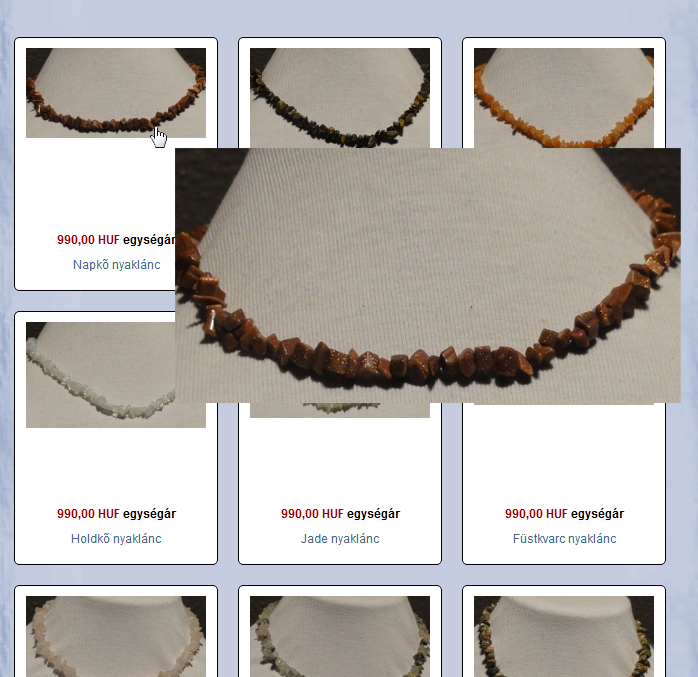
I was wondering, is there a way to show the big (original size) image of a thumbnail with my mouse hovering over it on the products listing page?
I'm asking only, because my site will have many products, and going into all of them just so the buyer can look at the big picture seems like a hassle.
Thank you for the reply in advance.
I've made this example with paint:
Please Log in or Create an account to join the conversation.

14 years 4 months ago #49421
by nicolas
Replied by nicolas on topic Re: Show big picture on mouse hover
Hi,
It's possible with some code modifications.
Here is an example of such modifications on the product page:
www.hikashop.com/en/forum/4-how-to/42708...-product-images.html
For the listing, it's the same kind of modification that you need to do, change :
to
but in the file "listing_img_title" of the view "product".
It's possible with some code modifications.
Here is an example of such modifications on the product page:
www.hikashop.com/en/forum/4-how-to/42708...-product-images.html
For the listing, it's the same kind of modification that you need to do, change :
Code:
<a href="<?php echo $link;?>" title="<?php echo $this->escape($this->row->product_name); ?>">
<?php }
echo $this->image->display(@$this->row->file_path,false,$this->escape($this->row->file_name), '' , '' , $this->image->main_thumbnail_x, $this->image->main_thumbnail_y);
if($this->params->get('link_to_product_page',1)){ ?>
</a>
Code:
<?php
echo $this->image->display(@$this->row->file_path,true,$this->escape($this->row->file_name), '' , ' onmouseover="SqueezeBox.fromElement(this,{parse: \'rel\'});return false;"' , $this->image->main_thumbnail_x, $this->image->main_thumbnail_y);
?>
The following user(s) said Thank You: kylx
Please Log in or Create an account to join the conversation.
14 years 4 months ago #49480
by kylx
Replied by kylx on topic Re: Show big picture on mouse hover
worked like a charm, thank you very much! 
Please Log in or Create an account to join the conversation.
14 years 4 months ago - 14 years 4 months ago #49491
by kylx
Replied by kylx on topic Re: Show big picture on mouse hover
Info for other users:
I tried the mouse hover, and... well:
Instead of mouse hover I advice the other users, who wish to do the same thing, to use "onmouseclick" instead of "onmouseover", because it can be kinda "brain damaging" :laugh:
I tried the mouse hover, and... well:
Instead of mouse hover I advice the other users, who wish to do the same thing, to use "onmouseclick" instead of "onmouseover", because it can be kinda "brain damaging" :laugh:
Last edit: 14 years 4 months ago by kylx.
Please Log in or Create an account to join the conversation.
14 years 4 months ago #49536
by rikatos
Replied by rikatos on topic Re: Show big picture on mouse hover
I did the onmouseover thing on my products, and found out it was very annoying for it to pop up all the time, it also drove my manager mad so took it off quick, might be worth considering sometimes you really dont want things popping up in your face !! 
Please Log in or Create an account to join the conversation.
13 years 10 months ago #76916
by lcoombes
Replied by lcoombes on topic Re: Show big picture on mouse hover
Hello!
I too, have a client who wants images in the products listing page to enlarge on mouseover. (Like this website: uk.farnell.com/jsp/search/browse.jsp?N=2...prevNValues%3D203450 )
I've added the code you suggested to the View > Listing_table. This works on hover, but opens the image in a shadowbox style view which then has to be closed using the X. I've added a screengrab showing this.
Can you advise?
Many thanks!
I too, have a client who wants images in the products listing page to enlarge on mouseover. (Like this website: uk.farnell.com/jsp/search/browse.jsp?N=2...prevNValues%3D203450 )
I've added the code you suggested to the View > Listing_table. This works on hover, but opens the image in a shadowbox style view which then has to be closed using the X. I've added a screengrab showing this.
Can you advise?
Many thanks!
Please Log in or Create an account to join the conversation.

13 years 10 months ago #77092
by Jerome
Jerome - Obsidev.com
HikaMarket & HikaSerial developer / HikaShop core dev team.
Also helping the HikaShop support team when having some time or couldn't sleep.
By the way, do not send me private message, use the "contact us" form instead.
Replied by Jerome on topic Show big picture on mouse hover
Hi,
The code that Nicolas gave was to open the Joomla popup window.
There is no library in Joomla or HikaShop to do the magnify like the screenshot. But some javascript libraries exists and can do it.
So, the code was just a base of idea, a proof of concept.
Best regards,
The code that Nicolas gave was to open the Joomla popup window.
There is no library in Joomla or HikaShop to do the magnify like the screenshot. But some javascript libraries exists and can do it.
So, the code was just a base of idea, a proof of concept.
Best regards,
Jerome - Obsidev.com
HikaMarket & HikaSerial developer / HikaShop core dev team.
Also helping the HikaShop support team when having some time or couldn't sleep.
By the way, do not send me private message, use the "contact us" form instead.
The following user(s) said Thank You: lcoombes
Please Log in or Create an account to join the conversation.
13 years 10 months ago #77432
by lcoombes
Replied by lcoombes on topic Show big picture on mouse hover
Thanks Jerome. Unfortunately, my javascript skills aren't up to much! :S
Will have a look around the web and see if I can find a solution.
All the best - Leo
Will have a look around the web and see if I can find a solution.
All the best - Leo
Please Log in or Create an account to join the conversation.
13 years 10 months ago #77454
by lcoombes
Replied by lcoombes on topic Show big picture on mouse hover
Right. I've worked out some sort of solution...
This post helped me:
www.hikashop.com/en/forum/4-how-to/1654-...e-zoom.html?start=20
First, I installed Magic Zoom:
www.magictoolbox.com/magiczoom/modules/joomla/
It was published in the header.
Then I edited the display > View > Product / listing_table
I changed this line:
to this:
Hope this helps others a bit!
This post helped me:
www.hikashop.com/en/forum/4-how-to/1654-...e-zoom.html?start=20
First, I installed Magic Zoom:
www.magictoolbox.com/magiczoom/modules/joomla/
It was published in the header.
Then I edited the display > View > Product / listing_table
I changed this line:
Code:
<a href="<?php echo $link;?>" title="<?php echo $this->escape($this->row->product_name); ?>">
to this:
Code:
<a href="/media/com_hikashop/upload/<?php echo ($this->row->file_path); ?>" class="MagicZoom"> title="<?php echo $this->escape($this->row->product_name); ?>">
Hope this helps others a bit!
The following user(s) said Thank You: Jerome
Please Log in or Create an account to join the conversation.
12 years 10 months ago #131669
by sifur
Replied by sifur on topic Show big picture on mouse hover
Hi, i'm using/working with HikaShop Business on a client site.
I tried above and other several topics on this forum, unfortunately i can't achieve this yet.
I want to show Big Image (may be with desired size eg. 400px*400px) with the item title and price in the bottom ON MOUSE HOVER (not in popup or after click)
here is the good example exactly what we want,
when you will hover mouse on the category product images it will show the big image with details.
Here is the code in listing_table.php under 'product' folder
You help appreciated.
Thank
I tried above and other several topics on this forum, unfortunately i can't achieve this yet.
I want to show Big Image (may be with desired size eg. 400px*400px) with the item title and price in the bottom ON MOUSE HOVER (not in popup or after click)
here is the good example exactly what we want,
Code:
http://themeforest.net/category/cms-themes/joomla
when you will hover mouse on the category product images it will show the big image with details.
Here is the code in listing_table.php under 'product' folder
Code:
<tr>
<?php if($this->config->get('thumbnail')){ ?>
<td class="hikashop_product_image_row">
<div style="height:<?php echo $divHeight;?>px;text-align:center;clear:both;" class="hikashop_product_image">
<div style="position:relative;text-align:center;clear:both;width:<?php echo $divWidth;?>px;margin: auto;" class="hikashop_product_image_subdiv">
<?php if($this->params->get('link_to_product_page',1)){ ?>
<a href="<?php echo $link;?>" title="<?php echo $this->escape($this->row->product_name); ?>">
<?php }
echo $this->image->display(@$this->row->file_path,false,$this->escape($this->row->file_name),"","", $width ,$height);
$main_thumb_x = $this->image->main_thumbnail_x;
$main_thumb_y = $this->image->main_thumbnail_y;
if($this->params->get('display_badges',1)){
$this->classbadge->placeBadges($this->image, $this->row->badges, -10, 0);
}
$this->image->main_thumbnail_x = $main_thumb_x;
$this->image->main_thumbnail_y = $main_thumb_y;
if($this->params->get('link_to_product_page',1)){ ?>
</a>
<?php } ?>
</div>
</div>
</td>
You help appreciated.
Thank
Please Log in or Create an account to join the conversation.
12 years 10 months ago #131704
by sifur
Replied by sifur on topic Show big picture on mouse hover
I'm using Joomla 3.1.5 and HikaShop Business latest version.
Also when i tried above code it's not working like that/first topic picture, it's opening with popup modal.
Thanks and waiting for help.
Also when i tried above code it's not working like that/first topic picture, it's opening with popup modal.
Thanks and waiting for help.
Please Log in or Create an account to join the conversation.
12 years 10 months ago #131708
by nicolas
Replied by nicolas on topic Show big picture on mouse hover
The modifications we proposed at the beginning of this thread is to open the image on mouse hover in a modal popup. So it's doing what it should.
We never published code to display it differently as it would actually quite complex. You would have to include a special library to handle the display of images like that. I think that the simplest would be to talk with a zoom system for HikaShop and see with them if they could help you do it for the listing page and not only the product page. For example:
www.magictoolbox.com/hikashop/
Or maybe you could see that with a third party developer like polishedgeek.com
We never published code to display it differently as it would actually quite complex. You would have to include a special library to handle the display of images like that. I think that the simplest would be to talk with a zoom system for HikaShop and see with them if they could help you do it for the listing page and not only the product page. For example:
www.magictoolbox.com/hikashop/
Or maybe you could see that with a third party developer like polishedgeek.com
Please Log in or Create an account to join the conversation.
10 years 6 months ago #232681
by dafyalex
Replied by dafyalex on topic Re: Show big picture on mouse hover
Hi,
I look for how to enlarge image onmouseover in products listing.
I seen it's possible in the previous versions of Hikashop with some code modifications in listing_img_title.
Have you a similar solution with Hikashop Business 2.6.1 / Joomla 3.4.8 ?
Thank's
I look for how to enlarge image onmouseover in products listing.
I seen it's possible in the previous versions of Hikashop with some code modifications in listing_img_title.
Have you a similar solution with Hikashop Business 2.6.1 / Joomla 3.4.8 ?
Thank's
Please Log in or Create an account to join the conversation.
10 years 6 months ago - 10 years 6 months ago #232691
by nicolas
Replied by nicolas on topic Re: Show big picture on mouse hover
Hi,
Try replacing the code:
with the code:
that we provided previously. It should still work fine with the new versions of HikaShop as long as mootools's modal library is loaded on the page.
Try replacing the code:
Code:
$img = $this->image->getThumbnail(@$this->row->file_path, array('width' => $this->image->main_thumbnail_x, 'height' => $this->image->main_thumbnail_y), $image_options);
if($img->success) {
echo '<img class="hikashop_product_listing_image" title="'.$this->escape(@$this->row->file_description).'" alt="'.$this->escape(@$this->row->file_name).'" src="'.$img->url.'"/>';
}
Code:
echo $this->image->display(@$this->row->file_path,true,$this->escape($this->row->file_name), '' , ' onmouseover="SqueezeBox.fromElement(this,{parse: \'rel\'});return false;"' , $this->image->main_thumbnail_x, $this->image->main_thumbnail_y);
Last edit: 10 years 6 months ago by nicolas.
Please Log in or Create an account to join the conversation.

Less
More
- Posts: 23
- Thank you received: 0
10 years 6 months ago #234172
by aran.gibbs
Replied by aran.gibbs on topic Re: Show big picture on mouse hover
Hi guys,
Where is this code located? Is it in the CSS file or somewhere else?
Thanks
Where is this code located? Is it in the CSS file or somewhere else?
Thanks
Please Log in or Create an account to join the conversation.
10 years 6 months ago #234173
by nicolas
Replied by nicolas on topic Re: Show big picture on mouse hover
Hi,
It's in the file "listing_img_title" of the view "product" that you can edit via the menu Display>views.
It's in the file "listing_img_title" of the view "product" that you can edit via the menu Display>views.
The following user(s) said Thank You: aran.gibbs
Please Log in or Create an account to join the conversation.
Time to create page: 0.349 seconds