

- Posts: 447
- Thank you received: 20
Custom Date Field Not Showing
14 years 4 months ago #50880
by davec
Custom Date Field Not Showing was created by davec
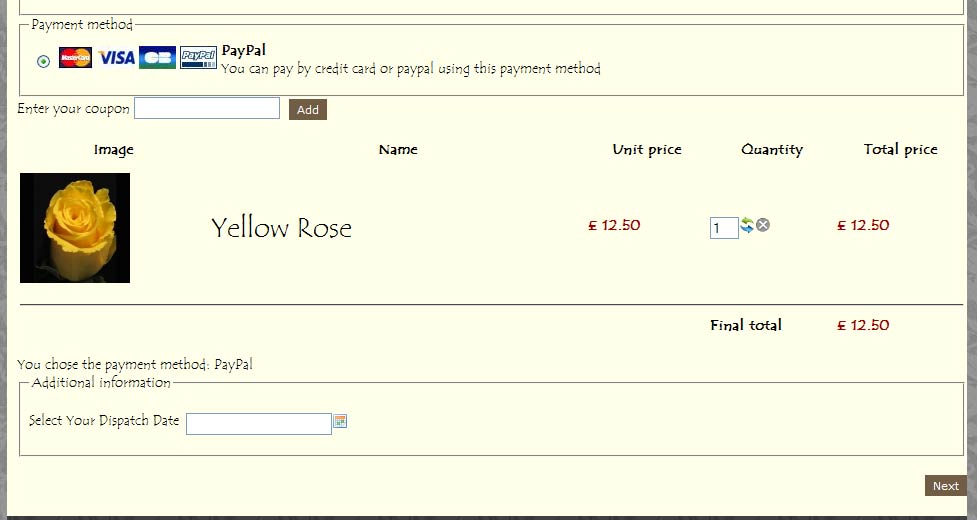
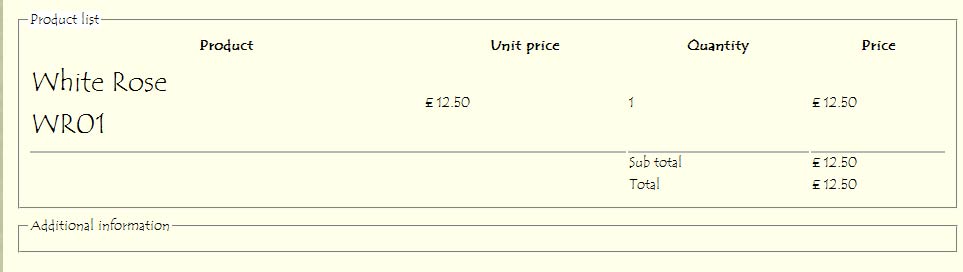
I have created a custom date field using JQuery in Table Order. It appears on the site within the order process under additional information and is selectable. However it does not appear in the confirmation email or within customers control panel. The label itself is in the email but not in the customer account panel. I have attached 2 screenshots.
Advice greatly appreciated as I may be missing something
Dave
Advice greatly appreciated as I may be missing something
Dave
Please Log in or Create an account to join the conversation.

14 years 4 months ago #50967
by nicolas
Replied by nicolas on topic Re: Custom Date Field Not Showing
What do you mean by "created a custom date field using JQuery" ? Jquery is normally not used by custom fields...
Can you do a screenshot of your custom field options ?
Not that the custom field will only be displayed in the email if a value is entered in the field.
Can you do a screenshot of your custom field options ?
Not that the custom field will only be displayed in the email if a value is entered in the field.
Please Log in or Create an account to join the conversation.
14 years 4 months ago #50988
by davec
Replied by davec on topic Re: Custom Date Field Not Showing
Hi Nicolas
attached is the screenshot as requested.
Dave
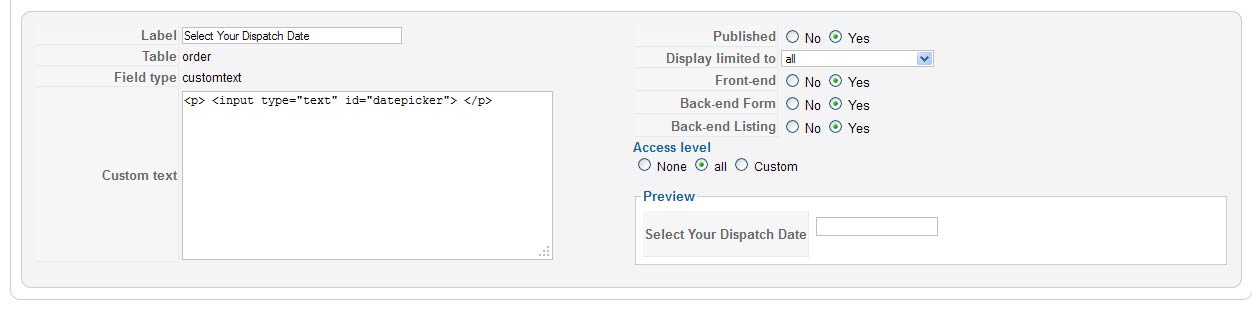
attached is the screenshot as requested.
Dave
Please Log in or Create an account to join the conversation.
14 years 4 months ago #51105
by nicolas
Replied by nicolas on topic Re: Custom Date Field Not Showing
Please delete that custom field and create a similar one, but of the type "date". That way it will work.
What you did cannot possibly work since customtext custom fields are plain and simply ignored by HikaShop when saving the data.
What you did cannot possibly work since customtext custom fields are plain and simply ignored by HikaShop when saving the data.
Please Log in or Create an account to join the conversation.
14 years 4 months ago - 14 years 4 months ago #51134
by davec
Replied by davec on topic Re: Custom Date Field Not Showing
Thanks for the reply. I am aware of the date option within the custom fields but needed to disable Sunday and Monday that is why I was using the JQuery script. I did enquire before and I believe you said a plugin was available to allow me to do this at 70 euros. I was hoping to use an alternative as the project itself has a budget limit.
Dave
Dave
Last edit: 14 years 4 months ago by davec.
Please Log in or Create an account to join the conversation.
14 years 4 months ago #51211
by nicolas
Replied by nicolas on topic Re: Custom Date Field Not Showing
Yes, there is no plugin for that, but we can develop one for you for that quote yes.
You could also add a jquery check directly on the date field, if you know javascript.
You could also add a jquery check directly on the date field, if you know javascript.
Please Log in or Create an account to join the conversation.
14 years 4 months ago #51215
by davec
Replied by davec on topic Re: Custom Date Field Not Showing
Hi Nicolas
thanks for the reply. Can you please advise the next steps for ordering the plug-in and the time frame for completion?. I do not really know Javascript and have already spent quite a bit of time on this. I have found a number of options online but integrating them is another matter!
Dave
thanks for the reply. Can you please advise the next steps for ordering the plug-in and the time frame for completion?. I do not really know Javascript and have already spent quite a bit of time on this. I have found a number of options online but integrating them is another matter!
Dave
Please Log in or Create an account to join the conversation.

14 years 4 months ago #51320
by Jerome
Jerome - Obsidev.com
HikaMarket & HikaSerial developer / HikaShop core dev team.
Replied by Jerome on topic Re: Custom Date Field Not Showing
Hi Dave,
You can contact me by email to "jerome at hikashop dot com".
I think there is an external plugin which could answer to your requirements.
Regards,
You can contact me by email to "jerome at hikashop dot com".
I think there is an external plugin which could answer to your requirements.
Regards,
Jerome - Obsidev.com
HikaMarket & HikaSerial developer / HikaShop core dev team.
The following user(s) said Thank You: davec
Please Log in or Create an account to join the conversation.
14 years 4 months ago #51324
by davec
Replied by davec on topic Re: Custom Date Field Not Showing
Thanks Jerome
I have just sent you an email ref this post.
Dave
I have just sent you an email ref this post.
Dave
Please Log in or Create an account to join the conversation.
Time to create page: 0.223 seconds