

- Posts: 43
- Thank you received: 3
Where to edit checkout layout?
14 years 4 months ago #52730
by SarahW
Where to edit checkout layout? was created by SarahW
The address boxes in the checkout are too wide for the content area, and the shipping address extends into the right-hand column (see attached screenshot). Please can anyone tell me where to edit this?
Thank you.
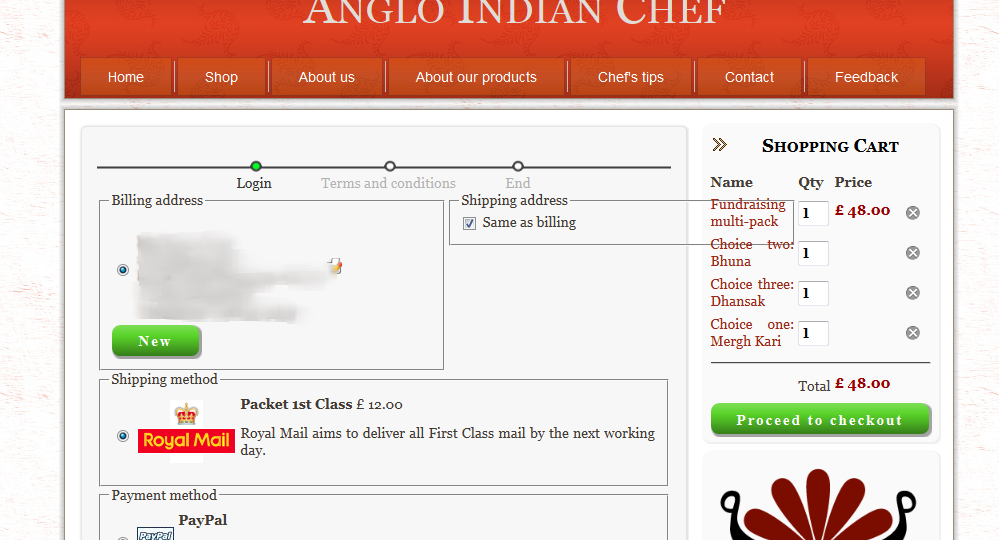
Thank you.
Please Log in or Create an account to join the conversation.

14 years 4 months ago #52740
by Xavier
Replied by Xavier on topic Re: Where to edit checkout layout?
Hi SarahW,
To edit the width of the address boxes go in HikaShop > System > Configuration > Display.
Click on the edit "icon" next to Front-End CSS File.
Then edit the properties of:
You can have more informations about CSS, Firebug, and where to edit the css in the FAQ:
www.hikashop.com/en/support/documentation/faq.html#css
To edit the width of the address boxes go in HikaShop > System > Configuration > Display.
Click on the edit "icon" next to Front-End CSS File.
Then edit the properties of:
Code:
.hikashop_checkout_address{
width: 250px;
}
.hikashop_checkout_address_right_part{
width: 250px;
}
You can have more informations about CSS, Firebug, and where to edit the css in the FAQ:
www.hikashop.com/en/support/documentation/faq.html#css
The following user(s) said Thank You: thoman
Please Log in or Create an account to join the conversation.
14 years 4 months ago #52754
by SarahW
Replied by SarahW on topic Re: Where to edit checkout layout?
Thank you very much for that, Xavier  .
.
. Please Log in or Create an account to join the conversation.
Time to create page: 0.189 seconds