
- Posts: 76
- Thank you received: 1
RESOLVED: Delete Categories to Start shop over
- scottshort
-
 Topic Author
- Offline
- Respect the Stash
Less
More
14 years 3 months ago - 14 years 3 months ago #53136
by scottshort
RESOLVED: Delete Categories to Start shop over was created by scottshort
Hi
I need to delete categories I created at root so I can re-enter them correctly in Products Category. I am getting an error message when I try to do this: "You cannot delete a default category". Is there a way around this in Hikashop, or a way to delete these categories in cPanel? How do I delete them?
Thanks
Scott
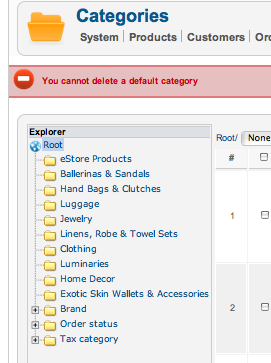
I need to delete categories I created at root so I can re-enter them correctly in Products Category. I am getting an error message when I try to do this: "You cannot delete a default category". Is there a way around this in Hikashop, or a way to delete these categories in cPanel? How do I delete them?
Thanks
Scott
Last edit: 14 years 3 months ago by scottshort. Reason: RESOLVED
Please Log in or Create an account to join the conversation.

Less
More
- Posts: 12953
- Thank you received: 1778
14 years 3 months ago #53144
by Mohamed Thelji
Replied by Mohamed Thelji on topic Re: Delete Categories to Start shop over
Hello Scott,
I think that you can't delete the default categories because Hikashop uses them.
I think that you can't delete the default categories because Hikashop uses them.
Please Log in or Create an account to join the conversation.
- scottshort
-
Topic Author
- Offline
- Respect the Stash
Less
More
- Posts: 76
- Thank you received: 1
14 years 3 months ago #53146
by scottshort
Replied by scottshort on topic Re: Delete Categories to Start shop over
Hi Mohamed, thanks for the help. But I only want to delete the product categories that I created.... then recreate them under the "products" category... We talked before about how I can not move theses categories because they have been created under the "root"... I assumed that I could just delete them and start over... now what?
Thanks
scott
Thanks
scott
Please Log in or Create an account to join the conversation.
Less
More
- Posts: 12953
- Thank you received: 1778
14 years 3 months ago #53154
by Mohamed Thelji
Replied by Mohamed Thelji on topic Re: Delete Categories to Start shop over
You shouldn't have done this but if you want to start over you'll have to delete the hikashop_category table and instal hikashop again.
Please Log in or Create an account to join the conversation.
- scottshort
-
Topic Author
- Offline
- Respect the Stash
Less
More
- Posts: 76
- Thank you received: 1
14 years 3 months ago #53169
by scottshort
Replied by scottshort on topic Re: Delete Categories to Start shop over
Hi again Mohamed, I misunderstood the tutorial "your first test sale". If I had known that all products and categories must be placed in default product folder.... I wouldn't have made this mistake. I never assumed that I wouldn't be able to move the files and reorder them later....
So where can I find this Hikashop_category table? Can I just delete the file in cPanel? Will I lose all of my Hikashop settings that Nicholas had helped me with? Thanks again for your help.
Regards
Scott
So where can I find this Hikashop_category table? Can I just delete the file in cPanel? Will I lose all of my Hikashop settings that Nicholas had helped me with? Thanks again for your help.
Regards
Scott
Please Log in or Create an account to join the conversation.

14 years 3 months ago #53249
by nicolas
Replied by nicolas on topic Re: Delete Categories to Start shop over
We don't want you to delete the default categories. Otherwise, HikaShop won't work properly. If you start to create additional main categories, they will also be considered as default categories and HikaShop won't allow you to move them.
Normally, you should create your categories under the "product categories" category. That's actually what happens when you go in the categories listing, click on new, enter a name and save. The category is automatically added under the "product categories" category.
If you delete the hikashop_category table and reinstall, that will remove your categories and put the default categories. However, that also mean that you will loose the links to the products, you so won't be able to see the products anymore...
If you have only a handful of products, you can recreate them. But if you have a lot of them that's really not a practical solution.
If you want to move the categories without destroying the link between products and categories, you can edit the categories in the hikashop_category table and change the category_parent_id to the new parent id you would like. Then, you will have to edit a product category via the interface, and change the category parent category (so it must one a category which was not a main category before, otherwise you can't edit it. That will make hikashop reprocess the category tree so that it is inconsistent. If you don't do that second step, you will get strange results in the listings.
Normally, you should create your categories under the "product categories" category. That's actually what happens when you go in the categories listing, click on new, enter a name and save. The category is automatically added under the "product categories" category.
If you delete the hikashop_category table and reinstall, that will remove your categories and put the default categories. However, that also mean that you will loose the links to the products, you so won't be able to see the products anymore...
If you have only a handful of products, you can recreate them. But if you have a lot of them that's really not a practical solution.
If you want to move the categories without destroying the link between products and categories, you can edit the categories in the hikashop_category table and change the category_parent_id to the new parent id you would like. Then, you will have to edit a product category via the interface, and change the category parent category (so it must one a category which was not a main category before, otherwise you can't edit it. That will make hikashop reprocess the category tree so that it is inconsistent. If you don't do that second step, you will get strange results in the listings.
Please Log in or Create an account to join the conversation.
- scottshort
-
Topic Author
- Offline
- Respect the Stash
Less
More
- Posts: 76
- Thank you received: 1
14 years 3 months ago - 14 years 3 months ago #53300
by scottshort
Replied by scottshort on topic Re: Delete Categories to Start shop over
Hi Nicolas, thanks for helping.
I have really messed things up and I haven't even started yet! :blush:
I had only created a few practice products and categories... but the categories are all in wrong place so I need to star over. I have already deleted all of my products [except for one test option that keeps showing up somehow ] so there is no concern about saving any categories-products relationships.......and now I need to delete all the categories and start over. The original category "Product Categories" I renamed and then I added a bunch more in the root as you can see from my first post.
Can you give me the step by step instructions I need to follow to delete all of these categories [and any remaining products like the option I can not find] and reset so I can start over? If it would help the situation, I could re-re- name the one category folder back to "Product Categories" if there is a way to selectively delete the rest of the category folders. If this is not possible, then I need to delete them all and reset the database.
One question: Will I loose all of my HikaShop settings like the timing fix you gave me for the translations windows, and the changes to my cart module in my product view, etc? I hope not, but if so, ok.
Thanks again for your help. Just found out that Hikari means "light".... I like that.
Regards
Scott
I have really messed things up and I haven't even started yet! :blush:
I had only created a few practice products and categories... but the categories are all in wrong place so I need to star over. I have already deleted all of my products [except for one test option that keeps showing up somehow ] so there is no concern about saving any categories-products relationships.......and now I need to delete all the categories and start over. The original category "Product Categories" I renamed and then I added a bunch more in the root as you can see from my first post.
Can you give me the step by step instructions I need to follow to delete all of these categories [and any remaining products like the option I can not find] and reset so I can start over? If it would help the situation, I could re-re- name the one category folder back to "Product Categories" if there is a way to selectively delete the rest of the category folders. If this is not possible, then I need to delete them all and reset the database.
One question: Will I loose all of my HikaShop settings like the timing fix you gave me for the translations windows, and the changes to my cart module in my product view, etc?
I hope not, but if so, ok.Thanks again for your help. Just found out that Hikari means "light".... I like that.
Regards
Scott
Last edit: 14 years 3 months ago by scottshort.
Please Log in or Create an account to join the conversation.
14 years 3 months ago #53309
by nicolas
Replied by nicolas on topic Re: Delete Categories to Start shop over
It's easy to do really.
Just delete the table hikashop_category via phpmyadmin. Once that's done, install again HikaShop. If you did your modifications via the interface (no hacks in files via FTP) you won't loose anything and it will add back the default categories.
Just delete the table hikashop_category via phpmyadmin. Once that's done, install again HikaShop. If you did your modifications via the interface (no hacks in files via FTP) you won't loose anything and it will add back the default categories.
Please Log in or Create an account to join the conversation.
- scottshort
-
Topic Author
- Offline
- Respect the Stash
Less
More
- Posts: 76
- Thank you received: 1
14 years 3 months ago #53355
by scottshort
Replied by scottshort on topic Re: Delete Categories to Start shop over
Hi Nicolas,
Can you tell me the command I must use to delete this Category table? I have never used phpMyAdmin. I found the following in the documentation but I want to be sure so I do not make a mistake.
Also, will this get rid of ghost product option that I still see now when I do a categories listing? see pic below:
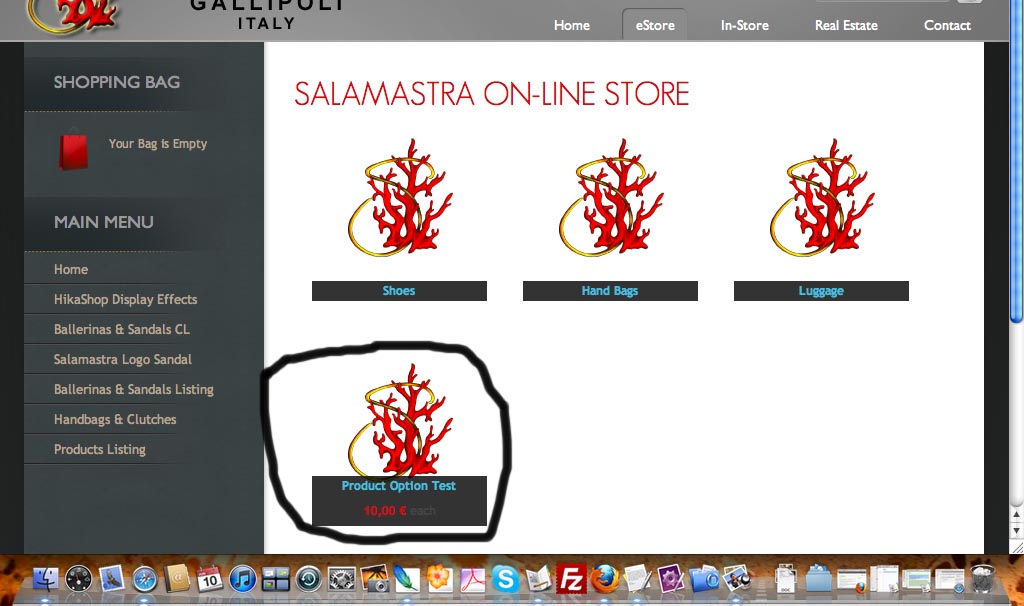
If the above command will not get rid of this product option, can you give me the steps to do this as well?
Thanks again
Regards
Scott
Can you tell me the command I must use to delete this Category table? I have never used phpMyAdmin. I found the following in the documentation but I want to be sure so I do not make a mistake.
This error is apparently due to the fact HikaShop could not be installed properly and there are probably still some instances of HikaShop on your Extensions Manager.
Please go on your Extensions Manager (click on the menu "Manage"), select HikaShop (the component) and uninstall it.
If it can't be uninstalled from there, please access your phpMyAdmin and execute this query:
• DELETE FROM `jos_menu` WHERE link LIKE '%com_hikashop%';
• DELETE FROM jos_extensions WHERE element = 'com_hikashop';
• DELETE FROM jos_assets WHERE name='com_hikashop';
Then install HikaShop again... it should work.
Also, will this get rid of ghost product option that I still see now when I do a categories listing? see pic below:
If the above command will not get rid of this product option, can you give me the steps to do this as well?
Thanks again
Regards
Scott
Please Log in or Create an account to join the conversation.
14 years 3 months ago #53360
by nicolas
Replied by nicolas on topic Re: Delete Categories to Start shop over
There is no need to enter a command. Go in phpmyadmin, open your database, click on the hikashop_category table and then on the delete button...
Please Log in or Create an account to join the conversation.
- scottshort
-
Topic Author
- Offline
- Respect the Stash
Less
More
- Posts: 76
- Thank you received: 1
14 years 3 months ago #53392
by scottshort
Replied by scottshort on topic Re: Delete Categories to Start shop over
Hi again Nicolas,
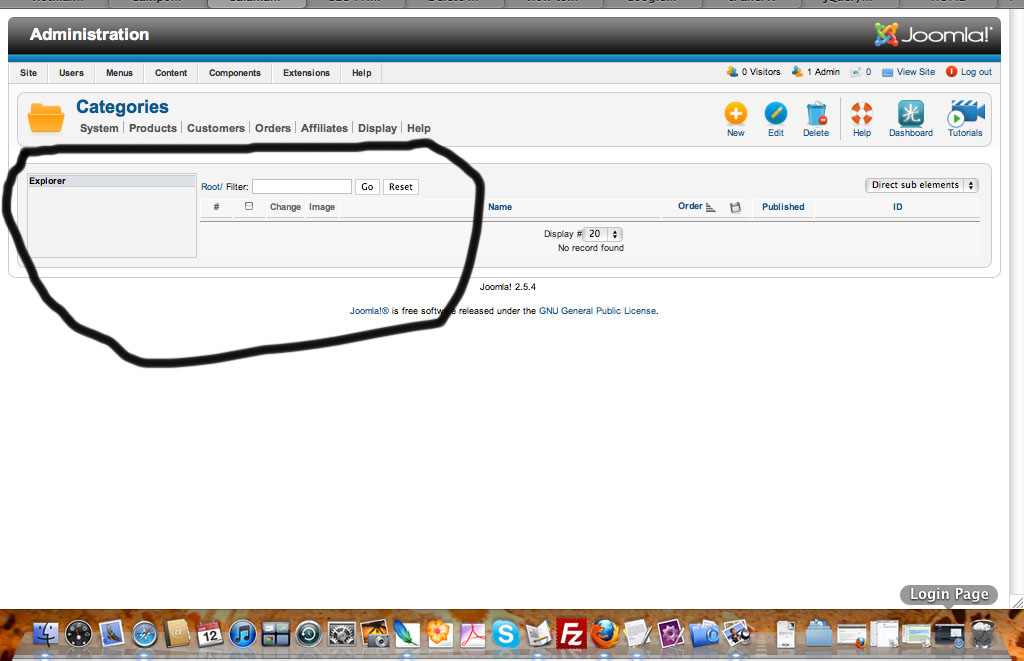
Thanks for the instructions. I deleted the hikashop_categories table and reinstalled HS. I want to avoid same error as before, but now on the add categories page, i do not see the original folders that I saw before like product categories, and I think, zones and a few others. I was hoping to see them so I could be sure to create my categories in this folder. From my attached pic, you can see that these folders are no where. I do not want to create another category under the root, but from the picture you can't see the product categories file.
Can you see anything wrong here? Where is default product categories folder? Do I need to create it now in the location on this page: please let me know, thanks.
scott
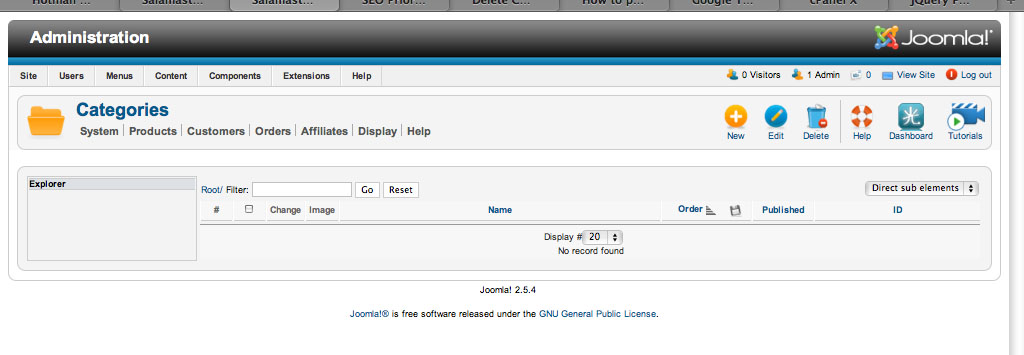
Thanks for the instructions. I deleted the hikashop_categories table and reinstalled HS. I want to avoid same error as before, but now on the add categories page, i do not see the original folders that I saw before like product categories, and I think, zones and a few others. I was hoping to see them so I could be sure to create my categories in this folder. From my attached pic, you can see that these folders are no where. I do not want to create another category under the root, but from the picture you can't see the product categories file.
Can you see anything wrong here? Where is default product categories folder? Do I need to create it now in the location on this page: please let me know, thanks.
scott
Please Log in or Create an account to join the conversation.
14 years 3 months ago #53394
by nicolas
Replied by nicolas on topic Re: Delete Categories to Start shop over
This means that the installation script couldn't add back the categories. It's probably because it couldn't create the table.
Go in your database, then in the SQL menu and copy/paste that query and run it:
Then, install again HikaShop and hopefully you should get back your categories.
Go in your database, then in the SQL menu and copy/paste that query and run it:
Code:
CREATE TABLE IF NOT EXISTS `jos_hikashop_category` (
`category_id` int(10) unsigned NOT NULL AUTO_INCREMENT,
`category_parent_id` int(10) unsigned NOT NULL DEFAULT '0',
`category_type` varchar(255) NOT NULL,
`category_name` varchar(255) NOT NULL,
`category_description` text NOT NULL,
`category_published` tinyint(4) NOT NULL DEFAULT '0',
`category_ordering` int(10) unsigned NOT NULL DEFAULT '0',
`category_left` int(10) unsigned NOT NULL DEFAULT '0',
`category_right` int(10) unsigned NOT NULL DEFAULT '0',
`category_depth` int(10) unsigned NOT NULL DEFAULT '0',
`category_namekey` varchar(255) NOT NULL,
`category_created` int(10) unsigned NOT NULL DEFAULT '0',
`category_modified` int(10) unsigned NOT NULL DEFAULT '0',
`category_access` varchar(255) NOT NULL DEFAULT 'all',
`category_menu` int(10) unsigned DEFAULT '0',
`category_keywords` varchar(255) NOT NULL,
`category_meta_description` varchar(155) NOT NULL DEFAULT '',
`category_layout` varchar(255) NOT NULL DEFAULT '',
PRIMARY KEY (`category_id`),
UNIQUE KEY `category_namekey` (`category_namekey`)
) ENGINE=MyISAM DEFAULT CHARSET=utf8 ;
Please Log in or Create an account to join the conversation.
- scottshort
-
Topic Author
- Offline
- Respect the Stash
Less
More
- Posts: 76
- Thank you received: 1
14 years 3 months ago - 14 years 3 months ago #53538
by scottshort
Replied by scottshort on topic Re: Delete Categories to Start shop over
Hi Nicolas, I ran the script, but then I realized that all of my tables have prefix: avphn and this script made table with prefix jos ... and I still only see blank directory without default categories. Should I just rerun the script using avphn prefix instead of jos? Or do I need to delete this jos table first? If so, please give the comands to do that. Thanks again for your help with this and sorry for bother.
Regards
Scott
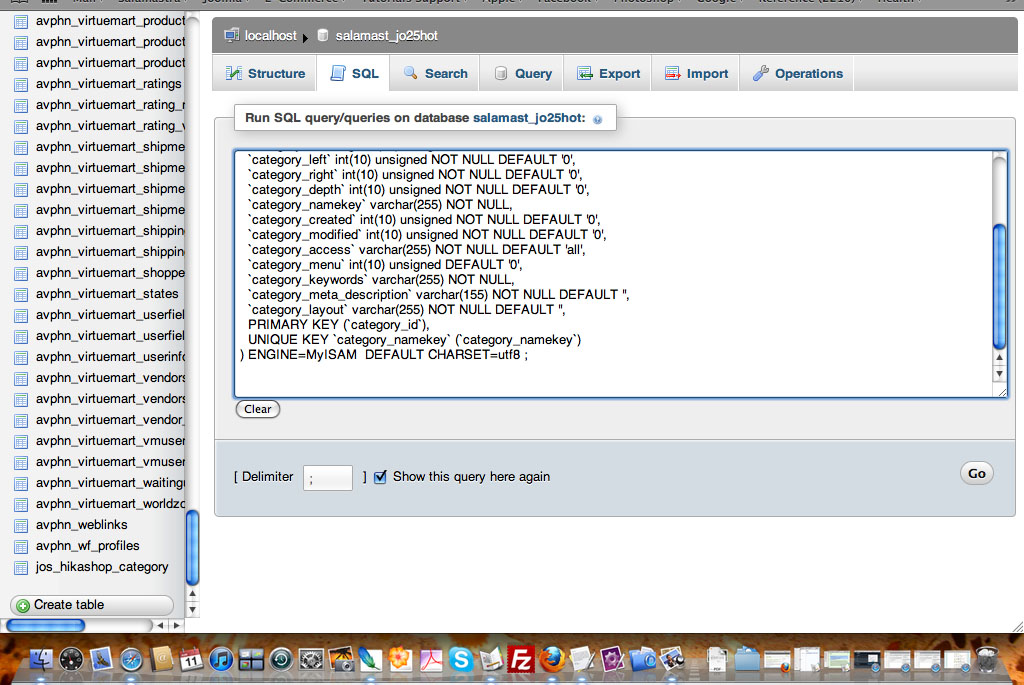
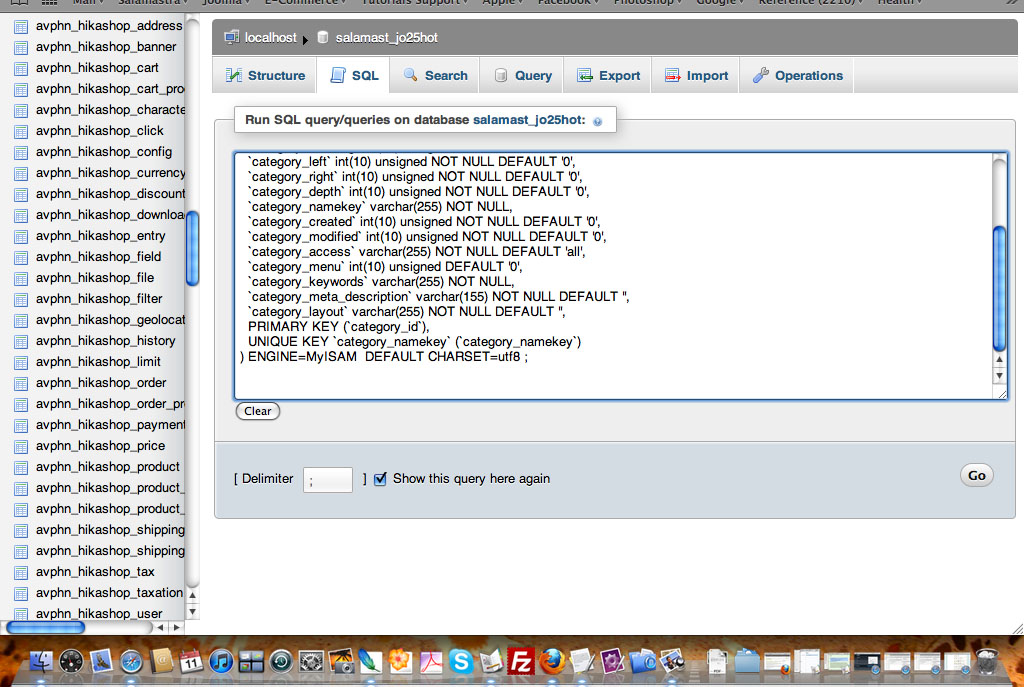
Regards
Scott
Last edit: 14 years 3 months ago by scottshort.
Please Log in or Create an account to join the conversation.
14 years 3 months ago #53545
by nicolas
Replied by nicolas on topic Re: Delete Categories to Start shop over
Yes, you need to change the prefix of the table in the query. No need to delete the table.
Please Log in or Create an account to join the conversation.
- scottshort
-
Topic Author
- Offline
- Respect the Stash
Less
More
- Posts: 76
- Thank you received: 1
14 years 3 months ago #53581
by scottshort
Replied by scottshort on topic Re: Delete Categories to Start shop over
Hi Nicolas,
I installed the table as you can see in first pic:
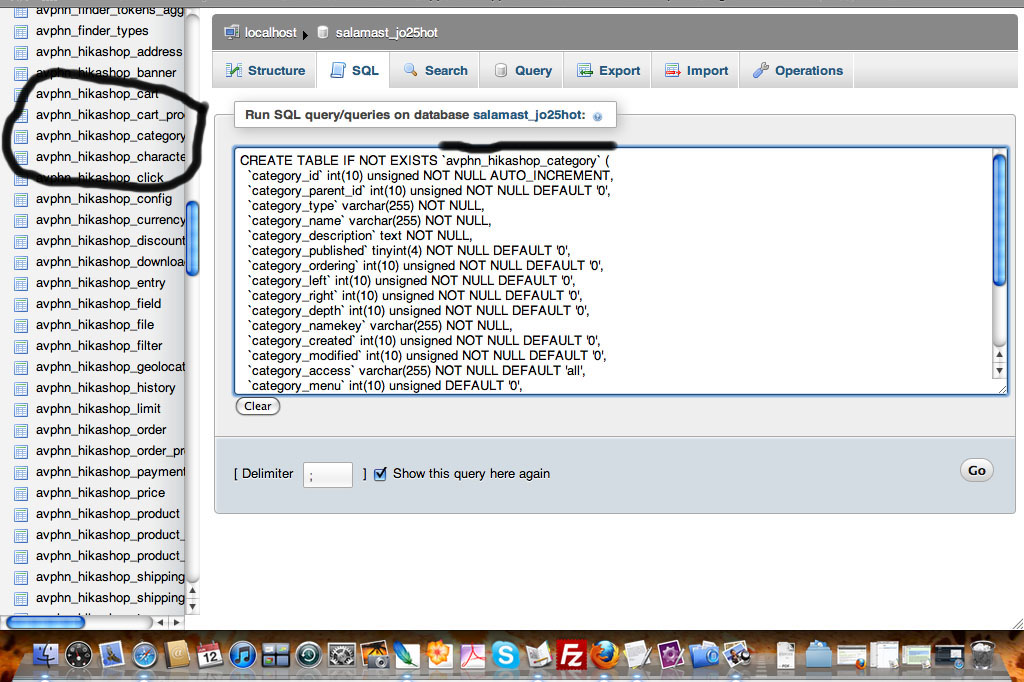
But still no default folders showing on add category page... can you see if i did anything wrong? Any additional suggestions?
Thanks again for your help.
Scott
I installed the table as you can see in first pic:
But still no default folders showing on add category page... can you see if i did anything wrong? Any additional suggestions?
Thanks again for your help.
Scott
Please Log in or Create an account to join the conversation.
14 years 3 months ago #53583
by nicolas
Replied by nicolas on topic Re: Delete Categories to Start shop over
Now that you added the table, you need to install HikaShop again so that it can fill the table.
Please Log in or Create an account to join the conversation.
- scottshort
-
Topic Author
- Offline
- Respect the Stash
Less
More
- Posts: 76
- Thank you received: 1
14 years 3 months ago - 14 years 3 months ago #53630
by scottshort
Replied by scottshort on topic Re: Delete Categories to Start shop over
Hi Nicolas
I now have product category folder. See first pic:
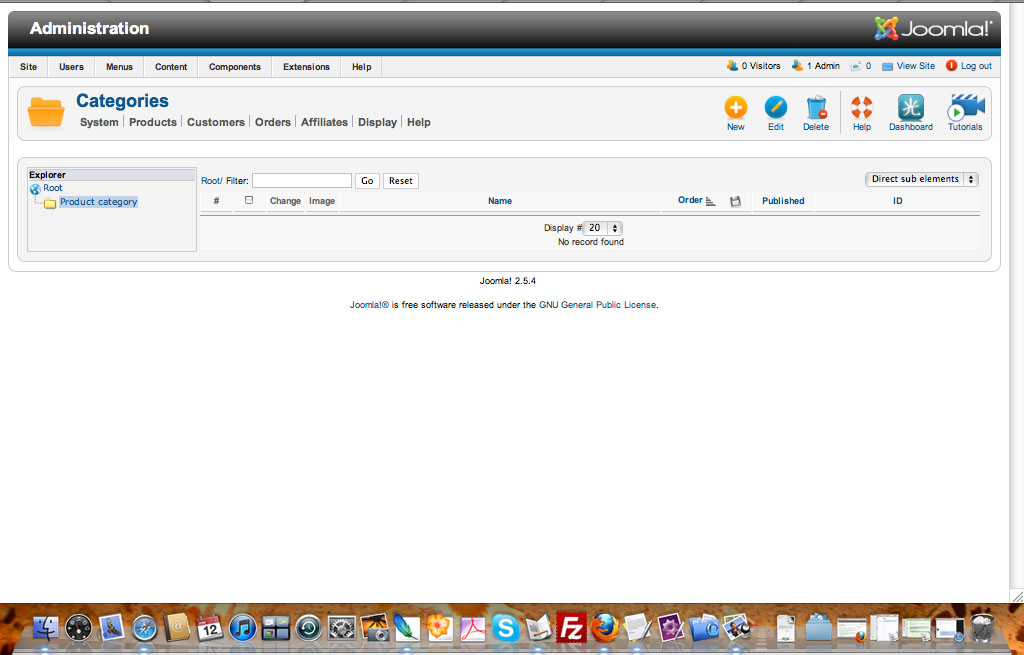
But what about the other category folders that I had access to before [see first post]?
I can still reach the Brand Category folder via the Brand Manager page, and the Tax Category folder via the Tax Category Manager page, but I see no way to reach the order status category folder.
Do you suggest that I need to do something further regarding these category folders?
Regards
Scott
I now have product category folder. See first pic:
But what about the other category folders that I had access to before [see first post]?
I can still reach the Brand Category folder via the Brand Manager page, and the Tax Category folder via the Tax Category Manager page, but I see no way to reach the order status category folder.
Do you suggest that I need to do something further regarding these category folders?
Regards
Scott
Last edit: 14 years 3 months ago by scottshort.
Please Log in or Create an account to join the conversation.
14 years 3 months ago #53634
by nicolas
Replied by nicolas on topic Re: Delete Categories to Start shop over
The order statuses can be accessed via System->Order statuses.
That's the normal behavior. There is nothing else to do.
That's the normal behavior. There is nothing else to do.
The following user(s) said Thank You: scottshort
Please Log in or Create an account to join the conversation.
- scottshort
-
Topic Author
- Offline
- Respect the Stash
Less
More
- Posts: 76
- Thank you received: 1
14 years 3 months ago #53643
by scottshort
Replied by scottshort on topic Re: Delete Categories to Start shop over
Thanks Nicolas - all resolved.
Please Log in or Create an account to join the conversation.
Time to create page: 0.260 seconds