

- Posts: 131
- Thank you received: 3
Bulk download upload user data shipping data
14 years 3 months ago #53517
by michael
Bulk download upload user data shipping data was created by michael
Hi Nicolas,
My next question is, if there is a way like csv download and upload for user data and shipping data. It will be easy for me to transfer my data from old site to new site.
Or if not, is there a way to allow me create a excel spreadsheet for shipping data and user data, than do a bulk upload?
Or, you have any good suggestion?
The worst of the worst, is log on 2 sites and copy - paste the data by switching them
Thank you!
My next question is, if there is a way like csv download and upload for user data and shipping data. It will be easy for me to transfer my data from old site to new site.
Or if not, is there a way to allow me create a excel spreadsheet for shipping data and user data, than do a bulk upload?
Or, you have any good suggestion?
The worst of the worst, is log on 2 sites and copy - paste the data by switching them
Thank you!
Please Log in or Create an account to join the conversation.

14 years 3 months ago #53584
by nicolas
Replied by nicolas on topic Re: Bulk download upload user data shipping data
The shipping data can easily be transferred from one database to another by exporting the hikashop_shipping table form the old database and importing it to the new one via phpmyadmin.
For the user data, that's tricky as the data is in several tables... You have the users table of joomla where the user's main information is stored. The hikashop_user data which stores the user in HikaShop and a link to the joomla user information. And the hikashop_address table where the addresses of the users are stored.
So it can be quite difficult to move... I don't have an easy solution for that.
For the user data, that's tricky as the data is in several tables... You have the users table of joomla where the user's main information is stored. The hikashop_user data which stores the user in HikaShop and a link to the joomla user information. And the hikashop_address table where the addresses of the users are stored.
So it can be quite difficult to move... I don't have an easy solution for that.
The following user(s) said Thank You: hamidre13
Please Log in or Create an account to join the conversation.
14 years 3 months ago #53804
by michael
Replied by michael on topic Re: Bulk download upload user data shipping data
Thank you Nicolas,
But have an error when upload to new site. I think I have to do it manually in admin panel
Thanks!
But have an error when upload to new site. I think I have to do it manually in admin panel
Thanks!
Please Log in or Create an account to join the conversation.
14 years 3 months ago #53946
by michael
Replied by michael on topic Re: Bulk download upload user data shipping data
Hi Nicolas,
As I am having error by download the shipping charge database from old site and upload to new site in PHPMyAdmin.
I am thinking create an excel file with these titles (copied from PHPMyAdmin structure) and upload to PHPMyAdmin in new site:
shipping_id shipping_type shipping_name shipping_zone_namekey shipping_price shipping_currency_id shipping_description shipping_published
Above fields should have no problem for entry, but my shipping charge based on the weight. In PHPMyAdmin Shipping structure, there is no field for min weight and max weight, but there is shipping_param field.
I am not sure how if it is for min weight and max weight, how to enter in this field for weight?
Thank you!
As I am having error by download the shipping charge database from old site and upload to new site in PHPMyAdmin.
I am thinking create an excel file with these titles (copied from PHPMyAdmin structure) and upload to PHPMyAdmin in new site:
shipping_id shipping_type shipping_name shipping_zone_namekey shipping_price shipping_currency_id shipping_description shipping_published
Above fields should have no problem for entry, but my shipping charge based on the weight. In PHPMyAdmin Shipping structure, there is no field for min weight and max weight, but there is shipping_param field.
I am not sure how if it is for min weight and max weight, how to enter in this field for weight?
Thank you!
Please Log in or Create an account to join the conversation.
14 years 3 months ago #54009
by nicolas
Replied by nicolas on topic Re: Bulk download upload user data shipping data
Hi,
The restrictions of the manual shipping method are stored in the shipping_params option after being serialized with the serialize function of PHP:
www.php.net/manual/en/function.serialize.php
You can use that tool in order to unserialize et reserialize the data in that column:
blog.tanist.co.uk/files/unserialize/index.php
The restrictions of the manual shipping method are stored in the shipping_params option after being serialized with the serialize function of PHP:
www.php.net/manual/en/function.serialize.php
You can use that tool in order to unserialize et reserialize the data in that column:
blog.tanist.co.uk/files/unserialize/index.php
Please Log in or Create an account to join the conversation.
14 years 3 months ago #54027
by michael
Replied by michael on topic Re: Bulk download upload user data shipping data
huh..the php is complicated to me  I cannot understand the links you given
but, from the PHPMyAdmin - shipping_params, I copy the data below:
O:8:"stdClass":14:{s:19:"shipping_percentage";s:1:"0";s:18:"shipping_min_price";s:0:"";s:18:"shipping_max_price";s:0:"";s:25:"shipping_virtual_included";s:1:"0";s:19:"shipping_min_weight";s:4:"0.01";s:19:"shipping_max_weight";s:0:"20";s:20:"shipping_weight_unit";s:1:"g";s:19:"shipping_zip_prefix";s:0:"";s:16:"shipping_min_zip";s:0:"";s:16:"shipping_max_zip";s:0:"";s:19:"shipping_zip_suffix";s:0:"";s:19:"shipping_min_volume";s:0:"";s:19:"shipping_max_volume";s:0:"";s:18:"shipping_size_unit";s:1:"m";}
I can see the "shipping_min_weight";s:4:"0.01"; and "shipping_max_weight";s:0:"20";
Am I correct to edit the weight data here and copy the whole codes in the params field and upload it (in CSV format) ?
I suggest Hikashop new release allow admin user upload in excel format in admin panel for the shipping charge data, it is easier to create in excel and done the job fast.
Thank you!
I cannot understand the links you given but, from the PHPMyAdmin - shipping_params, I copy the data below:
O:8:"stdClass":14:{s:19:"shipping_percentage";s:1:"0";s:18:"shipping_min_price";s:0:"";s:18:"shipping_max_price";s:0:"";s:25:"shipping_virtual_included";s:1:"0";s:19:"shipping_min_weight";s:4:"0.01";s:19:"shipping_max_weight";s:0:"20";s:20:"shipping_weight_unit";s:1:"g";s:19:"shipping_zip_prefix";s:0:"";s:16:"shipping_min_zip";s:0:"";s:16:"shipping_max_zip";s:0:"";s:19:"shipping_zip_suffix";s:0:"";s:19:"shipping_min_volume";s:0:"";s:19:"shipping_max_volume";s:0:"";s:18:"shipping_size_unit";s:1:"m";}
I can see the "shipping_min_weight";s:4:"0.01"; and "shipping_max_weight";s:0:"20";
Am I correct to edit the weight data here and copy the whole codes in the params field and upload it (in CSV format) ?
I suggest Hikashop new release allow admin user upload in excel format in admin panel for the shipping charge data, it is easier to create in excel and done the job fast.
Thank you!
Please Log in or Create an account to join the conversation.
14 years 3 months ago #54099
by nicolas
Replied by nicolas on topic Re: Bulk download upload user data shipping data
Having that is not a priority since it can be done via phpmyadmin.
Your serialized data is not valid.
When you see that:
s:19:"shipping_min_weight";s:4:"0.01";
the first part which is "s" indicates that you're looking at a string. The second part, 19, indicates the length of the string and then you have the string in the third parameter. So you have 19 because shipping_min_weight has 19 letters.
And as you can see, the value of that parameter has four characters: 0.01
So if you change the values there, you also need to change the letters count.
Thus, s:0:"20" is not possible. It should be s:2:"20".
If you use :
O:8:"stdClass":14:{s:19:"shipping_percentage";s:1:"0";s:18:"shipping_min_price";s:0:"";s:18:"shipping_max_price";s:0:"";s:25:"shipping_virtual_included";s:1:"0";s:19:"shipping_min_weight";s:4:"0.01";s:19:"shipping_max_weight";s:2:"20";s:20:"shipping_weight_unit";s:1:"g";s:19:"shipping_zip_prefix";s:0:"";s:16:"shipping_min_zip";s:0:"";s:16:"shipping_max_zip";s:0:"";s:19:"shipping_zip_suffix";s:0:"";s:19:"shipping_min_volume";s:0:"";s:19:"shipping_max_volume";s:0:"";s:18:"shipping_size_unit";s:1:"m";}
in the unserializer tool I gave you, it will display the data unserialized while with what you have now, it just says that the data is not valid.
Your serialized data is not valid.
When you see that:
s:19:"shipping_min_weight";s:4:"0.01";
the first part which is "s" indicates that you're looking at a string. The second part, 19, indicates the length of the string and then you have the string in the third parameter. So you have 19 because shipping_min_weight has 19 letters.
And as you can see, the value of that parameter has four characters: 0.01
So if you change the values there, you also need to change the letters count.
Thus, s:0:"20" is not possible. It should be s:2:"20".
If you use :
O:8:"stdClass":14:{s:19:"shipping_percentage";s:1:"0";s:18:"shipping_min_price";s:0:"";s:18:"shipping_max_price";s:0:"";s:25:"shipping_virtual_included";s:1:"0";s:19:"shipping_min_weight";s:4:"0.01";s:19:"shipping_max_weight";s:2:"20";s:20:"shipping_weight_unit";s:1:"g";s:19:"shipping_zip_prefix";s:0:"";s:16:"shipping_min_zip";s:0:"";s:16:"shipping_max_zip";s:0:"";s:19:"shipping_zip_suffix";s:0:"";s:19:"shipping_min_volume";s:0:"";s:19:"shipping_max_volume";s:0:"";s:18:"shipping_size_unit";s:1:"m";}
in the unserializer tool I gave you, it will display the data unserialized while with what you have now, it just says that the data is not valid.
Please Log in or Create an account to join the conversation.
14 years 3 months ago #54210
by michael
Replied by michael on topic Re: Bulk download upload user data shipping data
Thank you for the clarification!
I have tried many ways, and finally uploaded but without the shipping_params
So my shipping data still missed out of the min & max weights!!
After trying the unserialzer by putting the codes in params in the box, it's get:
stdClass Object
(
[shipping_percentage] => 0
[shipping_per_product] => 0
[shipping_price_per_product] =>
[shipping_min_price] =>
[shipping_max_price] =>
[shipping_virtual_included] => 0
[shipping_override_address] => 0
[shipping_override_address_text] =>
[shipping_min_weight] => 120.01
[shipping_max_weight] => 140
[shipping_weight_unit] => g
[shipping_zip_prefix] =>
[shipping_min_zip] =>
[shipping_max_zip] =>
[shipping_zip_suffix] =>
[shipping_min_volume] =>
[shipping_max_volume] =>
[shipping_size_unit] => m
)
How can I use above data? and how if I wanted to upload the missing min & max weights to fix into the shipping data table?
Thank you!
I have tried many ways, and finally uploaded but without the shipping_params
So my shipping data still missed out of the min & max weights!!
After trying the unserialzer by putting the codes in params in the box, it's get:
stdClass Object
(
[shipping_percentage] => 0
[shipping_per_product] => 0
[shipping_price_per_product] =>
[shipping_min_price] =>
[shipping_max_price] =>
[shipping_virtual_included] => 0
[shipping_override_address] => 0
[shipping_override_address_text] =>
[shipping_min_weight] => 120.01
[shipping_max_weight] => 140
[shipping_weight_unit] => g
[shipping_zip_prefix] =>
[shipping_min_zip] =>
[shipping_max_zip] =>
[shipping_zip_suffix] =>
[shipping_min_volume] =>
[shipping_max_volume] =>
[shipping_size_unit] => m
)
How can I use above data? and how if I wanted to upload the missing min & max weights to fix into the shipping data table?
Thank you!
Please Log in or Create an account to join the conversation.
14 years 3 months ago #54239
by michael
Replied by michael on topic Re: Bulk download upload user data shipping data
Ok, now I understand if I edit below for 3 objects by edit the value in stdClass":
O:8:"stdClass" :{s:19:"shipping_min_weight";s:4:"0.01";s:19:"shipping_max_weight";s:2:"20";s:20:"shipping_weight_unit";s:1:"g";}
So I think I can just upload min_weight, max_weight & weight_unit by edit O:8:"stdClass":14: to O:8:"stdClass": , but how about O:8: ? what is it stand for?
I still cannot upload with this params field, what have I missed out?
Very sorry, cannot find solution in any where on the net about params
Thank You!
O:8:"stdClass"
:{s:19:"shipping_min_weight";s:4:"0.01";s:19:"shipping_max_weight";s:2:"20";s:20:"shipping_weight_unit";s:1:"g";}So I think I can just upload min_weight, max_weight & weight_unit by edit O:8:"stdClass":14: to O:8:"stdClass"
: , but how about O:8: ? what is it stand for?I still cannot upload with this params field, what have I missed out?
Very sorry, cannot find solution in any where on the net about params
Thank You!
Please Log in or Create an account to join the conversation.
14 years 3 months ago #54240
by michael
Replied by michael on topic Re: Bulk download upload user data shipping data
Ok, now I understand if I edit below for 3 objects by edit the value in stdClass":
O:8:"stdClass":{s:19:"shipping_min_weight";s:4:"0.01";s:19:"shipping_max_weight";s:2:"20";s:20:"shipping_weight_unit";s:1:"g";}
So I think I can just upload min_weight, max_weight & weight_unit by edit O:8:"stdClass":14: to O:8:"stdClass": , but how about O:8: ? what is it stand for?
I still cannot upload with this params field, what have I missed out?
Very sorry, cannot find solution in any where on the net about params
Thank You!
O:8:"stdClass"
:{s:19:"shipping_min_weight";s:4:"0.01";s:19:"shipping_max_weight";s:2:"20";s:20:"shipping_weight_unit";s:1:"g";}So I think I can just upload min_weight, max_weight & weight_unit by edit O:8:"stdClass":14: to O:8:"stdClass"
: , but how about O:8: ? what is it stand for?I still cannot upload with this params field, what have I missed out?
Very sorry, cannot find solution in any where on the net about params
Thank You!
Please Log in or Create an account to join the conversation.
14 years 3 months ago #54281
by michael
Replied by michael on topic Re: Bulk download upload user data shipping data
ok, now understand the O:8:"stdClass" is stand for 8 charecters of the word "stdClass". I tried enter the params field is this way and it looks successfully uploaded:
stdClass Object
(
[shipping_percentage] => 0
[shipping_per_product] => 0
[shipping_price_per_product] =>
[shipping_min_price] =>
[shipping_max_price] =>
[shipping_virtual_included] => 0
[shipping_override_address] => 0
[shipping_override_address_text] =>
[shipping_min_weight] => 120.01
[shipping_max_weight] => 140
[shipping_weight_unit] => g
[shipping_zip_prefix] =>
[shipping_min_zip] =>
[shipping_max_zip] =>
[shipping_zip_suffix] =>
[shipping_min_volume] =>
[shipping_max_volume] =>
[shipping_size_unit] => m
)
but, in the admin backend, still don't see any result??
stdClass Object
(
[shipping_percentage] => 0
[shipping_per_product] => 0
[shipping_price_per_product] =>
[shipping_min_price] =>
[shipping_max_price] =>
[shipping_virtual_included] => 0
[shipping_override_address] => 0
[shipping_override_address_text] =>
[shipping_min_weight] => 120.01
[shipping_max_weight] => 140
[shipping_weight_unit] => g
[shipping_zip_prefix] =>
[shipping_min_zip] =>
[shipping_max_zip] =>
[shipping_zip_suffix] =>
[shipping_min_volume] =>
[shipping_max_volume] =>
[shipping_size_unit] => m
)
but, in the admin backend, still don't see any result??
Please Log in or Create an account to join the conversation.
14 years 3 months ago #54298
by nicolas
Replied by nicolas on topic Re: Bulk download upload user data shipping data
Please make sure that you add the serialized version of the params in the table of the database. Not the deserialized version like you have in your last post.
Please Log in or Create an account to join the conversation.
14 years 3 months ago #54341
by michael
Replied by michael on topic Re: Bulk download upload user data shipping data
So, as you mentioned, it should be entered in this way:
O:8:"stdClass":14:{s:19:"shipping_percentage";s:1:"0";s:18:"shipping_min_price";s:0:"";s:18:"shipping_max_price";s:0:"";s:25:"shipping_virtual_included";s:1:"0";s:19:"shipping_min_weight";s:4:"0.01";s:19:"shipping_max_weight";s:2:"20";s:20:"shipping_weight_unit";s:1:"g";s:19:"shipping_zip_prefix";s:0:"";s:16:"shipping_min_zip";s:0:"";s:16:"shipping_max_zip";s:0:"";s:19:"shipping_zip_suffix";s:0:"";s:19:"shipping_min_volume";s:0:"";s:19:"shipping_max_volume";s:0:"";s:18:"shipping_size_unit";s:1:"m";}
but, I just failed to do it! am I missed out something anywhere - eg, set permission 0777 to any folder? I tried set 0777 to component -com_hikashop - params, but also not working.
Hope you give more clearer instruction.
Thank you so much!
O:8:"stdClass":14:{s:19:"shipping_percentage";s:1:"0";s:18:"shipping_min_price";s:0:"";s:18:"shipping_max_price";s:0:"";s:25:"shipping_virtual_included";s:1:"0";s:19:"shipping_min_weight";s:4:"0.01";s:19:"shipping_max_weight";s:2:"20";s:20:"shipping_weight_unit";s:1:"g";s:19:"shipping_zip_prefix";s:0:"";s:16:"shipping_min_zip";s:0:"";s:16:"shipping_max_zip";s:0:"";s:19:"shipping_zip_suffix";s:0:"";s:19:"shipping_min_volume";s:0:"";s:19:"shipping_max_volume";s:0:"";s:18:"shipping_size_unit";s:1:"m";}
but, I just failed to do it! am I missed out something anywhere - eg, set permission 0777 to any folder? I tried set 0777 to component -com_hikashop - params, but also not working.
Hope you give more clearer instruction.
Thank you so much!
Please Log in or Create an account to join the conversation.
14 years 3 months ago #54369
by nicolas
Replied by nicolas on topic Re: Bulk download upload user data shipping data
That string is correct so it should work.
How are you adding it ? It should be added in the shipping_params column of your shipping methods in the hikashop_shipping table.
How are you adding it ? It should be added in the shipping_params column of your shipping methods in the hikashop_shipping table.
Please Log in or Create an account to join the conversation.
14 years 3 months ago - 14 years 3 months ago #54383
by michael
Replied by michael on topic Re: Bulk download upload user data shipping data
That's is very weird !!
When I don't enter this field, all other data uploaded. When adding this field will get error message.
Is the setting of this field correct?
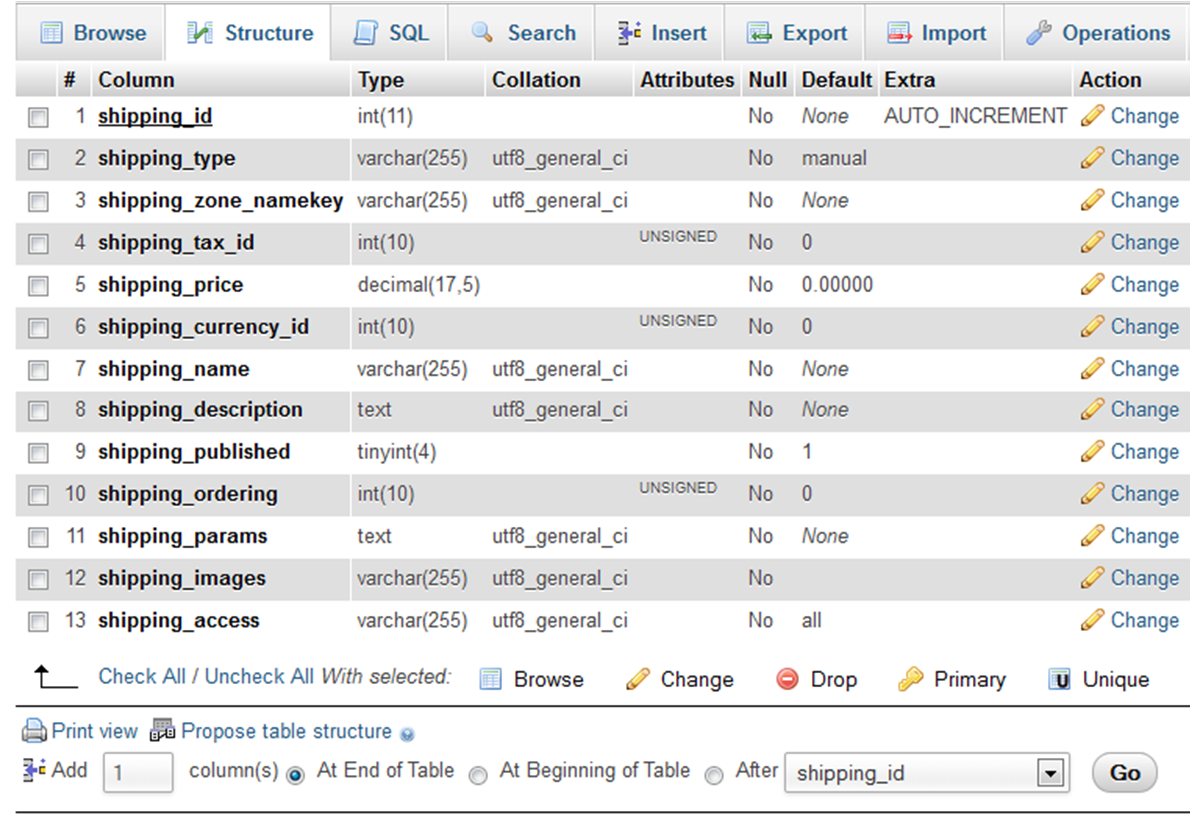
Thank you!
When I don't enter this field, all other data uploaded. When adding this field will get error message.
Is the setting of this field correct?
Thank you!
Last edit: 14 years 3 months ago by michael.
Please Log in or Create an account to join the conversation.
14 years 3 months ago #54442
by nicolas
Replied by nicolas on topic Re: Bulk download upload user data shipping data
What error message are you getting ?
Please Log in or Create an account to join the conversation.
14 years 3 months ago #54472
by michael
Replied by michael on topic Re: Bulk download upload user data shipping data
Sorry! forget about this! The error message is: Invalid column count in CSV input on line 1.
The setting in the import was by default.
Thank you!
The setting in the import was by default.
Thank you!
Please Log in or Create an account to join the conversation.
14 years 3 months ago #54521
by nicolas
Replied by nicolas on topic Re: Bulk download upload user data shipping data
What is the CSV file you're importing ? Could you attach it ?
Please Log in or Create an account to join the conversation.
14 years 3 months ago - 14 years 3 months ago #54527
by michael
Replied by michael on topic Re: Bulk download upload user data shipping data
The CSV file has deleted about 300 rows and remain first few for your view. Though it is ok. I leave the field title on first row, when uploading, it was deleted and second rows (the first record) will move up.
Thank you!
This attachment is hidden for guests.
Please log in or register to see it.
Please log in or register to see it.
Thank you!
Last edit: 14 years 3 months ago by michael.
Please Log in or Create an account to join the conversation.
14 years 3 months ago #54570
by nicolas
Replied by nicolas on topic Re: Bulk download upload user data shipping data
If you remove the first line of the CSV it's normal that it doesn't work. phpmyadmin needs that first line in order to know where to save what.
The CSV you attached in post is correct. If you just import it, like that, does it work ? If not, what is the error and how are your importing it (could you do a screenshot of the options screen of the import process )?
The CSV you attached in post is correct. If you just import it, like that, does it work ? If not, what is the error and how are your importing it (could you do a screenshot of the options screen of the import process )?
Please Log in or Create an account to join the conversation.
Time to create page: 0.297 seconds