
- Posts: 76
- Thank you received: 0
display FREE SHIPPING on product page?
- zoeatdemetra
-
 Topic Author
- Offline
Less
More
14 years 3 months ago #53727
by zoeatdemetra
display FREE SHIPPING on product page? was created by zoeatdemetra
Hi,
How to display FREE SHIPPING on the product page? I want it to be a LOGO, if not possible then at least text. Also it would be a great feature to show delivery estimate as the screen shot too. How can I achieve that?
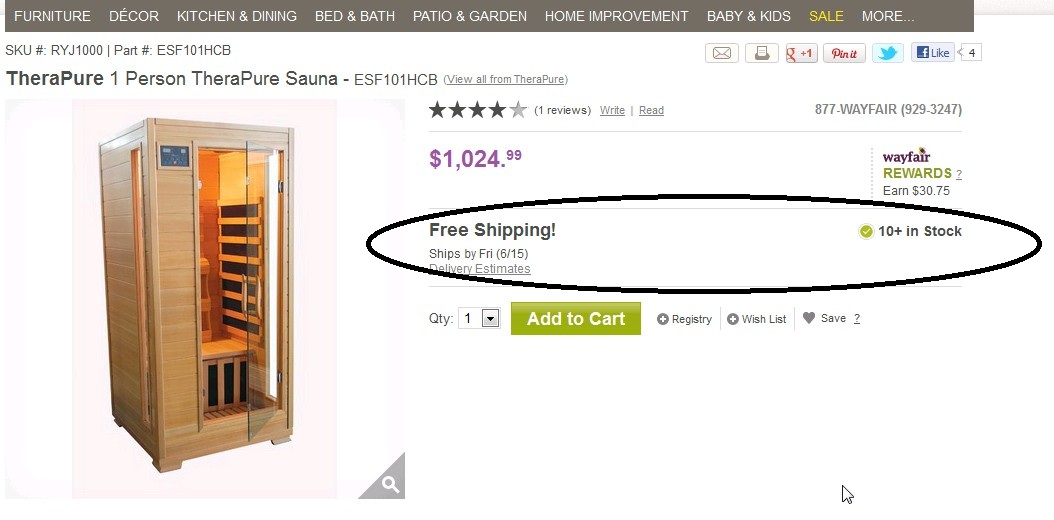
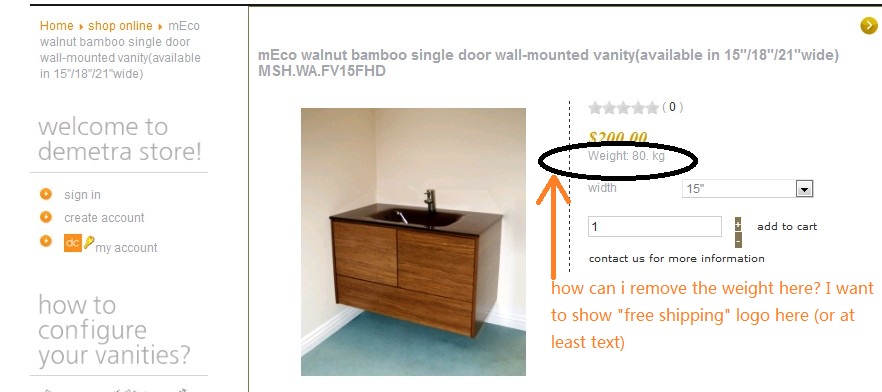
I offer all items FREE SHIPPING and have set the shipping method already. But on the product page it only displays the weight. I want to remove the weight.See screen shot.
How to display FREE SHIPPING on the product page? I want it to be a LOGO, if not possible then at least text. Also it would be a great feature to show delivery estimate as the screen shot too. How can I achieve that?
I offer all items FREE SHIPPING and have set the shipping method already. But on the product page it only displays the weight. I want to remove the weight.See screen shot.
Please Log in or Create an account to join the conversation.

14 years 3 months ago #53806
by nicolas
Replied by nicolas on topic Re: display FREE SHIPPING on product page?
For the weight, it is hidden by default, unless you removed the CSS code to display it:
.hikashop_product_weight_main{
display:none;
}
For the your additional text, you can add it in the "show_default" file of the view "product" via the menu Display->Views.
.hikashop_product_weight_main{
display:none;
}
For the your additional text, you can add it in the "show_default" file of the view "product" via the menu Display->Views.
Please Log in or Create an account to join the conversation.
- zoeatdemetra
-
Topic Author
- Offline
Less
More
- Posts: 76
- Thank you received: 0
14 years 3 months ago #53831
by zoeatdemetra
Replied by zoeatdemetra on topic Re: display FREE SHIPPING on product page?
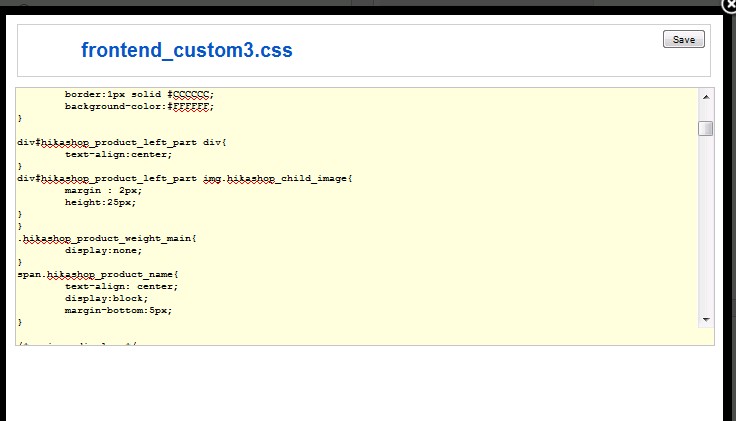
Q1. I checked the front end CSS file, the code is there, but the weight still displays on the front end.
see the screen shot below.
Q2: I've added text of "FREE SHIPPING" successfully to that "show_fault" php file, how can I add a image like
 instead right under the price? Can you show me the coding? I've upload this image on to Joomla media already (/mnt/data/vhosts/demetracabinetry.com/httpdocs/images/cart2.jpg), Thank you!
see the screen shot below.
Q2: I've added text of "FREE SHIPPING" successfully to that "show_fault" php file, how can I add a image like
Please Log in or Create an account to join the conversation.
14 years 3 months ago #53838
by nicolas
Replied by nicolas on topic Re: display FREE SHIPPING on product page?
Q1. Then please give a link to that page so that we can look at that.
2. It's basic HTML...
2. It's basic HTML...
<img src=" mywebsite.com/images/cart2.jpg"/ >
Please Log in or Create an account to join the conversation.
- zoeatdemetra
-
Topic Author
- Offline
Less
More
- Posts: 76
- Thank you received: 0
14 years 3 months ago #54023
by zoeatdemetra
Replied by zoeatdemetra on topic Re: display FREE SHIPPING on product page?
Q1.Here is the link to the product page, you can see the weight under the price, still there:
demetracabinetry.com/shop-online/product...n-15q18q21qwide.html
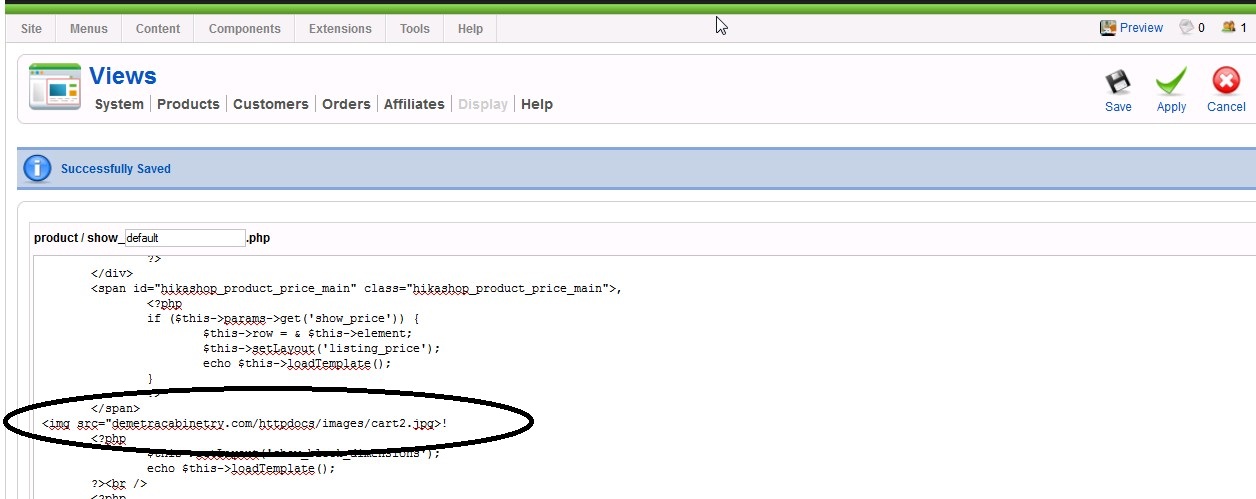
Q2:I added the html to the show_default.php file,but didn't work. Not sure if I did it correctly, i attched the screen shot here.
demetracabinetry.com/shop-online/product...n-15q18q21qwide.html
Q2:I added the html to the show_default.php file,but didn't work. Not sure if I did it correctly, i attched the screen shot here.
Please Log in or Create an account to join the conversation.
14 years 3 months ago #54093
by nicolas
Replied by nicolas on topic Re: display FREE SHIPPING on product page?
Hi,
1. That's because your img tag is not valid (see point2). It breaks the HTML of the weight display and the CSS doesn't work anymore.
2. You're missing the http : // at the beginning of the link of your image. You're also missing the " and the / at the end of the tag.
1. That's because your img tag is not valid (see point2). It breaks the HTML of the weight display and the CSS doesn't work anymore.
2. You're missing the http : // at the beginning of the link of your image. You're also missing the " and the / at the end of the tag.
Please Log in or Create an account to join the conversation.
- zoeatdemetra
-
Topic Author
- Offline
Less
More
- Posts: 76
- Thank you received: 0
14 years 3 months ago #54152
by zoeatdemetra
Replied by zoeatdemetra on topic Re: display FREE SHIPPING on product page?
1. I don't get it. I didn't see "point 2" that you meant in last reply.
2. I got it work now, thanks so much for the help. I am bugging too much huh!
2. I got it work now, thanks so much for the help. I am bugging too much huh!
Please Log in or Create an account to join the conversation.
14 years 3 months ago #54229
by nicolas
Replied by nicolas on topic Re: display FREE SHIPPING on product page?
Point 2 was the sentence with a 2. at the beginning...
Now that you fixed your HTML code, you can use the CSS I talked about previously:
.hikashop_product_weight_main{
display:none;
}
Now that you fixed your HTML code, you can use the CSS I talked about previously:
.hikashop_product_weight_main{
display:none;
}
Please Log in or Create an account to join the conversation.
- zoeatdemetra
-
Topic Author
- Offline
Less
More
- Posts: 76
- Thank you received: 0
14 years 3 months ago #54450
by zoeatdemetra
Replied by zoeatdemetra on topic Re: display FREE SHIPPING on product page?
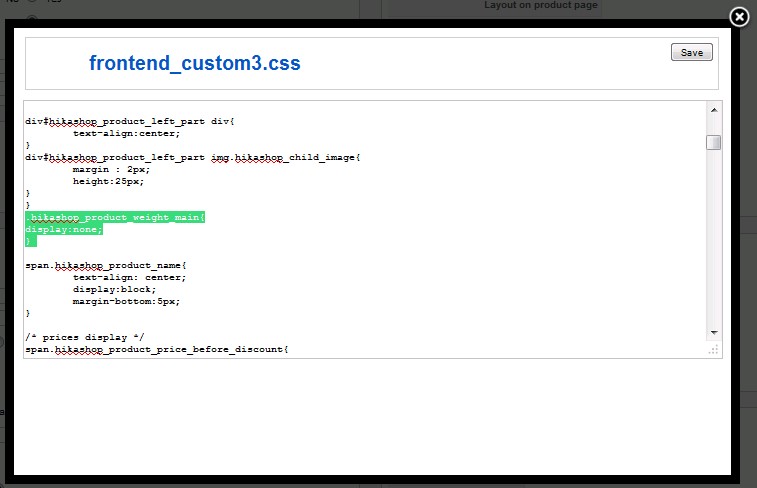
Nope, still not working, see the screen shot, I've had that sentence in the front end CSS file, but it still appears in the product listing(here is my link
demetracabinetry.com/shop-online/product...n-15q18q21qwide.html
.
Please Log in or Create an account to join the conversation.
- zoeatdemetra
-
Topic Author
- Offline
Less
More
- Posts: 76
- Thank you received: 0
14 years 3 months ago #54451
by zoeatdemetra
Replied by zoeatdemetra on topic weight still displays on the product page
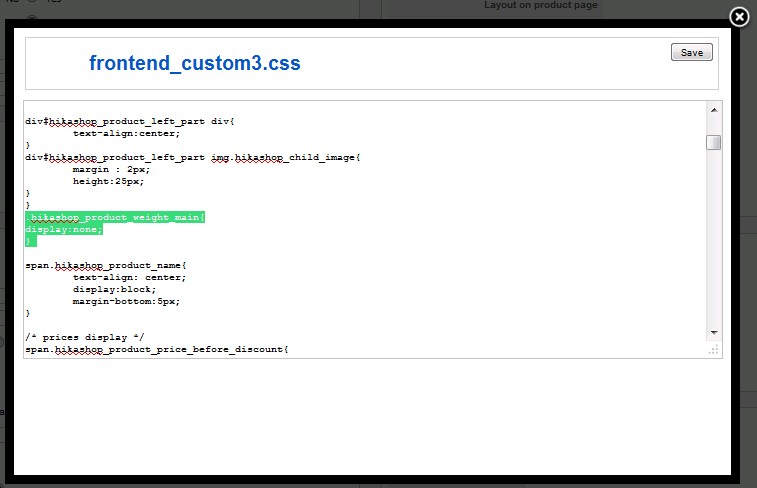
Nope, still not working, see the screen shot, I've had that sentence in the front end CSS file, but it still appears in the product listing(here is my link
demetracabinetry.com/shop-online/product...n-15q18q21qwide.html
.
Please Log in or Create an account to join the conversation.
14 years 3 months ago #54485
by nicolas
Replied by nicolas on topic Re: weight still displays on the product page
Your CSS is not valid.
You have two } before the code you added. That's not possible.
You should have only one.
It should be like that:
div#hikashop_product_left_part img.hikashop_child_image{
margin : 2px;
height:25px;
}
.hikashop_product_weight_main{
display:none;
}
You have two } before the code you added. That's not possible.
You should have only one.
It should be like that:
div#hikashop_product_left_part img.hikashop_child_image{
margin : 2px;
height:25px;
}
.hikashop_product_weight_main{
display:none;
}
Please Log in or Create an account to join the conversation.
- zoeatdemetra
-
Topic Author
- Offline
Less
More
- Posts: 76
- Thank you received: 0
14 years 3 months ago #54550
by zoeatdemetra
Replied by zoeatdemetra on topic Re: weight still displays on the product page
Yes, works! Thank you! Got to learn more about CSS code...
Please Log in or Create an account to join the conversation.
Time to create page: 0.271 seconds