
- Posts: 74
- Thank you received: 1
Modifying the default HikaShop Cart Module
- Southcoaster
-
 Topic Author
- Offline
Less
More
14 years 3 months ago #56295
by Southcoaster
Modifying the default HikaShop Cart Module was created by Southcoaster
When I use the supplied HikaShop cart module to start my check-out process I get the usual Login/Register page, but under that is the cart contents.
This makes a very cluttered long page's worth of data that goes off the bottom of the screen.
Can I just have the Login/Register page on its own (if required), with a 'next' button to then give me the cart contents on a new page like there is on the HikaShop website when you purchase Essential or Business packages?
Thanks.
This makes a very cluttered long page's worth of data that goes off the bottom of the screen.
Can I just have the Login/Register page on its own (if required), with a 'next' button to then give me the cart contents on a new page like there is on the HikaShop website when you purchase Essential or Business packages?
Thanks.
Please Log in or Create an account to join the conversation.

14 years 3 months ago #56371
by nicolas
Replied by nicolas on topic Re: Modifying the default HikaShop Cart Module
Yes. You need to change your 'checkout workflow' option in the Checkout tab of the configuration for that.
Please Log in or Create an account to join the conversation.
- Southcoaster
-
Topic Author
- Offline
Less
More
- Posts: 74
- Thank you received: 1
14 years 3 months ago - 14 years 3 months ago #56415
by Southcoaster
Replied by Southcoaster on topic Re: Modifying the default HikaShop Cart Module
Hi Nicolas,
Thanks for that, but would you give more detail please on how to do it?
In my checkout tab, I can change the order of the items but that is all.
Thanks.
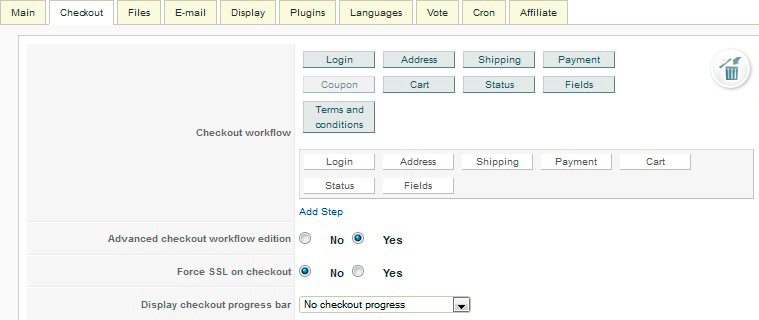
Thanks for that, but would you give more detail please on how to do it?
In my checkout tab, I can change the order of the items but that is all.
Thanks.
Last edit: 14 years 3 months ago by Southcoaster. Reason: Spelling error
Please Log in or Create an account to join the conversation.
14 years 3 months ago #56473
by nicolas
Replied by nicolas on topic Re: Modifying the default HikaShop Cart Module
Click on "add step" and drag and drop all the views except the login view from the first step to the second one and then save the configuration.
Please Log in or Create an account to join the conversation.
- Southcoaster
-
Topic Author
- Offline
Less
More
- Posts: 74
- Thank you received: 1
14 years 3 months ago #56574
by Southcoaster
Replied by Southcoaster on topic Re: Modifying the default HikaShop Cart Module
Many thanks Nicolas,
I now see what that section was for.
Regards.
I now see what that section was for.
Regards.
Please Log in or Create an account to join the conversation.
Time to create page: 0.202 seconds