
- Posts: 14
- Thank you received: 0
content modules - carousel problem
- iloveshop123@gmail.com
-
 Topic Author
- Offline
Less
More
14 years 2 months ago #59017
by iloveshop123@gmail.com
content modules - carousel problem was created by iloveshop123@gmail.com
Hi,
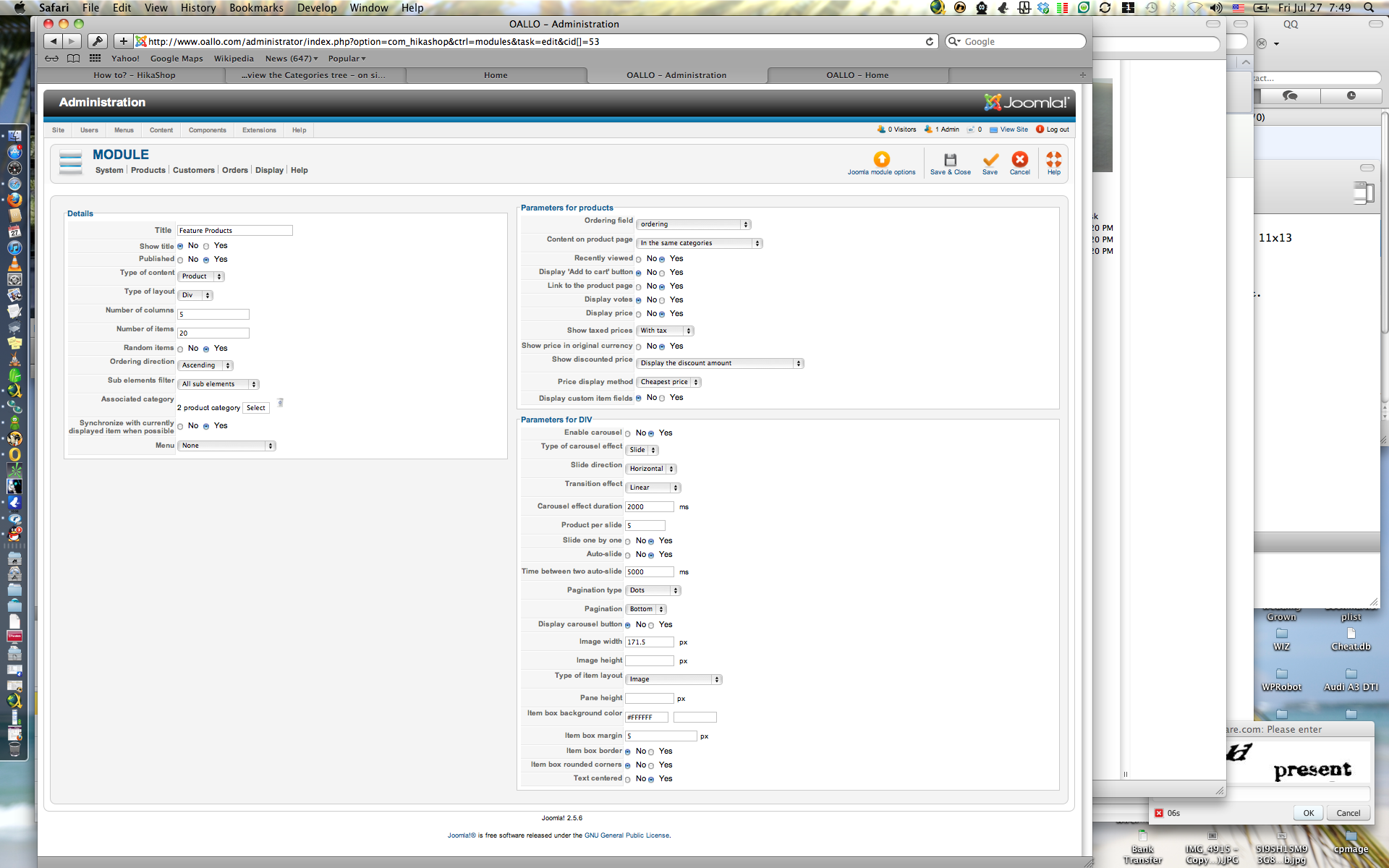
I am having problem with product listing carousel. I cannot get my products to display in 1 row, it keeps going over to the 2nd row.
I have set the number of columns to 5 and the Parameters for DIV product per slide 5.
Here is my site:
www.oallo.com
Can someone give me some suggestions?
Thanks.
I am having problem with product listing carousel. I cannot get my products to display in 1 row, it keeps going over to the 2nd row.
I have set the number of columns to 5 and the Parameters for DIV product per slide 5.
Here is my site:
www.oallo.com
Can someone give me some suggestions?
Thanks.
Please Log in or Create an account to join the conversation.

14 years 2 months ago #59023
by Eliot
Replied by Eliot on topic Re: content modules - carousel problem
Hi,
Could you please give us a screenshot of your configuration so we can spot the problem?
Thanks.
Could you please give us a screenshot of your configuration so we can spot the problem?
Thanks.
Please Log in or Create an account to join the conversation.
- iloveshop123@gmail.com
-
Topic Author
- Offline
Less
More
- Posts: 14
- Thank you received: 0
14 years 2 months ago #59078
by iloveshop123@gmail.com
Replied by iloveshop123@gmail.com on topic Re: content modules - carousel problem
Thank you. Here is a screen shot of my configuration.
Please Log in or Create an account to join the conversation.
14 years 2 months ago #59081
by Eliot
Replied by Eliot on topic Re: content modules - carousel problem
I cannot reproduce your problem with the same configuration.
Could you please set a different width and a different margin left it blank for example)? It may fix the problem.
Could you please set a different width and a different margin left it blank for example)? It may fix the problem.
Please Log in or Create an account to join the conversation.
- iloveshop123@gmail.com
-
Topic Author
- Offline
Less
More
- Posts: 14
- Thank you received: 0
14 years 2 months ago #59082
by iloveshop123@gmail.com
Replied by iloveshop123@gmail.com on topic Re: content modules - carousel problem
What do you mean or where do I go to set the different width / different margin?
Please Log in or Create an account to join the conversation.
14 years 2 months ago #59084
by Eliot
Replied by Eliot on topic Re: content modules - carousel problem
I mean let the "image width" and "Item box margin" field blank.
Please Log in or Create an account to join the conversation.
- iloveshop123@gmail.com
-
Topic Author
- Offline
Less
More
- Posts: 14
- Thank you received: 0
14 years 2 months ago #59088
by iloveshop123@gmail.com
Replied by iloveshop123@gmail.com on topic Re: content modules - carousel problem
I just tried, both img width and margin in different size and/or blank.
Still the same thing. Right now, I am just leaving it with 5 columns with 4 products per slide to get the 1 row display effect.
Still the same thing. Right now, I am just leaving it with 5 columns with 4 products per slide to get the 1 row display effect.
Please Log in or Create an account to join the conversation.
14 years 2 months ago #59092
by Eliot
Replied by Eliot on topic Re: content modules - carousel problem
Can you set the "synchronize with the currently displayed item when possible" option to no please?
If this option doesn't solve the problem I may need an access to your administrator panel so I can check where does it comes from.
If this option doesn't solve the problem I may need an access to your administrator panel so I can check where does it comes from.
Please Log in or Create an account to join the conversation.
- iloveshop123@gmail.com
-
Topic Author
- Offline
Less
More
- Posts: 14
- Thank you received: 0
14 years 2 months ago #59094
by iloveshop123@gmail.com
Replied by iloveshop123@gmail.com on topic Re: content modules - carousel problem
I just did, same problem.
How do I let you to access the backend?
How do I let you to access the backend?
Please Log in or Create an account to join the conversation.
14 years 2 months ago - 14 years 2 months ago #59095
by Eliot
Replied by Eliot on topic Re: content modules - carousel problem
I guess it comes from your template or something like that.
You can create a new user account with access to the backend, I'll do some test on monday.
Thanks in advance!
You can create a new user account with access to the backend, I'll do some test on monday.
Thanks in advance!
Last edit: 14 years 2 months ago by Eliot.
Please Log in or Create an account to join the conversation.
- iloveshop123@gmail.com
-
Topic Author
- Offline
Less
More
- Posts: 14
- Thank you received: 0
14 years 2 months ago #59096
by iloveshop123@gmail.com
Replied by iloveshop123@gmail.com on topic Re: content modules - carousel problem
Also, when you get in the backend. Can you also help to check for another problem.
This is related to SEF. If I turn my SEF ON in Joomla, hikashop area seems to works, however it messup (no able to access) all my other pages and articles postings. But before I install hikashop, my joomla SEF worked great.
It drives me crazy LOL
This is related to SEF. If I turn my SEF ON in Joomla, hikashop area seems to works, however it messup (no able to access) all my other pages and articles postings. But before I install hikashop, my joomla SEF worked great.
It drives me crazy LOL
Please Log in or Create an account to join the conversation.
- iloveshop123@gmail.com
-
Topic Author
- Offline
Less
More
- Posts: 14
- Thank you received: 0
14 years 2 months ago #59097
by iloveshop123@gmail.com
Replied by iloveshop123@gmail.com on topic Re: content modules - carousel problem
Thanks. Do I post the username and password here? or email to you?
Please Log in or Create an account to join the conversation.

14 years 2 months ago #59164
by nicolas
Replied by nicolas on topic Re: content modules - carousel problem
Please use our contact form and give a link to this forum thread:
www.hikashop.com/en/contact-us.html
The SEF system outside HikaShop is not related to HikaShop. I might be a good idea to aslo ask on joomla forums for your problem as we are not specialists of SEF outside the realms of HikaShop even though we'll have a look.
www.hikashop.com/en/contact-us.html
The SEF system outside HikaShop is not related to HikaShop. I might be a good idea to aslo ask on joomla forums for your problem as we are not specialists of SEF outside the realms of HikaShop even though we'll have a look.
Please Log in or Create an account to join the conversation.
- iloveshop123@gmail.com
-
Topic Author
- Offline
Less
More
- Posts: 14
- Thank you received: 0
14 years 2 months ago #59211
by iloveshop123@gmail.com
Replied by iloveshop123@gmail.com on topic Re: content modules - carousel problem
Thank you. I understand it could be a SEF system problem outside HikaShop.
But where I got trouble is during checkout. At "checkout/step/step-1.html" I keep getting the following:
"403 - You are not authorised to view this resource."
You may not be able to visit this page because of:
an out-of-date bookmark/favourite
a search engine that has an out-of-date listing for this site
a mistyped address
you have no access to this page
The requested resource was not found.
An error has occurred while processing your request.
Please try one of the following pages:
Home Page
If difficulties persist, please contact the System Administrator of this site and report the error below..
I have tried both turning on and off the SEF or URL rewrite, etc. I still couldn't finish the whole checkout process.
I look forward to hear from you. Thanks.
But where I got trouble is during checkout. At "checkout/step/step-1.html" I keep getting the following:
"403 - You are not authorised to view this resource."
You may not be able to visit this page because of:
an out-of-date bookmark/favourite
a search engine that has an out-of-date listing for this site
a mistyped address
you have no access to this page
The requested resource was not found.
An error has occurred while processing your request.
Please try one of the following pages:
Home Page
If difficulties persist, please contact the System Administrator of this site and report the error below..
I have tried both turning on and off the SEF or URL rewrite, etc. I still couldn't finish the whole checkout process.
I look forward to hear from you. Thanks.
Please Log in or Create an account to join the conversation.
14 years 2 months ago #59282
by nicolas
Replied by nicolas on topic Re: content modules - carousel problem
We didn't get any contact request from you.
Please Log in or Create an account to join the conversation.
- iloveshop123@gmail.com
-
Topic Author
- Offline
Less
More
- Posts: 14
- Thank you received: 0
14 years 2 months ago #59313
by iloveshop123@gmail.com
Replied by iloveshop123@gmail.com on topic Re: content modules - carousel problem
what do you mean by contact request?
Please Log in or Create an account to join the conversation.
14 years 2 months ago #59390
by nicolas
Replied by nicolas on topic Re: content modules - carousel problem
In my message, I had told you to use our contact form:
www.hikashop.com/forum/4-how-to/59017-co...m.html?lang=ja#59164
in order to send the information. But We never got anything from you via that form.
www.hikashop.com/forum/4-how-to/59017-co...m.html?lang=ja#59164
in order to send the information. But We never got anything from you via that form.
Please Log in or Create an account to join the conversation.
- iloveshop123@gmail.com
-
Topic Author
- Offline
Less
More
- Posts: 14
- Thank you received: 0
14 years 2 months ago #59395
by iloveshop123@gmail.com
Replied by iloveshop123@gmail.com on topic Re: content modules - carousel problem
Hi Nicolas,
I did yesterday using your contact us form. And I just send you another message using your contact form again.
Please let me know if you get it.
Thanks.
I did yesterday using your contact us form. And I just send you another message using your contact form again.
Please let me know if you get it.
Thanks.
Please Log in or Create an account to join the conversation.
14 years 2 months ago #59406
by nicolas
Replied by nicolas on topic Re: content modules - carousel problem
All the links are working fine on your website.
The checkout was not working because in the "force a menu on checkout" option of the configuration, you selected a joomla category listing menu item. So the SEF system didn't understand why a joomla category listing menu was displaying the checkout page and produced that error. I've changed that option to use a hikashop checkout menu item and it's working great now.
The checkout was not working because in the "force a menu on checkout" option of the configuration, you selected a joomla category listing menu item. So the SEF system didn't understand why a joomla category listing menu was displaying the checkout page and produced that error. I've changed that option to use a hikashop checkout menu item and it's working great now.
Please Log in or Create an account to join the conversation.
- iloveshop123@gmail.com
-
Topic Author
- Offline
Less
More
- Posts: 14
- Thank you received: 0
14 years 2 months ago #59412
by iloveshop123@gmail.com
Replied by iloveshop123@gmail.com on topic Re: content modules - carousel problem
Thank you.
It is always a quick fix for expert
Also were you able to figure out my carousel problem ?
> I am having problem with product listing carousel. I cannot get my products to display in 1 row, it keeps going over to the 2nd row.
> I have set the number of columns to 5 and the Parameters for DIV product per slide 5.
Right now, I am just leaving it with 5 columns with 4 products per slide to get the 1 row display effect.
Thanks.
It is always a quick fix for expert
Also were you able to figure out my carousel problem ?
> I am having problem with product listing carousel. I cannot get my products to display in 1 row, it keeps going over to the 2nd row.
> I have set the number of columns to 5 and the Parameters for DIV product per slide 5.
Right now, I am just leaving it with 5 columns with 4 products per slide to get the 1 row display effect.
Thanks.
Please Log in or Create an account to join the conversation.
Time to create page: 0.324 seconds