
Disable order custom field

14 years 2 months ago #59917
by Teto
Disable order custom field was created by Teto
In our website we have a promotion like "recruit-a-friend".
The first time a new user buys something may indicate the email of a friend during the checkout process.
In this way the friend obtains a discount of 10 Euro for each new users indicate his name..
I added a custom field in order to manage this information.
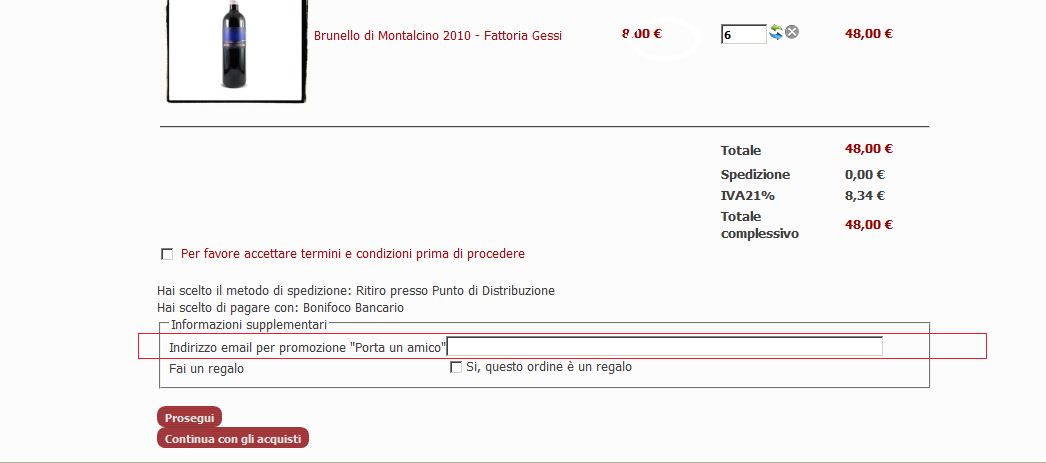
I would like to show this field only during the first purchase (after the first purchase the promotion is no more valid)
Do you have any suggestion?
I thought to use the "access level" but I need to use in the opposite way (if a user is inside the group "already purchased" he cannot see anymore the custom field)
Alternatively I also thought to modify the view, and use the function:
$user =& JFactory::getUser();
$userGroups = JAccess::getGroupsByUser($user->id, true);
if (!in_array(9,$userGroups)) {
in this case I don't know how to disable only the specific custom fields (I have 2 custom fields).
Thank You
The first time a new user buys something may indicate the email of a friend during the checkout process.
In this way the friend obtains a discount of 10 Euro for each new users indicate his name..
I added a custom field in order to manage this information.
I would like to show this field only during the first purchase (after the first purchase the promotion is no more valid)
Do you have any suggestion?
I thought to use the "access level" but I need to use in the opposite way (if a user is inside the group "already purchased" he cannot see anymore the custom field)
Alternatively I also thought to modify the view, and use the function:
$user =& JFactory::getUser();
$userGroups = JAccess::getGroupsByUser($user->id, true);
if (!in_array(9,$userGroups)) {
in this case I don't know how to disable only the specific custom fields (I have 2 custom fields).
Thank You
Please Log in or Create an account to join the conversation.

14 years 2 months ago #59984
by nicolas
Replied by nicolas on topic Re: Disable order custom field
You could have a custom field of the table "user" which would be titled "already_recruited".
The in the view, you could add some simple code:
$user = hikashop_loadUser(true);
if($user->already_recruited=='no' || $field->field_namekey!='friend_email'){
//field display
}
in the file "custom_fields" of the checkout view.
Then, you just have to toggle that custom field for the user once he has recruited someone so that he won't see the field.
The in the view, you could add some simple code:
$user = hikashop_loadUser(true);
if($user->already_recruited=='no' || $field->field_namekey!='friend_email'){
//field display
}
in the file "custom_fields" of the checkout view.
Then, you just have to toggle that custom field for the user once he has recruited someone so that he won't see the field.
Please Log in or Create an account to join the conversation.
14 years 1 month ago #60076
by Teto
Replied by Teto on topic Re: Disable order custom field SOLVED
thank you! 
I solved the problem, i used a the group ti check if a user has already bought something (i use akeeba subs, and the first purchase in my site has to be a subscription, so I can add the user to a specific group and then test it)
The code is a little bit different, I hope it may help someone else.
<?php
$type = $this->type;
foreach($this->extraFields[$type] as $fieldName => $oneExtraField) {
// Stefano Start
$user =& JFactory::getUser();
$userGroups = JAccess::getGroupsByUser($user->id, true);
if ( !(in_array(11,$userGroups) and ($oneExtraField->field_namekey=='order_portaunamico')) ) {
// Stefano End
?>
<tr class="hikashop_checkout_<?php echo $fieldName;?>_line" id="hikashop_<?php echo $type.'_'.$oneExtraField->field_namekey; ?>">
<td class="key">
<?php echo $this->fieldsClass->getFieldName($oneExtraField);?>
</td>
<td>
<?php $onWhat='onchange'; if($oneExtraField->field_type=='radio') $onWhat='onclick';
echo $this->fieldsClass->display($oneExtraField,$this->$type->$fieldName,'data',false,' '.$onWhat.'="hikashopToggleFields(this.value,\''.$fieldName.'\',\''.$type.'\',0);"');
?>
</td>
</tr>
<?php
// Stefano Start
}
// Stefano End
} ?>
I solved the problem, i used a the group ti check if a user has already bought something (i use akeeba subs, and the first purchase in my site has to be a subscription, so I can add the user to a specific group and then test it)
The code is a little bit different, I hope it may help someone else.
<?php
$type = $this->type;
foreach($this->extraFields[$type] as $fieldName => $oneExtraField) {
// Stefano Start
$user =& JFactory::getUser();
$userGroups = JAccess::getGroupsByUser($user->id, true);
if ( !(in_array(11,$userGroups) and ($oneExtraField->field_namekey=='order_portaunamico')) ) {
// Stefano End
?>
<tr class="hikashop_checkout_<?php echo $fieldName;?>_line" id="hikashop_<?php echo $type.'_'.$oneExtraField->field_namekey; ?>">
<td class="key">
<?php echo $this->fieldsClass->getFieldName($oneExtraField);?>
</td>
<td>
<?php $onWhat='onchange'; if($oneExtraField->field_type=='radio') $onWhat='onclick';
echo $this->fieldsClass->display($oneExtraField,$this->$type->$fieldName,'data',false,' '.$onWhat.'="hikashopToggleFields(this.value,\''.$fieldName.'\',\''.$type.'\',0);"');
?>
</td>
</tr>
<?php
// Stefano Start
}
// Stefano End
} ?>
The following user(s) said Thank You: nicolas
Please Log in or Create an account to join the conversation.
Time to create page: 0.199 seconds