

- Posts: 49
- Thank you received: 0
[Solved]Text Alignment
14 years 2 months ago - 14 years 1 month ago #59950
by Fintan
[Solved]Text Alignment was created by Fintan
On my product listing page the Title is alligned "center" with the image alligned "left".
Here I would like the Title (Product name) alligned left.
On the product detail page the Product title (name) is alligned "left" and the image "center".
Here I would like The image alligned "left" as well.
I tried playing with: frontend_default.css but to no avail.
Here I would like the Title (Product name) alligned left.
On the product detail page the Product title (name) is alligned "left" and the image "center".
Here I would like The image alligned "left" as well.
I tried playing with: frontend_default.css but to no avail.
Last edit: 14 years 1 month ago by Fintan.
Please Log in or Create an account to join the conversation.

14 years 2 months ago #60019
by nicolas
Replied by nicolas on topic Re: Text Alignment
You should indeed be able to do that with CSS.
Can you give a link to that page so that we can analyze the CSS on your page ?
Can you give a link to that page so that we can analyze the CSS on your page ?
Please Log in or Create an account to join the conversation.
14 years 2 months ago #60048
by Fintan
I know but where?
www.fintan-gastro-consulting.ch/Pizza/in...p/de/unser-take-away
for the product list test page
www.fintan-gastro-consulting.ch/Pizza/in...ay/product/1-pizza-1
For a test detail page.
Cheers
Replied by Fintan on topic Re: Text Alignment
You should indeed be able to do that with CSS.
I know but where?
www.fintan-gastro-consulting.ch/Pizza/in...p/de/unser-take-away
for the product list test page
www.fintan-gastro-consulting.ch/Pizza/in...ay/product/1-pizza-1
For a test detail page.
Cheers
Please Log in or Create an account to join the conversation.
14 years 1 month ago #60106
by nicolas
Replied by nicolas on topic Re: Text Alignment
You can add that CSS:
span.hikashop_product_name {
text-align: left !important;
}
div#hikashop_product_left_part div {
text-align: left !important;
}
in the front end CSS file of HikaShop via the Display tab of the configuration.
span.hikashop_product_name {
text-align: left !important;
}
div#hikashop_product_left_part div {
text-align: left !important;
}
in the front end CSS file of HikaShop via the Display tab of the configuration.
Please Log in or Create an account to join the conversation.
14 years 1 month ago #60110
by Fintan
Okay, I went to configuration->display tab->views->my template->frontend. which file? There are a "few"
Replied by Fintan on topic Re: Text Alignment
in the front end CSS file of HikaShop via the Display tab of the configuration.
Okay, I went to configuration->display tab->views->my template->frontend. which file? There are a "few"
Please Log in or Create an account to join the conversation.
14 years 1 month ago - 14 years 1 month ago #60137
by Fintan
Replied by Fintan on topic Re: Text Alignment
Okay, I found the file you meant.
I changed this:
this:
as suggested. No change. Cleared Cahche from Browser and (as fa as I know) joomla.
Is there an override anywhere.
Edit: After changing the file I get a new CSS file "custom" to choose from. which I obviously chose.
Edit2: I looked at this on another browser and now I can see the changes in the product details page but still not on the product list page. Here the Product name is still centered.
I did find this (with firebug):
Is this of any relevance to my issue?
Also, on the product detail page the description is too far below the image. Is there any way to movve it right below the Product name or image?
I changed this:
to:span.hikashop_product_name{
text-align: center;
display:block;
margin-bottom:5px;
}
this:
span.hikashop_product_name {
text-align: left !important;
}
div#hikashop_product_left_part div {
text-align: left !important;
}
as suggested. No change. Cleared Cahche from Browser and (as fa as I know) joomla.
Is there an override anywhere.
Edit: After changing the file I get a new CSS file "custom" to choose from. which I obviously chose.
Edit2: I looked at this on another browser and now I can see the changes in the product details page but still not on the product list page. Here the Product name is still centered.
I did find this (with firebug):
#hikashop_button_1 div.hikashop_subcontainer, #hikashop_button_2 div.hikashop_subcontainer, #hikashop_button_3 div.hikashop_subcontainer,#hikashop_order_listing div.hikashop_subcontainer {
text-align:center;
}
Is this of any relevance to my issue?
Also, on the product detail page the description is too far below the image. Is there any way to movve it right below the Product name or image?
Last edit: 14 years 1 month ago by Fintan.
Please Log in or Create an account to join the conversation.
14 years 1 month ago #60226
by nicolas
Replied by nicolas on topic Re: Text Alignment
Hi,
I tried to look at your pages but I don't see HikaShop anymore so unfortunately I can't say much.
I tried to look at your pages but I don't see HikaShop anymore so unfortunately I can't say much.
Please Log in or Create an account to join the conversation.
14 years 1 month ago #60246
by Fintan
Replied by Fintan on topic Re: Text Alignment
Yeah, sorry. I was testing vmart as well. I have set up two menu items Shop 1(Hika) and Shop 2(vmart).
Please have another look. Thanks
Please have another look. Thanks
Please Log in or Create an account to join the conversation.
14 years 1 month ago #60304
by nicolas
Replied by nicolas on topic Re: Text Alignment
I can see that you changed your products listing page so that it uses another item box layout. So I don't think that you want to have the product name centered on the left anymore with this one.
For the description on the product page, it's displayed on the bottom area of the page. If you want to have it right under the image, you will have to move the description display block of code of the "show_default" view file at the end of the hikashop_product_left_part area by editing it via the menu Display->Views.
For the description on the product page, it's displayed on the bottom area of the page. If you want to have it right under the image, you will have to move the description display block of code of the "show_default" view file at the end of the hikashop_product_left_part area by editing it via the menu Display->Views.
Please Log in or Create an account to join the conversation.
14 years 1 month ago - 14 years 1 month ago #60334
by Fintan
Thanks for getting back to me so soon.
The product detail page is good noe.
When I click on the product category I get this:Prod_List1.jpeg
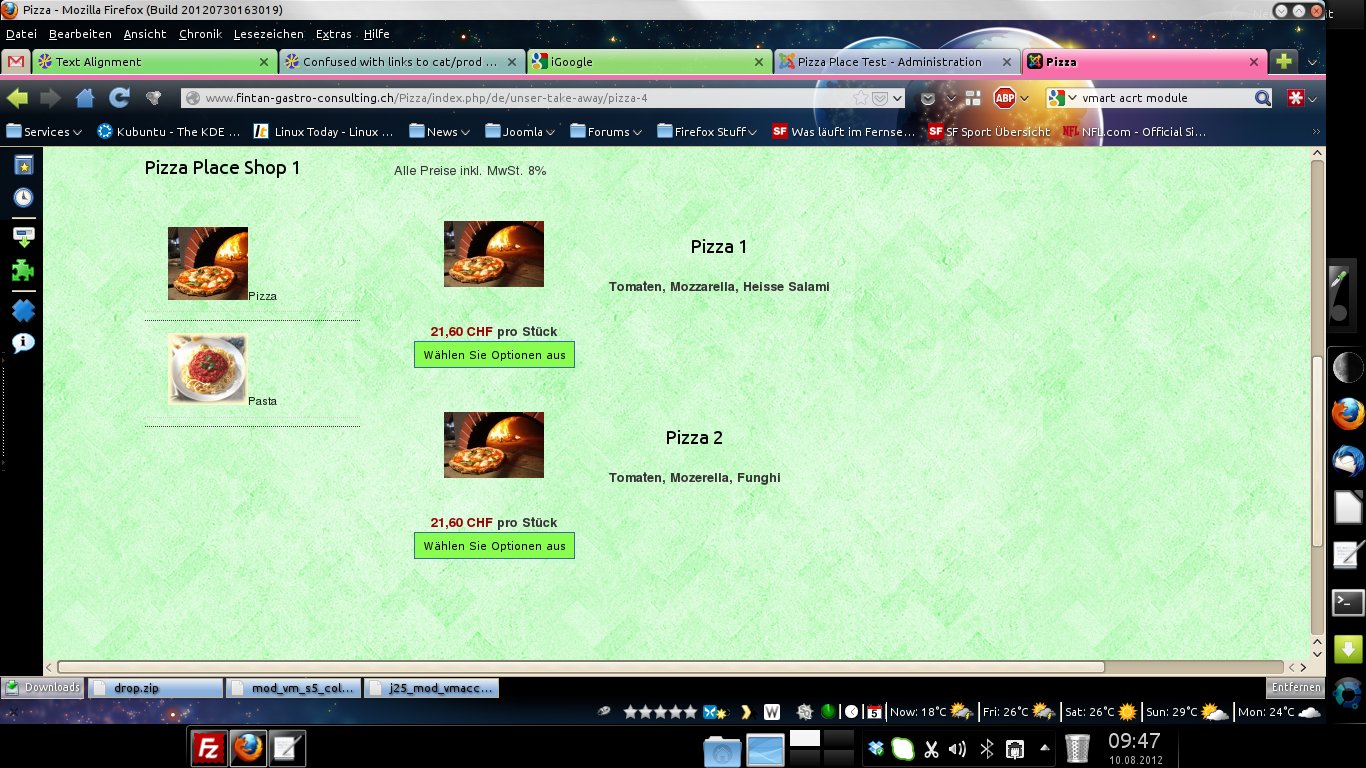
I would like it to look like this:Prod_List2.jpeg
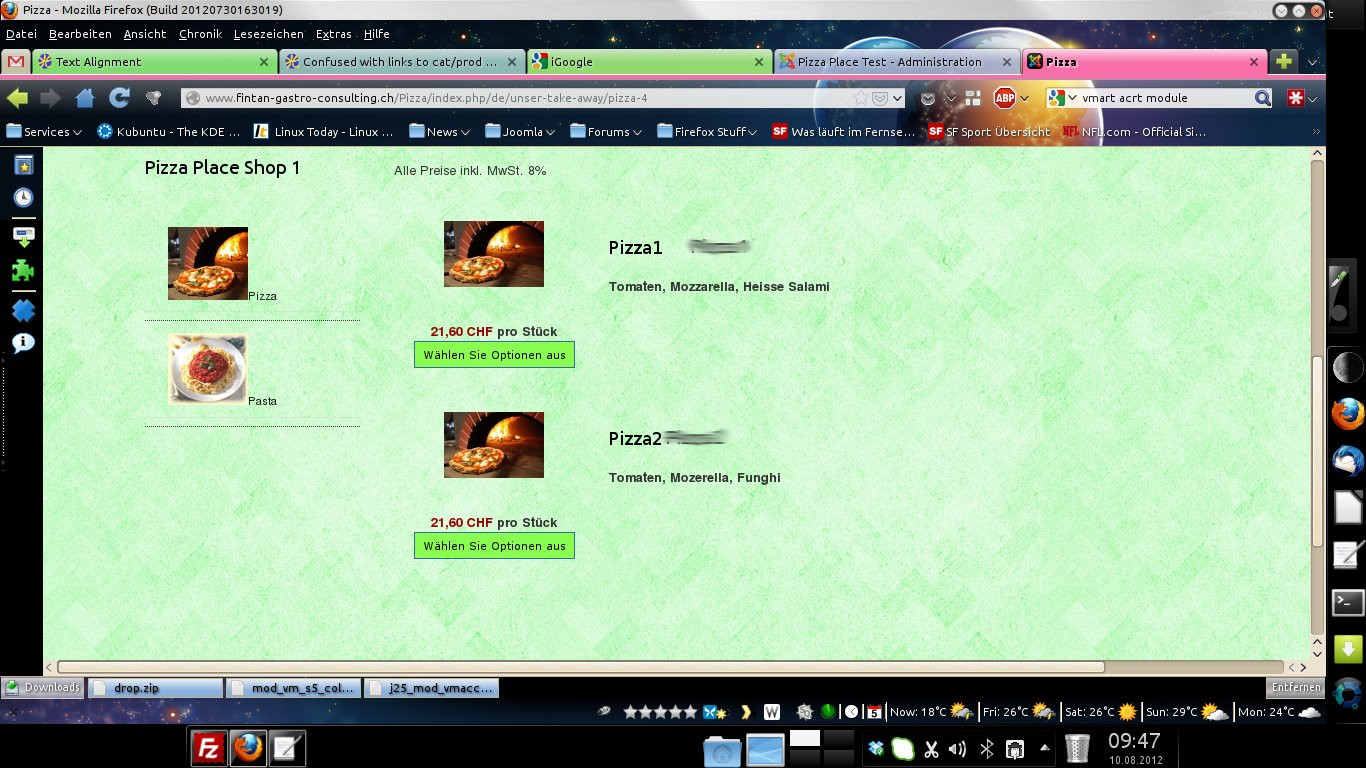
What do I need to edit?
Thanks I'll give that a whirl.
Replied by Fintan on topic Re: Text Alignment
I can see that you changed your products listing page so that it uses another item box layout. So I don't think that you want to have the product name centered on the left anymore with this one.
Thanks for getting back to me so soon.
The product detail page is good noe.
When I click on the product category I get this:Prod_List1.jpeg
I would like it to look like this:Prod_List2.jpeg
What do I need to edit?
For the description on the product page, it's displayed on the bottom area of the page. If you want to have it right under the image, you will have to move the description display block of code of the "show_default" view file at the end of the hikashop_product_left_part area by editing it via the menu Display->Views.
Thanks I'll give that a whirl.
Last edit: 14 years 1 month ago by Fintan.
Please Log in or Create an account to join the conversation.
14 years 1 month ago #60335
by Fintan
<div id="hikashop_product_left_part" class="hikashop_product_left_part">
<?php
$this->row = & $this->element;
$this->setLayout('show_block_img');
echo $this->loadTemplate();
?>
</div>
I cannot see:
I am not very good at PHP coding
Replied by Fintan on topic Re: Text Alignment
Hmm... on line 37 of ->display->views->"show-default" I can see this:For the description on the product page, it's displayed on the bottom area of the page. If you want to have it right under the image, you will have to move the description display block of code of the "show_default" view file at the end of the hikashop_product_left_part area by editing it via the menu Display->Views.
<div id="hikashop_product_left_part" class="hikashop_product_left_part">
<?php
$this->row = & $this->element;
$this->setLayout('show_block_img');
echo $this->loadTemplate();
?>
</div>
I cannot see:
description display
I am not very good at PHP coding
Please Log in or Create an account to join the conversation.
14 years 1 month ago #60393
by nicolas
Replied by nicolas on topic Re: Text Alignment
Try to add that CSS code instead and that should do it:
span.hikashop_product_name {
text-align: left !important;
display: block;
}
span.hikashop_product_name {
text-align: left !important;
display: block;
}
Please Log in or Create an account to join the conversation.
14 years 1 month ago - 14 years 1 month ago #60399
by Fintan
Replied by Fintan on topic Re: Text Alignment
I had that set in:
frontend_custom.css
which has replaced "frontend_default.css" after the last changes we made.
is there another file I should edit?
Ahh success
I found this:
.hikashop_subcontainer{
padding-top:10px;
padding-bottom:10px;
}
and changed it to:
.hikashop_subcontainer{
text-align: left !important;
padding-top:10px;
padding-bottom:10px;
}
Great now it looks clean
Thank you for your patience.
frontend_custom.css
which has replaced "frontend_default.css" after the last changes we made.
is there another file I should edit?
Ahh success
I found this:
.hikashop_subcontainer{
padding-top:10px;
padding-bottom:10px;
}
and changed it to:
.hikashop_subcontainer{
text-align: left !important;
padding-top:10px;
padding-bottom:10px;
}
Great now it looks clean
Thank you for your patience.
Last edit: 14 years 1 month ago by Fintan.
Please Log in or Create an account to join the conversation.
Time to create page: 0.221 seconds