
Disable Back button

14 years 2 months ago - 14 years 2 months ago #60065
by Teto
Disable Back button was created by Teto
On the website a created a menù where the users can verify their orders, addresses and change the password.
I used the the menu type
Hika->User Addresses
Hika->Customer Orders
Users Managemens (joomla)->Password Reset
I am also using the plug in "Redirect Joomla registration to HikaShop Plugin".
Is it possibile to disable the "back" button?
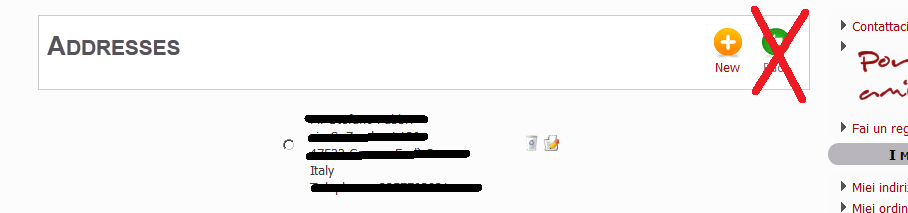
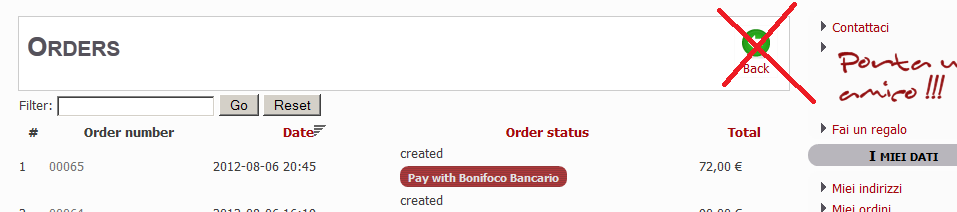
If possibile I would like to mantain only the back button when you are inside the order.
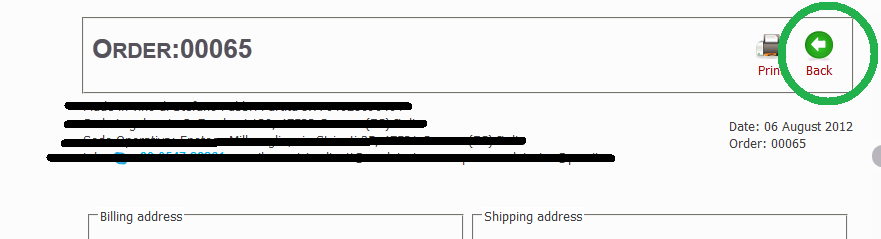
Thank you!
I used the the menu type
Hika->User Addresses
Hika->Customer Orders
Users Managemens (joomla)->Password Reset
I am also using the plug in "Redirect Joomla registration to HikaShop Plugin".
Is it possibile to disable the "back" button?
If possibile I would like to mantain only the back button when you are inside the order.
Thank you!
Last edit: 14 years 2 months ago by Teto.
Please Log in or Create an account to join the conversation.

14 years 1 month ago #60129
by nicolas
Replied by nicolas on topic Re: Disable Back button
You will need to edit the file 'listing' of the view 'order' and the file 'listing' of the view 'address' via the menu Display->Views and remove the back button code near the top of the file.
Please Log in or Create an account to join the conversation.
14 years 1 month ago #60176
by Teto
Replied by Teto on topic Re: Disable Back button
This is Perfect!!!! :laugh: :laugh: :laugh:
Please Log in or Create an account to join the conversation.
Time to create page: 0.207 seconds