
Plus / Minus behave strange, also want to remove t

14 years 1 month ago #60268
by gasoline
I'll keep on trying!
Plus / Minus behave strange, also want to remove t was created by gasoline
If someone select a product and changes the size (X - Xl - XXl) than I sea the + & - again. They are removed by css, butt when you select another size they appear? What am I doing wrong.
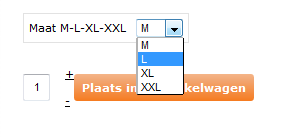
Also I can not find the file to change the layout. I want to completly remove the + and - and putt some text their (piece). So it says "1" "piece" - "place in basket".
Also I can not find the file to change the layout. I want to completly remove the + and - and putt some text their (piece). So it says "1" "piece" - "place in basket".
I'll keep on trying!
Please Log in or Create an account to join the conversation.

14 years 1 month ago #60312
by nicolas
Replied by nicolas on topic Re: Plus / Minus behave strange, also want to remove t
If you don't want any quantity field and plus/minus buttons, you can change the option "Display the quantity field on the product page" to "no input".
The text in the button, like any text in HikaShop, can be changed with a translation override:
www.hikashop.com/en/download/languages.html#modify
Regarding the fact that you added CSS to remove the +/- and that they appear when changing the characteristic, it's because your CSS modification is not correct. I would need to look at the page with firebug in order to tell you precisely what to do but as I explained above, there is an option to do that, so you don't need any CSS in fact.
The text in the button, like any text in HikaShop, can be changed with a translation override:
www.hikashop.com/en/download/languages.html#modify
Regarding the fact that you added CSS to remove the +/- and that they appear when changing the characteristic, it's because your CSS modification is not correct. I would need to look at the page with firebug in order to tell you precisely what to do but as I explained above, there is an option to do that, so you don't need any CSS in fact.
Please Log in or Create an account to join the conversation.
14 years 1 month ago #60357
by gasoline
I'll keep on trying!
Replied by gasoline on topic Re: Plus / Minus behave strange, also want to remove t
O.k. Clear. Removed the CSS and changed settings. That worked. However what I want is tis, see image:
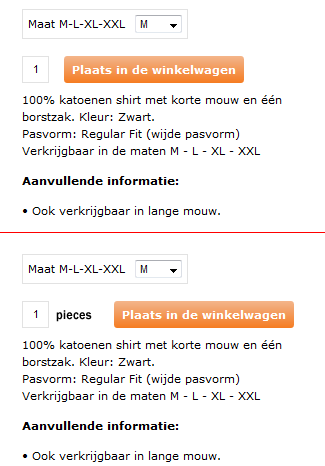
Si now there is (translated) 1 - putt in bastket.
Butt I want to add a word 'pieces" (stuks) so I get
1 - pieces - putt in basket
I can't find the file(s) to edit.
Si now there is (translated) 1 - putt in bastket.
Butt I want to add a word 'pieces" (stuks) so I get
1 - pieces - putt in basket
I can't find the file(s) to edit.
I'll keep on trying!
Please Log in or Create an account to join the conversation.
14 years 1 month ago #60419
by nicolas
Replied by nicolas on topic Re: Plus / Minus behave strange, also want to remove t
You will have to edit the code of the file administrator/components/com_hikashop/helper/cart.php in the display function
I would recommend though to do a quantity field display override as explained here:
www.hikashop.com/fr/support/documentatio...tation.html#override
But it's more complex that just editing directly the code of the file. However, that will allow you to update without loosing your changes.
I would recommend though to do a quantity field display override as explained here:
www.hikashop.com/fr/support/documentatio...tation.html#override
But it's more complex that just editing directly the code of the file. However, that will allow you to update without loosing your changes.
Please Log in or Create an account to join the conversation.
14 years 1 month ago #60568
by gasoline
I'll keep on trying!
Replied by gasoline on topic Re: Plus / Minus behave strange, also want to remove t
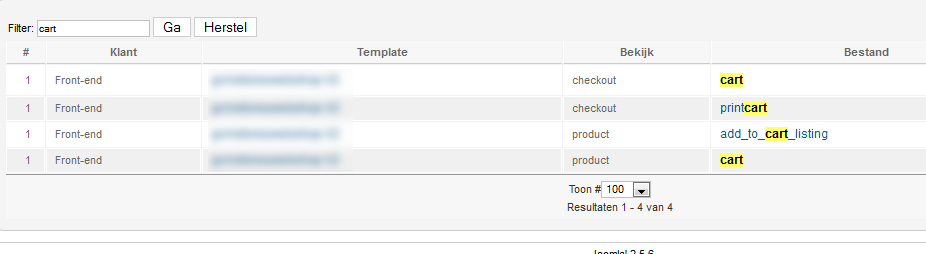
I thought I had to change one of the files (see image) but it is more complex apparently. That's a shame because client insist on the change. I thought I could change the TR in the file and add the text PIECES.
I'll keep on trying!
Please Log in or Create an account to join the conversation.
14 years 1 month ago #60605
by nicolas
Replied by nicolas on topic Re: Plus / Minus behave strange, also want to remove t
The file administrator/components/com_hikashop/helper/cart.php is a core file, not a view file. You need to edit it via FTP.
Please Log in or Create an account to join the conversation.
14 years 2 weeks ago #66602
by gasoline
Hi, After update to 1.6 this problem is back. I have set the setteings as mentoioned above. What should I do??
I get the +/- buttons when I change the size of an artikel. So we have f.e. s / m / l / xl
Product uis standard displayed as say S. When I pull down to any other size the +/- apperas again.
I'll keep on trying!
Replied by gasoline on topic Re: Plus / Minus behave strange, also want to remove t
nicolas wrote: If you don't want any quantity field and plus/minus buttons, you can change the option "Display the quantity field on the product page" to "no input".
Hi, After update to 1.6 this problem is back. I have set the setteings as mentoioned above. What should I do??
I get the +/- buttons when I change the size of an artikel. So we have f.e. s / m / l / xl
Product uis standard displayed as say S. When I pull down to any other size the +/- apperas again.
I'll keep on trying!
Please Log in or Create an account to join the conversation.
14 years 2 weeks ago #66809
by nicolas
Replied by nicolas on topic Re: Plus / Minus behave strange, also want to remove t
Hi,
It's the same result but the problem is different.
Here is the solution:
www.hikashop.com/forum/4-how-to/66021-hi...s.html?lang=en#66239
It's the same result but the problem is different.
Here is the solution:
www.hikashop.com/forum/4-how-to/66021-hi...s.html?lang=en#66239
Please Log in or Create an account to join the conversation.
Time to create page: 0.220 seconds