
- Posts: 27
- Thank you received: 1
Altering the Product Page display
- rstaniszewski
-
 Topic Author
- Offline
Less
More
14 years 1 month ago #62521
by rstaniszewski
Altering the Product Page display was created by rstaniszewski
Hi Guys,
Can you help me?
I've been looking at both the CSS and the product show_default files. I'm having difficulty making a few changes.
I'd like my product page to look like:
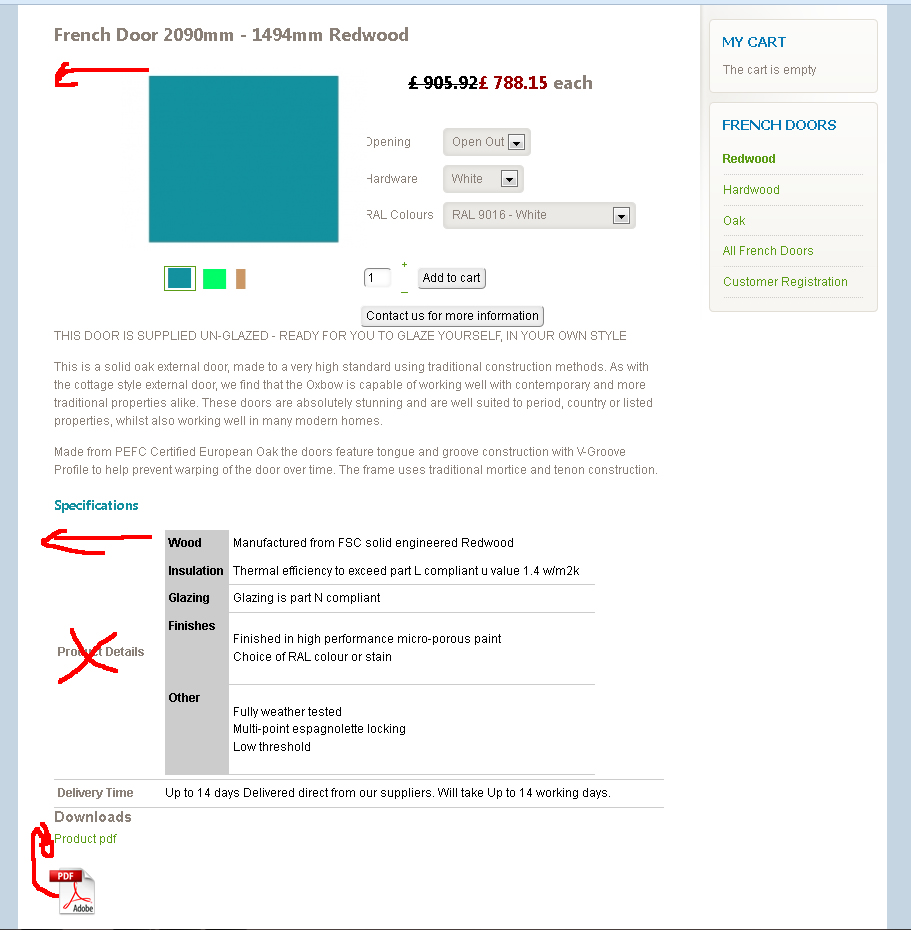
1. Move the opening image back in line with the product title
2. Remove the words Product details out of my custom field and move the table back to the margin
3 add the pdf graphic.
Many thanks in advance
Richard
Can you help me?
I've been looking at both the CSS and the product show_default files. I'm having difficulty making a few changes.
I'd like my product page to look like:
1. Move the opening image back in line with the product title
2. Remove the words Product details out of my custom field and move the table back to the margin
3 add the pdf graphic.
Many thanks in advance
Richard
Please Log in or Create an account to join the conversation.
- rstaniszewski
-
Topic Author
- Offline
Less
More
- Posts: 27
- Thank you received: 1
14 years 1 month ago #62577
by rstaniszewski
Replied by rstaniszewski on topic Re: Altering the Product Page display
Hi Guys,
I've managed to do all of the items I wanted to on this request except for one.
I'd like to know how to move the child thumbnails over to the left. I've moved the main image over by 150px which has left the thumbnails not in line.
Thanks.
Richard
I've managed to do all of the items I wanted to on this request except for one.
I'd like to know how to move the child thumbnails over to the left. I've moved the main image over by 150px which has left the thumbnails not in line.
Thanks.
Richard
Please Log in or Create an account to join the conversation.

14 years 1 month ago #62694
by nicolas
Replied by nicolas on topic Re: Altering the Product Page display
Hi,
You should be able to do that with that CSS:
.hikashop_small_image_div{ text-align: left !important; }
You should be able to do that with that CSS:
.hikashop_small_image_div{ text-align: left !important; }
Please Log in or Create an account to join the conversation.
Time to create page: 0.177 seconds