

- Posts: 447
- Thank you received: 20
Add to Cart not on Related Products
14 years 3 weeks ago #65074
by davec
Add to Cart not on Related Products was created by davec
Hi
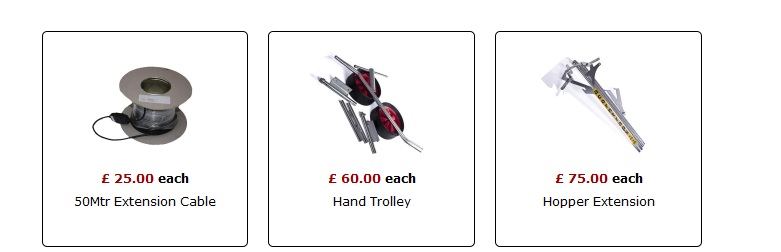
I am currently uopdating a site from Redshop to Hikashop. I have some related products on the poage but no Add To Cart Button is visible. Is there a setting I am missing? The attachded image is for related products on a particular item.
Ideally a checkbox would be a prefered option but it is not available, or at least it wasn't when I raised the question some time a go?
Regards
Dave
I am currently uopdating a site from Redshop to Hikashop. I have some related products on the poage but no Add To Cart Button is visible. Is there a setting I am missing? The attachded image is for related products on a particular item.
Ideally a checkbox would be a prefered option but it is not available, or at least it wasn't when I raised the question some time a go?
Regards
Dave
Please Log in or Create an account to join the conversation.

Less
More
- Posts: 12953
- Thank you received: 1778
14 years 3 weeks ago #65085
by Mohamed Thelji
Replied by Mohamed Thelji on topic Re: Add to Cart not on Related Products
Hi Dave,
I think that you should edit your "related products" module through "Hikashop->Display->Content modules" and set the "Display add to cart button" option to YES
I think that you should edit your "related products" module through "Hikashop->Display->Content modules" and set the "Display add to cart button" option to YES
Please Log in or Create an account to join the conversation.
14 years 3 weeks ago #65087
by davec
Replied by davec on topic Re: Add to Cart not on Related Products
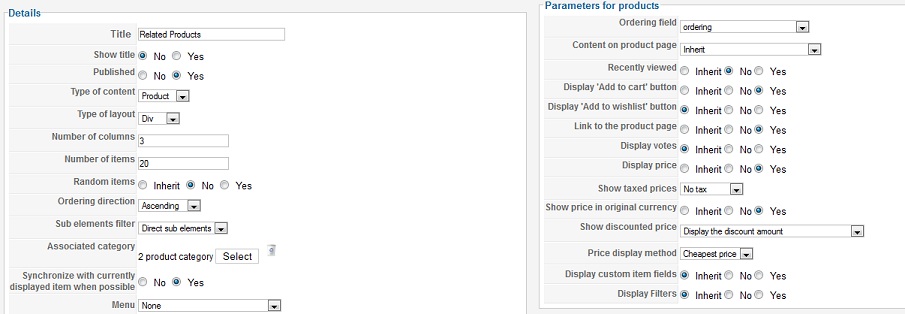
I have done this and have attached a screenshot of the settings just in case I am missing something.
Thanks
Dave
Thanks
Dave
Please Log in or Create an account to join the conversation.
Less
More
- Posts: 12953
- Thank you received: 1778
14 years 3 weeks ago #65093
by Mohamed Thelji
Replied by Mohamed Thelji on topic Re: Add to Cart not on Related Products
Ok, Can you please give me a temporary access to your back-end by PM ?
Thanks
Thanks
Please Log in or Create an account to join the conversation.
14 years 3 weeks ago - 14 years 3 weeks ago #65105
by davec
Replied by davec on topic Re: Add to Cart not on Related Products
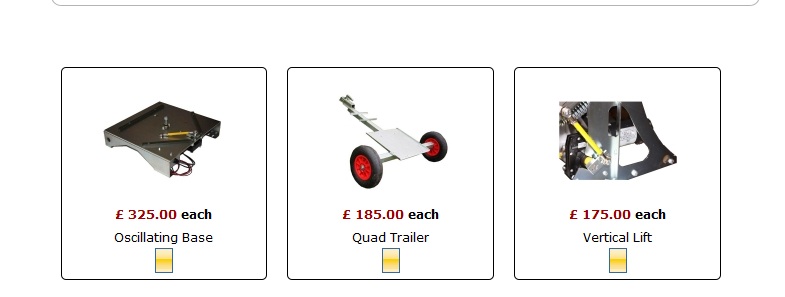
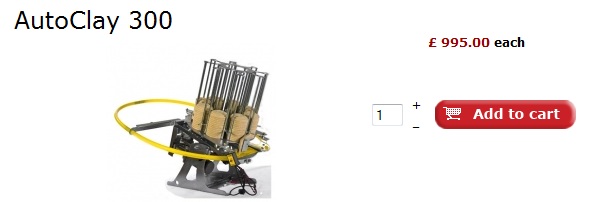
If I switch to Button Style CSS I get a little orange square, no text etc. This is being controlled by the actual site template. If I select Button Style Normal I get the red add to cart for the product but not the related products. See screenshots
So do I require an additional button for related products?
Quite happy for you to take a look at the admin if you need to after this explanation!
Thanks
Dave
So do I require an additional button for related products?
Quite happy for you to take a look at the admin if you need to after this explanation!
Thanks
Dave
Last edit: 14 years 3 weeks ago by davec.
Please Log in or Create an account to join the conversation.
Less
More
- Posts: 12953
- Thank you received: 1778
14 years 3 weeks ago - 14 years 3 weeks ago #65116
by Mohamed Thelji
Replied by Mohamed Thelji on topic Re: Add to Cart not on Related Products
I added the following CSS to your file "css/style1.css" in your template "jm-business-marketing" :
Then the add to cart button will be displaid and you'll be able to change the picture if you want by changing the path of the line :
Code:
#hikashop_module_116 .hikashop_product_stock .button {
background-image: url(../images/add-to-cart.gif);
background-repeat:no-repeat;
width: 145px;
height: 30px;
}
Code:
background-image: url(/../images/add-to-cart.gif);
Last edit: 14 years 3 weeks ago by Mohamed Thelji.
The following user(s) said Thank You: davec
Please Log in or Create an account to join the conversation.
14 years 3 weeks ago #65118
by davec
Replied by davec on topic Re: Add to Cart not on Related Products
Thanks very much for that. Wasn't expecting you to do the work for me but greatly appreciated. :woohoo:
Thanks
Dave
Thanks
Dave
Please Log in or Create an account to join the conversation.
Time to create page: 0.197 seconds