
Display custom item fields in product display ??
- alain.roger
-
 Topic Author
- Offline
Less
More
14 years 3 weeks ago #65702
by alain.roger
What does not kill you, makes you stronger.
Display custom item fields in product display ?? was created by alain.roger
Hi,
i would like to know to what corresponds "Display custom item fields" in System > Configuration > Display > Default parameters for products.
how to use it ? i mean where will it be displayed ? on "detailed product page" ?
thx.
i would like to know to what corresponds "Display custom item fields" in System > Configuration > Display > Default parameters for products.
how to use it ? i mean where will it be displayed ? on "detailed product page" ?
thx.
What does not kill you, makes you stronger.
Please Log in or Create an account to join the conversation.

14 years 2 weeks ago #65780
by Eliot
Replied by Eliot on topic Re: Display custom item fields in product display ??
Hi Alain,
As it's said in the documentation (that you can display by clicking in the "Help" button in the configuration page):
As it's said in the documentation (that you can display by clicking in the "Help" button in the configuration page):
I hope it's clear enought, do not hesitate to ask if you any other questionsDisplay custom item fields : Show custom fields in the product listing.
Please Log in or Create an account to join the conversation.
- alain.roger
-
Topic Author
- Offline
14 years 2 weeks ago #65847
by alain.roger
What does not kill you, makes you stronger.
Replied by alain.roger on topic Re: Display custom item fields in product display ??
Sorry Eliot to look like an idiot, but what are the custom fields in this case ? because i checked in custom fields... on product table and in fact i've seen nothing that could fit my need....
i need for each variant to display close to the price (so on right part side of detailed product page) a small text what deals with what the license(so the new price) is about.
if standard license => text 1 close to price
if extended license => text 2 close to price
those 2 things have nothing in common with the product description, and therefore can not be written in product description....
it's relative only to product license type/price.
is it clearer ?
i need for each variant to display close to the price (so on right part side of detailed product page) a small text what deals with what the license(so the new price) is about.
if standard license => text 1 close to price
if extended license => text 2 close to price
those 2 things have nothing in common with the product description, and therefore can not be written in product description....
it's relative only to product license type/price.
is it clearer ?
What does not kill you, makes you stronger.
Please Log in or Create an account to join the conversation.

14 years 2 weeks ago #65940
by nicolas
Replied by nicolas on topic Re: Display custom item fields in product display ??
If you want to have different text for different variants next to the price, you can follow the instructions of the section 'I sell packed products, how can I change "each" text in the product page ?' of the FAQ:
www.hikashop.com/en/support/documentation/faq.html
You will need a custom field of the table "product".
www.hikashop.com/en/support/documentation/faq.html
You will need a custom field of the table "product".
Please Log in or Create an account to join the conversation.
- alain.roger
-
Topic Author
- Offline
14 years 2 weeks ago #65967
by alain.roger
What does not kill you, makes you stronger.
Replied by alain.roger on topic Re: Display custom item fields in product display ??
Hi Nicolas,
before to write post i tried the custom field on Product page...in fact i chose custom text, but only text "Specifications" appeared and not my custom field
even if with "published" "front end" enabled.
now i'm going to read the link you sent me and i will let you know the result.
thx
before to write post i tried the custom field on Product page...in fact i chose custom text, but only text "Specifications" appeared and not my custom field
even if with "published" "front end" enabled.
now i'm going to read the link you sent me and i will let you know the result.
thx
What does not kill you, makes you stronger.
Please Log in or Create an account to join the conversation.
14 years 2 weeks ago #65968
by nicolas
Replied by nicolas on topic Re: Display custom item fields in product display ??
Custom text only allows you to display text in the form. That's not the type you want to use.
You should use "text".
You should use "text".
Please Log in or Create an account to join the conversation.
- alain.roger
-
Topic Author
- Offline
14 years 2 weeks ago #65975
by alain.roger
What does not kill you, makes you stronger.
Replied by alain.roger on topic Re: Display custom item fields in product display ??
Hi Nicolas,
so i tried and unfortunately as i wrote before, custom fields on frond end are not displayed
look at the screenshot in attachment. i did what was written in FAQ link you sent me.
I see only "specifications"....but nothing below as it should be.
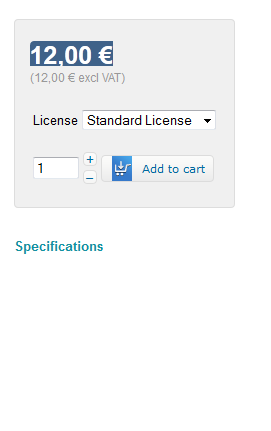
as you can see on screenshot below (htmlcode) the table whre specifications should be written is empty.

so i tried and unfortunately as i wrote before, custom fields on frond end are not displayed
look at the screenshot in attachment. i did what was written in FAQ link you sent me.
I see only "specifications"....but nothing below as it should be.
as you can see on screenshot below (htmlcode) the table whre specifications should be written is empty.
What does not kill you, makes you stronger.
Please Log in or Create an account to join the conversation.
- alain.roger
-
Topic Author
- Offline
14 years 2 weeks ago #66117
by alain.roger
What does not kill you, makes you stronger.
Replied by alain.roger on topic Re: Display custom item fields in product display ??
Ok Nicolas,
after checking everything i discovered where was my mistake.
Now everything works well.
thx.
after checking everything i discovered where was my mistake.
Now everything works well.
thx.
What does not kill you, makes you stronger.
Please Log in or Create an account to join the conversation.
Time to create page: 0.186 seconds