

- Posts: 4
- Thank you received: 0
Watermark - why doesn't it work?
13 years 11 months ago - 13 years 11 months ago #69649
by Flexi8
Watermark - why doesn't it work? was created by Flexi8
Hi folks,
a couple of days ago we bought Hika Shop Business and now we try to add a watermark to our product pictures, but it doesn't work at all. We upload a watermark picure, but it doesn't shop up on the product pics. Why? It's a .png.
Thanks in advance!
a couple of days ago we bought Hika Shop Business and now we try to add a watermark to our product pictures, but it doesn't work at all.
We upload a watermark picure, but it doesn't shop up on the product pics. Why? It's a .png.Thanks in advance!
Last edit: 13 years 11 months ago by Flexi8.
Please Log in or Create an account to join the conversation.

Less
More
- Posts: 12953
- Thank you received: 1778
13 years 11 months ago #69652
by Mohamed Thelji
Replied by Mohamed Thelji on topic Re: Watermark - why doesn't it work?
Please Log in or Create an account to join the conversation.
13 years 11 months ago #69655
by Flexi8
Replied by Flexi8 on topic Re: Watermark - why doesn't it work?
No, no badges.
Please Log in or Create an account to join the conversation.
Less
More
- Posts: 12953
- Thank you received: 1778
13 years 11 months ago #69666
by Mohamed Thelji
Replied by Mohamed Thelji on topic Re: Watermark - why doesn't it work?
Then try it, it should help you to do what you want to.
Please Log in or Create an account to join the conversation.
13 years 11 months ago #69704
by Flexi8
Replied by Flexi8 on topic Re: Watermark - why doesn't it work?
Thanks for replying, but unfortunately this doesn't help at all. We need watermarks and not bagdes. Strange thing is, we don't have a preview picture of the watermark. Something is wrong, but I have no idea what it might be.
Please Log in or Create an account to join the conversation.

13 years 11 months ago #69895
by nicolas
Replied by nicolas on topic Re: Watermark - why doesn't it work?
Badges are added on top of the images on the fly with some CSS magic.
The watermark is added in hard on the image itself. That is done when the image is uploaded.
So of course, for existing images in HikaShop, it won't change anything. It will only add the watermark on new images that you add to HikaShop. Maybe that's why you don't see it ?
The watermark is added in hard on the image itself. That is done when the image is uploaded.
So of course, for existing images in HikaShop, it won't change anything. It will only add the watermark on new images that you add to HikaShop. Maybe that's why you don't see it ?
Please Log in or Create an account to join the conversation.
13 years 11 months ago #69960
by Flexi8
Replied by Flexi8 on topic Re: Watermark - why doesn't it work?
I finally managed to have watermarks, but now they are also on the thumbnails. Thought that is not possible?
Nevermind, the watermark picture was larger than the actual picture and that is, why no watermark was shown at all. :lol:
Nevermind, the watermark picture was larger than the actual picture and that is, why no watermark was shown at all. :lol:
Please Log in or Create an account to join the conversation.
13 years 11 months ago #70092
by nicolas
Replied by nicolas on topic Re: Watermark - why doesn't it work?
The watermark is added directly on the image when you upload it. So when HikaShop creates the thumbnail of the image, the watermark is already on it and that's why you have it on the thumbnails too.
Not having it on the thumbnails would be quite difficult with the way the system is done right now and require several complex code modifications.
Not having it on the thumbnails would be quite difficult with the way the system is done right now and require several complex code modifications.
Please Log in or Create an account to join the conversation.
13 years 8 months ago #84783
by cesgarcia
Replied by cesgarcia on topic Re: Watermark - why doesn't it work?
I am also experiencing issues with this, When I load new images the watermark appears but with older images the watermark will not display. If you need a link to see what I am talking about feel free to ask.
Please Log in or Create an account to join the conversation.

13 years 8 months ago #84830
by Xavier
Replied by Xavier on topic Re: Watermark - why doesn't it work?
That's because when you had uploaded the old images, you haven't set the watermark.
The watermark is added when you upload the image, so you have to remove the old images and upload them again.
The watermark is added when you upload the image, so you have to remove the old images and upload them again.
Please Log in or Create an account to join the conversation.
13 years 7 months ago #89699
by dyvymtvar
Replied by dyvymtvar on topic Re: Watermark - why doesn't it work?
I'm trying to use watermark but when I upload the product image I only can see a black square.
Why?
Why?
Please Log in or Create an account to join the conversation.
13 years 7 months ago #89797
by Xavier
Replied by Xavier on topic Re: Watermark - why doesn't it work?
Could you give us a screenshot of your image configuration ?
What type of image are you adding ?
What type of image are you adding ?
Please Log in or Create an account to join the conversation.
13 years 7 months ago - 13 years 7 months ago #89806
by dyvymtvar
Replied by dyvymtvar on topic Re: Watermark - why doesn't it work?
Yes, of course
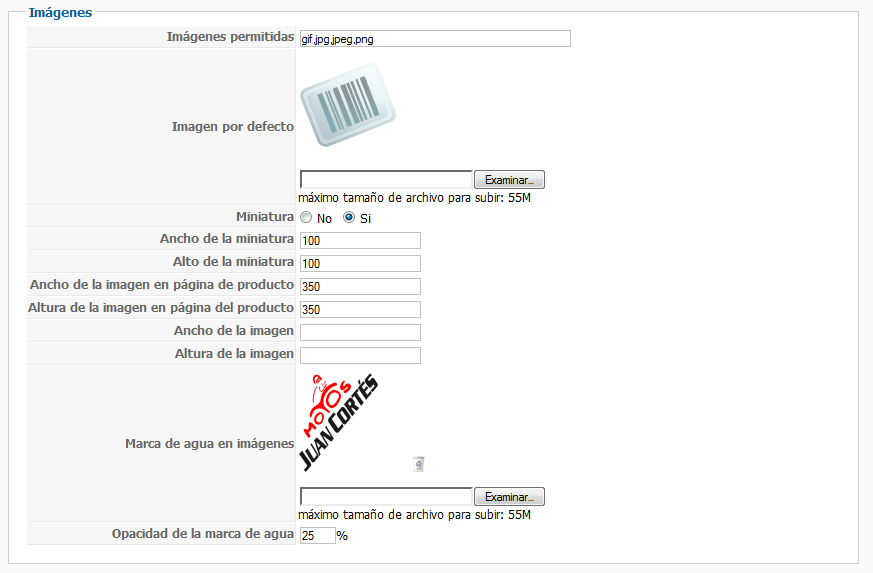
Both images, article and watermark, are .png
This is what I see.

EDIT: I'm using joomla 2.5.9 and hikashop 2.1.0 business
Both images, article and watermark, are .png
This is what I see.
EDIT: I'm using joomla 2.5.9 and hikashop 2.1.0 business
Last edit: 13 years 7 months ago by dyvymtvar.
Please Log in or Create an account to join the conversation.

13 years 7 months ago #89896
by Jerome
Jerome - Obsidev.com
HikaMarket & HikaSerial developer / HikaShop core dev team.
Replied by Jerome on topic Re: Watermark - why doesn't it work?
Hi,
Which is the format of your watermark image ?
I made some tests and if your image is a png you should let the opacity to 100%, at this moment, the transparency would be used correctly.
The PNG should not be compressed with special "encoding" in order to be properly open by PHP GD.
Regards,
Which is the format of your watermark image ?
I made some tests and if your image is a png you should let the opacity to 100%, at this moment, the transparency would be used correctly.
The PNG should not be compressed with special "encoding" in order to be properly open by PHP GD.
Regards,
Jerome - Obsidev.com
HikaMarket & HikaSerial developer / HikaShop core dev team.
Please Log in or Create an account to join the conversation.
13 years 7 months ago #89900
by dyvymtvar
Replied by dyvymtvar on topic Re: Watermark - why doesn't it work?
Ok i'm doing something wrong.
I have a .pdf file with the logo. I open it with photoshop, I transform the image size and click on save as. I select the type .pdf and save, interlace? No.
I upload the image as watermark (100% opacity) and after that I upload the product image and then I have a black box.
I have a .pdf file with the logo. I open it with photoshop, I transform the image size and click on save as. I select the type .pdf and save, interlace? No.
I upload the image as watermark (100% opacity) and after that I upload the product image and then I have a black box.
Please Log in or Create an account to join the conversation.
13 years 7 months ago #89945
by Jerome
Jerome - Obsidev.com
HikaMarket & HikaSerial developer / HikaShop core dev team.
Replied by Jerome on topic Re: Watermark - why doesn't it work?
Hi,
PDF file is not an image.
You have to use an image file like: jpeg/jpg, png, gif.
Regards,
PDF file is not an image.
You have to use an image file like: jpeg/jpg, png, gif.
Regards,
Jerome - Obsidev.com
HikaMarket & HikaSerial developer / HikaShop core dev team.
Please Log in or Create an account to join the conversation.
13 years 7 months ago #89995
by dyvymtvar
Sorry I have a mistake.
...click on save as. I select the type .png and save, interlace? No.
Replied by dyvymtvar on topic Re: Watermark - why doesn't it work?
dyvymtvar wrote: Ok i'm doing something wrong.
I have a .pdf file with the logo. I open it with photoshop, I transform the image size and click on save as. I select the type .pdf and save, interlace? No.
I upload the image as watermark (100% opacity) and after that I upload the product image and then I have a black box.
Sorry I have a mistake.
...click on save as. I select the type .png and save, interlace? No.
Please Log in or Create an account to join the conversation.
13 years 7 months ago #90000
by Jerome
Jerome - Obsidev.com
HikaMarket & HikaSerial developer / HikaShop core dev team.
Replied by Jerome on topic Re: Watermark - why doesn't it work?
Hi,
Would it be possible to have your images for internal tests ?
You can send them by email if you want (jerome at hikashop.com).
Regards,
Would it be possible to have your images for internal tests ?
You can send them by email if you want (jerome at hikashop.com).
Regards,
Jerome - Obsidev.com
HikaMarket & HikaSerial developer / HikaShop core dev team.
Please Log in or Create an account to join the conversation.
13 years 4 months ago #106570
by uteco
Replied by uteco on topic Watermark - why doesn't it work?
the thumbnail watermark is still a big problem. There has to be a way bypassing it. Especially on category images it has no point in any way ... they are tiny already and will not be able to be seen larger ... a watermark is VERY anoying.
Please find a way around that problem
Please find a way around that problem
Please Log in or Create an account to join the conversation.
13 years 4 months ago #106609
by Jerome
Jerome - Obsidev.com
HikaMarket & HikaSerial developer / HikaShop core dev team.
Replied by Jerome on topic Watermark - why doesn't it work?
Hi,
I updated a task in our TODO list in order to include your feedback.
We will see to improve it in a future version.
Regards,
I updated a task in our TODO list in order to include your feedback.
We will see to improve it in a future version.
Regards,
Jerome - Obsidev.com
HikaMarket & HikaSerial developer / HikaShop core dev team.
The following user(s) said Thank You: uteco
Please Log in or Create an account to join the conversation.
Time to create page: 0.312 seconds