

- Posts: 2
- Thank you received: 0
Problem to display product listing in main menu
13 years 11 months ago - 13 years 11 months ago #76191
by iocom
Problem to display product listing in main menu was created by iocom
Hello,
i follow step by step how to create a listing products on a menu :
- create a menu through "Control panel->Menu manager->Menu Item->New"
- set the "Menu Item Type" to product listing
- save on time
- configure your hikashop product listing through the "HikaShop Options" link
- set the "Associated category" to the category that you want to be displaid
The problem, when i select the associated category, by exemple "vêtements", so i click on "choose" , select "vetements" and when i save the change, it is modified in "2 product category" and never keep my choice.
In front end, it displays the 3 thumbnails of the 3 sub cat that exist in "categorie de produits", the parent cat create on installation of the component.
Thnaks in advance to help me.
i follow step by step how to create a listing products on a menu :
- create a menu through "Control panel->Menu manager->Menu Item->New"
- set the "Menu Item Type" to product listing
- save on time
- configure your hikashop product listing through the "HikaShop Options" link
- set the "Associated category" to the category that you want to be displaid
The problem, when i select the associated category, by exemple "vêtements", so i click on "choose" , select "vetements" and when i save the change, it is modified in "2 product category" and never keep my choice.
In front end, it displays the 3 thumbnails of the 3 sub cat that exist in "categorie de produits", the parent cat create on installation of the component.
Thnaks in advance to help me.
Last edit: 13 years 11 months ago by iocom.
Please Log in or Create an account to join the conversation.

13 years 11 months ago #76392
by Jerome
Jerome - Obsidev.com
HikaMarket & HikaSerial developer / HikaShop core dev team.
Replied by Jerome on topic Problem to display product listing in main menu
Hi,
Do you use the "+" button to select your wanted category ?
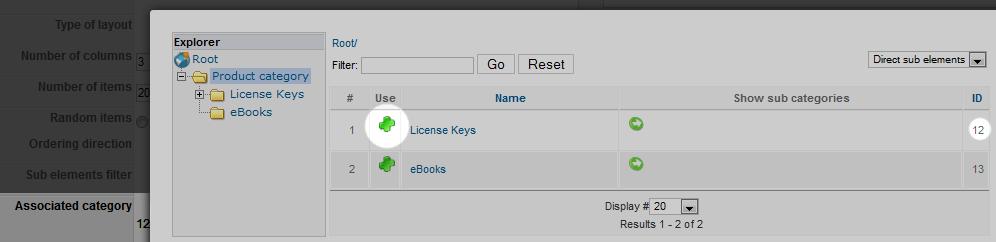
Regards,
Do you use the "+" button to select your wanted category ?
Regards,
Jerome - Obsidev.com
HikaMarket & HikaSerial developer / HikaShop core dev team.
Please Log in or Create an account to join the conversation.
13 years 11 months ago - 13 years 11 months ago #76463
by iocom
Replied by iocom on topic Problem to display product listing in main menu
No, i click just next on the name.
On your example, i click on "license keys" ...
And immediately when i apply, the name of my cat is replace by "2 product category" ...
Any idea ? bug ?
Thanks in advance
On your example, i click on "license keys" ...
And immediately when i apply, the name of my cat is replace by "2 product category" ...
Any idea ? bug ?
Thanks in advance
Last edit: 13 years 11 months ago by iocom.
Please Log in or Create an account to join the conversation.

13 years 11 months ago #76611
by Eliot
Replied by Eliot on topic Problem to display product listing in main menu
Hi there,
Try to click on the plus, clicking on the name doesn't have the same behavior
Try to click on the plus, clicking on the name doesn't have the same behavior
Please Log in or Create an account to join the conversation.
Time to create page: 0.062 seconds