

- Posts: 152
- Thank you received: 11
Three things
13 years 7 months ago - 13 years 7 months ago #91980
by holm76
I'm using firebug, forumsearch, dokumentation and then I ask.. It's so easy
Three things was created by holm76
Hello
Here again a few questions to make things easier ..
1. Can you in any way remove the basket when you have clicked on in the basket?
We have on our side only two sides, a front, where to shop and cart are, and a condition page, which also curve is visible.
But when clicked on, the basket would disappear, leaving only the statement of acquisition and input fields on the page. It is to prevent people click on the curve or alternatively change the button's color to make it less visible, while on the input side?
2. How do you get extra fields in the mail which is sent to the store owner when has made an order?
The extra fields that we have created, and we also want to mail address as entered comes in the email.
The same iwith your delivery address that comes only one address and it stands as the billing address, if the costumer write a new delevery address in at the checkout, this address is overwrite the billing address.
(It should be noted that we do not have user creation on our side. People should only be ordered on the side)
3. if we do not want to receive an email when a credit card payment is completed, it is then just delete the mail in hikashop> main> emails? Or will it mean that the system fails if you do it?
Thank you in advance
Here again a few questions to make things easier ..
1. Can you in any way remove the basket when you have clicked on in the basket?
We have on our side only two sides, a front, where to shop and cart are, and a condition page, which also curve is visible.
But when clicked on, the basket would disappear, leaving only the statement of acquisition and input fields on the page. It is to prevent people click on the curve or alternatively change the button's color to make it less visible, while on the input side?
2. How do you get extra fields in the mail which is sent to the store owner when has made an order?
The extra fields that we have created, and we also want to mail address as entered comes in the email.
The same iwith your delivery address that comes only one address and it stands as the billing address, if the costumer write a new delevery address in at the checkout, this address is overwrite the billing address.
(It should be noted that we do not have user creation on our side. People should only be ordered on the side)
3. if we do not want to receive an email when a credit card payment is completed, it is then just delete the mail in hikashop> main> emails? Or will it mean that the system fails if you do it?
Thank you in advance
I'm using firebug, forumsearch, dokumentation and then I ask.. It's so easy
Last edit: 13 years 7 months ago by holm76.
Please Log in or Create an account to join the conversation.

Less
More
- Posts: 12953
- Thank you received: 1778
13 years 7 months ago #92021
by Mohamed Thelji
Replied by Mohamed Thelji on topic Three things
Hi,
1.
I didn't really understood your answer, can you explain it to me with some screenshots ?
2.
If you want to add an extra field to your emails, you'll have to directly edit your email code through "Hikashop->System->Emails" (This feature is only available through the Business version of Hikashop).
Or if you just want to edit the TEXT of your mails, you'll be able to do that by editing your translation file ("Hikashop->System->Configuration->Language->'YOUR LANGUAGE FILE'"
3.
If you don't want a mail to be sent, you'll just have to unpublish it through "Hikashop->System->Emails"
1.
I didn't really understood your answer, can you explain it to me with some screenshots ?
2.
If you want to add an extra field to your emails, you'll have to directly edit your email code through "Hikashop->System->Emails" (This feature is only available through the Business version of Hikashop).
Or if you just want to edit the TEXT of your mails, you'll be able to do that by editing your translation file ("Hikashop->System->Configuration->Language->'YOUR LANGUAGE FILE'"
3.
If you don't want a mail to be sent, you'll just have to unpublish it through "Hikashop->System->Emails"
Please Log in or Create an account to join the conversation.
13 years 7 months ago #92116
by holm76
I'm using firebug, forumsearch, dokumentation and then I ask.. It's so easy
Replied by holm76 on topic Three things
I'm trying to be more precise.
On our side, we have actually seen only two pages. A front where hikashop is, there is only one product to buy. And another page with terms and conditions.
When the front submit an item to the basket and proceed to payment is my wish that the curve disappears from the page. The reason is that my colleagues are afraid that customers are confused about that, under the deal.
You can see hvqad I think the petrooil.dk
on No 2 which parameters should I add in the mail?
3. the confirmation is sent to the shop owner that I would like not to send. It is not mail list. But I can surely remove mail address for confirmation email?
On our side, we have actually seen only two pages. A front where hikashop is, there is only one product to buy. And another page with terms and conditions.
When the front submit an item to the basket and proceed to payment is my wish that the curve disappears from the page. The reason is that my colleagues are afraid that customers are confused about that, under the deal.
You can see hvqad I think the petrooil.dk
on No 2 which parameters should I add in the mail?
3. the confirmation is sent to the shop owner that I would like not to send. It is not mail list. But I can surely remove mail address for confirmation email?
I'm using firebug, forumsearch, dokumentation and then I ask.. It's so easy
Please Log in or Create an account to join the conversation.
13 years 7 months ago - 13 years 7 months ago #92330
by holm76
I'm using firebug, forumsearch, dokumentation and then I ask.. It's so easy
Replied by holm76 on topic Three things
And one more question.
Is it possible to do this, move the text behind the boxes, and delete the quantity field and +/-?
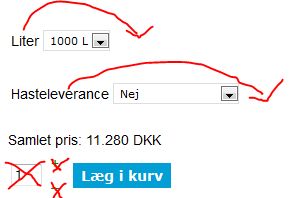
The first is characteristics and the second is an option
Is it possible to do this, move the text behind the boxes, and delete the quantity field and +/-?
The first is characteristics and the second is an option
I'm using firebug, forumsearch, dokumentation and then I ask.. It's so easy
Last edit: 13 years 7 months ago by holm76.
Please Log in or Create an account to join the conversation.

13 years 6 months ago #92680
by nicolas
Replied by nicolas on topic Three things
Hi,
I'm a bit confused by your messages but I'll try to answer them as best as possible.
2. Custom fields of the table "order" or of the table "item" are added automatically to the email. There is nothing to do for that. Which means that you must have created custom fields of another table ? Could you do a screenshot of your custom field configuration so that we can see what you did ? That would help us tell you what to do exactly to add it in the email.
3. Which email you don't want to be sent ? Could you do a screenshot so that we can be sure of what you're talking about ?
As mohamed already said, the order admin notification which is sent to the admin when an order is created can be disabled by simply unpublishing it via the menu System->Emails.
4. There is no option to swap the characteristic name and the dropdown. One simple solution though is to turn off the option "display characteristic name" in the configuration so that the characteristic name does not appear and instead change the characteristic values from 1000 L to 1000 liters, etc so that the characteristic name is directly in the characteristics values at the end.
5. If you don't want the quantity box and the - and + buttons, you can simply change the option "Display the quantity field on the product page" to "no input" in the configuration of HikaShop.
I'm a bit confused by your messages but I'll try to answer them as best as possible.
2. Custom fields of the table "order" or of the table "item" are added automatically to the email. There is nothing to do for that. Which means that you must have created custom fields of another table ? Could you do a screenshot of your custom field configuration so that we can see what you did ? That would help us tell you what to do exactly to add it in the email.
3. Which email you don't want to be sent ? Could you do a screenshot so that we can be sure of what you're talking about ?
As mohamed already said, the order admin notification which is sent to the admin when an order is created can be disabled by simply unpublishing it via the menu System->Emails.
4. There is no option to swap the characteristic name and the dropdown. One simple solution though is to turn off the option "display characteristic name" in the configuration so that the characteristic name does not appear and instead change the characteristic values from 1000 L to 1000 liters, etc so that the characteristic name is directly in the characteristics values at the end.
5. If you don't want the quantity box and the - and + buttons, you can simply change the option "Display the quantity field on the product page" to "no input" in the configuration of HikaShop.
Please Log in or Create an account to join the conversation.
13 years 6 months ago #93548
by holm76
I'm using firebug, forumsearch, dokumentation and then I ask.. It's so easy
Replied by holm76 on topic Three things
For additional fields, it is the last four from my address table I want to be with.
We also have a problem with that if the customer enters a different address for delivery, overwrites the billing address.
We are running with no registration and thus no with login. So it is better to omit the address field in checkoutflow?

We also have a problem with that if the customer enters a different address for delivery, overwrites the billing address.
We are running with no registration and thus no with login. So it is better to omit the address field in checkoutflow?
I'm using firebug, forumsearch, dokumentation and then I ask.. It's so easy
Please Log in or Create an account to join the conversation.
13 years 6 months ago #93771
by nicolas
Replied by nicolas on topic Three things
Hi,
If you have both a shipping and a billing address, both will be displayed on the checkout, on the order invoice and on the emails. There is no overwrite.
If you want to display the values of additional custom address fields, you need to edit the files "address_template" (several of them) via the menu Display->Views and add the corresponding tags like it is already done for the default custom address fields.
If you have both a shipping and a billing address, both will be displayed on the checkout, on the order invoice and on the emails. There is no overwrite.
If you want to display the values of additional custom address fields, you need to edit the files "address_template" (several of them) via the menu Display->Views and add the corresponding tags like it is already done for the default custom address fields.
Please Log in or Create an account to join the conversation.
13 years 6 months ago - 13 years 6 months ago #93829
by holm76
I'm using firebug, forumsearch, dokumentation and then I ask.. It's so easy
Replied by holm76 on topic Three things
The fields is now on and working, but is it also possible to insert the mail in the address_template - without the costumers have to write it 2 times?
And is it possible to insert how the products are paid in the mail?
I have now testet the billing and delevering address. It's not showed in the the admin recived.
I have made some scrrenshots.
The checkout, where the 2 addresses is
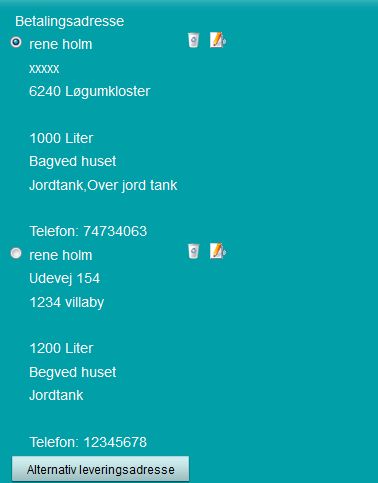
This is the recieved mail:
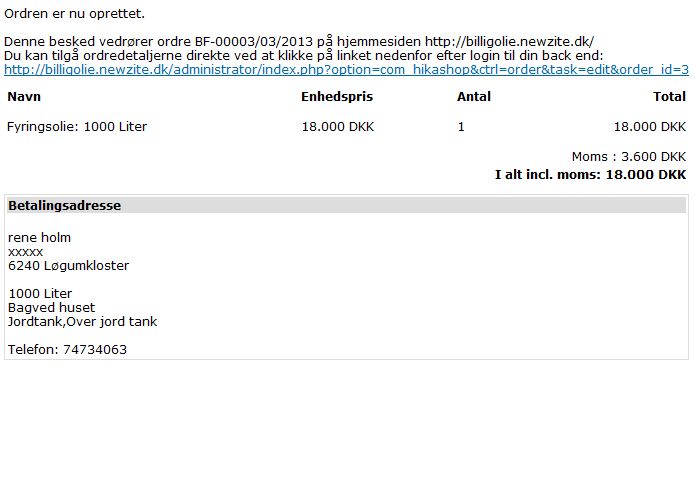
This is the order in backend

How the checkout is set up in backend
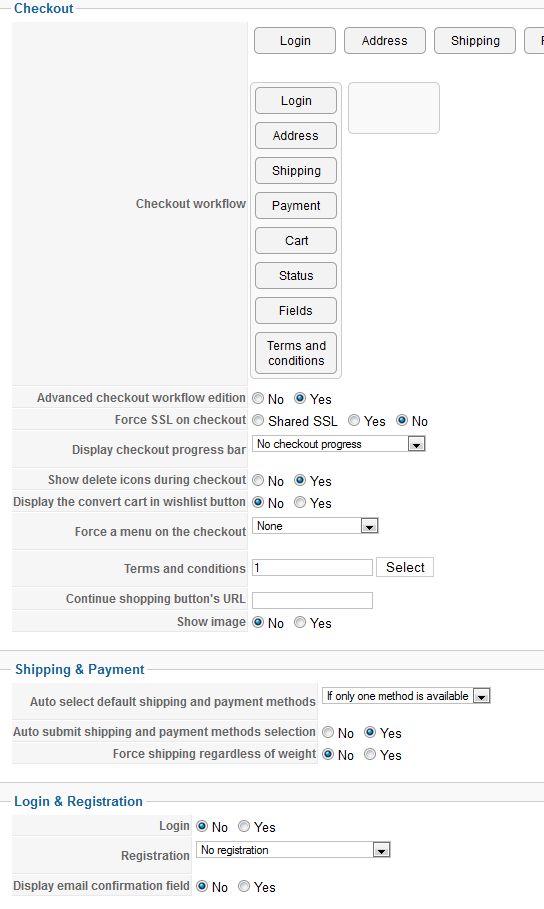
And is it possible to insert how the products are paid in the mail?
I have now testet the billing and delevering address. It's not showed in the the admin recived.
I have made some scrrenshots.
The checkout, where the 2 addresses is
This is the recieved mail:
This is the order in backend
How the checkout is set up in backend
I'm using firebug, forumsearch, dokumentation and then I ask.. It's so easy
Last edit: 13 years 6 months ago by holm76.
Please Log in or Create an account to join the conversation.

13 years 6 months ago #93908
by Xavier
Replied by Xavier on topic Three things
Hi,
You can edit the view "checkout/ address" to display the customer email. You can get it with:
In the mail, the payment method should be displayed thanks to the line:
Because on the order (backend) the both addresses are displayed, had you entered two different addresses ?
You can edit the view "checkout/ address" to display the customer email. You can get it with:
Code:
$fullUser = hikashop_loadUser(true);
$email = $fullUser->user_email;
In the mail, the payment method should be displayed thanks to the line:
Code:
if(bccomp($data->order_payment_price,0,5)){
echo '<tr><td colspan="'.$colspan.'" style="text-align:right">'.JText::_('HIKASHOP_PAYMENT_METHOD').' : '.$currencyHelper->format($data->order_payment_price,$data->order_currency_id).'</td></tr>';
}
You mean in the admin mail, or order in backend ?I have now testet the billing and delevering address. It's not showed in the the admin recived.
Because on the order (backend) the both addresses are displayed, had you entered two different addresses ?
Please Log in or Create an account to join the conversation.
13 years 6 months ago - 13 years 6 months ago #94058
by holm76
I'm using firebug, forumsearch, dokumentation and then I ask.. It's so easy
Replied by holm76 on topic Three things
Where to put the codes? Just in some php tags? I have tried to put them in the bottom of the template.
At 2. it's in the mail we recieve, when a new order is created on the site. Just as my image #2
At 2. it's in the mail we recieve, when a new order is created on the site. Just as my image #2
I'm using firebug, forumsearch, dokumentation and then I ask.. It's so easy
Last edit: 13 years 6 months ago by holm76.
Please Log in or Create an account to join the conversation.
13 years 6 months ago #94127
by Xavier
Replied by Xavier on topic Three things
Yes you have to put the code in php tags, and then add some code to display the email. Because the given code is just to have the mail, not to display it.
It require PHP knowledge.
2. Are you sure that the customers enter their shipping address ? Is it required in the checkout ? Because if not, it's not displayed in the email and in the backend > orders the billing is displayed bu default in the shipping one.
It require PHP knowledge.
2. Are you sure that the customers enter their shipping address ? Is it required in the checkout ? Because if not, it's not displayed in the email and in the backend > orders the billing is displayed bu default in the shipping one.
Please Log in or Create an account to join the conversation.
13 years 6 months ago #94253
by holm76
I'm using firebug, forumsearch, dokumentation and then I ask.. It's so easy
Replied by holm76 on topic Three things
Ok thats not my strongest side.
I have made it with a extra field, where I ask the costumers to put in there mail for a security..
2. As you can see at my screenshots I have made it in a checkout. Enteret 2 addresses and then its not showed in the mail sending out but its in the backend
I have made it with a extra field, where I ask the costumers to put in there mail for a security..
2. As you can see at my screenshots I have made it in a checkout. Enteret 2 addresses and then its not showed in the mail sending out but its in the backend
I'm using firebug, forumsearch, dokumentation and then I ask.. It's so easy
Please Log in or Create an account to join the conversation.
13 years 6 months ago #94484
by holm76
I have solved the problem here by my self.. I have just downloaded the free version of modulemanager from nonumbers.nl
there I have set the URLs under the checkout mot to be showed. It works
I'm using firebug, forumsearch, dokumentation and then I ask.. It's so easy
Replied by holm76 on topic Three things
holm76 wrote: 1. Can you in any way remove the basket when you have clicked on in the basket?
We have on our side only two sides, a front, where to shop and cart are, and a condition page, which also curve is visible.
But when clicked on, the basket would disappear, leaving only the statement of acquisition and input fields on the page. It is to prevent people click on the curve or alternatively change the button's color to make it less visible, while on the input side?
I have solved the problem here by my self.. I have just downloaded the free version of modulemanager from nonumbers.nl
there I have set the URLs under the checkout mot to be showed. It works
I'm using firebug, forumsearch, dokumentation and then I ask.. It's so easy
The following user(s) said Thank You: Xavier
Please Log in or Create an account to join the conversation.
13 years 6 months ago #95000
by holm76
I'm using firebug, forumsearch, dokumentation and then I ask.. It's so easy
Replied by holm76 on topic Three things
I have still some problems with the address
Here I have af payment address in top, and a delevery address in the bottom.
They are different.
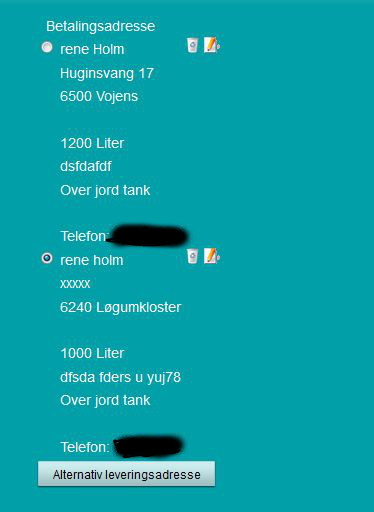
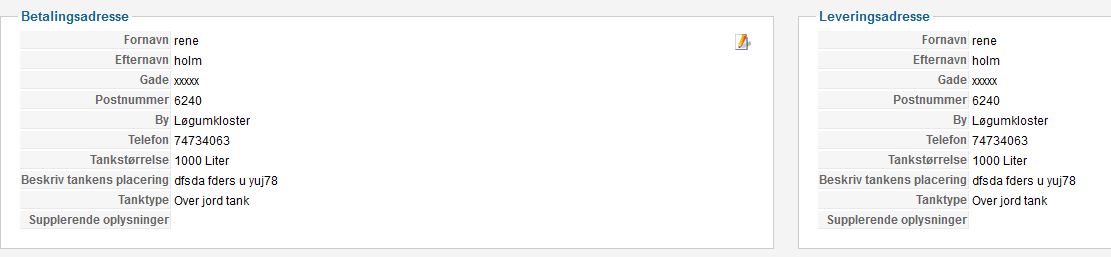
But both in the backend and in the order created mail, the payment address is missing, and there is only showed the delevery address.
backend there is my deleveryaddress the same as the payment address
mail here is only the delevery address and it's showed as the payment address
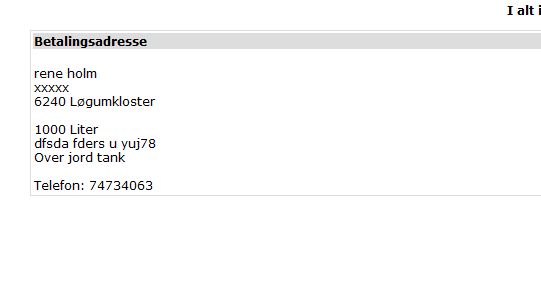
We use no registration and no account setup.
Here I have af payment address in top, and a delevery address in the bottom.
They are different.
But both in the backend and in the order created mail, the payment address is missing, and there is only showed the delevery address.
backend there is my deleveryaddress the same as the payment address
mail here is only the delevery address and it's showed as the payment address
We use no registration and no account setup.
I'm using firebug, forumsearch, dokumentation and then I ask.. It's so easy
Please Log in or Create an account to join the conversation.
13 years 6 months ago #95314
by nicolas
Replied by nicolas on topic Three things
That should not happen unless you have to shipping method selected during the checkout.
Would that be the case ?
Normally, an order with a shipping address should have a shipping method selected.
Could you give a link to the shop so that we can see that ?
Would that be the case ?
Normally, an order with a shipping address should have a shipping method selected.
Could you give a link to the shop so that we can see that ?
Please Log in or Create an account to join the conversation.
13 years 6 months ago - 13 years 6 months ago #95409
by holm76
I'm using firebug, forumsearch, dokumentation and then I ask.. It's so easy
Replied by holm76 on topic Three things
okay
I don't have defined the shipping method in the checkout flow. I'll try to put it on.
EDIT: It works now thx for your help
I don't have defined the shipping method in the checkout flow. I'll try to put it on.
EDIT: It works now thx for your help
I'm using firebug, forumsearch, dokumentation and then I ask.. It's so easy
Last edit: 13 years 6 months ago by holm76.
Please Log in or Create an account to join the conversation.
13 years 6 months ago #96082
by holm76
Xavier can you tell me where to place this code?
I have tried to place it inside <td></td> tags, between the </tr><tr> tags and in the bottom of the table, around the ORDER_ADMIN_NOTIFICATION mail.. The only I get i nothing displayed, except the first time where I forgot the php tags, there where the text showed..
I'm using firebug, forumsearch, dokumentation and then I ask.. It's so easy
Replied by holm76 on topic Three things
Xavier wrote: In the mail, the payment method should be displayed thanks to the line:
Code:if(bccomp($data->order_payment_price,0,5)){ echo '<tr><td colspan="'.$colspan.'" style="text-align:right">'.JText::_('HIKASHOP_PAYMENT_METHOD').' : '.$currencyHelper->format($data->order_payment_price,$data->order_currency_id).'</td></tr>'; }
Xavier can you tell me where to place this code?
I have tried to place it inside <td></td> tags, between the </tr><tr> tags and in the bottom of the table, around the ORDER_ADMIN_NOTIFICATION mail.. The only I get i nothing displayed, except the first time where I forgot the php tags, there where the text showed..
I'm using firebug, forumsearch, dokumentation and then I ask.. It's so easy
Please Log in or Create an account to join the conversation.
13 years 6 months ago #96138
by Xavier
Replied by Xavier on topic Three things
You have to place it inside the <table> </table> tags. There is already <tr> and <td> inside the code.
But if the payment price is free, it's not displayed. To display it always, you have to remove the "if" condition "if(bccomp($data->order_payment_price,0,5)){"
Don't forget to remove the "}" too.
But if the payment price is free, it's not displayed. To display it always, you have to remove the "if" condition "if(bccomp($data->order_payment_price,0,5)){"
Don't forget to remove the "}" too.
Please Log in or Create an account to join the conversation.
13 years 6 months ago - 13 years 6 months ago #96155
by holm76
I'm using firebug, forumsearch, dokumentation and then I ask.. It's so easy
Replied by holm76 on topic Three things
I don't know what, but something is going wrong..
Nothing is displayed..
On the test site I use bank transfer, but as I see the code it goes for both bank transfer and creditcard.
EDIT: I have now tried to put the code in without the "if" and then the text is showing, but it tell how much the price for payment is, not which payment option the costumer has chosen..
Nothing is displayed..
On the test site I use bank transfer, but as I see the code it goes for both bank transfer and creditcard.
Code:
<?php
/**
* @package HikaShop for Joomla!
* @version 2.1.1
* @author hikashop.com
* @copyright (C) 2010-2012 HIKARI SOFTWARE. All rights reserved.
* @license GNU/GPLv3 http://www.gnu.org/licenses/gpl-3.0.html
*/
defined('_JEXEC') or die('Restricted access');
?> <div style="background-color: #ffffff; font-family: Verdana, Arial, Helvetica, sans-serif;font-size:12px; color: #000000; width: 100%;">
<table style="margin: auto;font-family: Verdana, Arial, Helvetica, sans-serif;font-size:12px;" border="0" cellspacing="0" cellpadding="0">
<tbody>
<tr>
<td height="10">
</td>
</tr>
<?php if(bccomp($data->order_payment_price,0,5)){
echo '<tr><td colspan="'.$colspan.'" style="text-align:right">'.JText::_('HIKASHOP_PAYMENT_METHOD').' : '.$currencyHelper->format($data->order_payment_price,$data->order_currency_id).'</td></tr>';
}?>
<tr>
<td>
<br/>
<br/>
<?php
$url = HIKASHOP_LIVE.'administrator/index.php
EDIT: I have now tried to put the code in without the "if" and then the text is showing, but it tell how much the price for payment is, not which payment option the costumer has chosen..
I'm using firebug, forumsearch, dokumentation and then I ask.. It's so easy
Last edit: 13 years 6 months ago by holm76.
Please Log in or Create an account to join the conversation.
13 years 6 months ago #96590
by nicolas
Replied by nicolas on topic Three things
The code should be:
Code:
if(bccomp($data->order_payment_method,0,5)){
echo '<tr><td colspan="'.$colspan.'" style="text-align:right">'.JText::_('HIKASHOP_PAYMENT_METHOD').' : '.$data->order_payment_method.'</td></tr>';
}
Please Log in or Create an account to join the conversation.
Time to create page: 0.368 seconds