
- Posts: 46
- Thank you received: 0
Added quantity field, need formattation
- giorgiofox
-
 Topic Author
- Offline
Less
More
13 years 4 months ago #109040
by giorgiofox
Added quantity field, need formattation was created by giorgiofox
Hello,
I've succesfully added the quentity field in list, but how I can center and put in another line the cart button?
See attached image: I need to center quantity field, and put after, down, the add to cart button
Thanks!
I've succesfully added the quentity field in list, but how I can center and put in another line the cart button?
See attached image: I need to center quantity field, and put after, down, the add to cart button
Thanks!
Please Log in or Create an account to join the conversation.

13 years 4 months ago #109051
by Eliot
Replied by Eliot on topic Added quantity field, need formattation
Hi there,
This is a css issue.
You should take a look at our documentation: www.hikashop.com/fr/support/documentation/faq.html#css
You can still ask us if you need some help
This is a css issue.
You should take a look at our documentation: www.hikashop.com/fr/support/documentation/faq.html#css
You can still ask us if you need some help
Please Log in or Create an account to join the conversation.
- giorgiofox
-
Topic Author
- Offline
Less
More
- Posts: 46
- Thank you received: 0
13 years 4 months ago #109056
by giorgiofox
Replied by giorgiofox on topic Added quantity field, need formattation
Uhm.. maybe please can you help me to solve this?
Please Log in or Create an account to join the conversation.

13 years 4 months ago #109057
by nicolas
Replied by nicolas on topic Added quantity field, need formattation
We would need a link to that page to help you more precisely as it depends on the CSS on your website which we don't know.
Please Log in or Create an account to join the conversation.
- giorgiofox
-
Topic Author
- Offline
Less
More
- Posts: 46
- Thank you received: 0
13 years 4 months ago #109058
by giorgiofox
Replied by giorgiofox on topic Added quantity field, need formattation
Please Log in or Create an account to join the conversation.
13 years 4 months ago #109079
by nicolas
Replied by nicolas on topic Added quantity field, need formattation
It's indeed because of the CSS of your template.
You can counteract that by add that CSS:
.hikashop_product_quantity_field{ padding: 0 !important; }
You can counteract that by add that CSS:
.hikashop_product_quantity_field{ padding: 0 !important; }
The following user(s) said Thank You: giorgiofox
Please Log in or Create an account to join the conversation.
- giorgiofox
-
Topic Author
- Offline
Less
More
- Posts: 46
- Thank you received: 0
13 years 4 months ago #109087
by giorgiofox
Replied by giorgiofox on topic Added quantity field, need formattation
Thanks, but I can't understand what file exactly I need to modify adding that line.
I've tried many css, with no success.
I've tried many css, with no success.
Please Log in or Create an account to join the conversation.
13 years 4 months ago #109090
by nicolas
Replied by nicolas on topic Added quantity field, need formattation
As explained in the documentation link Eliot gave you, you can add that code in the frontend CSS file of HikaShop via the Display tab of the configuration.
Please Log in or Create an account to join the conversation.
- giorgiofox
-
Topic Author
- Offline
Less
More
- Posts: 46
- Thank you received: 0
13 years 4 months ago #109093
by giorgiofox
Replied by giorgiofox on topic Added quantity field, need formattation
Hello
I've supposed that and also already tried.
See attachment to check if I done it tight please.
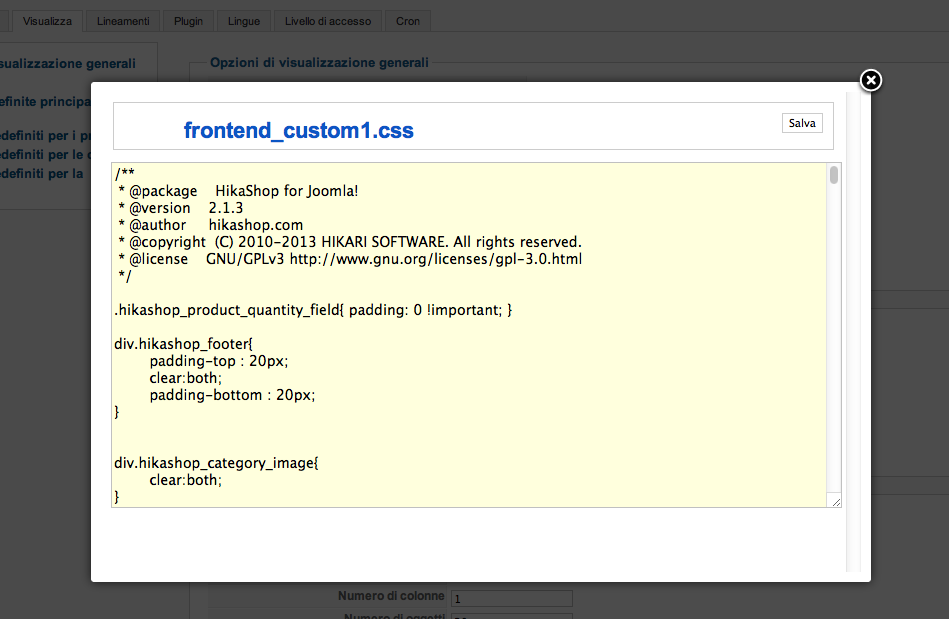
I've supposed that and also already tried.
See attachment to check if I done it tight please.
Please Log in or Create an account to join the conversation.
13 years 4 months ago #109103
by Eliot
Replied by Eliot on topic Added quantity field, need formattation
You should put it at the end of the file and make sure you saved the configuration with this file selected.
Please Log in or Create an account to join the conversation.
- giorgiofox
-
Topic Author
- Offline
Less
More
- Posts: 46
- Thank you received: 0
13 years 4 months ago #109109
by giorgiofox
Replied by giorgiofox on topic Added quantity field, need formattation
Done, but nothing changed 
Please Log in or Create an account to join the conversation.
13 years 4 months ago #109127
by nicolas
Replied by nicolas on topic Added quantity field, need formattation
I can see that the file used on your website is frontend_custom.css while you're editing the file frontend_custom1.css
So you didn't select the correct CSS file in the configuration and saved it.
So you didn't select the correct CSS file in the configuration and saved it.
Please Log in or Create an account to join the conversation.
- giorgiofox
-
Topic Author
- Offline
Less
More
- Posts: 46
- Thank you received: 0
13 years 4 months ago #109142
by giorgiofox
Replied by giorgiofox on topic Added quantity field, need formattation
No! I've changed it, but I have also modified it. I've simply tried another file.
The frontend_custom.css is modified.
The frontend_custom.css is modified.
Please Log in or Create an account to join the conversation.
13 years 4 months ago #109143
by nicolas
Replied by nicolas on topic Added quantity field, need formattation
You didn't add the correct code.
I see that you added:
.hikashop_product_quantity_field{ padding: 110 !important; }
I see that you added:
.hikashop_product_quantity_field{ padding: 110 !important; }
Please Log in or Create an account to join the conversation.
- giorgiofox
-
Topic Author
- Offline
Less
More
- Posts: 46
- Thank you received: 0
13 years 4 months ago #109149
by giorgiofox
Replied by giorgiofox on topic Added quantity field, need formattation
Yes, "110" is an experiment to see if anything changes.
Now is again "0" but nothing changed.
Now is again "0" but nothing changed.
Please Log in or Create an account to join the conversation.
13 years 4 months ago #109175
by nicolas
Replied by nicolas on topic Added quantity field, need formattation
Try like that:
.hikashop_product_quantity_field{ padding: 0px !important; }
.hikashop_product_quantity_field{ padding: 0px !important; }
Please Log in or Create an account to join the conversation.
- giorgiofox
-
Topic Author
- Offline
Less
More
- Posts: 46
- Thank you received: 0
13 years 4 months ago #109182
by giorgiofox
Replied by giorgiofox on topic Added quantity field, need formattation
Tried, no success
Nothing changed again.
Nothing changed again.
Please Log in or Create an account to join the conversation.
- giorgiofox
-
Topic Author
- Offline
Less
More
- Posts: 46
- Thank you received: 0
13 years 4 months ago #109269
by giorgiofox
Replied by giorgiofox on topic Added quantity field, need formattation
Any other idea please?
Thanks in advance
Giorgio
Thanks in advance
Giorgio
Please Log in or Create an account to join the conversation.
13 years 4 months ago #109272
by nicolas
Replied by nicolas on topic Added quantity field, need formattation
I see that there is also a margin set by your template so you also need that CSS:
.hikashop_product_quantity_field {
margin: 0px !important;
}
Please note that this comes from your template CSS, so you should see with them normally...
.hikashop_product_quantity_field {
margin: 0px !important;
}
Please note that this comes from your template CSS, so you should see with them normally...
Please Log in or Create an account to join the conversation.
- giorgiofox
-
Topic Author
- Offline
Less
More
- Posts: 46
- Thank you received: 0
13 years 4 months ago #109277
by giorgiofox
Replied by giorgiofox on topic Added quantity field, need formattation
Done, but now is attached to left!
I really need that the quantity filed, go in another line.
Please note that If I check html, I can see a simple table with two column! I need two row!
Thanks again
Giorgio
I really need that the quantity filed, go in another line.
Please note that If I check html, I can see a simple table with two column! I need two row!
Thanks again
Giorgio
Please Log in or Create an account to join the conversation.
Time to create page: 0.197 seconds