

- Posts: 52
- Thank you received: 3
create a canonical URL
12 years 10 months ago #132458
by yolknet
create a canonical URL was created by yolknet
Hi, I have a quite simple question but cannot find the answer. When I create a canonical URL in HIKAshop, what do I have to fill in?
www.sitename.nl/categoryname/product/productname
or:
/categoryname/product/productname
www.sitename.nl/categoryname/product/productname
or:
/categoryname/product/productname
Please Log in or Create an account to join the conversation.

12 years 10 months ago - 12 years 10 months ago #132503
by Jerome
Jerome - Obsidev.com
HikaMarket & HikaSerial developer / HikaShop core dev team.
Replied by Jerome on topic create a canonical URL
Hi,
The second one.
(But the first one should work too)
Regards,
The second one.
(But the first one should work too)
Regards,
Jerome - Obsidev.com
HikaMarket & HikaSerial developer / HikaShop core dev team.
Last edit: 12 years 10 months ago by Jerome.
The following user(s) said Thank You: yolknet
Please Log in or Create an account to join the conversation.
12 years 10 months ago #132509
by yolknet
Replied by yolknet on topic create a canonical URL
Thank you. So we created the right canonical urls to the products in this website. Then we have another problem: six different urls show the same product, as you can see in the printscreen. Do you have any idea what goes wrong?
The canonical url is: nl/spellen-en-handleidingen/product/10-kwaliteitenspel
Website url: www.kwaliteitenspel.nl
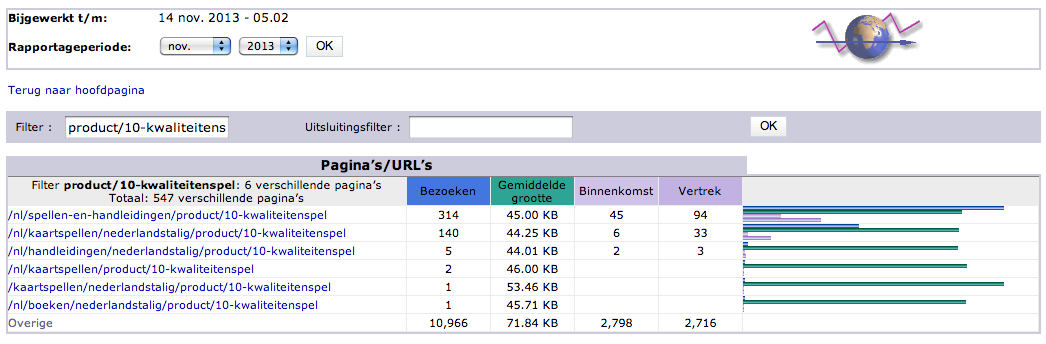
The canonical url is: nl/spellen-en-handleidingen/product/10-kwaliteitenspel
Website url: www.kwaliteitenspel.nl
Please Log in or Create an account to join the conversation.

12 years 10 months ago #132545
by Xavier
Replied by Xavier on topic create a canonical URL
Hi,
This seems to be a common behavior, if you have many menus which can redirects to the products, so there is many different urls. That can't be changed, unless you use only one menu.
And that's why the canonicals are there, to improve the SEO when there is many links. Google and the other robots will reference this product just with the canonical url when parsing the site.
This seems to be a common behavior, if you have many menus which can redirects to the products, so there is many different urls. That can't be changed, unless you use only one menu.
And that's why the canonicals are there, to improve the SEO when there is many links. Google and the other robots will reference this product just with the canonical url when parsing the site.
Please Log in or Create an account to join the conversation.
12 years 10 months ago #133467
by yolknet
Replied by yolknet on topic create a canonical URL
Hi, it still isn't really clear for me.
We did setup the canonical url for the products in the site above. For example: /nl/spellen-en-handleidingen/product/10-kwaliteitenspel. But there are still different urls; the url doesn't adjust automatically. What goes wrong?
Another question: how important is the backslash in the beginning of the url?
1. /nl/spellen-en-handleidingen/product/10-kwaliteitenspel or:
2. nl/spellen-en-handleidingen/product/10-kwaliteitenspel
We did setup the canonical url for the products in the site above. For example: /nl/spellen-en-handleidingen/product/10-kwaliteitenspel. But there are still different urls; the url doesn't adjust automatically. What goes wrong?
Another question: how important is the backslash in the beginning of the url?
1. /nl/spellen-en-handleidingen/product/10-kwaliteitenspel or:
2. nl/spellen-en-handleidingen/product/10-kwaliteitenspel
Please Log in or Create an account to join the conversation.
12 years 10 months ago #133498
by Xavier
Replied by Xavier on topic create a canonical URL
Hi,
It's normal that the product can be reached from different urls.
The canonical url is just for SEO improvement. Even if the product is reached from different URLs, the SEO url is only the one set in the canonical field.
To have only one url to reach the product, it require to have only one menu which can link to this product, and in the modules parameters set the "menu" option to this menu. This is generally possible only for very small shops.
The backslash is not very important, you can put it or not at the start of the url.
We call a function which securise the url, it add the domain name, extension and the backslash if it's missing.
It's normal that the product can be reached from different urls.
The canonical url is just for SEO improvement. Even if the product is reached from different URLs, the SEO url is only the one set in the canonical field.
To have only one url to reach the product, it require to have only one menu which can link to this product, and in the modules parameters set the "menu" option to this menu. This is generally possible only for very small shops.
The backslash is not very important, you can put it or not at the start of the url.
We call a function which securise the url, it add the domain name, extension and the backslash if it's missing.
Please Log in or Create an account to join the conversation.
Time to create page: 0.225 seconds