
- Posts: 33
- Thank you received: 1
Client VAT in Invoice
- ceccarelli
-
 Topic Author
- Offline
Less
More
10 years 10 months ago #223409
by ceccarelli
Client VAT in Invoice was created by ceccarelli
Hi i have hikashop essentials and i'm trying to display the vat number of the client in the invoice just after his address and name
in backend i have activated this field... how to get it in the invoice now?
in backend i have activated this field... how to get it in the invoice now?
Please Log in or Create an account to join the conversation.

10 years 10 months ago #223456
by nicolas
Replied by nicolas on topic Client VAT in Invoice
Hi,
You need to edit the file "address_template" for both your frontend and backend template via the menu Display>Views and then add the tag corresponding to your custom field in there.
You need to edit the file "address_template" for both your frontend and backend template via the menu Display>Views and then add the tag corresponding to your custom field in there.
Please Log in or Create an account to join the conversation.
- ceccarelli
-
Topic Author
- Offline
Less
More
- Posts: 33
- Thank you received: 1
10 years 10 months ago #223500
by ceccarelli
Replied by ceccarelli on topic Client VAT in Invoice
Thankyou very much done easily and now working 
Please Log in or Create an account to join the conversation.
- ceccarelli
-
Topic Author
- Offline
Less
More
- Posts: 33
- Thank you received: 1
10 years 10 months ago #223671
by ceccarelli
Replied by ceccarelli on topic Client VAT in Invoice
Sorry another question, i have to add a text (law stuff) at the bottom of my invoice
where can i do that?
i use the pdf plugin
where can i do that?
i use the pdf plugin
Please Log in or Create an account to join the conversation.
- ceccarelli
-
Topic Author
- Offline
Less
More
- Posts: 33
- Thank you received: 1
10 years 10 months ago #223680
by ceccarelli
Replied by ceccarelli on topic Client VAT in Invoice
actually i could do that in the invoice from backend but not from forntend....the one the client print
Please Log in or Create an account to join the conversation.
10 years 10 months ago #223717
by nicolas
Replied by nicolas on topic Client VAT in Invoice
Hi,
The PDF invoice plugin file is plugins/hikashop/attachinvoice/attachinvoice/invoice.php
It's the same for both the frontend and the backend. So if you want to add text in there, you should do it in that file and you would see the change in the PDF regardless from where you get it.
The PDF invoice plugin file is plugins/hikashop/attachinvoice/attachinvoice/invoice.php
It's the same for both the frontend and the backend. So if you want to add text in there, you should do it in that file and you would see the change in the PDF regardless from where you get it.
Please Log in or Create an account to join the conversation.
- ceccarelli
-
Topic Author
- Offline
Less
More
- Posts: 33
- Thank you received: 1
10 years 10 months ago #223735
by ceccarelli
Replied by ceccarelli on topic Client VAT in Invoice
Sorry... i have opened another question in another topic but i think is better to do it in this thread:
I have different invoices layout outputed form forntend, backend and backend pdf plugin print invoice function in orders listing
i just would like to have one unique output everywhere...
I have different invoices layout outputed form forntend, backend and backend pdf plugin print invoice function in orders listing
i just would like to have one unique output everywhere...
Please Log in or Create an account to join the conversation.
10 years 10 months ago #223764
by nicolas
Replied by nicolas on topic Client VAT in Invoice
That should be the case, unless you deactivated the settings of the PDF invoice plugin so please check them via the Joomla plugins manager.
If that doesn't help, please provide screenshots of what you get where so that we can better understand the issue.
If that doesn't help, please provide screenshots of what you get where so that we can better understand the issue.
Please Log in or Create an account to join the conversation.
- ceccarelli
-
Topic Author
- Offline
Less
More
- Posts: 33
- Thank you received: 1
10 years 10 months ago - 10 years 10 months ago #223829
by ceccarelli
Replied by ceccarelli on topic Client VAT in Invoice
ok configured the plugin correctly! Thankyou!
now i need to solve a orrible layout mismatch....
se the FATTURA and the NUMERO FATTURA in this image below... how can i solve that?
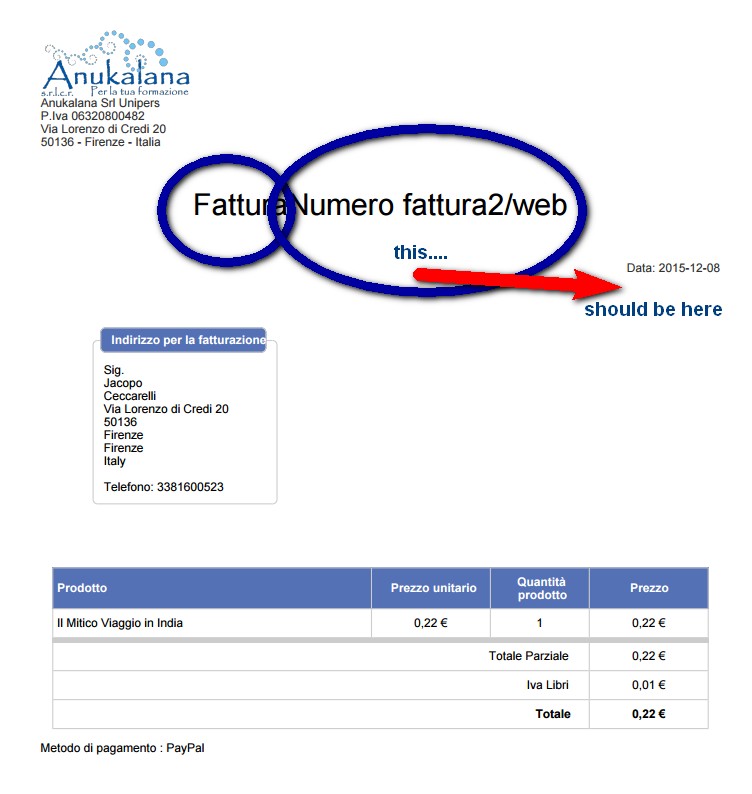
now i need to solve a orrible layout mismatch....
se the FATTURA and the NUMERO FATTURA in this image below... how can i solve that?
Last edit: 10 years 10 months ago by ceccarelli.
Please Log in or Create an account to join the conversation.
10 years 10 months ago #223946
by nicolas
Replied by nicolas on topic Client VAT in Invoice
Hi,
You need to edit the file plugins/hikashop/attachinvoice/attachinvoice/invoice.php and change the code displaying the invoice number:
You need to edit the file plugins/hikashop/attachinvoice/attachinvoice/invoice.php and change the code displaying the invoice number:
Code:
<div class="invoicetitle"><?php echo JText::_('INVOICE').$number.$order->order_invoice_number; ?></div>
Please Log in or Create an account to join the conversation.
- ceccarelli
-
Topic Author
- Offline
Less
More
- Posts: 33
- Thank you received: 1
10 years 10 months ago #223947
by ceccarelli
Replied by ceccarelli on topic Client VAT in Invoice
oh my god
found file and string but i'm a php analphabet
could you just tell me what string to plache there instead?
i would be super grateful for that
found file and string but i'm a php analphabet
could you just tell me what string to plache there instead?
i would be super grateful for that
Please Log in or Create an account to join the conversation.
10 years 10 months ago #223986
by nicolas
Replied by nicolas on topic Client VAT in Invoice
Hi,
It's simple really. You don't need to know PHP.
Change the class of that line from invoicetitle to date so that it uses the same formatting as the date.
It's simple really. You don't need to know PHP.
Change the class of that line from invoicetitle to date so that it uses the same formatting as the date.
Please Log in or Create an account to join the conversation.
- ceccarelli
-
Topic Author
- Offline
Less
More
- Posts: 33
- Thank you received: 1
10 years 10 months ago #224001
by ceccarelli
Replied by ceccarelli on topic Client VAT in Invoice
thankyou now is in the right place but the rendering is strange
fatturanumerofattura2/web
it should be:
fattura numero 2/web
so with no repetitions and the appropriate spaces.... where can i fix that?
thankyou for your patience
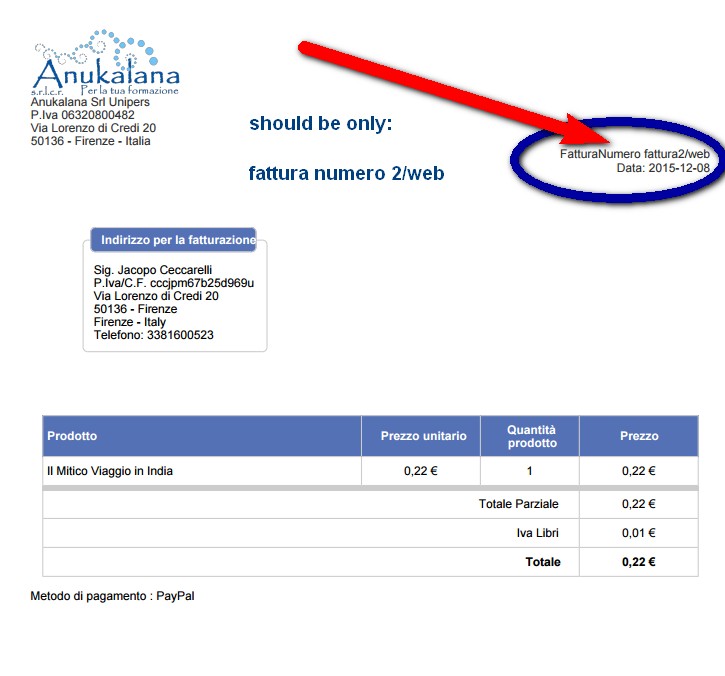
fatturanumerofattura2/web
it should be:
fattura numero 2/web
so with no repetitions and the appropriate spaces.... where can i fix that?
thankyou for your patience
Please Log in or Create an account to join the conversation.
10 years 10 months ago #224021
by nicolas
Replied by nicolas on topic Client VAT in Invoice
Hi,
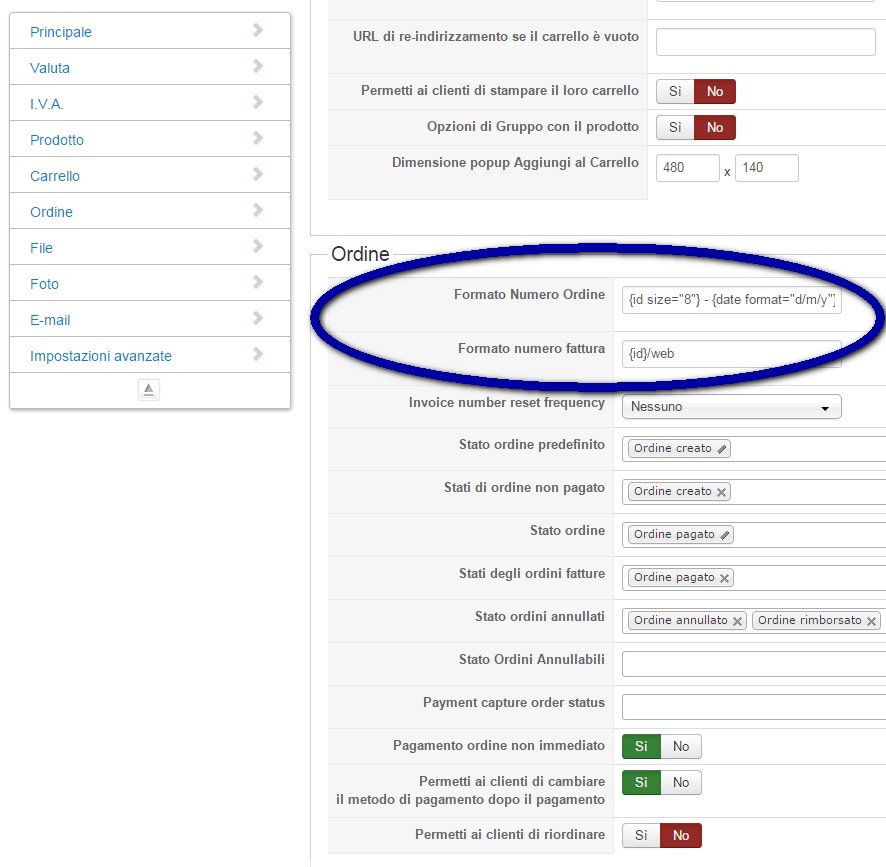
The fattura in the middle comes from what you've written in the "order number format" or "invoice number format" settings of the HikaShop configuration.
So please remove it from there and that should fix it for new orders.
The fattura in the middle comes from what you've written in the "order number format" or "invoice number format" settings of the HikaShop configuration.
So please remove it from there and that should fix it for new orders.
Please Log in or Create an account to join the conversation.
- ceccarelli
-
Topic Author
- Offline
Less
More
- Posts: 33
- Thank you received: 1
10 years 10 months ago #224032
by ceccarelli
Replied by ceccarelli on topic Client VAT in Invoice
You mean here? there is no fattura in the fields....
Please Log in or Create an account to join the conversation.
10 years 10 months ago #224062
by nicolas
Replied by nicolas on topic Client VAT in Invoice
Then it comes from a modification you made in either the invoice file or in the translation overrides.
Please understand that since you've added that on your end, you should know better than us how you added it there. On our end, we're just guessing what is the most likely thing you might have done to get that result.
Please understand that since you've added that on your end, you should know better than us how you added it there. On our end, we're just guessing what is the most likely thing you might have done to get that result.
Please Log in or Create an account to join the conversation.
Time to create page: 0.162 seconds