

- Posts: 267
- Thank you received: 5
How can I insert a column with product code in the backend in the new version 3
8 years 11 months ago - 6 years 2 months ago #279676
by dvddvd
How can I insert a column with product code in the backend in the new version 3 was created by dvddvd
-- HikaShop version -- : 3.2
-- Joomla version -- : 3.8
-- PHP version -- : 7.1
-- Browser(s) name and version -- : chrome
Hello,
In previous verions, I could insert a column in the backend, with the product code, as you can see below:
[attachme
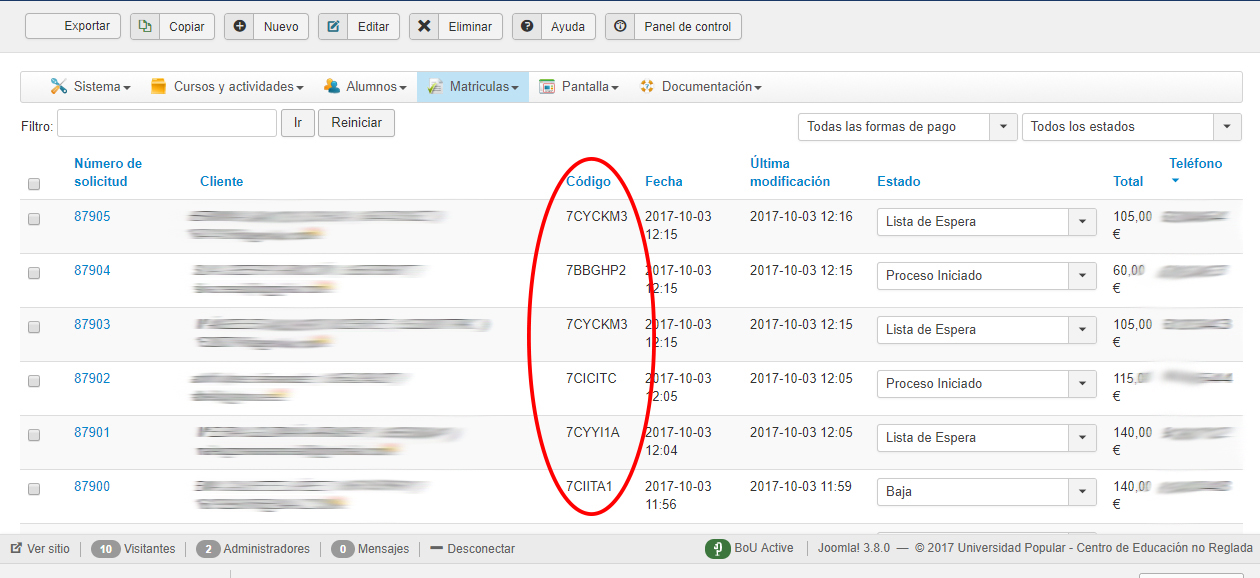
In the current version 3.2, I tried several ways to make this modification, but I do not get the same result.
Thank you so much
-- Joomla version -- : 3.8
-- PHP version -- : 7.1
-- Browser(s) name and version -- : chrome
Hello,
In previous verions, I could insert a column in the backend, with the product code, as you can see below:
[attachme
In the current version 3.2, I tried several ways to make this modification, but I do not get the same result.
Thank you so much
Last edit: 6 years 2 months ago by dvddvd. Reason: The image show personal data
Please Log in or Create an account to join the conversation.

Less
More
- Posts: 12953
- Thank you received: 1778
8 years 11 months ago #279679
by Mohamed Thelji
Replied by Mohamed Thelji on topic How can I insert a column with product code in the backend in the new version 3
Hello,
Nothing changed since previous versions for the back-end product listing, so the solution will still be to directly adapt the code of the "Listing" file of the "Product" view of your front-end template.
Nothing changed since previous versions for the back-end product listing, so the solution will still be to directly adapt the code of the "Listing" file of the "Product" view of your front-end template.
Please Log in or Create an account to join the conversation.
6 years 2 months ago #321371
by dvddvd
Replied by dvddvd on topic How can I insert a column with product code in the backend in the new version 3
Hello,
Hello,
I have updated to HikaShop Business version: 4.3.0.
With your excellent help, I made some modifications to the files:
administrator / components / com_hikashop / views / order / view.html.php
and
screen -> Views -> order -> listing
Some changes so that the username, address telephone and product code fields appear in the list of orders in the administration.
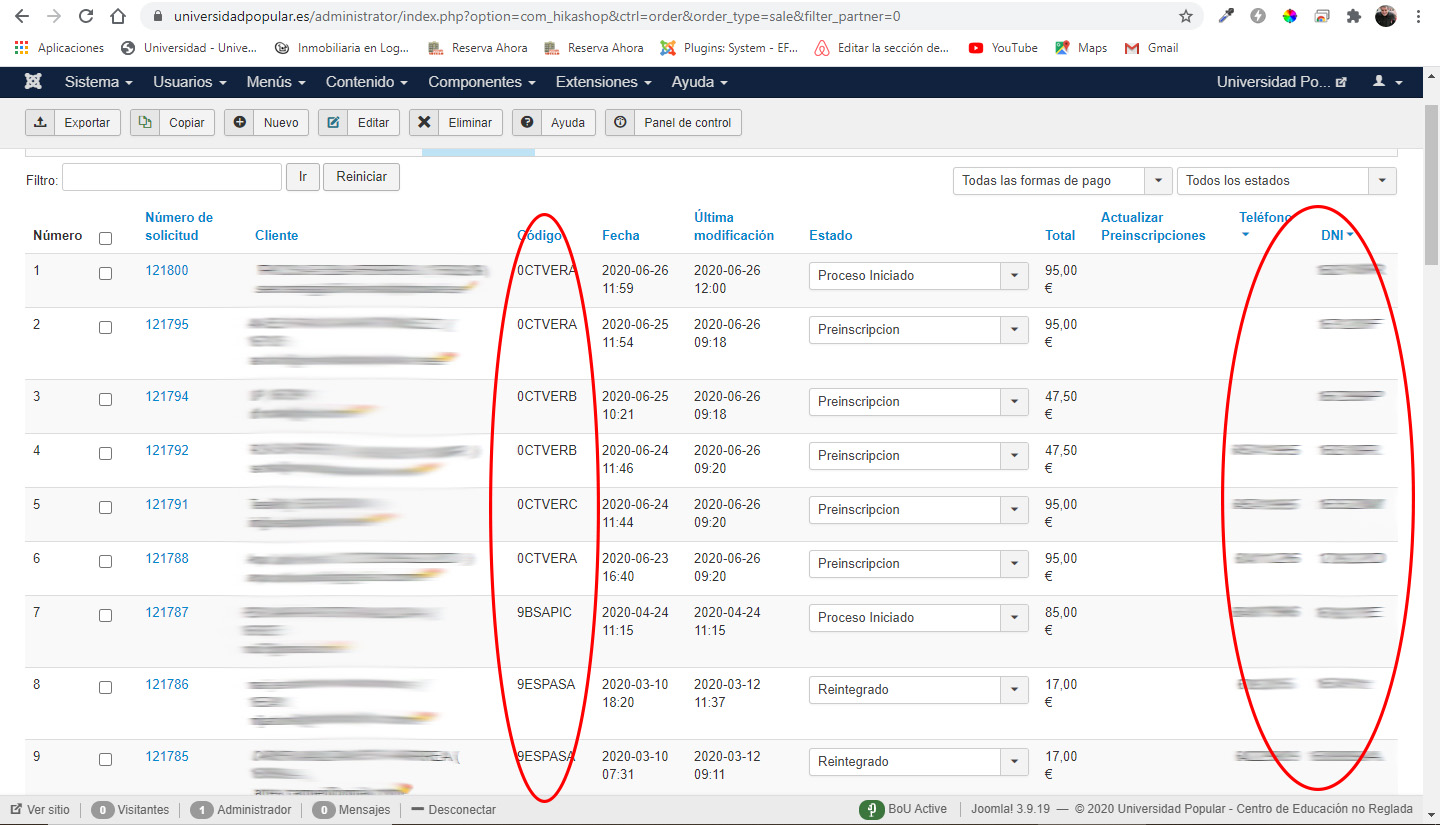
Those fields continue to appear in the order list, but when placing a new order from the administration, assigning a user and adding their data, the fields are not filled out, they are left blank.
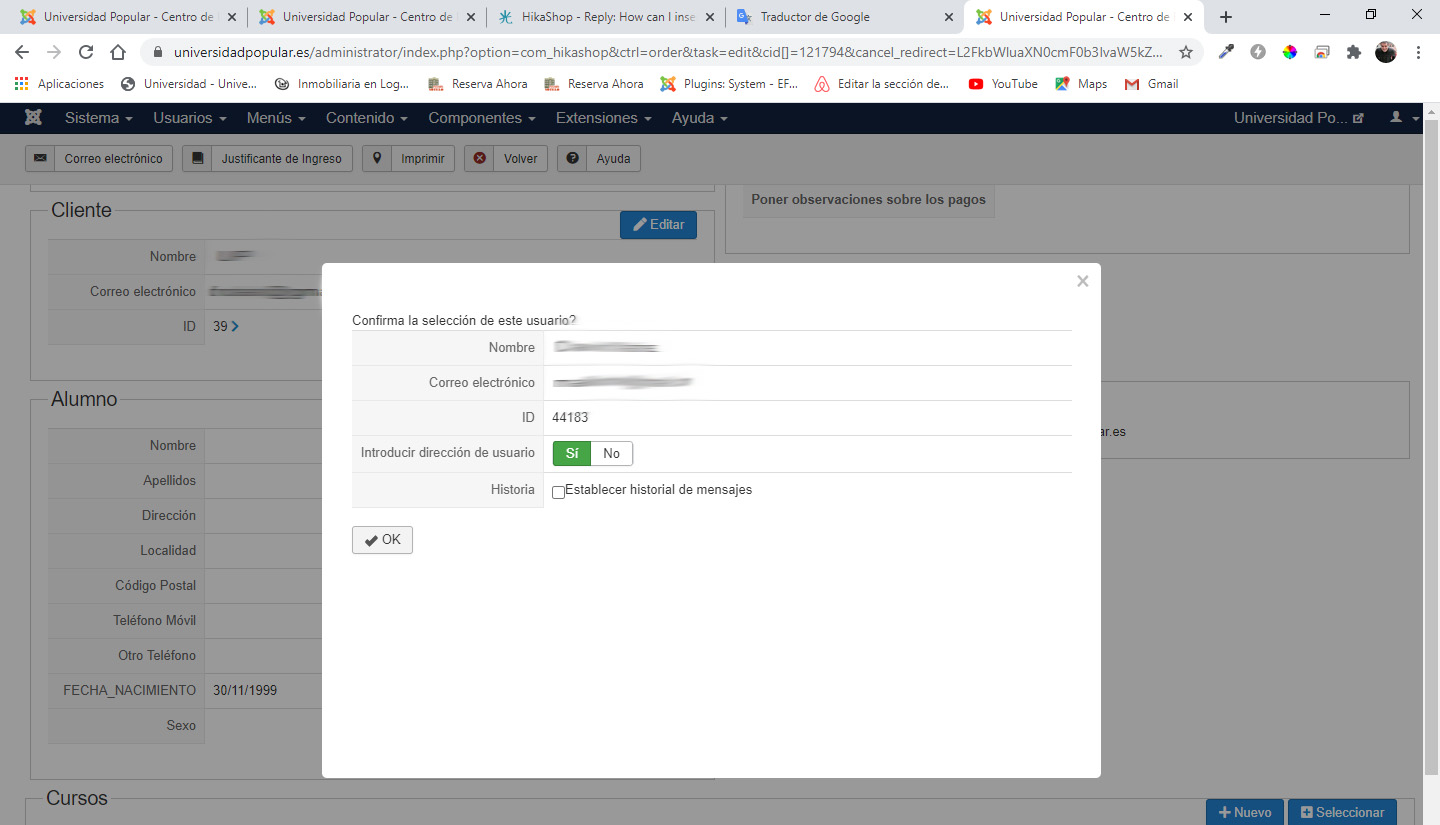
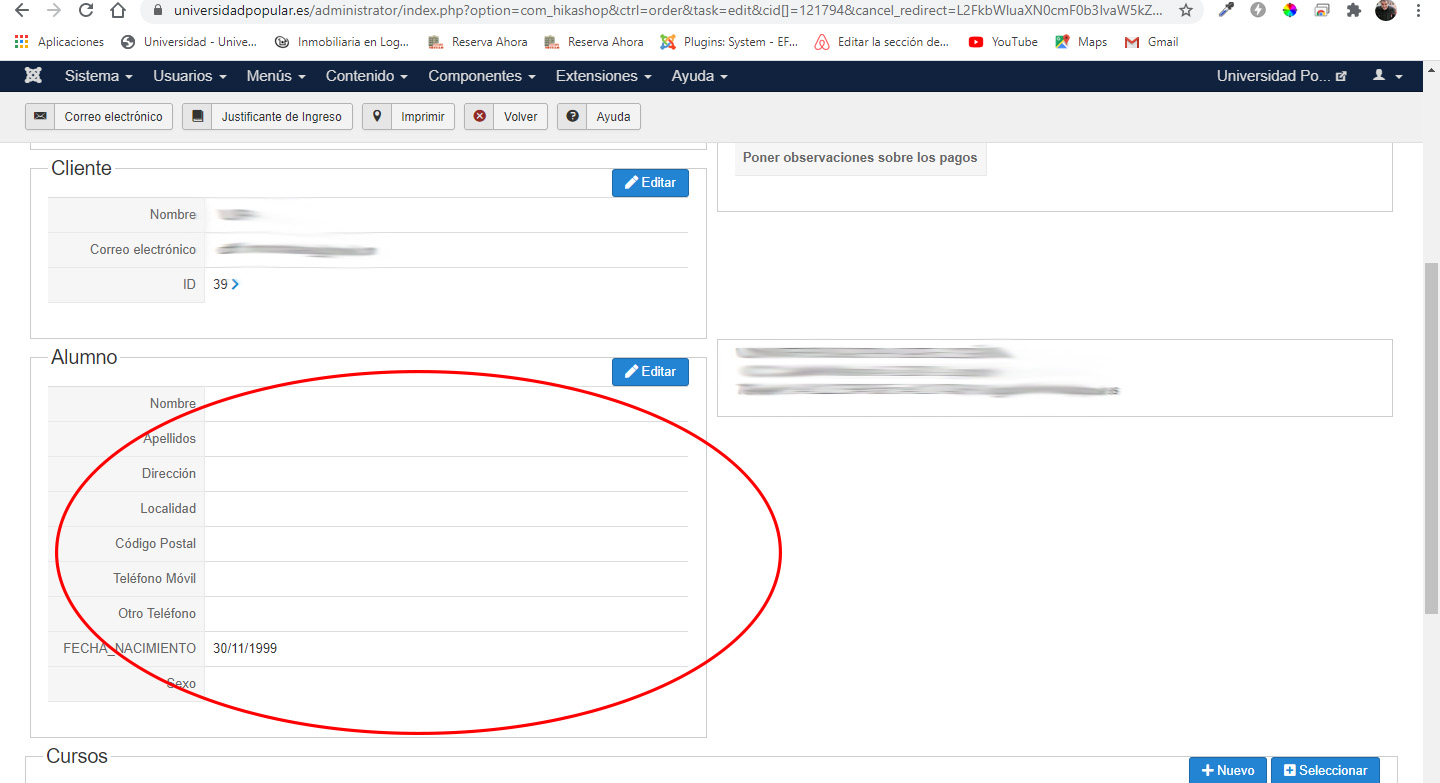
I have tried to fix it by myself, but am not able to. Can you give me a hand.
Thank you very much and congratulations on the constant updates and better.
A cordial greeting.
Hello,
I have updated to HikaShop Business version: 4.3.0.
With your excellent help, I made some modifications to the files:
administrator / components / com_hikashop / views / order / view.html.php
and
screen -> Views -> order -> listing
Some changes so that the username, address telephone and product code fields appear in the list of orders in the administration.
Those fields continue to appear in the order list, but when placing a new order from the administration, assigning a user and adding their data, the fields are not filled out, they are left blank.
I have tried to fix it by myself, but am not able to. Can you give me a hand.
Thank you very much and congratulations on the constant updates and better.
A cordial greeting.
Please Log in or Create an account to join the conversation.

6 years 2 months ago #321397
by nicolas
Replied by nicolas on topic How can I insert a column with product code in the backend in the new version 3
Hi,
From what I can see, these are custom address fields.
So you can change them by editing the billing or shipping address of the order.
The update didn't change anything to that.
From what I can see, these are custom address fields.
So you can change them by editing the billing or shipping address of the order.
The update didn't change anything to that.
The following user(s) said Thank You: dvddvd
Please Log in or Create an account to join the conversation.
6 years 2 months ago - 6 years 2 months ago #321430
by dvddvd
Replied by dvddvd on topic How can I insert a column with product code in the backend in the new version 3
Hello,
Thanks for your quick response.
I already had it configured in both and the data is not loaded.
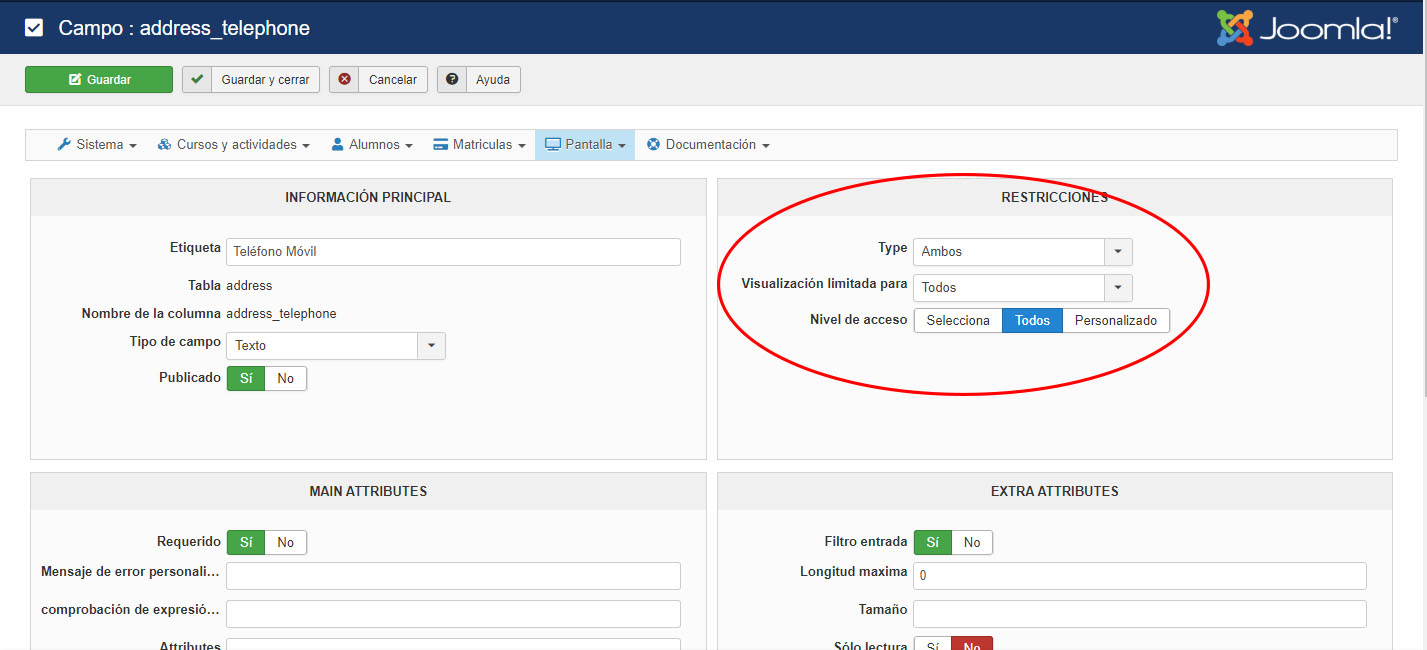
Also errors come out in case of putting the web in error report
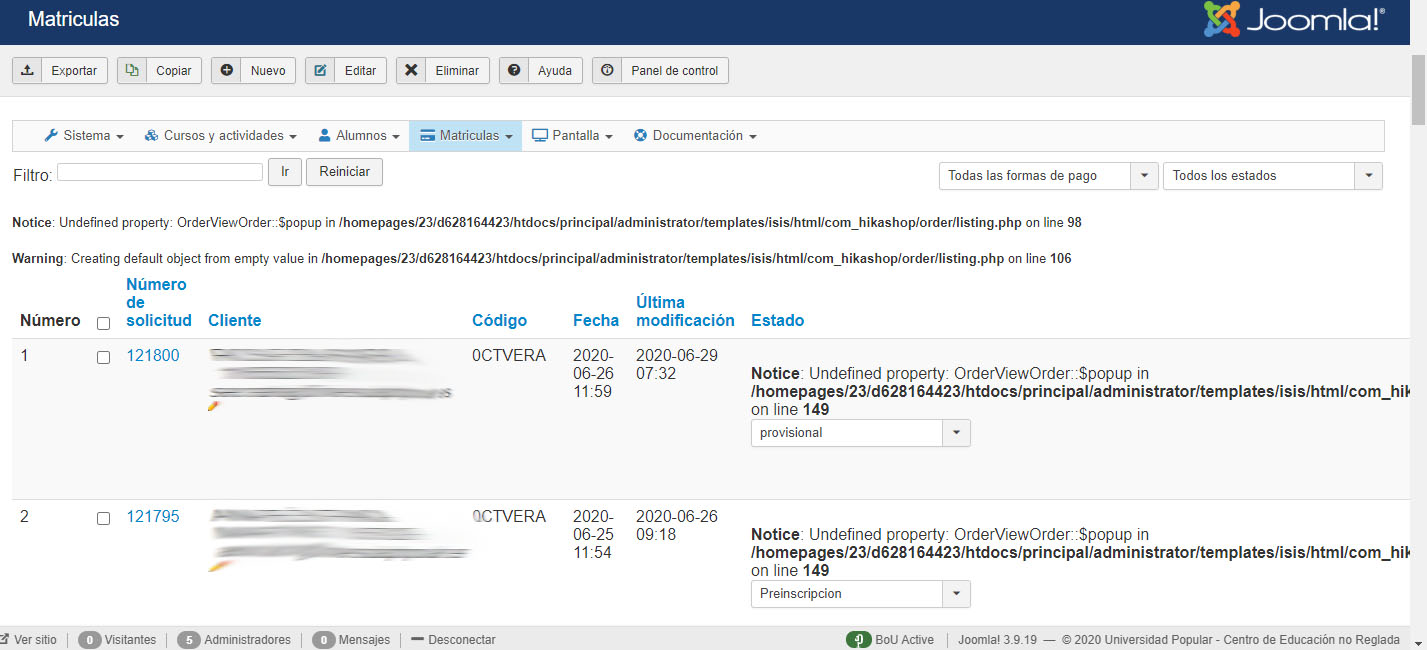
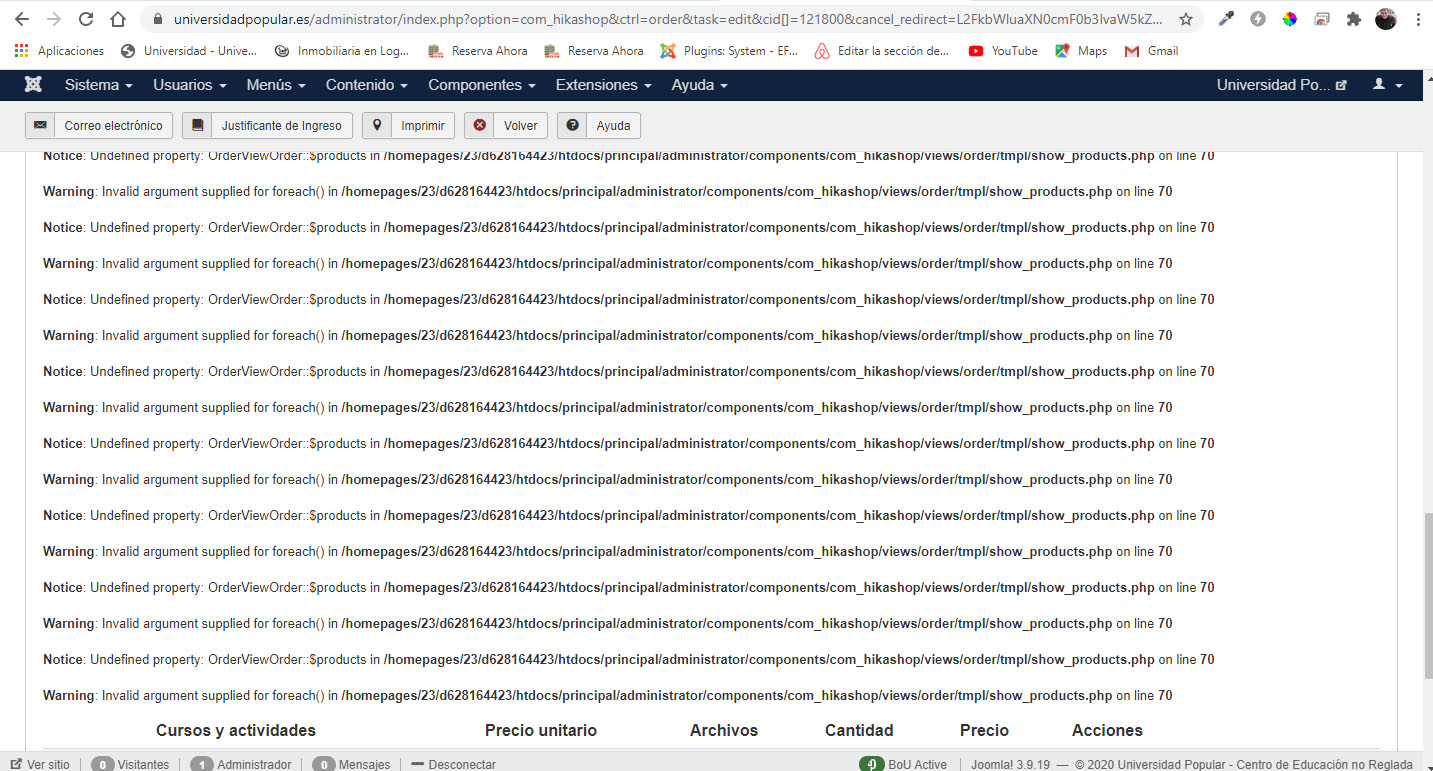
thank you for your attention.
Thanks for your quick response.
I already had it configured in both and the data is not loaded.
Also errors come out in case of putting the web in error report
thank you for your attention.
Last edit: 6 years 2 months ago by dvddvd. Reason: personal data view
Please Log in or Create an account to join the conversation.
6 years 2 months ago #321441
by nicolas
Replied by nicolas on topic How can I insert a column with product code in the backend in the new version 3
Hi,
Ah, so you're saying that the issue is with the addresses not being automatically filled with the address of the customer when you change it ?
That's a bug. Download the install package of HikaShop on our website and install it on yours and it will add a patch for that.
Ah, so you're saying that the issue is with the addresses not being automatically filled with the address of the customer when you change it ?
That's a bug. Download the install package of HikaShop on our website and install it on yours and it will add a patch for that.
Please Log in or Create an account to join the conversation.
6 years 2 months ago - 6 years 2 months ago #321480
by dvddvd
Replied by dvddvd on topic How can I insert a column with product code in the backend in the new version 3
Hi Nicolas,
With the file of the update the custom fields come out very well, and the client's data is loaded when a new order is successfully made.
But I can't make the product code appear, in the list of orders (in my case it is only one product per order).
Nor manage to perform searches for the product code.
Now I have the file view.html.php placed. Original of the update and the result of the display is correct in the custom fields, but the column of the product code appears blank.
Thanks, best regard.
With the file of the update the custom fields come out very well, and the client's data is loaded when a new order is successfully made.
But I can't make the product code appear, in the list of orders (in my case it is only one product per order).
Nor manage to perform searches for the product code.
Now I have the file view.html.php placed. Original of the update and the result of the display is correct in the custom fields, but the column of the product code appears blank.
Thanks, best regard.
Last edit: 6 years 2 months ago by dvddvd.
Please Log in or Create an account to join the conversation.
6 years 2 months ago - 6 years 2 months ago #321485
by nicolas
Replied by nicolas on topic How can I insert a column with product code in the backend in the new version 3
Hi,
You need to update to the latest version of HikaShop and use the default view.html.php file and it will work fine. Then, just add your modifications again to the new version of the file.
I suppose it should be a few lines of PHP and a MySQL query to load the product data from the hikashop_order_product table and add it to each order object.
You need to update to the latest version of HikaShop and use the default view.html.php file and it will work fine. Then, just add your modifications again to the new version of the file.
I suppose it should be a few lines of PHP and a MySQL query to load the product data from the hikashop_order_product table and add it to each order object.
Last edit: 6 years 2 months ago by nicolas.
The following user(s) said Thank You: dvddvd
Please Log in or Create an account to join the conversation.
6 years 2 months ago - 6 years 2 months ago #321558
by dvddvd
Replied by dvddvd on topic How can I insert a column with product code in the backend in the new version 3
Hi Nicilás:
Thank you very much for your indications and sorry for not having understood before.
I've only had one problem:
If the order_product_code field does not exist and you try to enter the order by clicking on the order number, you do not access the order details.
I have changed:
For:
Thank you!
Thank you very much for your indications and sorry for not having understood before.
I've only had one problem:
If the order_product_code field does not exist and you try to enter the order by clicking on the order number, you do not access the order details.
I have changed:
Code:
<td class="hikashop_order_payment_value">
<?php if(!empty($row->order_payment_method)){
if(!empty($this->payments[$row->order_payment_id])){
echo $this->payments[$row->order_payment_id]->payment_name;
}elseif(!empty($this->payments[$row->order_payment_method])){
echo $this->payments[$row->order_payment_method]->payment_name;
}else{
echo $row->order_payment_method;
}
} ?>
</td>
For:
Code:
<td class="hikashop_order_payment_value">
<?php echo $row->order_product_code;?>
</td>
Last edit: 6 years 2 months ago by nicolas.
Please Log in or Create an account to join the conversation.
6 years 2 months ago #321568
by nicolas
Replied by nicolas on topic How can I insert a column with product code in the backend in the new version 3
Hi,
I don't see why that would be the case with just that modification.
I can only think that you have another modification.
Could you give the URL you get when the link doesn't work ?
I don't see why that would be the case with just that modification.
I can only think that you have another modification.
Could you give the URL you get when the link doesn't work ?
Please Log in or Create an account to join the conversation.
6 years 2 months ago #321586
by dvddvd
Replied by dvddvd on topic How can I insert a column with product code in the backend in the new version 3
Hi Nicolas,
When I click on the order number in the administration list, it returns me to the order list again, only in the case where there is no product assigned in the order
Yes these are the changes that I have made.
On /mysite/administrator/components/com_hikashop/views/order/view.html.php
1.-
The original code:
$searchMap = array('c.id','c.username','c.name','a.user_email','b.order_user_id','b.order_number','b.order_id','b.order_invoice_number','b.order_invoice_id','b.order_full_price','d.address_firstname','d.address_lastname');
The midified code:
$searchMap = array('c.id','c.username','c.name','a.user_email','b.order_user_id','b.order_number','b.order_id','b.order_invoice_id','b.order_full_price','d.address_firstname','d.address_lastname','p.order_product_code');
2.-
The original code is:
$query = ' FROM '.hikashop_table('order').' AS b '.
' LEFT JOIN '.hikashop_table('address').' AS d ON b.order_billing_address_id = d.address_id '.
' LEFT JOIN '.hikashop_table('user').' AS a ON b.order_user_id=a.user_id '.
' LEFT JOIN '.hikashop_table('users',false).' AS c ON a.user_cms_id = c.id ' .
implode(' ', $tables) . ' ' . $filters . $order;
$database->setQuery('SELECT a.*,b.*,c.*,d.*'.$query, (int)$pageInfo->limit->start, (int)$pageInfo->limit->value);
The modified code is:
$query = ' FROM '.hikashop_table('order').' AS b '.
' LEFT JOIN '.hikashop_table('address').' AS d ON b.order_billing_address_id = d.address_id '.
' LEFT JOIN '.hikashop_table('user').' AS a ON b.order_user_id=a.user_id '.
' LEFT JOIN '.hikashop_table('users',false).' AS c ON a.user_cms_id = c.id ' .
' LEFT JOIN '.hikashop_table('order_product').' AS p ON b.order_id = p.order_id' .
implode(' ', $tables) . ' ' . $filters . $order;
$database->setQuery('SELECT a.*,b.*,c.*,d.*,p.*'.$query, (int)$pageInfo->limit->start, (int)$pageInfo->limit->value);
3.-
The original code is:
$searchMap = array(
'j_user.id',
'j_user.username',
'j_user.name',
'hk_user.user_email',
'hk_order.order_user_id',
'hk_order.order_id',
'hk_order.order_full_price'
);
The modified code is:
$searchMap = array(
'j_user.id',
'j_user.username',
'j_user.name',
'hk_user.user_email',
'hk_order.order_user_id',
'hk_order.order_id',
'hk_order.order_full_price',
'hk_order.order_product_code'
);
___
In HikaShop > Display > Views, edit the view "order / listing"
1.-
The Original code:
<th class="hikashop_order_number_title title">
<?php echo JHTML::_('grid.sort', JText::_('ORDER_NUMBER'), 'b.order_number', $this->pageInfo->filter->order->dir,$this->pageInfo->filter->order->value ); ?>
<br/>
<?php echo JHTML::_('grid.sort', JText::_('INVOICE_NUMBER'), 'b.order_invoice_number', $this->pageInfo->filter->order->dir,$this->pageInfo->filter->order->value ); ?>
</th>
The midified code:
<th class="hikashop_order_number_title title">
<?php echo JHTML::_('grid.sort', JText::_('ORDER_NUMBER'), 'b.order_number', $this->pageInfo->filter->order->dir,$this->pageInfo->filter->order->value ); ?>
<br/>
</th>
2.-
The original code:
<th class="hikashop_order_payment_title title">
<?php echo JHTML::_('grid.sort', JText::_('PAYMENT_METHOD'), 'b.order_payment_method', $this->pageInfo->filter->order->dir,$this->pageInfo->filter->order->value ); ?>
</th>
The midified code:
<th class="hikashop_order_payment_title title">
<?php echo JHTML::_('grid.sort', JText::_('Código'), 'b.order_payment_method', $this->pageInfo->filter->order->dir,$this->pageInfo->filter->order->value ); ?>
</th>
3.-
The original code:
<th class="hikashop_order_id_title title">
<?php echo JHTML::_('grid.sort', JText::_( 'ID' ), 'b.order_id', $this->pageInfo->filter->order->dir, $this->pageInfo->filter->order->value ); ?>
</th>
The modified code:
<th class="hikashop_order_id_title title">
<?php echo JHTML::_('grid.sort', JText::_( 'Teléfono' ), 'b.order_id', $this->pageInfo->filter->order->dir, $this->pageInfo->filter->order->value ); ?>
</th>
<th class="hikashop_order_id_title title">
<?php echo JHTML::_('grid.sort', JText::_( 'DNI' ), 'b.order_id', $this->pageInfo->filter->order->dir, $this->pageInfo->filter->order->value ); ?>
</th>
Thanks very much
4.-
The original code:
<?php if(!empty($row->order_invoice_number)) {
if($this->manage){ ?>
<a title="<?php echo JText::_('INVOICE_NUMBER'); ?>" href="<?php echo hikashop_completeLink('order&task=edit&cid[]='.$row->order_id.'&cancel_redirect='.urlencode(base64_encode(hikashop_completeLink('order')))).$target; ?>">
<?php } ?>
<?php echo '<br/>'.$row->order_invoice_number; ?>
<?php if($this->manage){ ?>
The modified code:
<?php if(!empty($row->order_invoice_number)) {
if($this->manage){ ?>
<a title="<?php echo JText::_('INVOICE_NUMBER'); ?>" href="<?php echo hikashop_completeLink('order&task=edit&cid[]='.$row->order_id.'&cancel_redirect='.urlencode(base64_encode(hikashop_completeLink('order')))).$target; ?>">
<?php } ?>
<?php if($this->manage){ ?>
5.-
The original code:
<td class="hikashop_order_payment_value">
<?php if(!empty($row->order_payment_method)){
if(!empty($this->payments[$row->order_payment_id])){
echo $this->payments[$row->order_payment_id]->payment_name;
}elseif(!empty($this->payments[$row->order_payment_method])){
echo $this->payments[$row->order_payment_method]->payment_name;
}else{
echo $row->order_payment_method;
}
} ?>
</td>
The modified code:
<td class="hikashop_order_payment_value">
<?php echo $row->order_product_code; ?>
</td>
6.-
The original code:
<td class="hikashop_order_id_value">
<?php echo $row->order_id; ?>
</td>
The modified code:
<td class="hikashop_order_id_value">
<?php echo $row->address_telephone; ?>
</td>
<td class="hikashop_order_id_value">
<?php echo $row->username; ?>
</td>
When I click on the order number in the administration list, it returns me to the order list again, only in the case where there is no product assigned in the order
Yes these are the changes that I have made.
On /mysite/administrator/components/com_hikashop/views/order/view.html.php
1.-
The original code:
$searchMap = array('c.id','c.username','c.name','a.user_email','b.order_user_id','b.order_number','b.order_id','b.order_invoice_number','b.order_invoice_id','b.order_full_price','d.address_firstname','d.address_lastname');
The midified code:
$searchMap = array('c.id','c.username','c.name','a.user_email','b.order_user_id','b.order_number','b.order_id','b.order_invoice_id','b.order_full_price','d.address_firstname','d.address_lastname','p.order_product_code');
2.-
The original code is:
$query = ' FROM '.hikashop_table('order').' AS b '.
' LEFT JOIN '.hikashop_table('address').' AS d ON b.order_billing_address_id = d.address_id '.
' LEFT JOIN '.hikashop_table('user').' AS a ON b.order_user_id=a.user_id '.
' LEFT JOIN '.hikashop_table('users',false).' AS c ON a.user_cms_id = c.id ' .
implode(' ', $tables) . ' ' . $filters . $order;
$database->setQuery('SELECT a.*,b.*,c.*,d.*'.$query, (int)$pageInfo->limit->start, (int)$pageInfo->limit->value);
The modified code is:
$query = ' FROM '.hikashop_table('order').' AS b '.
' LEFT JOIN '.hikashop_table('address').' AS d ON b.order_billing_address_id = d.address_id '.
' LEFT JOIN '.hikashop_table('user').' AS a ON b.order_user_id=a.user_id '.
' LEFT JOIN '.hikashop_table('users',false).' AS c ON a.user_cms_id = c.id ' .
' LEFT JOIN '.hikashop_table('order_product').' AS p ON b.order_id = p.order_id' .
implode(' ', $tables) . ' ' . $filters . $order;
$database->setQuery('SELECT a.*,b.*,c.*,d.*,p.*'.$query, (int)$pageInfo->limit->start, (int)$pageInfo->limit->value);
3.-
The original code is:
$searchMap = array(
'j_user.id',
'j_user.username',
'j_user.name',
'hk_user.user_email',
'hk_order.order_user_id',
'hk_order.order_id',
'hk_order.order_full_price'
);
The modified code is:
$searchMap = array(
'j_user.id',
'j_user.username',
'j_user.name',
'hk_user.user_email',
'hk_order.order_user_id',
'hk_order.order_id',
'hk_order.order_full_price',
'hk_order.order_product_code'
);
___
In HikaShop > Display > Views, edit the view "order / listing"
1.-
The Original code:
<th class="hikashop_order_number_title title">
<?php echo JHTML::_('grid.sort', JText::_('ORDER_NUMBER'), 'b.order_number', $this->pageInfo->filter->order->dir,$this->pageInfo->filter->order->value ); ?>
<br/>
<?php echo JHTML::_('grid.sort', JText::_('INVOICE_NUMBER'), 'b.order_invoice_number', $this->pageInfo->filter->order->dir,$this->pageInfo->filter->order->value ); ?>
</th>
The midified code:
<th class="hikashop_order_number_title title">
<?php echo JHTML::_('grid.sort', JText::_('ORDER_NUMBER'), 'b.order_number', $this->pageInfo->filter->order->dir,$this->pageInfo->filter->order->value ); ?>
<br/>
</th>
2.-
The original code:
<th class="hikashop_order_payment_title title">
<?php echo JHTML::_('grid.sort', JText::_('PAYMENT_METHOD'), 'b.order_payment_method', $this->pageInfo->filter->order->dir,$this->pageInfo->filter->order->value ); ?>
</th>
The midified code:
<th class="hikashop_order_payment_title title">
<?php echo JHTML::_('grid.sort', JText::_('Código'), 'b.order_payment_method', $this->pageInfo->filter->order->dir,$this->pageInfo->filter->order->value ); ?>
</th>
3.-
The original code:
<th class="hikashop_order_id_title title">
<?php echo JHTML::_('grid.sort', JText::_( 'ID' ), 'b.order_id', $this->pageInfo->filter->order->dir, $this->pageInfo->filter->order->value ); ?>
</th>
The modified code:
<th class="hikashop_order_id_title title">
<?php echo JHTML::_('grid.sort', JText::_( 'Teléfono' ), 'b.order_id', $this->pageInfo->filter->order->dir, $this->pageInfo->filter->order->value ); ?>
</th>
<th class="hikashop_order_id_title title">
<?php echo JHTML::_('grid.sort', JText::_( 'DNI' ), 'b.order_id', $this->pageInfo->filter->order->dir, $this->pageInfo->filter->order->value ); ?>
</th>
Thanks very much
4.-
The original code:
<?php if(!empty($row->order_invoice_number)) {
if($this->manage){ ?>
<a title="<?php echo JText::_('INVOICE_NUMBER'); ?>" href="<?php echo hikashop_completeLink('order&task=edit&cid[]='.$row->order_id.'&cancel_redirect='.urlencode(base64_encode(hikashop_completeLink('order')))).$target; ?>">
<?php } ?>
<?php echo '<br/>'.$row->order_invoice_number; ?>
<?php if($this->manage){ ?>
The modified code:
<?php if(!empty($row->order_invoice_number)) {
if($this->manage){ ?>
<a title="<?php echo JText::_('INVOICE_NUMBER'); ?>" href="<?php echo hikashop_completeLink('order&task=edit&cid[]='.$row->order_id.'&cancel_redirect='.urlencode(base64_encode(hikashop_completeLink('order')))).$target; ?>">
<?php } ?>
<?php if($this->manage){ ?>
5.-
The original code:
<td class="hikashop_order_payment_value">
<?php if(!empty($row->order_payment_method)){
if(!empty($this->payments[$row->order_payment_id])){
echo $this->payments[$row->order_payment_id]->payment_name;
}elseif(!empty($this->payments[$row->order_payment_method])){
echo $this->payments[$row->order_payment_method]->payment_name;
}else{
echo $row->order_payment_method;
}
} ?>
</td>
The modified code:
<td class="hikashop_order_payment_value">
<?php echo $row->order_product_code; ?>
</td>
6.-
The original code:
<td class="hikashop_order_id_value">
<?php echo $row->order_id; ?>
</td>
The modified code:
<td class="hikashop_order_id_value">
<?php echo $row->address_telephone; ?>
</td>
<td class="hikashop_order_id_value">
<?php echo $row->username; ?>
</td>
Please Log in or Create an account to join the conversation.
6 years 2 months ago #321599
by nicolas
Replied by nicolas on topic How can I insert a column with product code in the backend in the new version 3
Hi,
I don't see why that would be the case with just these modifications.
Could you give the URL you get when the link doesn't work ?
I don't see why that would be the case with just these modifications.
Could you give the URL you get when the link doesn't work ?
Please Log in or Create an account to join the conversation.
6 years 2 months ago #321601
by dvddvd
Replied by dvddvd on topic How can I insert a column with product code in the backend in the new version 3
Hello and thenks Nicolas,
I have made you a copy of the link.
When the page loads, it shows the list of orders.
universidadpopular.es/administrator/inde...=order&task=edit&cid []=&cancel_redirect=L2FkbWluaXN0cmF0b3IvaW5kZXgucGhwP29wdGlvbj1jb21faGlrYXNob3AmYW1wO2N0cmw9b3JkZXI%3D
A cordial greeting.
I have made you a copy of the link.
When the page loads, it shows the list of orders.
universidadpopular.es/administrator/inde...=order&task=edit&cid []=&cancel_redirect=L2FkbWluaXN0cmF0b3IvaW5kZXgucGhwP29wdGlvbj1jb21faGlrYXNob3AmYW1wO2N0cmw9b3JkZXI%3D
A cordial greeting.
Please Log in or Create an account to join the conversation.
6 years 2 months ago #321606
by nicolas
Replied by nicolas on topic How can I insert a column with product code in the backend in the new version 3
Hi,
The order_id is missing in the cid[] parameter of the URL. This indicates that either $row->order_id is missing or that you're modified the code which generate the URL of the order number to not use the variable.
So please check that line in the file :
The order_id is missing in the cid[] parameter of the URL. This indicates that either $row->order_id is missing or that you're modified the code which generate the URL of the order number to not use the variable.
So please check that line in the file :
Code:
<a title="<?php echo JText::_('ORDER_NUMBER'); ?>" href="<?php echo hikashop_completeLink('order&task=edit&cid[]='.$row->order_id.'&cancel_redirect='.urlencode(base64_encode(hikashop_completeLink('order')))).$target; ?>">
The following user(s) said Thank You: dvddvd
Please Log in or Create an account to join the conversation.
6 years 2 months ago #321669
by dvddvd
Replied by dvddvd on topic How can I insert a column with product code in the backend in the new version 3
Sorry Nicolas,
I have made the following ccamnio and now it works perfectly.
My code with error
Rectified code:
Thanks for everything, I really appreciate your constant help and patience.
I have made the following ccamnio and now it works perfectly.
My code with error
Code:
$query = ' FROM '.hikashop_table('order').' AS b '.
' LEFT JOIN '.hikashop_table('address').' AS d ON b.order_billing_address_id = d.address_id '.
' LEFT JOIN '.hikashop_table('user').' AS a ON b.order_user_id=a.user_id '.
' LEFT JOIN '.hikashop_table('users',false).' AS c ON a.user_cms_id = c.id ' .
' LEFT JOIN '.hikashop_table('order_product').' AS p ON b.order_id = p.order_id' .
implode(' ', $tables) . ' ' . $filters . $order;
$database->setQuery('SELECT a.*,b.*,c.*,d.*,p.*'.$query, (int)$pageInfo->limit->start, (int)$pageInfo->limit->value);
$rows = $database->loadObjectList();
Rectified code:
Code:
$query = ' FROM '.hikashop_table('order').' AS b '.
' LEFT JOIN '.hikashop_table('address').' AS d ON b.order_billing_address_id = d.address_id '.
' LEFT JOIN '.hikashop_table('user').' AS a ON b.order_user_id=a.user_id '.
' LEFT JOIN '.hikashop_table('users',false).' AS c ON a.user_cms_id = c.id ' .
' INNER JOIN '.hikashop_table('order_product').' AS p ON b.order_id = p.order_id' .
implode(' ', $tables) . ' ' . $filters . $order;
$database->setQuery('SELECT a.*,b.*,c.*,d.*,p.*'.$query, (int)$pageInfo->limit->start, (int)$pageInfo->limit->value);
$rows = $database->loadObjectList();
Thanks for everything, I really appreciate your constant help and patience.
Please Log in or Create an account to join the conversation.
3 years 2 months ago - 3 years 2 months ago #353287
by dvddvd
Replied by dvddvd on topic How can I insert a column with product code in the backend in the new version 3
Hi Nicolas,
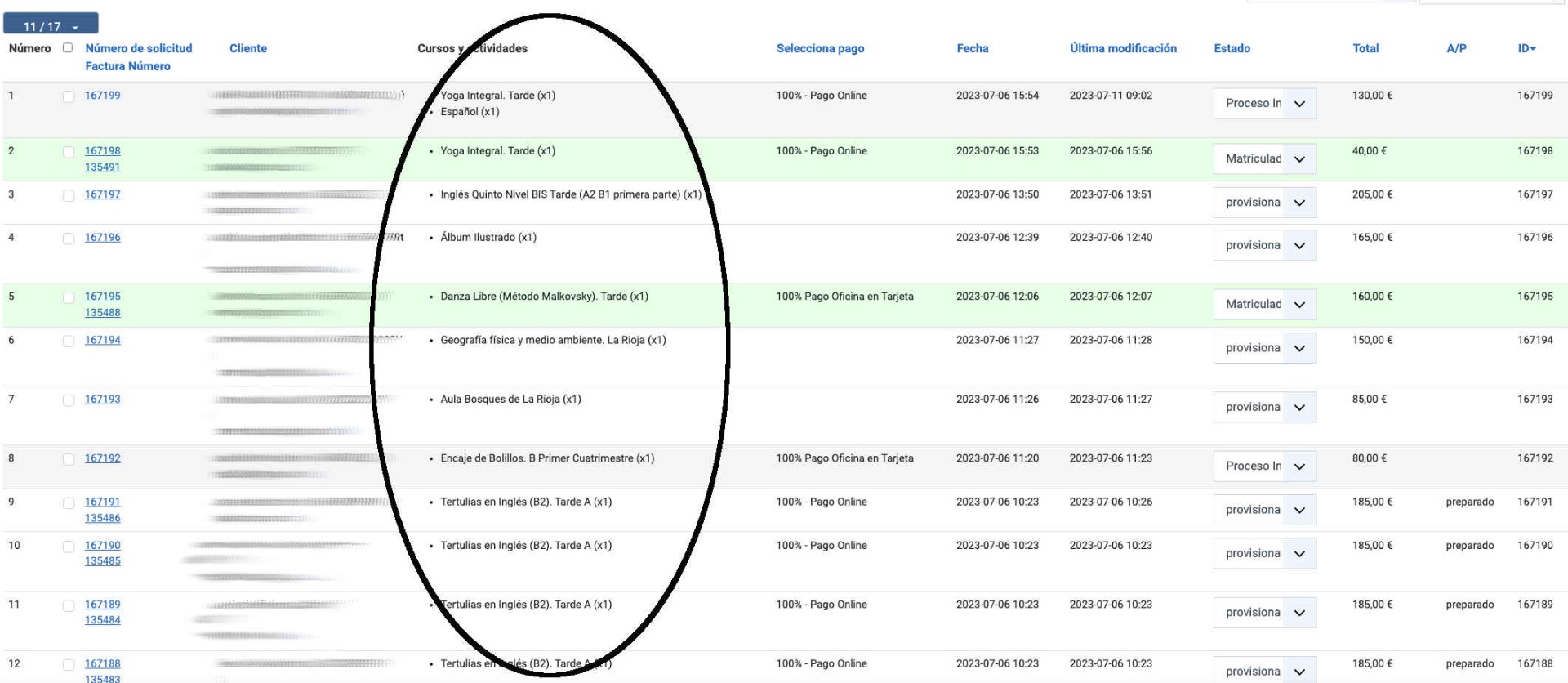
Is it possible to replace the marked values that appear in the column "Courses and activities" (products), by their corresponding codes (order_product_code)?
How could I make this substitution?
Would it be possible in this case to be able to search by code?
Thank you!
Is it possible to replace the marked values that appear in the column "Courses and activities" (products), by their corresponding codes (order_product_code)?
How could I make this substitution?
Would it be possible in this case to be able to search by code?
Thank you!
Last edit: 3 years 2 months ago by dvddvd.
Please Log in or Create an account to join the conversation.
3 years 2 months ago #353290
by nicolas
Replied by nicolas on topic How can I insert a column with product code in the backend in the new version 3
Hi,
Edit the file order / listing for your backend template via the menu Display>Views.
There, change the line:
to:
Edit the file order / listing for your backend template via the menu Display>Views.
There, change the line:
Code:
$products .= '<li>'.$p->order_product_name.' (x'.$p->order_product_quantity.')</li>';
Code:
$products .= '<li>'.$p->order_product_code.' (x'.$p->order_product_quantity.')</li>';
The following user(s) said Thank You: dvddvd
Please Log in or Create an account to join the conversation.
3 years 2 months ago #353326
by dvddvd
Replied by dvddvd on topic How can I insert a column with product code in the backend in the new version 3
Hi Nicolas,
Thanks, it works perfectly, but I can't make searches that work in the search engine, entering the name of the course or the code.
Is there any way to get it?
Thanks again!
Thanks, it works perfectly, but I can't make searches that work in the search engine, entering the name of the course or the code.
Is there any way to get it?
Thanks again!
Please Log in or Create an account to join the conversation.
3 years 2 months ago #353327
by nicolas
Replied by nicolas on topic How can I insert a column with product code in the backend in the new version 3
Hi,
For performance reasons, the search is only done on the hikashop_order table in the database. The data of the products in the order is in the table hikashop_order_product. So that's why the search doesn't return any result if you search for product codes.
I would recommend using this plugin:
www.hikashop.com/marketplace/product/272...-product-filter.html
It adds a product filter on the order listing page so that you can easily select a product and have it filter the orders based on that selection.
For performance reasons, the search is only done on the hikashop_order table in the database. The data of the products in the order is in the table hikashop_order_product. So that's why the search doesn't return any result if you search for product codes.
I would recommend using this plugin:
www.hikashop.com/marketplace/product/272...-product-filter.html
It adds a product filter on the order listing page so that you can easily select a product and have it filter the orders based on that selection.
Please Log in or Create an account to join the conversation.
3 years 2 months ago #353333
by dvddvd
Replied by dvddvd on topic How can I insert a column with product code in the backend in the new version 3
Thanks very mach
Please Log in or Create an account to join the conversation.
Time to create page: 1.173 seconds