

- Posts: 6
- Thank you received: 0
Lost the State Field on Registration
15 years 8 months ago #9143
by garagepro
Lost the State Field on Registration was created by garagepro
In Joomla 1.6 with the latest Hika update, I lost my State field in the Registration Process. I had made some Language Overrides (nothing dealing with the "State" Field), edited the front-end CSS for the cart (colors and width), and disabled the Paypal plugin. Now the State field is missing in the Registration. I put everything back the way it was before (cleared cache), and even tried no CSS on the Frontend but the field is still missing in all browsers.
Any ideas how to fix this? image missing http://www.hikashop.com/media/kunena/attachments/legacy/images/registration.JPG
Any ideas how to fix this?
image missing http://www.hikashop.com/media/kunena/attachments/legacy/images/registration.JPG Please Log in or Create an account to join the conversation.

15 years 8 months ago #9149
by nicolas
Replied by nicolas on topic Re: Lost the State Field on Registration
You need to have the country field published so that the state field can work. Please go in the menu Display->Custom fields and publish the country field. If you want to hide the country field, you can just use some CSS to hide it:
#address_country{ display:none; }
#address_country{ display:none; }
Please Log in or Create an account to join the conversation.
15 years 8 months ago #9192
by garagepro
Replied by garagepro on topic Re: Lost the State Field on Registration
Thank you for the fast reply.
That worked and brought up the state and country, but United States is missing from the drop down list.
All System Zones are published including the United States and the Main Tax Zone is configured as 223 United States of America.
What am I missing? Thanks
That worked and brought up the state and country, but United States is missing from the drop down list.
All System Zones are published including the United States and the Main Tax Zone is configured as 223 United States of America.
What am I missing? Thanks
Please Log in or Create an account to join the conversation.
15 years 8 months ago #9193
by nicolas
Replied by nicolas on topic Re: Lost the State Field on Registration
Please make sure that the USA type is country and not something else.
Please Log in or Create an account to join the conversation.
15 years 8 months ago #9214
by garagepro
Replied by garagepro on topic Re: Lost the State Field on Registration
Not even sure how that was changed - but good call. Now I just need to figure out why it registers people but they can't log in or continue with checkout.
Please Log in or Create an account to join the conversation.
15 years 8 months ago #9224
by nicolas
Replied by nicolas on topic Re: Lost the State Field on Registration
When they register, they should be automatically logged in unless you activated the account confirmation in the joomla configuration. In that case, a message will be displayed and an email sent to the user so that he can confirm his account. If you don't see the message then maybe that's because of your template:
www.hikashop.com/en/support/documentatio...tibility-issues.html
www.hikashop.com/en/support/documentatio...tibility-issues.html
Please Log in or Create an account to join the conversation.
14 years 2 months ago #63355
by dipito31
Replied by dipito31 on topic Re: Lost the State Field on Registration
Hello,
I have had the same problem. I can't see the state dropdown on my registration page.
I even added a custom state field and even that didn't show up.
This is the link to my website, coralsfashion.com/index.php?option=com_h...l=user&task=form .
Can I please know what is wrong with it.
Thanks.
I have had the same problem. I can't see the state dropdown on my registration page.
I even added a custom state field and even that didn't show up.
This is the link to my website, coralsfashion.com/index.php?option=com_h...l=user&task=form .
Can I please know what is wrong with it.
Thanks.
Please Log in or Create an account to join the conversation.
14 years 2 months ago #63499
by nicolas
Replied by nicolas on topic Re: Lost the State Field on Registration
Hi,
There is a javascript error on your website:
Uncaught SyntaxError: Unexpected end of input in coralsfashion.com/templates/tage/js/hover.js
Because of that the javascript of HikaShop cannot run and thus you don't get the state dropdown displayed.
If you fix that javascript error in your template, that will make the state dropdown display.
There is a javascript error on your website:
Uncaught SyntaxError: Unexpected end of input in coralsfashion.com/templates/tage/js/hover.js
Because of that the javascript of HikaShop cannot run and thus you don't get the state dropdown displayed.
If you fix that javascript error in your template, that will make the state dropdown display.
Please Log in or Create an account to join the conversation.

Less
More
- Posts: 47
- Thank you received: 0
13 years 2 weeks ago #128733
by oxheadproductions
I have the same issue too... I made a "work around" which is a patch only... I created a "new" country called "-select country-"... so the buyer is directed to select one... the shortcoming with the "work around" is if the customer fails to select then their address will be from the country "-select country-"....it works temporarily, however the bottom line is I need this fixed...
Currently I sell to both USA and Canada.... and neither state/province appears unless I move the "country" drop down selector... then they magically appear.
I have attached a jpg for assistance.
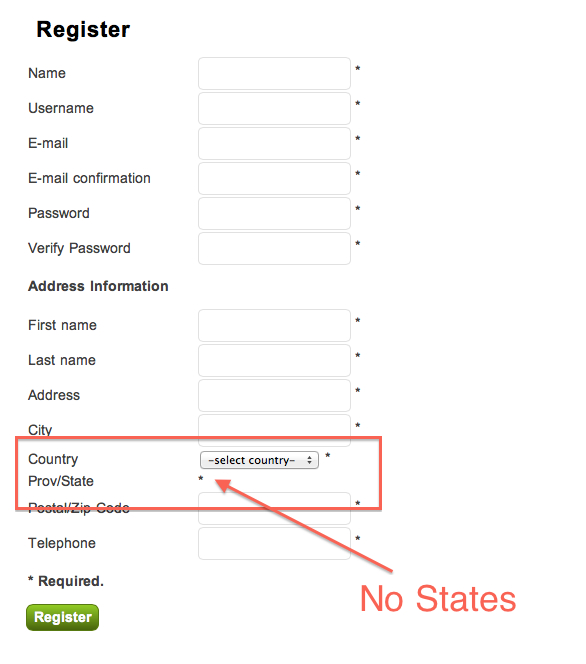
Any help would be appreciated.
Replied by oxheadproductions on topic Re: Lost the State Field on Registration
dipito31 wrote: Hello,
I have had the same problem. I can't see the state dropdown on my registration page.
I even added a custom state field and even that didn't show up.
This is the link to my website, coralsfashion.com/index.php?option=com_h...l=user&task=form .
Can I please know what is wrong with it.
Thanks.
I have the same issue too... I made a "work around" which is a patch only... I created a "new" country called "-select country-"... so the buyer is directed to select one... the shortcoming with the "work around" is if the customer fails to select then their address will be from the country "-select country-"....it works temporarily, however the bottom line is I need this fixed...
Currently I sell to both USA and Canada.... and neither state/province appears unless I move the "country" drop down selector... then they magically appear.
I have attached a jpg for assistance.
Any help would be appreciated.
Please Log in or Create an account to join the conversation.

13 years 2 weeks ago #128735
by Jerome
Jerome - Obsidev.com
HikaMarket & HikaSerial developer / HikaShop core dev team.
Replied by Jerome on topic Re: Lost the State Field on Registration
Hi,
HikaShop version (number) please ?
Regards,
HikaShop version (number) please ?
Regards,
Jerome - Obsidev.com
HikaMarket & HikaSerial developer / HikaShop core dev team.
Please Log in or Create an account to join the conversation.
Less
More
- Posts: 47
- Thank you received: 0
13 years 2 weeks ago #128736
by oxheadproductions
Wow... that was fast... I'm using Business: 2.2.1
Replied by oxheadproductions on topic Re: Lost the State Field on Registration
Jerome wrote: Hi,
HikaShop version (number) please ?
Regards,
Wow... that was fast... I'm using Business: 2.2.1
Please Log in or Create an account to join the conversation.
13 years 2 weeks ago #128741
by Jerome
Jerome - Obsidev.com
HikaMarket & HikaSerial developer / HikaShop core dev team.
Replied by Jerome on topic Lost the State Field on Registration
Hi,
In HikaShop 2.2.2 we introduced a new option for adding a "please select" in the zone dropdowns.
For your current display, I want to say that's logical. Your country "please select" does not have any state attached so the state list is empty. The result is that, we do not display a dropdown (because there is no element into).
Regards,
In HikaShop 2.2.2 we introduced a new option for adding a "please select" in the zone dropdowns.
For your current display, I want to say that's logical. Your country "please select" does not have any state attached so the state list is empty. The result is that, we do not display a dropdown (because there is no element into).
Regards,
Jerome - Obsidev.com
HikaMarket & HikaSerial developer / HikaShop core dev team.
Please Log in or Create an account to join the conversation.
Less
More
- Posts: 47
- Thank you received: 0
13 years 2 weeks ago #128742
by oxheadproductions
Thanks for the awesome fast response... however do you have any other suggestions?.... plus when is 2.2.2 available? This could solve the issue?
Replied by oxheadproductions on topic Lost the State Field on Registration
Good assumption... however I did add states to the country "please select" (actually "select country")... it doesn't work even when I default USA or Canada either...both also with a complete set of assigned states.Jerome wrote: Hi,
In HikaShop 2.2.2 we introduced a new option for adding a "please select" in the zone dropdowns.
For your current display, I want to say that's logical. Your country "please select" does not have any state attached so the state list is empty. The result is that, we do not display a dropdown (because there is no element into).
Regards,
Thanks for the awesome fast response... however do you have any other suggestions?.... plus when is 2.2.2 available? This could solve the issue?
Please Log in or Create an account to join the conversation.

Less
More
- Posts: 12953
- Thank you received: 1778
13 years 1 week ago #128800
by Mohamed Thelji
Replied by Mohamed Thelji on topic Lost the State Field on Registration
Hi,
1. The 2.2.2 version is already available so can you download the last Hikashop version through our website, install it, and try it again ?
2. Also can you show me screenshots of how did you configured your country and state custom fields ?
Thanks.
1. The 2.2.2 version is already available so can you download the last Hikashop version through our website, install it, and try it again ?
2. Also can you show me screenshots of how did you configured your country and state custom fields ?
Thanks.
Please Log in or Create an account to join the conversation.
Less
More
- Posts: 47
- Thank you received: 0
13 years 1 week ago #128831
by oxheadproductions
However.... when I upgraded I no longer have the business version. The upgrade gave me the basic version. So how do I get upgraded back to business 2.2.2.? (I couldn't find the answer on your site)
Replied by oxheadproductions on topic Lost the State Field on Registration
Wooo hooo... the upgrade to 2.2.2 did the trick, all is working now.Mohamed Thelji wrote: Hi,
1. The 2.2.2 version is already available so can you download the last Hikashop version through our website, install it, and try it again ?
2. Also can you show me screenshots of how did you configured your country and state custom fields ?
Thanks.
However.... when I upgraded I no longer have the business version. The upgrade gave me the basic version. So how do I get upgraded back to business 2.2.2.? (I couldn't find the answer on your site)
Please Log in or Create an account to join the conversation.
13 years 1 week ago #128832
by Jerome
Jerome - Obsidev.com
HikaMarket & HikaSerial developer / HikaShop core dev team.
Replied by Jerome on topic Lost the State Field on Registration
Hi,
You have to download the Bussiness edition in "your subscriptions" page.
Menu : "My account" > "My subscriptions".
Regards,
You have to download the Bussiness edition in "your subscriptions" page.
Menu : "My account" > "My subscriptions".
Regards,
Jerome - Obsidev.com
HikaMarket & HikaSerial developer / HikaShop core dev team.
The following user(s) said Thank You: oxheadproductions
Please Log in or Create an account to join the conversation.
Less
More
- Posts: 47
- Thank you received: 0
13 years 1 week ago #128837
by oxheadproductions
Replied by oxheadproductions on topic Lost the State Field on Registration
Awesome support... all working. The upgrade did the trick and business edition is installed. Have a great day! :lol:
Please Log in or Create an account to join the conversation.
13 years 6 days ago #129932
by jarinz
Replied by jarinz on topic Lost the State Field on Registration
I have this problem too with Hikashop business 2.2.2
when editing an existing address, the state works fine
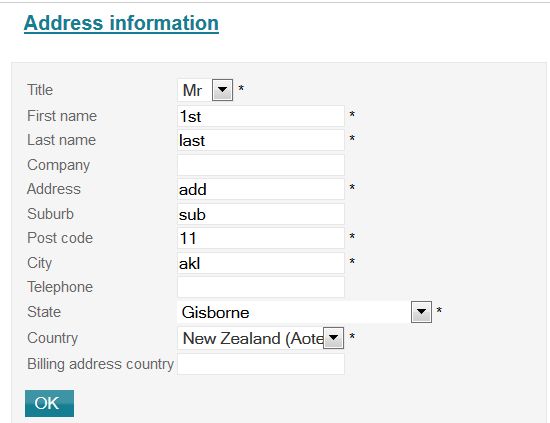
but when adding a new address, states are not displayed
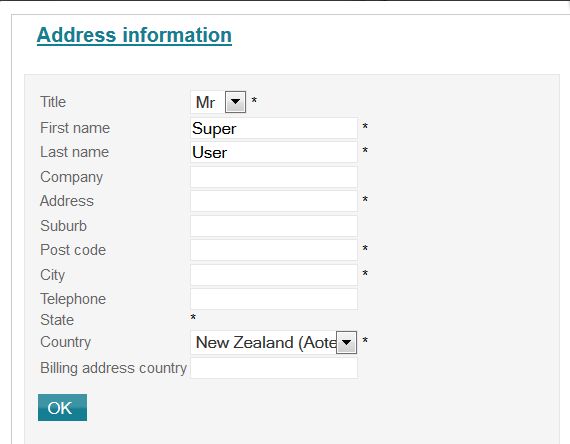
what can I do to fix this?
when editing an existing address, the state works fine
but when adding a new address, states are not displayed
what can I do to fix this?
Please Log in or Create an account to join the conversation.
13 years 5 days ago #129951
by nicolas
Replied by nicolas on topic Lost the State Field on Registration
That's because of the default value of the fields.
Edit the country and the state fields via the menu Display->Custom fields, select their default value and save.
It will then display properly.
Edit the country and the state fields via the menu Display->Custom fields, select their default value and save.
It will then display properly.
Please Log in or Create an account to join the conversation.
13 years 5 days ago #129957
by jarinz
Replied by jarinz on topic Lost the State Field on Registration
I can't select default for State as it's not displaying any options (the Country one is all good)
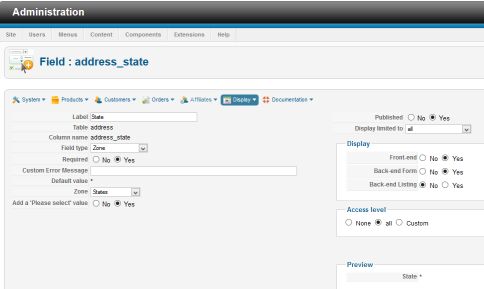
Please Log in or Create an account to join the conversation.
Time to create page: 0.214 seconds