
- Posts: 25
- Thank you received: 1
Taxes apply
- nojunkgoodfood
-
 Topic Author
- Offline
Less
More
10 years 11 months ago #217791
by nojunkgoodfood
Taxes apply was created by nojunkgoodfood
-- HikaShop version -- : 2.6.0
-- Joomla version -- : 3.4.4
-- PHP version -- : 5.5.26
Hi
I want to create a tax category (22%) for :
1. EU individuals
2. Italian Companies
And no tax to:
1. Except EU individuals
2. Except Italian Companies
I can do the restrictions but I can not do all restrictions together. Any suggestion how to do it?
Thank you
-- Joomla version -- : 3.4.4
-- PHP version -- : 5.5.26
Hi
I want to create a tax category (22%) for :
1. EU individuals
2. Italian Companies
And no tax to:
1. Except EU individuals
2. Except Italian Companies
I can do the restrictions but I can not do all restrictions together. Any suggestion how to do it?
Thank you
Please Log in or Create an account to join the conversation.

Less
More
- Posts: 12953
- Thank you received: 1778
10 years 11 months ago #217814
by Mohamed Thelji
Replied by Mohamed Thelji on topic Taxes apply
Hello,
Note that you can restrict your taxes regarding your customer Billing address and user group.
So you'll just have to create a tax that will apply to :
- EU and Italian addresses
- Individuals and Companies user groups.
Note that you can restrict your taxes regarding your customer Billing address and user group.
So you'll just have to create a tax that will apply to :
- EU and Italian addresses
- Individuals and Companies user groups.
Please Log in or Create an account to join the conversation.
- nojunkgoodfood
-
Topic Author
- Offline
Less
More
- Posts: 25
- Thank you received: 1
10 years 11 months ago #217951
by nojunkgoodfood
Replied by nojunkgoodfood on topic Taxes apply
I want to pay VAT only:
1. EU individuals
2. Italian Companies
So I restrict:
Zone: Europe
Customer type: "Individual" and "Companies with VAT"
but how to include ONLY Italians "Companies with VAT"?
The above configuration includes and other EU countries companies.
Thank you.
1. EU individuals
2. Italian Companies
So I restrict:
Zone: Europe
Customer type: "Individual" and "Companies with VAT"
but how to include ONLY Italians "Companies with VAT"?
The above configuration includes and other EU countries companies.
Thank you.
Please Log in or Create an account to join the conversation.

10 years 11 months ago #217966
by nicolas
Replied by nicolas on topic Taxes apply
Hi,
You just have to configure several tax rules:
One for the individuals and the Europe zone
One for the companies and the Italy zone
You just have to configure several tax rules:
One for the individuals and the Europe zone
One for the companies and the Italy zone
Please Log in or Create an account to join the conversation.
- nojunkgoodfood
-
Topic Author
- Offline
Less
More
- Posts: 25
- Thank you received: 1
10 years 11 months ago - 10 years 11 months ago #218018
by nojunkgoodfood
Replied by nojunkgoodfood on topic Taxes apply
Yes I can do that but all products must have the same Tax rule.
So in one tax rule I must have all restrictions.
Or how else can apply 2 rules in products?
I asked an accountant and told me that this is the standard way of selling goods in EU, so I suppose that this will be a guide for others with the same problem.
So in one tax rule I must have all restrictions.
Or how else can apply 2 rules in products?
I asked an accountant and told me that this is the standard way of selling goods in EU, so I suppose that this will be a guide for others with the same problem.
Last edit: 10 years 11 months ago by nojunkgoodfood.
Please Log in or Create an account to join the conversation.
10 years 11 months ago #218095
by nicolas
Replied by nicolas on topic Taxes apply
Hi,
No, the products must have the same tax rate, not the same tax rule.
So you can create two tax rules using the same tax rate. That will work.
That's what everyone in EU using HikaShop does, and no other accountant had a problem with that. We do it on our own website using HikaShop and we are also based in the EU. I can guarantee you that we checked with our own accountant before implementing that.
No, the products must have the same tax rate, not the same tax rule.
So you can create two tax rules using the same tax rate. That will work.
That's what everyone in EU using HikaShop does, and no other accountant had a problem with that. We do it on our own website using HikaShop and we are also based in the EU. I can guarantee you that we checked with our own accountant before implementing that.
The following user(s) said Thank You: nojunkgoodfood
Please Log in or Create an account to join the conversation.
- nojunkgoodfood
-
Topic Author
- Offline
Less
More
- Posts: 25
- Thank you received: 1
10 years 11 months ago #218113
by nojunkgoodfood
Replied by nojunkgoodfood on topic Taxes apply
Thank you.
It was so simple and I lost there in taxes!
The key was , THE SAME tax category!
To make it simpler for other users I made as you said:
1. One default tax Category with Italian VAT rate.
2. Two tax rules with the same above tax category and the restrictions:
a. Zone: Europe, Customer Type: Individual
b. Zone: Italy, Customer Type: Company with VAT Number
So only EU individuals and Italian companies will pay VAT
As far as it concerns the Hikashop, I have test it a lot in U.S. e-shops and I am convinced that it is by far the best Joomla cart component.
Best Regards
It was so simple and I lost there in taxes!
The key was , THE SAME tax category!
To make it simpler for other users I made as you said:
1. One default tax Category with Italian VAT rate.
2. Two tax rules with the same above tax category and the restrictions:
a. Zone: Europe, Customer Type: Individual
b. Zone: Italy, Customer Type: Company with VAT Number
So only EU individuals and Italian companies will pay VAT
As far as it concerns the Hikashop, I have test it a lot in U.S. e-shops and I am convinced that it is by far the best Joomla cart component.
Best Regards
Please Log in or Create an account to join the conversation.
Less
More
- Posts: 606
- Thank you received: 13
10 years 10 months ago #218795
by mohairbears
Replied by mohairbears on topic Taxes apply
Hi, I am struggling to make this work correctly for European VAT registered businesses. I have tried various options bases on the previous thread without success.
The end goal is;
All UK pays 20% VAT
EU individuals & businesses pay 20% VAT
EU VAT registered businesses with a valid VAT number pay 0% VAT
I have followed the previous thread but exchanged Italy for UK but cannot get Hikashop to add or remove the VAT as required for the Europe? is there another setting I am missing somewhere?
thanks
The end goal is;
All UK pays 20% VAT
EU individuals & businesses pay 20% VAT
EU VAT registered businesses with a valid VAT number pay 0% VAT
I have followed the previous thread but exchanged Italy for UK but cannot get Hikashop to add or remove the VAT as required for the Europe? is there another setting I am missing somewhere?
thanks
Please Log in or Create an account to join the conversation.
10 years 10 months ago #218834
by nicolas
Replied by nicolas on topic Taxes apply
No, it should be quite simple, with just two tax rules:
- one for the UK country zone with your 20% tax rate for the default tax category
- one for the Europe tax zone (remove the UK from it) only for the type of clients individual and company without vat number, again, with your 20% tax rate for the default tax category
Then, make sure that the address_company and address_vat fields are activated and that the products as assigned to the default tax category and that should be it.
- one for the UK country zone with your 20% tax rate for the default tax category
- one for the Europe tax zone (remove the UK from it) only for the type of clients individual and company without vat number, again, with your 20% tax rate for the default tax category
Then, make sure that the address_company and address_vat fields are activated and that the products as assigned to the default tax category and that should be it.
Please Log in or Create an account to join the conversation.
Less
More
- Posts: 606
- Thank you received: 13
10 years 10 months ago #218918
by mohairbears
Replied by mohairbears on topic Taxes apply
Hi Nicolas,
Yes that is one of the ways I have tried to get this to work as I would have expected this to be the preferred method. The problem appears to be that 'individuals' in the Europe zone allow purchases to be tax free which is incorrect, the only way I can get the cart to charge VAT for individuals in Europe is to select 'all customer types'

Yes that is one of the ways I have tried to get this to work as I would have expected this to be the preferred method. The problem appears to be that 'individuals' in the Europe zone allow purchases to be tax free which is incorrect, the only way I can get the cart to charge VAT for individuals in Europe is to select 'all customer types'
Please Log in or Create an account to join the conversation.
10 years 10 months ago #218980
by nicolas
Replied by nicolas on topic Taxes apply
Then it means that you've changed the "default customer type" setting of the HikaShop configuration to something else than "individuals" and thus you don't have individuals anymore on your website.
Put it back to "individuals" as it is by default and it will work.
Put it back to "individuals" as it is by default and it will work.
Please Log in or Create an account to join the conversation.
Less
More
- Posts: 606
- Thank you received: 13
10 years 10 months ago #219053
by mohairbears
Replied by mohairbears on topic Taxes apply
Hi Nicolas, 100% correct as usual ;o)
I now have a little problem as the 'default address type' has vanish from my config menu after making the change?
I now have a little problem as the 'default address type' has vanish from my config menu after making the change?
Please Log in or Create an account to join the conversation.
10 years 10 months ago #219054
by nicolas
Replied by nicolas on topic Taxes apply
Hi,
That's normal. We've actually removed that option as people were changing it without knowing what they were doing.
It now only displays if you update HikaShop and had set it up to something else than 'individual' (because then we assume that you know what you were doing but we still give you the possibility to set it back to "individual").
That's normal. We've actually removed that option as people were changing it without knowing what they were doing.
It now only displays if you update HikaShop and had set it up to something else than 'individual' (because then we assume that you know what you were doing but we still give you the possibility to set it back to "individual").
The following user(s) said Thank You: mohairbears
Please Log in or Create an account to join the conversation.
10 years 5 months ago - 10 years 5 months ago #234770
by pljuarez
Replied by pljuarez on topic Taxes apply
Hi Nicholas, I have the same problem.
My configuration:
Address used for taxes: Billing Address
2 Taxes: Same Category, Same Tax rate, 2 diferent zones:

But when I use a French or Italian billing address at checkout, VAT don't apply.
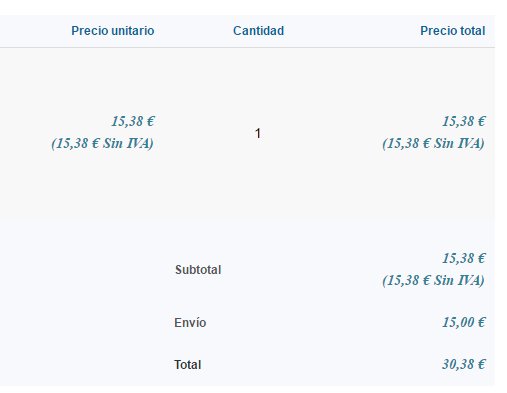
Where can I look my "default customer type" configuration? because I can't find it at Hikashop Configuration
Thanks in advice
My configuration:
Address used for taxes: Billing Address
2 Taxes: Same Category, Same Tax rate, 2 diferent zones:
- Europe no Spain: Individuals, Companies without VAT number
- Spain: All customer types
But when I use a French or Italian billing address at checkout, VAT don't apply.
Where can I look my "default customer type" configuration? because I can't find it at Hikashop Configuration
Thanks in advice
Last edit: 10 years 5 months ago by pljuarez.
Please Log in or Create an account to join the conversation.
10 years 5 months ago #234772
by nicolas
Replied by nicolas on topic Taxes apply
Hi,
As I said in my previous message, that option has been removed so that you can't mess with it.
So it's normal that you don't have it, and the problem doesn't come from that.
If it works fine for Spain but not France, it's likely that the problem comes from the way you setup the Europe_no_spain zone.
Make sure that it is of the type "tax zone" and that it contains the countris you want as "sub zones".
As I said in my previous message, that option has been removed so that you can't mess with it.
So it's normal that you don't have it, and the problem doesn't come from that.
If it works fine for Spain but not France, it's likely that the problem comes from the way you setup the Europe_no_spain zone.
Make sure that it is of the type "tax zone" and that it contains the countris you want as "sub zones".
Please Log in or Create an account to join the conversation.
10 years 5 months ago #234824
by pljuarez
Replied by pljuarez on topic Taxes apply
I have done my "Europe_no_Spain" zone by copying your "Europe" Tax zone and removing Spain from subzones list.
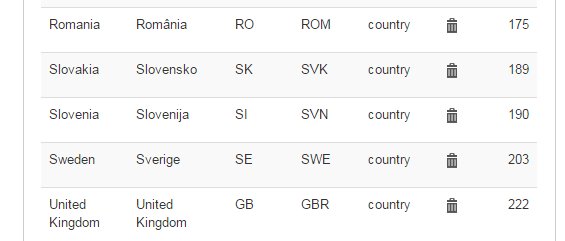
Even, I created a new Spain Tax zone by copying Spain country zone to apply only to spanish customers, but VAT still doesn't apply to customers of rest of Europe
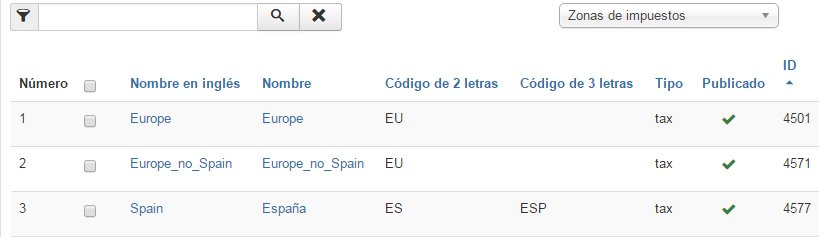
Regards
Even, I created a new Spain Tax zone by copying Spain country zone to apply only to spanish customers, but VAT still doesn't apply to customers of rest of Europe
Regards
Please Log in or Create an account to join the conversation.
10 years 5 months ago #234890
by pljuarez
Replied by pljuarez on topic Taxes apply
Hi Nicholas, I think I found the problem. If I introduce a valid document number in address_vat field in my address form, hikashop considers my customer like company with VAT number, because if I leave this field blank then hikashop applies VAT correctly.
Is this the correct behaviour?
Thanks
Is this the correct behaviour?
Thanks
Please Log in or Create an account to join the conversation.
10 years 5 months ago #234834
by nicolas
Replied by nicolas on topic Taxes apply
Then the problem might be elsewhere.
It has to come from one of the points in:
www.hikashop.com/support/documentation/3...ion-listing.html#faq
Please check each point.
If you don't find anything and you have a commercial edition of HikaShop, please provide a backend access and a link to this thread via our contact form ( www.hikashop.com/support/contact-us.html ) and we'll check your settings.
It has to come from one of the points in:
www.hikashop.com/support/documentation/3...ion-listing.html#faq
Please check each point.
If you don't find anything and you have a commercial edition of HikaShop, please provide a backend access and a link to this thread via our contact form ( www.hikashop.com/support/contact-us.html ) and we'll check your settings.
Please Log in or Create an account to join the conversation.

10 years 5 months ago #234901
by Xavier
Replied by Xavier on topic Taxes apply
Hi,
Yes it indeed the correct behaviour.
Yes it indeed the correct behaviour.
Please Log in or Create an account to join the conversation.
10 years 5 months ago #234969
by pljuarez
Replied by pljuarez on topic Taxes apply
Thanks, Nicholas and Xavier, but , Xavier, our financial department tells us that if the customer is in the European Union, they need a valid document from customer to make an invoice, even if the customer is an individual, but if customer fill in "address_vat" field then is condsidered like a company and then VAT doesn't apply and, for us, this is not correct.
Where can I change the implementation of this behaviour in our proper manner?
Regards
Where can I change the implementation of this behaviour in our proper manner?
Regards
Please Log in or Create an account to join the conversation.
Time to create page: 0.339 seconds