

- Posts: 40
- Thank you received: 0
Wishlist access from product listing doesn´t work
13 years 7 months ago #91957
by Woxxx
Wishlist access from product listing doesn´t work was created by Woxxx
Hi,
I have a problem with the wishlist. If I click to the "add to wishlist button" from main page (product listing) I get the reached limit message and the wishlist doesn´t appear. If I do the same thing from product details it works fine. I set the maximum quantity for each product to one in backend and modified the wishlist (cart/showcart). Even when I set the showcart to default the problem still is being there. Website: www.mydinx.com .
I have a problem with the wishlist. If I click to the "add to wishlist button" from main page (product listing) I get the reached limit message and the wishlist doesn´t appear. If I do the same thing from product details it works fine. I set the maximum quantity for each product to one in backend and modified the wishlist (cart/showcart). Even when I set the showcart to default the problem still is being there. Website: www.mydinx.com .
Please Log in or Create an account to join the conversation.

13 years 7 months ago #92009
by Xavier
Replied by Xavier on topic Wishlist access from product listing doesn´t work
Hi,
The wishlist must not be concerned by the limits. There are checks on that, but it seems that one of them were missing.
I have corrected it on my end.
You have to edit the file "administrator/components/com_hikashop/classes/cart.php" in the function "loadFullCart()" add the code:
Before:
The wishlist must not be concerned by the limits. There are checks on that, but it seems that one of them were missing.
I have corrected it on my end.
You have to edit the file "administrator/components/com_hikashop/classes/cart.php" in the function "loadFullCart()" add the code:
Code:
$database->setQuery('SELECT cart_type FROM '.hikashop_table('cart').' WHERE cart_id = '.(int)$cart->cart_id);
$cart_type = $database->loadResult();
if($cart->cart_type != 'wishlist')
Code:
$this->_checkQuantity($product,$product->cart_product_quantity,$cart->products,$product->cart_product_id);
Please Log in or Create an account to join the conversation.
13 years 7 months ago #92076
by Woxxx
Replied by Woxxx on topic Wishlist access from product listing doesn´t work
Hi Xavier,
I set wishlist to default and modified cart.php. The problem is still there. I the attachment you can see what I modified.
I set wishlist to default and modified cart.php. The problem is still there. I the attachment you can see what I modified.
This attachment is hidden for guests.
Please log in or register to see it.
Please log in or register to see it.
Please Log in or Create an account to join the conversation.
13 years 7 months ago #92143
by Xavier
Replied by Xavier on topic Wishlist access from product listing doesn´t work
Can you try with:
Instead of:
Code:
$cartData = $this->loadCart($cart->cart_id);
if($cartData->cart_type != 'wishlist')
Code:
$database->setQuery('SELECT cart_type FROM '.hikashop_table('cart').' WHERE cart_id = '.(int)$cart->cart_id);
$cart_type = $database->loadResult();
if($cart->cart_type != 'wishlist')
Please Log in or Create an account to join the conversation.
13 years 7 months ago #92155
by Woxxx
Replied by Woxxx on topic Wishlist access from product listing doesn´t work
Hi Xavier,
Thanks for response. I changed the code and cleaned up all wishlists but nothing changes.
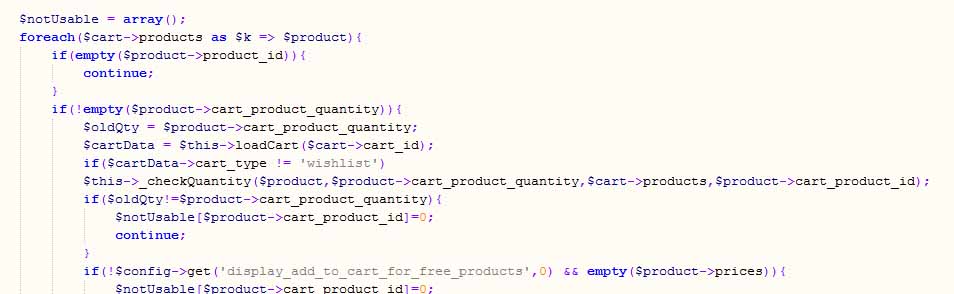
Thanks for response. I changed the code and cleaned up all wishlists but nothing changes.
Please Log in or Create an account to join the conversation.
13 years 6 months ago - 13 years 6 months ago #92355
by Xavier
Replied by Xavier on topic Wishlist access from product listing doesn´t work
Hi,
Could you give me a link to your website, and a backend access ?
Thanks for the backend access.
I need the FTP to debug your problem, I can't reproduce it on my end.
And the config access.
PS: You can use the pm button.
Could you give me a link to your website, and a backend access ?
Thanks for the backend access.
I need the FTP to debug your problem, I can't reproduce it on my end.
And the config access.
PS: You can use the pm button.
Last edit: 13 years 6 months ago by Xavier.
Please Log in or Create an account to join the conversation.
13 years 6 months ago #93116
by Xavier
Replied by Xavier on topic Wishlist access from product listing doesn´t work
Solved, the problem was that you don't had the latest version of the file "components/com_hikashop/controllers/product.php" and when clicking to add in the wishlist, it tried to add to the cart.
Please Log in or Create an account to join the conversation.
13 years 6 months ago #93329
by Woxxx
Replied by Woxxx on topic Wishlist access from product listing doesn´t work
Hi Xavier,
Thank you for help me. I`m missing the wishlist. When I push the "add to wishlist button" as registred user or guest nothing happens. There should come the wishlist for registred users and a message like "login first" for guests when pushing the botton. Can you explain me how to solve this please?
Best Regards
Thank you for help me. I`m missing the wishlist. When I push the "add to wishlist button" as registred user or guest nothing happens. There should come the wishlist for registred users and a message like "login first" for guests when pushing the botton. Can you explain me how to solve this please?
Best Regards
Please Log in or Create an account to join the conversation.
13 years 6 months ago #93376
by Xavier
Replied by Xavier on topic Wishlist access from product listing doesn´t work
Hi,
I tried again on your website, and when clicking on the "add to wishlist button" the product is added to the wishlist.
Then clicking on the show wishlist button (bottom left of your website) it redirect me to the wishlist listing.
I don't see any problem here.
To hide the wishlist to the users, you can use the option "Hide wishlist button for guest users" in Config > Features > Wishlists.
I tried again on your website, and when clicking on the "add to wishlist button" the product is added to the wishlist.
Then clicking on the show wishlist button (bottom left of your website) it redirect me to the wishlist listing.
I don't see any problem here.
To hide the wishlist to the users, you can use the option "Hide wishlist button for guest users" in Config > Features > Wishlists.
Please Log in or Create an account to join the conversation.
13 years 6 months ago #93692
by Woxxx
Replied by Woxxx on topic Wishlist access from product listing doesn´t work
Hi Xavier,
Sorry I forgot that position. I was just for testing. I`m not sure if I explained right before about the add to wishlist button. This is not what I wanted to ask you. I mean the function of the add to wishlist button. The button ever has to be visible. There I just need that a "login first message" appears when a non registred user pushs the button.
I still have problems with the wishlist. If I eliminate all products from hikashop wishlist I get a white screen. When I push the browsers Back-button after getting the white screen I get a login first message and I can´t add more products.
Sorry I forgot that position. I was just for testing. I`m not sure if I explained right before about the add to wishlist button. This is not what I wanted to ask you. I mean the function of the add to wishlist button. The button ever has to be visible. There I just need that a "login first message" appears when a non registred user pushs the button.
I still have problems with the wishlist. If I eliminate all products from hikashop wishlist I get a white screen. When I push the browsers Back-button after getting the white screen I get a login first message and I can´t add more products.
Please Log in or Create an account to join the conversation.
13 years 6 months ago #93822
by Xavier
Replied by Xavier on topic Wishlist access from product listing doesn´t work
Hi,
You can create a plugin based on the function "onBeforeCartUpdate()" and id the cart type is "wishlist" and the user is not logged in, so you don't add anything in the wishlist, display a message (Joomla enqueue message, or popup, or redirect to custom page) and then redirect back the customer to the product listing.
www.hikashop.com/fr/support/documentatio...umentation.html#cart
For the white page, it seems that a 500 error is returned, can you enable the Joomla debug mode and set the error reporting to "maximum" ?
You can create a plugin based on the function "onBeforeCartUpdate()" and id the cart type is "wishlist" and the user is not logged in, so you don't add anything in the wishlist, display a message (Joomla enqueue message, or popup, or redirect to custom page) and then redirect back the customer to the product listing.
www.hikashop.com/fr/support/documentatio...umentation.html#cart
For the white page, it seems that a 500 error is returned, can you enable the Joomla debug mode and set the error reporting to "maximum" ?
Please Log in or Create an account to join the conversation.
13 years 6 months ago #93881
by Woxxx
Replied by Woxxx on topic Wishlist access from product listing doesn´t work
Hi Xavier,
I tried to understand how to create a plugin. But this is really too heavy for me. Isn´t it possible to modify the cart/showcart.php? I have seen that there is some code in the top area under the line $app = JFactory::getApplication();. Is it possible to add the function that if user is not logged in he gets directed to register page? I was looking for the right code but could`t make it work.
I turned on the debug mode and following message appears:
Notice: Undefined variable: conf in /var/www/vhosts/mydinx.com/httpdocs/components/com_hikashop/controllers/product.php on line 389 Fatal error: Call to a member function get() on a non-object in /var/www/vhosts/mydinx.com/httpdocs/components/com_hikashop/controll
ers/product.php on line 389
I tried to understand how to create a plugin. But this is really too heavy for me. Isn´t it possible to modify the cart/showcart.php? I have seen that there is some code in the top area under the line $app = JFactory::getApplication();. Is it possible to add the function that if user is not logged in he gets directed to register page? I was looking for the right code but could`t make it work.
I turned on the debug mode and following message appears:
Notice: Undefined variable: conf in /var/www/vhosts/mydinx.com/httpdocs/components/com_hikashop/controllers/product.php on line 389 Fatal error: Call to a member function get() on a non-object in /var/www/vhosts/mydinx.com/httpdocs/components/com_hikashop/controll
This attachment is hidden for guests.
Please log in or register to see it.
Please log in or register to see it.
ers/product.php on line 389
Please Log in or Create an account to join the conversation.
13 years 6 months ago #94076
by Xavier
Replied by Xavier on topic Wishlist access from product listing doesn´t work
Hi,
You can edit the view "product / quantity" and for the add to wishlist, you can replace the action/url if the user is not logged in.
To check if the user is logged in or not, you can use the code:
You can edit the view "product / quantity" and for the add to wishlist, you can replace the action/url if the user is not logged in.
To check if the user is logged in or not, you can use the code:
Code:
$user = hikashop_loadUser();
if($user == null){
// Your link
}else{
echo $this->cart->displayButton(JText::_('ADD_TO_WISHLIST'),$btnType,$this->params,$url,$wishlistAjax,'',$max,$min,'',false); //Old code
}
Please Log in or Create an account to join the conversation.
13 years 6 months ago #94284
by Woxxx
Replied by Woxxx on topic Wishlist access from product listing doesn´t work
Hi Xavier,
I`m getting error message: Parse error: syntax error, unexpected 'else' (T_ELSE)
If I do it without "else{" I get the message: Parse error: syntax error, unexpected end of file
I attached the file. Can you tell me please how to solve this? Thank you.
Best Regards,
Wolfgang
I`m getting error message: Parse error: syntax error, unexpected 'else' (T_ELSE)
If I do it without "else{" I get the message: Parse error: syntax error, unexpected end of file
I attached the file. Can you tell me please how to solve this? Thank you.
This attachment is hidden for guests.
Please log in or register to see it.
Please log in or register to see it.
Best Regards,
Wolfgang
Please Log in or Create an account to join the conversation.
13 years 6 months ago #94340
by Xavier
Replied by Xavier on topic Wishlist access from product listing doesn´t work
Hi,
You have wrongly edited this file, many "}" were missing..
Thanks to try with that code:
You have wrongly edited this file, many "}" were missing..
Thanks to try with that code:
Code:
<?php
/**
* @package HikaShop for Joomla!
* @version 2.1.0
* @author hikashop.com
* @copyright (C) 2010-2012 HIKARI SOFTWARE. All rights reserved.
* @license GNU/GPLv3 http://www.gnu.org/licenses/gpl-3.0.html
*/
defined('_JEXEC') or die('Restricted access');
?><?php
if(!isset($this->cart)) $this->cart = hikashop_get('helper.cart');
if(!empty($this->row->has_options)){
echo $this->cart->displayButton(JText::_('CHOOSE_OPTIONS'),'choose_options',$this->params,hikashop_completeLink('product&task=show&product_id='.$this->row->product_id.'&name='.$this->row->alias.$this->itemid.$this->category_pathway),'window.location = \''.str_replace("'","\'",hikashop_completeLink('product&task=show&product_id='.$this->row->product_id.'&name='.$this->row->alias.$this->itemid.$this->category_pathway)).'\';return false;','');
}else{
$config =& hikashop_config();
$this->cart = hikashop_get('helper.cart');
$url = '';
$module_id = $this->params->get('from_module',0);
if(empty($this->ajax)){
$this->ajax = 'return hikashopModifyQuantity(\''.$this->row->product_id.'\',field,1,0,\'cart\','.$module_id.')';
}
if(@$this->row->product_sale_start || empty($this->element->main)){
$start_date = @$this->row->product_sale_start;
}else{
$start_date = $this->element->main->product_sale_start;
}
if(@$this->row->product_sale_end || empty($this->element->main)){
$end_date = @$this->row->product_sale_end;
}else{
$end_date = $this->element->main->product_sale_end;
}
if($end_date && $end_date<time()){
?>
<span class="hikashop_product_sale_end">
<?php echo JText::_('ITEM_NOT_SOLD_ANYMORE'); ?>
</span>
<?php
}elseif($start_date && $start_date>time()){
?>
<span class="hikashop_product_sale_start">
<?php
echo JText::sprintf('ITEM_SOLD_ON_DATE',hikashop_getDate($start_date,$this->params->get('date_format','%d %B %Y')));
?>
</span>
<?php
}elseif(!$this->params->get('catalogue') && ($this->config->get('display_add_to_cart_for_free_products') || !empty($this->row->prices))){
if(@$this->row->product_min_per_order || empty($this->element->main)){
$min = @$this->row->product_min_per_order;
}else{
$min = @$this->element->main->product_min_per_order;
}
if(@$this->row->product_max_per_order || empty($this->element->main)){
$max = @$this->row->product_max_per_order;
}else{
$max = @$this->element->main->product_max_per_order;
}
if($min<=0){
$min=1;
}
$formName = ',0';
if (!$this->config->get('ajax_add_to_cart', 0) || ($this->config->get('show_quantity_field')>=2 && !@$this->element->product_id)) {
if(empty($this->formName)) {
if(@$this->row->product_id)
$formName = ',\'hikashop_product_form_'.$this->row->product_id.'_'.$this->params->get('main_div_name').'\'';
else
$formName = ',\'hikashop_product_form_'.$this->params->get('main_div_name').'\'';
} else {
$formName = $this->formName;
}
}
$wishlistAjax = 'if(hikashopCheckChangeForm(\'item\''.$formName.')){ return hikashopModifyQuantity(\'' . (int)@$this->row->product_id . '\',field,1' . $formName . ',\'wishlist\','.$module_id.'); } else { return false; }';
if($this->row->product_quantity == -1 && !empty($this->element->main) && $this->element->main->product_quantity != -1){
$this->row->product_quantity = $this->element->main->product_quantity;
}
$btnType = 'add';
if($this->row->product_quantity==-1){
?>
<div class="hikashop_product_stock">
<?php
if($this->params->get('add_to_cart',1)){
echo $this->cart->displayButton(JText::_('ADD_TO_CART'),'add',$this->params,$url,$this->ajax,'',$max,$min);
$btnType = 'wish';
}
if(hikashop_loadUser() != null){
// display the button
}
if($this->params->get('add_to_wishlist') && $config->get('enable_wishlist', 1)){
echo '<div id="hikashop_add_wishlist">';
$user = hikashop_loadUser();
if($user == null){ // www.mydinx.com/login.html
}
else{
echo $this->cart->displayButton(JText::_('ADD_TO_WISHLIST'),$btnType,$this->params,$url,$wishlistAjax,'',$max,$min,'',false);
echo '</div>';
}
}
}elseif($this->row->product_quantity>0){
?>
<div class="hikashop_product_stock">
<?php
echo '<span class="hikashop_product_stock_count">'.JText::sprintf('X_ITEMS_IN_STOCK',$this->row->product_quantity).'</span><br/>';
if($config->get('button_style','normal')=='css'){
echo '<br />';
}
if($max<=0 || $max>$this->row->product_quantity) $max = $this->row->product_quantity;
if($this->params->get('add_to_cart',1)){
echo $this->cart->displayButton(JText::_('ADD_TO_CART'),'add',$this->params,$url,$this->ajax,'',$max,$min);
$btnType = 'wish';
}
if(hikashop_loadUser() != null){
// display the button
}
if($this->params->get('add_to_wishlist') && $config->get('enable_wishlist', 1)){
echo '<div id="hikashop_add_wishlist">';
$user = hikashop_loadUser();
if($user == null){ // www.mydinx.com/login.html
}
else{
echo $this->cart->displayButton(JText::_('ADD_TO_WISHLIST'),$btnType,$this->params,$url,$wishlistAjax,'',$max,$min,'',false);
echo '</div>';
}
}
}else{
?>
<div class="hikashop_product_no_stock">
<?php
echo JText::_('NO_STOCK').'<br/>';
$waitlist = $this->config->get('product_waitlist',0);
if(hikashop_level(1) && ($waitlist==2 || ($waitlist==1 && (!empty($this->element->main->product_waitlist) || !empty($this->element->product_waitlist))))){ ?>
</div><div id="hikashop_product_waitlist_main" class="hikashop_product_waitlist_main">
<?php
$empty='';
jimport('joomla.html.parameter');
$params = new HikaParameter($empty);
echo $this->cart->displayButton(JText::_('ADD_ME_WAITLIST'),'add_waitlist',$params,hikashop_completeLink('product&task=waitlist&cid='.$this->row->product_id),'window.location=\''.str_replace("'","\'",hikashop_completeLink('product&task=waitlist&cid='.$this->row->product_id)).'\';return false;');
}
if(hikashop_loadUser() != null){
// display the button
}
if($this->params->get('add_to_wishlist') && $config->get('enable_wishlist', 1)){
echo '<div id="hikashop_add_wishlist">';
$user = hikashop_loadUser();
if($user == null){ // www.mydinx.com/login.html
}
else{
echo $this->cart->displayButton(JText::_('ADD_TO_WISHLIST'),'add',$this->params,$url,$wishlistAjax,'',@$this->row->product_max_per_order,1,'',false);
echo '</div>';
}
}
}?>
</div>
<?php
}
}
?>
Please Log in or Create an account to join the conversation.
13 years 6 months ago #94344
by Woxxx
Replied by Woxxx on topic Wishlist access from product listing doesn´t work
Hi Xavier,
Thank you for your fast reply. I tried the code. Now I get following message:
Parse error: syntax error, unexpected $end in ...../html/com_hikashop/product/quantity.php on line 1
Thank you for your fast reply. I tried the code. Now I get following message:
Parse error: syntax error, unexpected $end in ...../html/com_hikashop/product/quantity.php on line 1
Please Log in or Create an account to join the conversation.
13 years 6 months ago #94363
by Xavier
Replied by Xavier on topic Wishlist access from product listing doesn´t work
Try to save your current code in an external file, delete the modifications in the views listing for the view "quantity".
See if it's working fine, and try to add again your changes without forget some "}"
See if it's working fine, and try to add again your changes without forget some "}"
Please Log in or Create an account to join the conversation.
13 years 6 months ago #94426
by Woxxx
Replied by Woxxx on topic Wishlist access from product listing doesn´t work
Thank you. Now the site is back again but the add to wishlist button disappears when not logged in.
This is why I included:
if(hikashop_loadUser() != null){
// display the button
}
It worked before but now it doesn´t take effect any more. You can see it too in the code you send me.
This is why I included:
if(hikashop_loadUser() != null){
// display the button
}
It worked before but now it doesn´t take effect any more. You can see it too in the code you send me.
Please Log in or Create an account to join the conversation.
13 years 6 months ago #94480
by Xavier
Replied by Xavier on topic Wishlist access from product listing doesn´t work
In your code the part:
is useless.
But instead of:
You need to put a button instead of the comment, if you only have a comment, so it's normal to have nothing displayed.
Code:
if(hikashop_loadUser() != null){
// display the button
}
But instead of:
Code:
if($user == null){ // www.mydinx.com/login.html
}
Code:
if($user == null){ // www.mydinx.com/login.html
echo "<input type='button' value='".JText::_('ADD_TO_CART')."' onclick='window.location = \"http://www.mydinx.com/login.html/\"'/>";
}
Please Log in or Create an account to join the conversation.
13 years 6 months ago #94645
by Woxxx
Replied by Woxxx on topic Wishlist access from product listing doesn´t work
Thank you Xavier. Now the button appears again  . To show the cart button I included class from the button I modified before but the button still is the same. There shouldn´t be a border or background image.
echo "<input class='hikashop_cart_button' type='button' value='".JText::_('ADD_TO_WISHLIST').....;
. To show the cart button I included class from the button I modified before but the button still is the same. There shouldn´t be a border or background image.echo "<input class='hikashop_cart_button' type='button' value='".JText::_('ADD_TO_WISHLIST').....;
Please Log in or Create an account to join the conversation.
Time to create page: 0.381 seconds