
- Posts: 15
- Thank you received: 0
print wishlist
- alanjosino
-
 Topic Author
- Offline
Less
More
12 years 5 months ago #153173
by alanjosino
print wishlist was created by alanjosino
hello, I only want to use the wishlist and print your list, how can I do?
Please Log in or Create an account to join the conversation.

12 years 5 months ago #153190
by Xavier
Replied by Xavier on topic print wishlist
Hi,
You have to enable the wishlists in Configuration > Features > Wishlists.
Then disable the option "Display 'Add to cart' button" in Configuration > Display > Products.
By this way only the wishlist buttons will be displayed.
Then you can create a wishlist menu (cart show vut select wishlist type) and in that view the customer can print the list.
You have to enable the wishlists in Configuration > Features > Wishlists.
Then disable the option "Display 'Add to cart' button" in Configuration > Display > Products.
By this way only the wishlist buttons will be displayed.
Then you can create a wishlist menu (cart show vut select wishlist type) and in that view the customer can print the list.
The following user(s) said Thank You: alanjosino
Please Log in or Create an account to join the conversation.
- alanjosino
-
Topic Author
- Offline
Less
More
- Posts: 15
- Thank you received: 0
12 years 5 months ago - 12 years 5 months ago #153348
by alanjosino
Replied by alanjosino on topic print wishlist
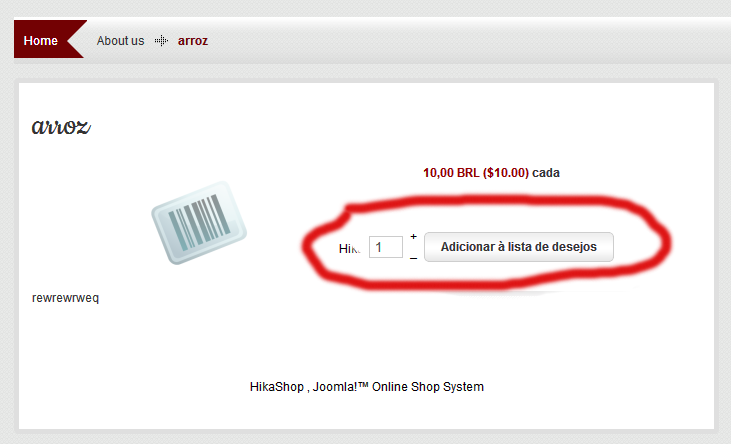
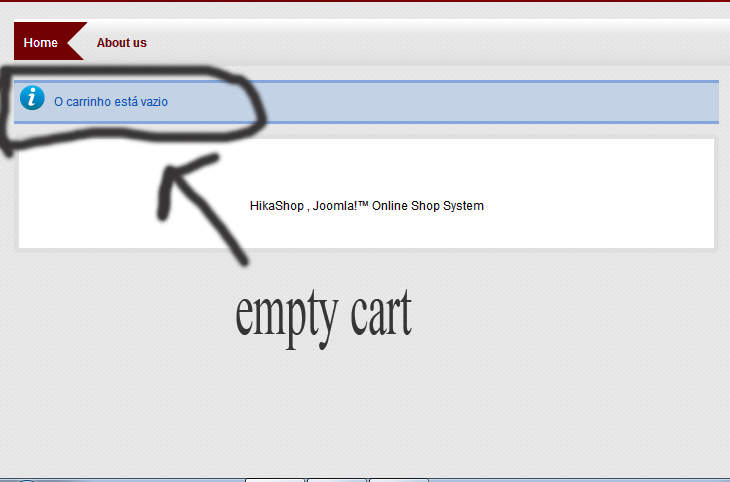
I'm sorry I have not properly explained the issue, I want all users to print wish list, I do not want to use login form hikashop, do not want to register an account on my website, I want anyone can print your wishlist.my website I have only wish list button when I want to see the list of wish list

Last edit: 12 years 5 months ago by alanjosino.
Please Log in or Create an account to join the conversation.
12 years 5 months ago #153373
by Xavier
Replied by Xavier on topic print wishlist
So I think that the best way is to use the cart, but make translation overrides.
By this way even if the customer is guest he can create his cart, and thanks to the menu "showcart" he will be able to print it.
Here is some documentation to make translation overrides:
hikashop.com/support/faq.html#tran
By this way even if the customer is guest he can create his cart, and thanks to the menu "showcart" he will be able to print it.
Here is some documentation to make translation overrides:
hikashop.com/support/faq.html#tran
The following user(s) said Thank You: alanjosino
Please Log in or Create an account to join the conversation.
- alanjosino
-
Topic Author
- Offline
Less
More
- Posts: 15
- Thank you received: 0
12 years 5 months ago #153481
by alanjosino
Replied by alanjosino on topic print wishlist
Thanks, solved my problem, now I want to delete the warning: Please configure your payment methods
No payment method found and button next on the page of checkout
thanks!
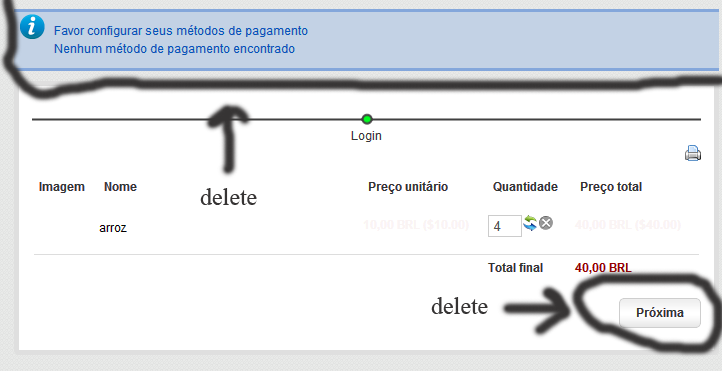
No payment method found and button next on the page of checkout
thanks!
Please Log in or Create an account to join the conversation.
12 years 5 months ago #153505
by Xavier
Replied by Xavier on topic print wishlist
You should not allow to reach the checkout page, but create a menu "showcart". It will display the cart without asking for checking out.
In the main configuration of hikashop, in cart section when a user add a product to the cart select the value "always stay on the same page" in order to not redirect them to the checkout.
In the main configuration of hikashop, in cart section when a user add a product to the cart select the value "always stay on the same page" in order to not redirect them to the checkout.
Please Log in or Create an account to join the conversation.
- alanjosino
-
Topic Author
- Offline
Less
More
- Posts: 15
- Thank you received: 0
12 years 5 months ago #153678
by alanjosino
Replied by alanjosino on topic print wishlist
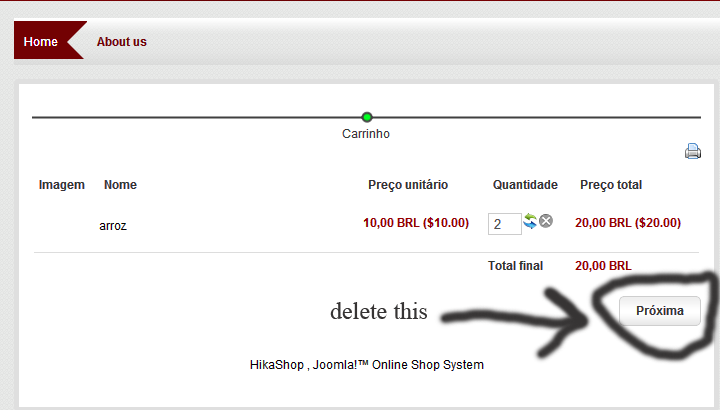
is not it, I just want to exclude this page next button.
Please Log in or Create an account to join the conversation.

12 years 5 months ago #153697
by Jerome
Jerome - Obsidev.com
HikaMarket & HikaSerial developer / HikaShop core dev team.
Replied by Jerome on topic print wishlist
Hi,
You are in the checkout, the goal of the checkout is to finalize and create an order.
So the button "next" must be there.
I don't think you are looking at the good place if you just want to print a cart, I will recommend you to use the "cart" page instead of the "checkout".
Regards,
You are in the checkout, the goal of the checkout is to finalize and create an order.
So the button "next" must be there.
I don't think you are looking at the good place if you just want to print a cart, I will recommend you to use the "cart" page instead of the "checkout".
Regards,
Jerome - Obsidev.com
HikaMarket & HikaSerial developer / HikaShop core dev team.
Please Log in or Create an account to join the conversation.
- alanjosino
-
Topic Author
- Offline
Less
More
- Posts: 15
- Thank you received: 0
12 years 5 months ago #153737
by alanjosino
Replied by alanjosino on topic print wishlist
hi,
thanks for the help, unfortunately I edited the site to print this part, every part has been edited lacking only this button, I appreciate if you can help me delete it. thanks.
thanks for the help, unfortunately I edited the site to print this part, every part has been edited lacking only this button, I appreciate if you can help me delete it. thanks.
Please Log in or Create an account to join the conversation.
12 years 5 months ago #153798
by Xavier
Replied by Xavier on topic print wishlist
Hi,
So you have to edit the view "checkout / step" and add the code
Before:
So you have to edit the view "checkout / step" and add the code
Code:
$this->nextButton = false;
Code:
if($this->nextButton)
The following user(s) said Thank You: alanjosino
Please Log in or Create an account to join the conversation.
- alanjosino
-
Topic Author
- Offline
Less
More
- Posts: 15
- Thank you received: 0
12 years 5 months ago #154049
by alanjosino
Replied by alanjosino on topic print wishlist
Thank's, you solved my problem.
Please Log in or Create an account to join the conversation.
Time to create page: 0.251 seconds