

- Posts: 41
- Thank you received: 1
Wishlist Display Issue
9 years 7 months ago #260701
by wild4gsus
Wishlist Display Issue was created by wild4gsus
-- HikaShop version -- : latest
-- Joomla version -- : latest
Now that I've updated to 3.0, I decided to implement the Wishlist option. When I go to the Control Panel on the frontend as a user, the Carts and Wishlist buttons display (I have Multi-Cart turned off, so not sure if that is supposed to be there or not). When I click on Wishlist button, it displays the Carts and not the Wishlists. I even tried creating a link in the menu and when I set it to display the Wishlists, it displays the Carts. The only way I can access the Wishlists directly is to turn the Wishlist module into a Mini Cart and click on "Total" to be taken to the Wishlist page. If I have an item in the Cart that I put in the Wishlist, the Wishlist will then display correctly as well.
I was hoping that I could setup the Wishlist module similar to the Cart module with a "Proceed to" button so I could have the Wishlist products display in the module but am settling for the mini-cart so that the customer has direct access to the wishlist because the button doesn't work in the Control Panel. Why am I redirected to the Carts instead of the Wishlists? Is the issue I have with the Wishlists linked to an issue of some sort with the Cart display?
-- Joomla version -- : latest
Now that I've updated to 3.0, I decided to implement the Wishlist option. When I go to the Control Panel on the frontend as a user, the Carts and Wishlist buttons display (I have Multi-Cart turned off, so not sure if that is supposed to be there or not). When I click on Wishlist button, it displays the Carts and not the Wishlists. I even tried creating a link in the menu and when I set it to display the Wishlists, it displays the Carts. The only way I can access the Wishlists directly is to turn the Wishlist module into a Mini Cart and click on "Total" to be taken to the Wishlist page. If I have an item in the Cart that I put in the Wishlist, the Wishlist will then display correctly as well.
I was hoping that I could setup the Wishlist module similar to the Cart module with a "Proceed to" button so I could have the Wishlist products display in the module but am settling for the mini-cart so that the customer has direct access to the wishlist because the button doesn't work in the Control Panel. Why am I redirected to the Carts instead of the Wishlists? Is the issue I have with the Wishlists linked to an issue of some sort with the Cart display?
Please Log in or Create an account to join the conversation.

9 years 7 months ago #260708
by nicolas
Replied by nicolas on topic Wishlist Display Issue
Hi,
I've done a test on my end and whether it's on a test website on my end or our demo website, the wishlist link of the control panel works fine.
I guess we would need that you provide a test user account and the precise instructions we can use on your website to reproduce the problem. In order to understand what's going on.
I've done a test on my end and whether it's on a test website on my end or our demo website, the wishlist link of the control panel works fine.
I guess we would need that you provide a test user account and the precise instructions we can use on your website to reproduce the problem. In order to understand what's going on.
Please Log in or Create an account to join the conversation.
9 years 7 months ago #260775
by wild4gsus
Front End:
1) After you login (login module on bottom of menu in left column), hover over "My Account" link on top and choose "Wishlists" in the menu. You'll see it goes right to Carts instead of the Wishlists despite the "Wishlists" being correct in the link settings.
2) If you click on "My Account" and choose the Wishlists button on the control panel, it does the exact same thing. Since I have Multi-Carts disabled, I would assume the Carts button shouldn't even be there?
Replied by wild4gsus on topic Wishlist Display Issue
I created a Super User account of you so you can see the front-end issue and have back-end access if you need to check anything. Do you want me to PM you or contact you via a different method?nicolas wrote: Hi,
I've done a test on my end and whether it's on a test website on my end or our demo website, the wishlist link of the control panel works fine.
I guess we would need that you provide a test user account and the precise instructions we can use on your website to reproduce the problem. In order to understand what's going on.
Front End:
1) After you login (login module on bottom of menu in left column), hover over "My Account" link on top and choose "Wishlists" in the menu. You'll see it goes right to Carts instead of the Wishlists despite the "Wishlists" being correct in the link settings.
2) If you click on "My Account" and choose the Wishlists button on the control panel, it does the exact same thing. Since I have Multi-Carts disabled, I would assume the Carts button shouldn't even be there?
Please Log in or Create an account to join the conversation.
9 years 7 months ago #260785
by nicolas
Replied by nicolas on topic Wishlist Display Issue
Hi,
Thanks. You can use our contact form for that:
www.hikashop.com/support/contact-us.html
Please make sure that you include a link to this thread in your message.
2. When the multicarts is disabled the carts button actually displays your cart instead of a listing of the carts you might have. So it's normal that you still have the button.
Thanks. You can use our contact form for that:
www.hikashop.com/support/contact-us.html
Please make sure that you include a link to this thread in your message.
2. When the multicarts is disabled the carts button actually displays your cart instead of a listing of the carts you might have. So it's normal that you still have the button.
Please Log in or Create an account to join the conversation.
9 years 7 months ago - 9 years 7 months ago #260797
by wild4gsus
Replied by wild4gsus on topic Wishlist Display Issue
Just sent over the access with subject line "Access to SCCGear.com"
Regarding the cart... I wasn't sure if that was how it worked or not. Thanks!
Regarding the cart... I wasn't sure if that was how it worked or not. Thanks!
Last edit: 9 years 7 months ago by Jerome. Reason: removing useless quote
Please Log in or Create an account to join the conversation.

9 years 7 months ago - 9 years 7 months ago #260838
by Philip
Replied by Philip on topic Wishlist Display Issue
Hello,
How do you proceed to create your menu ? I think the root issue is around there, because when I look on your html code I see a wrong url link, see by yourself :
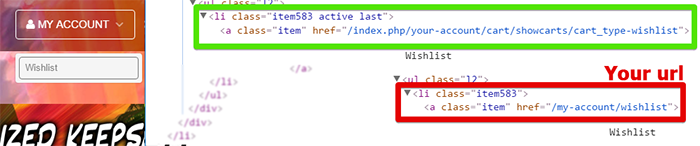
The correct url is :
Hope this will help you move forward, awaiting news from you.
Regards
How do you proceed to create your menu ? I think the root issue is around there, because when I look on your html code I see a wrong url link, see by yourself :
The correct url is :
Code:
/index.php/your-account/cart/showcarts/cart_type-wishlist
Regards
Last edit: 9 years 7 months ago by Philip.
Please Log in or Create an account to join the conversation.
9 years 7 months ago #260859
by wild4gsus
I don't mind not having the Wishlists link on the "My Account" menu, as I really only put it there to test things, but I would think the Wishlists button and the Wishlist module would link to the same thing.
Replied by wild4gsus on topic Wishlist Display Issue
If you go to the Control Panel, the button has the URL you show as correct, yet it still does not work. If you click Carts and Wishlists, they are two different links but both go to Carts. If you go to the Control Panel and click Wishlists, you will get the image I attached. Before upgrading to 3.0, I was testing it in 2.X but decided not to use it. just yet and it appeared to work fine at the time. I was thinking that maybe if I created a new link, maybe that would work, as there may have been something that changed for the 3.0 upgrade. No luck. The link that does work is in the Wishlists module... "/my-account/wishlist/cart/showcart/cart_id-393/cart_type-wishlist"Philip wrote: Hello,
How do you proceed to create your menu ? I think the root issue is around there, because when I look on your html code I see a wrong url link, see by yourself :
The correct url is :Hope this will help you move forward, awaiting news from you.Code:/index.php/your-account/cart/showcarts/cart_type-wishlist
Regards
I don't mind not having the Wishlists link on the "My Account" menu, as I really only put it there to test things, but I would think the Wishlists button and the Wishlist module would link to the same thing.
Please Log in or Create an account to join the conversation.

9 years 7 months ago #260861
by Jerome
Jerome - Obsidev.com
HikaMarket & HikaSerial developer / HikaShop core dev team.
Also helping the HikaShop support team when having some time or couldn't sleep.
By the way, do not send me private message, use the "contact us" form instead.
Replied by Jerome on topic Wishlist Display Issue
Hi,
"showcart" do not exist anymore in HikaShop 3.x ; the view "show" is used instead.
Nevertheless, there is a legacy support which redirect the "showcart" into the "show" view.
About your issue, we just added in the HikaShop 3.0 package in order to handle the parameter "cart_type" when there is no cart id specified ; so it will load the current wishlist instead of always loading the current cart.
You can re-download HikaShop 3.0 to get that patch.
Regards,
"showcart" do not exist anymore in HikaShop 3.x ; the view "show" is used instead.
Nevertheless, there is a legacy support which redirect the "showcart" into the "show" view.
About your issue, we just added in the HikaShop 3.0 package in order to handle the parameter "cart_type" when there is no cart id specified ; so it will load the current wishlist instead of always loading the current cart.
You can re-download HikaShop 3.0 to get that patch.
Regards,
Jerome - Obsidev.com
HikaMarket & HikaSerial developer / HikaShop core dev team.
Also helping the HikaShop support team when having some time or couldn't sleep.
By the way, do not send me private message, use the "contact us" form instead.
Please Log in or Create an account to join the conversation.
9 years 7 months ago #260892
by wild4gsus
Replied by wild4gsus on topic Wishlist Display Issue
Thanks!
Please Log in or Create an account to join the conversation.
Time to create page: 0.168 seconds